1. Introduzione
This manual provides detailed instructions for the safe and efficient operation of your Crown XLS1002 2-Channel Class D DriveCore Professional Power Amplificatore. Leggere attentamente il presente manuale prima di utilizzare l'unità e conservarlo per riferimento futuro.
The Crown XLS1002 amplifier is designed for high performance and efficiency, featuring DriveCore technology. It delivers significant power output while remaining lightweight. Key features include advanced DSP capabilities, integrated PureBand™ Crossover System, and Peakx™ Limiters for optimal sound and speaker protection.
2. Informazioni sulla sicurezza
Seguire sempre le precauzioni di sicurezza di base quando si utilizza questo prodotto per ridurre il rischio di incendi, scosse elettriche e lesioni personali. Queste includono, a titolo esemplificativo ma non esaustivo:
- Non esporre questo apparecchio alla pioggia o all'umidità.
- Non ostruire le aperture di ventilazione. Installare secondo le istruzioni del produttore.
- Non installare vicino a fonti di calore come radiatori, bocchette di riscaldamento, stufe o altri apparecchi (inclusi amplificatori) che producono calore.
- Utilizzare solo accessori/componenti specificati dal produttore.
- Affidare tutte le operazioni di manutenzione a personale di assistenza qualificato. L'assistenza è necessaria quando l'apparecchio è stato danneggiato in qualsiasi modo.
3. Prodotto finitoview
Pannello frontale
The front panel of the Crown XLS1002 features controls and indicators for easy operation and monitoring.

Figura 3.1: Fronte view of the Crown XLS1002 amplifier, showing the LCD display, control knobs for channels 1 and 2, and power indicators.
Pannello posteriore
The rear panel provides all necessary input and output connections for integrating the amplifier nel tuo sistema audio.
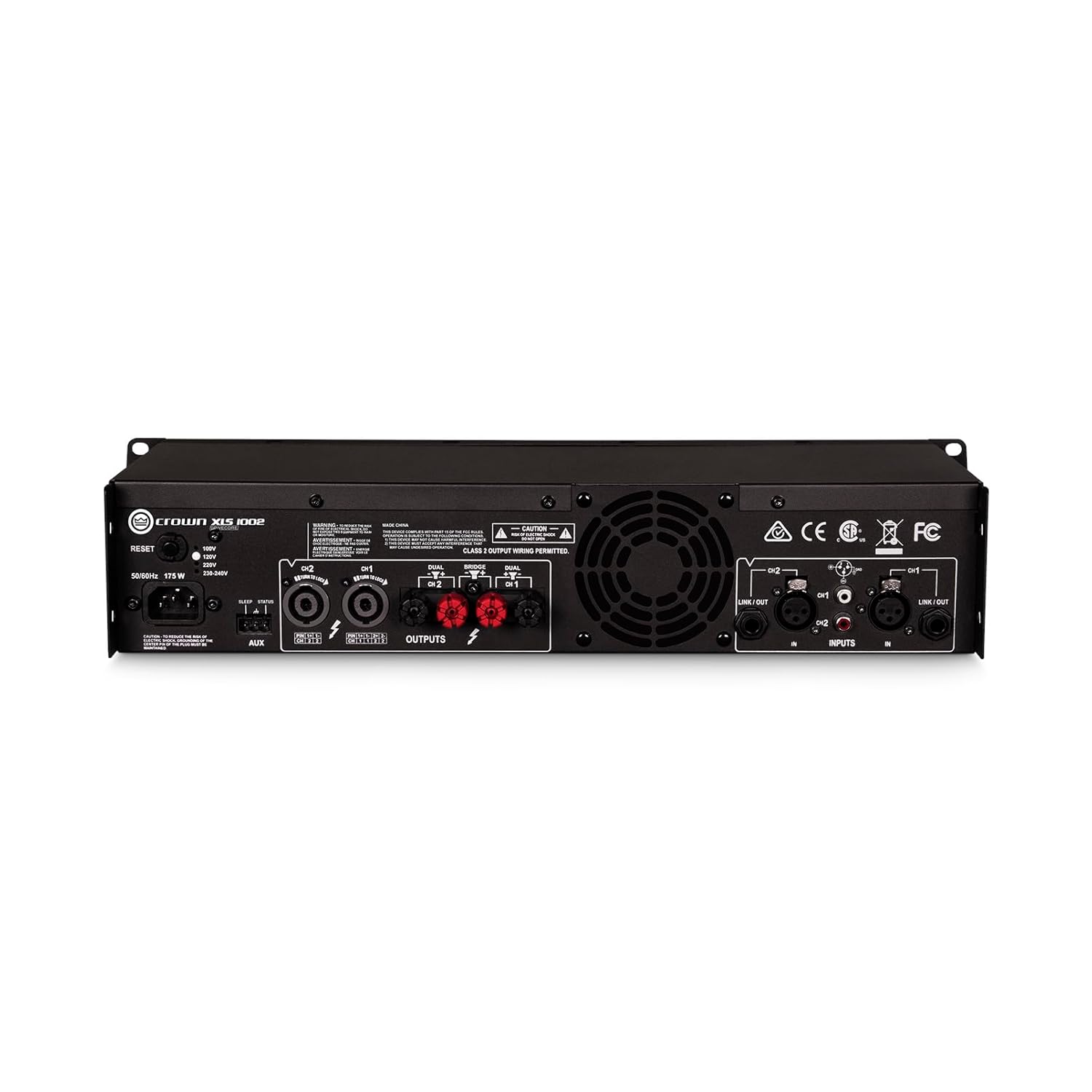
Figura 3.2: Posteriore view of the Crown XLS1002 amplifier, highlighting the XLR, 1/4", and RCA inputs, along with Speakon and binding post outputs.
4. Configurazione e connessioni
4.1 Disimballaggio e posizionamento
Rimuovere con attenzione il file amplifier from its packaging. Ensure all components are present. Place the amplifier in a well-ventilated area, ideally in a standard 19-inch equipment rack. The unit is lightweight, less than 11 lb (5 kg), making rack mounting convenient.
4.2 Collegamenti di ingresso
The XLS1002 offers versatile input options:
- Ingressi XLR: For professional balanced audio signals.
- 1/4" (TRS) Inputs: For balanced or unbalanced audio signals.
- Ingressi RCA: For unbalanced consumer-level audio signals.
Collega la tua sorgente audio (mixer, pre-amplifier, etc.) to the appropriate input jacks on the rear panel. Ensure secure connections for optimal signal integrity.
4.3 Collegamenti di uscita
Collega i tuoi altoparlanti al amplifier's output terminals:
- Combo Speakon Outputs: For secure and high-current speaker connections.
- Binding Post Outputs: For traditional bare wire or banana plug connections.
Ensure correct polarity (+ to + and - to -) when connecting speakers. The amplifier supports various impedance levels, including 4 ohms and 2 ohms, and can be bridged for 8-ohm loads.
4.4 Collegamento di alimentazione
Collegare il cavo di alimentazione CA in dotazione al amplifier's power inlet and then to a suitable AC power outlet. The amplifier features a remote power trigger for seamless integration into larger systems.
5. Istruzioni per l'uso
5.1 Accensione/Spegnimento
Premere il pulsante di accensione sul pannello frontale per accendere il amplifier on. The LCD display will illuminate, indicating the unit is operational. To power off, press the power button again.
5.2 Ottieni il controllo
Adjust the gain knobs for Channel 1 and Channel 2 on the front panel to control the input sensitivity. Start with lower gain settings and gradually increase to achieve the desired volume without distortion.
5.3 DSP Features and Crossovers
The XLS1002 includes advanced Digital Signal Processing (DSP) capabilities. Use the front panel controls and LCD display to access and configure these features:
- Bandpass Filters: Configure a bandpass filter per channel for precise frequency control.
- Sistema crossover PureBand™: Utilize the integrated crossover system for optimal performance and control, allowing you to tailor the frequency response for different speaker setups (e.g., separating low frequencies for subwoofers).
- Peakx™ Limiters: These limiters provide maximum output without risking damage to your speakers by preventing clipping.
Refer to the on-screen menu for detailed navigation and parameter adjustment of the DSP functions.
5.4 Input Sensitivity Selection
IL amplifier offers selectable input sensitivity (1.4Vrms or 0.775Vrms) to match various audio sources. This setting can be adjusted via the menu on the LCD display.
6. Manutenzione
6.1 Pulizia
Pulisci l'esterno del amplifier with a soft, dry cloth. Do not use liquid cleaners or aerosols. Ensure ventilation grilles are free from dust and debris to maintain proper airflow.
6.2 Sistema di raffreddamento
The XLS1002 features efficient forced-air fans to prevent excessive thermal buildup. Ensure adequate space around the unit for proper ventilation. Do not block the fan vents.
7. Risoluzione Dei Problemi
If you experience issues with your XLS1002 amplifier, fare riferimento ai seguenti passaggi comuni per la risoluzione dei problemi:
- Nessun potere: Check the power cord connection and the AC outlet. Ensure the power button is pressed.
- Nessun suono: Verify all input and output cables are securely connected. Check the source device and speaker connections. Ensure gain controls are not set to minimum.
- Suono distorto: Reduce the input gain or source volume. Check speaker impedance compatibility. Ensure Peakx™ Limiters are active if needed.
- Surriscaldamento: Assicurare una ventilazione adeguata attorno all' amplifier. Clear any obstructions from the fan vents.
For more detailed troubleshooting or persistent issues, please consult the full user manual PDF or contact Crown customer support.
8. Specifiche
| Caratteristica | Specificazione |
|---|---|
| Potenza di uscita (4 ohm) | 350W x 2 |
| Potenza di uscita (2 ohm) | 550W x 2 |
| Power Output (8 ohms bridged) | 700W x 1 |
| AmpTipo lificatore | Class D with DriveCore Technology |
| Controllo di Produzione | Variable high-, low-, and band-pass crossovers |
| Ingressi | XLR, TRS (1/4"), RCA |
| Risultati | Combo Speakon, Binding Posts |
| Dimensioni (L x P x A) | 7.7 x 19 x 3.5 pollici |
| Peso | 8.6 Pounds (less than 11 lb / 5 kg) |
| Numero di modello | XLS1002 |
| Produttore | Corona |
9. Garanzia e supporto
For detailed warranty information and technical support, please refer to the official Crown websito o il manuale utente completo in PDF.
Potrebbero essere disponibili piani di protezione aggiuntivi da acquistare per estendere la copertura oltre la garanzia standard del produttore.
You can download the official user manual (PDF) Qui.


