Introduzione
This manual provides detailed instructions for the setup, operation, and maintenance of your Casio DQD-805J-2JF Digital Alarm Clock. Please read this manual thoroughly to ensure proper use and to fully utilize all features of your device.

Figura 1: Davanti view of the Casio DQD-805J-2JF digital alarm clock. The display shows time, date, temperature, and humidity. Buttons for alarm, monitor, wave reception, set, reset, and snooze/light are visible below the display.
Caratteristiche del prodotto
- Display digitale: Clear and easy-to-read time, date, temperature, and humidity.
- Radio-Controlled Timekeeping (Wave Ceptor): Automatically synchronizes with atomic time signals for accurate time.
- Funzione di allarme: Daily alarm with adjustable settings.
- Funzione snooze: Temporarily pauses the alarm for additional rest.
- Retroilluminazione: Illumina il display per renderlo visibile in condizioni di scarsa illuminazione.
- Monitor di temperatura e umidità: Displays current indoor temperature and humidity levels.
- Design compatto: Portable and suitable for various indoor environments.

Figura 2: The Casio DQD-805J-2JF clock is equipped with a temperature and humidity meter, making it suitable for creating a comfortable environment in bedrooms and desk areas. Its compact size also allows for easy portability.
Identificazione dei componenti
Prendi familiarità con le varie parti e i comandi della tua sveglia.
Controlli del pannello frontale:
- Pulsante di allarme: Attiva o disattiva l'allarme.
- Alarm Monitor Button: Previews the alarm sound.
- Wave Reception Button: Initiates manual radio wave time synchronization.
- Imposta pulsante: Accede alla modalità di impostazione di ora, data e sveglia.
- Pulsante di reset: Resets the clock to factory defaults (requires a pointed object).
- Pulsante Snooze/Luce: Activates snooze during an alarm or illuminates the display.
- +/- Pulsanti: Adjusts values during setting mode.
- Snooze ON/OFF Slider: Enables or disables the snooze function.
Indicatori di visualizzazione:
- Visualizzazione dell'ora: Shows current hour, minute, and second.
- Visualizzazione della data: Mostra mese e giorno.
- Visualizzazione della temperatura: Shows current ambient temperature in Celsius.
- Visualizzazione dell'umidità: Mostra la percentuale attuale di umidità ambientaletage.
- Wave Reception Indicator: Shows status of radio signal reception.
- Alarm ON Indicator: Appears when the alarm is active.
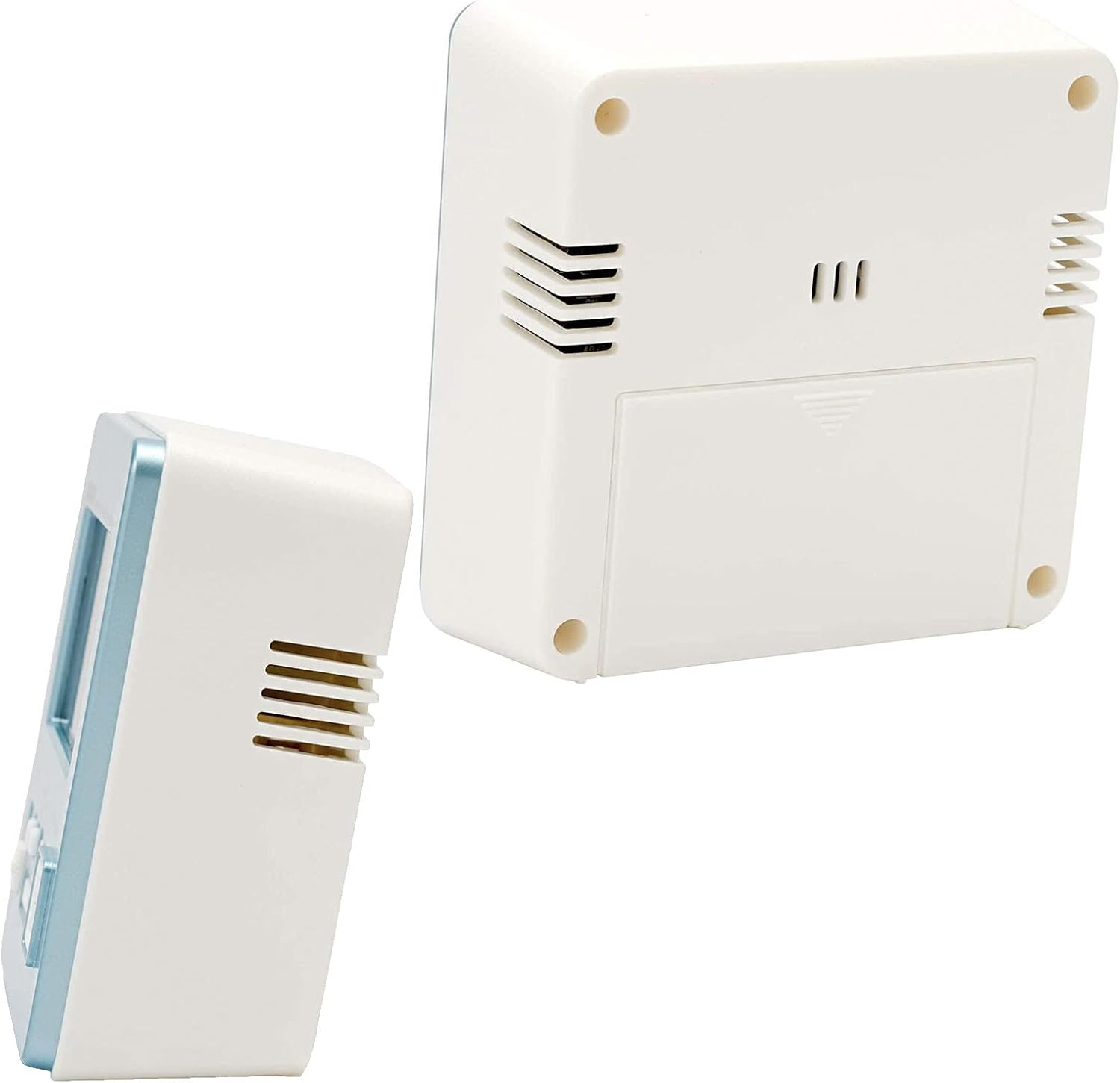
Figura 3: Posteriore e laterale view of the alarm clock, showing the battery compartment and ventilation slots.
Impostare
1. Installazione della batteria
- Aprire il coperchio del vano batterie situato sul retro dell'orologio.
- Insert the required batteries (typically AA or AAA, refer to the battery compartment label) ensuring correct polarity (+/-).
- Chiudere saldamente il coperchio del vano batterie.
2. Initial Power On and Radio Wave Reception
Upon battery installation, the clock will attempt to receive the time calibration signal automatically. This process may take several minutes.
- Per una ricezione ottimale del segnale, posizionare l'orologio vicino a una finestra.
- The wave reception indicator on the display will show the signal strength.
- Once successful, the clock will display the correct time and date automatically.

Figura 4: The Casio Wave Ceptor technology ensures accurate time display through radio signal reception.
3. Manual Time and Date Setting (if automatic reception fails)
- Premere e tenere premuto il tasto Impostato finché le cifre dell'ora non iniziano a lampeggiare.
- Utilizzare il +/- pulsanti per regolare l'ora, quindi premere Impostato per confermare e passare ai minuti.
- Ripetere questo procedimento per minuti, anno, mese e giorno.
- Premere Impostato di nuovo per uscire dalla modalità di impostazione.
4. Impostazione dell'allarme
- Premere il tasto Allarme per accedere alla modalità di impostazione della sveglia. L'ora della sveglia lampeggerà.
- Utilizzare il +/- buttons to set the desired alarm hour, then press Allarme per confermare e passare ai minuti.
- Utilizzare il +/- pulsanti per impostare i minuti desiderati per la sveglia.
- Premere Allarme again to exit alarm setting mode. The alarm ON indicator will appear on the display.
Istruzioni per l'uso
1. Viewing Time, Date, Temperature, and Humidity
The clock continuously displays the current time, date, temperature, and humidity. No specific action is required to view questi.
2. Attivazione/disattivazione dell'allarme
Premere il tasto Allarme button once to toggle the alarm ON or OFF. The alarm ON indicator will show its status.
3. Utilizzo della funzione Snooze
- Fai scorrere il Snooze ON/OFF switch to the ON position to enable snooze.
- Quando suona la sveglia, premere il tasto grande Posticipa/Luce button to activate snooze. The alarm will pause and sound again after a few minutes (typically 5 minutes).
- To stop the alarm completely, slide the Snooze ON/OFF switch to OFF or press any other button except Posticipa/Luce.
4. Using the Backlight
Premi il grande Posticipa/Luce pulsante per illuminare il display per alcuni secondi.
5. Manual Radio Wave Reception
If you wish to manually attempt time synchronization, press the Wave Reception button. The clock will begin searching for the signal. Ensure the clock is in an area with good reception.
Manutenzione
1. Pulizia
- Pulire l'orologio con un panno morbido e asciutto.
- Non utilizzare detergenti abrasivi, solventi o spray chimici, poiché potrebbero danneggiare il casing o display.
2. Sostituzione della batteria
When the display becomes dim or the clock functions erratically, it is time to replace the batteries. Follow the battery installation steps in the Setup section.
3. Conservazione
If storing the clock for an extended period, remove the batteries to prevent leakage and damage.
Risoluzione dei problemi
| Problema | Possibile causa | Soluzione |
|---|---|---|
| Il display è vuoto o poco luminoso. | Batterie scariche o esaurite. | Sostituisci le batterie con altre nuove. |
| L'allarme non suona. | L'allarme è disattivato. | Premere il tasto Allarme button to activate the alarm (alarm ON indicator should appear). |
| Ora visualizzata non corretta. | Poor radio signal reception; manual time not set. | Move the clock to a location with better reception or perform manual time setting. |
| Radio wave reception fails. | Interference; clock too far from transmitter; environmental factors. | Place the clock near a window, away from electronic devices. Try manual reception. |
Specifiche
- Marca: Casio
- Numero modello: DQD-805J-2JF
- Colore: Azzurro chiaro
- Dimensioni del prodotto: 7.8 x 3.81 x 8.2 cm (circa 3.07 x 1.5 x 3.23 pollici)
- Peso dell'articolo: 135 g (approximately 4.76 ounces)
- Tipo di visualizzazione: Digitale
- Fonte di energia: Battery (Mechanical/Kinetic listed in product data, but typically battery for digital clocks)
- Utilizzo interno/esterno: Al chiuso

Figura 5: Dimensions of the Casio DQD-805J-2JF alarm clock: 7.8 cm width, 4.9 cm depth, and 8.2 cm height. Weight is approximately 135g.
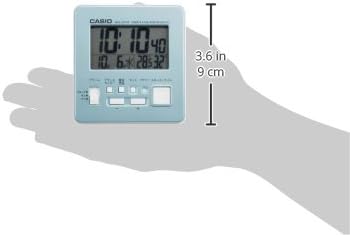
Figura 6: A hand holding the clock, illustrating its compact and portable design, with a height of approximately 9 cm (3.6 inches).
Informazioni sulla garanzia
For specific warranty details, please refer to the warranty card included with your product or visit the official Casio website. Casio typically offers a limited warranty covering manufacturing defects from the date of purchase.
Supporto
If you encounter issues not covered in this manual or require further assistance, please contact Casio customer support through their official websito o le informazioni di contatto fornite nella confezione del prodotto.
You can visit the official Casio store for more information: Negozio Casio su Amazon


