Introduzione
This manual provides instructions for the proper setup, operation, and maintenance of your Motorola AURI3500W Cordless Phone. Please read this manual thoroughly before using your new phone to ensure safe and optimal performance.
The Motorola AURI3500W features DECT 6.0 wireless technology, caller ID, a reminder alarm, an integrated speakerphone, and an illuminated display and keypad for ease of use.
Contenuto della confezione
Verifica che il pacco contenga i seguenti articoli:
- Motorola AURI3500W Handset
- Motorola AURI3500W Base Unit
- Adattatore di alimentazione per unità base
- Cavo della linea telefonica
- Rechargeable Batteries (included)
- Manuale dell'utente (questo documento)
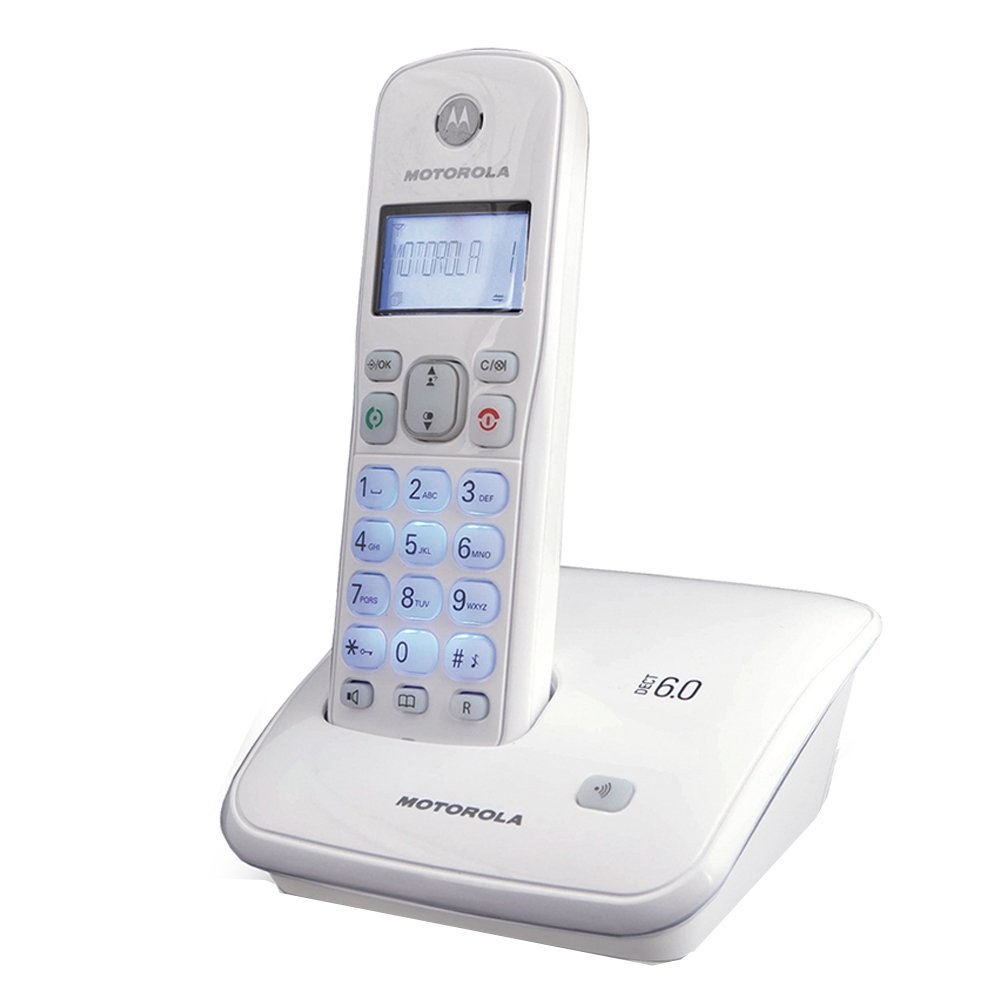
Image: Motorola AURI3500W Cordless Phone and Base Unit. This image shows the complete phone system, including the handset and its charging base.
Impostare
1. Installazione della batteria
- Individuare il vano batteria sul retro del ricevitore.
- Per aprire il coperchio del vano batteria, farlo scorrere verso il basso.
- Insert the provided rechargeable batteries, observing the correct polarity (+ and - markings).
- Rimettere a posto il coperchio del vano batteria finché non scatta in posizione.
Note: Use only the rechargeable batteries supplied with your phone or recommended replacements. Non-rechargeable batteries may damage the device.
2. Collegamento dell'unità base
- Place the base unit on a flat, stable surface near a power outlet and a telephone wall jack.
- Collegare un'estremità del cavo della linea telefonica alla presa TEL LINE sull'unità base.
- Collegare l'altra estremità del cavo della linea telefonica alla presa telefonica a muro.
- Connect the small end of the power adapter to the DC IN 6V jack on the base unit.
- Collegare l'estremità grande dell'adattatore di alimentazione a una presa elettrica standard.
Important: Use only the power adapter supplied with this product.
3. Ricarica iniziale
Place the handset on the base unit's charging cradle. The handset will begin charging. Allow the handset to charge for at least 12-16 hours before its first use, even if the display indicates a full charge sooner. This ensures optimal battery performance.
Istruzioni per l'uso
Effettuare una chiamata
- Premere il tasto PARLARE button or lift the handset from the base.
- Componi il numero di telefono desiderato.
- Premere il tasto FINE pulsante per riagganciare.
Ricevere una chiamata
Quando squilla il telefono, premere il tasto PARLARE button or lift the handset from the base to answer.
Utilizzo del vivavoce
Durante una chiamata, premere il tasto ORATORE pulsante per attivare il vivavoce. Premerlo nuovamente per tornare alla modalità cornetta.
ID chiamante
If you subscribe to Caller ID service, the caller's name and number will appear on the handset display before you answer the call. You can review past calls using the CID pulsante.
Allarme promemoria
Your phone includes a reminder alarm feature. Refer to the on-screen menu options for setting and managing alarms. Typically, this involves navigating to a "Settings" or "Alarm" menu item and following the prompts.
Illuminated Display and Keypad
The display and keypad illuminate automatically when a button is pressed or a call is received, enhancing visibility in low-light conditions.
Manutenzione
Pulizia del telefono
Pulisci il telefono e l'unità base con un panno morbido e leggermente abrasivo.amp cloth. Do not use cleaning sprays or abrasive cleaners, as these can damage the finish or electronic components.
Cura della batteria
- To maintain optimal battery life, always return the handset to the base unit when not in use.
- Se il telefono non verrà utilizzato per un periodo prolungato, rimuovere le batterie per evitare perdite.
- Smaltire le vecchie batterie in modo responsabile secondo le normative locali.
Risoluzione dei problemi
Nessun tono di linea
- Assicurarsi che il cavo della linea telefonica sia collegato saldamente sia all'unità base sia alla presa a muro.
- Verificare che l'adattatore di alimentazione sia collegato correttamente all'unità base e alla presa elettrica.
- Verificare che le batterie del portatile siano cariche.
Il display è vuoto o scuro
- Place the handset on the base unit to charge the batteries.
- Assicurarsi che le batterie siano installate correttamente.
- If the issue persists after charging, the batteries may need replacement.
Durata breve della batteria
- Ensure the handset is fully charged for 12-16 hours before initial use.
- Always return the handset to the base unit when not in use.
- Batteries have a limited lifespan and may need replacement after extended use.
Impossibile effettuare o ricevere chiamate
- Check all cable connections (power, telephone line).
- Assicurarsi che il portatile si trovi nel raggio di azione dell'unità base.
- Confirm that your telephone service is active.
Specifiche
| Numero modello: | AURI3500W |
| Marca: | Motorola |
| Tecnologia wireless: | DECT 6.0 |
| Dimensioni dello schermo: | 1.5 pollici |
| Dimensioni (L x P x A): | Dimensioni: 11.5 x 11.5 x 15 cm |
| Peso: | 370 grammi |
| Codice UPC: | 183420002134 |
| Caratteristiche: | Caller ID, Reminder Alarm, Integrated Speakerphone, Illuminated Display & Keypad |
Garanzia e supporto
Per informazioni sulla garanzia e supporto tecnico, fare riferimento alla scheda di garanzia inclusa con il prodotto o visitare il sito ufficiale di supporto Motorola websito. Conservare la ricevuta d'acquisto come prova d'acquisto per eventuali reclami in garanzia.
For further assistance, you may contact Motorola customer service through their official channels.