Introduzione
The ASTRO Gaming A40 TR Headset and MixAmp Pro TR are designed to provide a high-fidelity audio experience for gaming on PlayStation 4 and PC. The A40 TR headset offers user customization, allowing transformation from an open-back to a closed-back noise-canceling headset with optional Mod Kits. The MixAmp Pro TR features all-digital components for clear, interference-free audio and voice communication, with customizable settings via the ASTRO Command Center software.

Image: The ASTRO Gaming A40 TR Headset and MixAmp Pro TR, showcasing both components together. The headset is black with gold accents, and the MixAmp is a compact black unit with control dials.
Contenuto della confezione
Verificare che tutti gli articoli elencati di seguito siano inclusi nella confezione del prodotto:
- ASTRO A40 TR Headset
- ASTRO MixAmp Pro TR
- A40 TR Inline Mute Cable (2.0m)
- TOSlink Optical Cable (3.0m)
- Micro-USB Cable (3.0m)
- Digital Daisy Chain Cable (0.5m)
- Swappable Microphone
Impostare
Connessione a PlayStation 4 (PS4)
- Collegare il Cavo ottico TOSlink dal MixAmp Pro TR's OPTICAL port to the PS4's Optical Out port.
- Collegare il Cavo micro-USB dal MixAmp Pro TR's USB port to an available USB port on the PS4.
- Collegare il A40 TR Inline Mute Cable from your A40 TR Headset to the headset port on the front of the MixAmp Pro TR.
- Sulla tua PS4, vai a Impostazioni > Suono e schermo > Impostazioni uscita audio.
- Impostato Porta di uscita primaria A Uscita digitale (ottica).
- Selezionare Dolby Digital (Bitstream) for the audio format.
- Vai a Impostazioni > Dispositivi > Dispositivi audio.
- Impostato Dispositivo di input A USB Headset (ASTRO MixAmp Pro TR).
- Impostato Dispositivo di uscita A USB Headset (ASTRO MixAmp Pro TR).
- Regolare Controllo del volume (cuffie) al massimo.
- Impostato Uscita per cuffie A Audio chat or Tutto l'audio come preferito.
Connessione al PC
- Collegare il Cavo micro-USB dal MixAmp Pro TR's USB port to an available USB port on your PC.
- Collegare il A40 TR Inline Mute Cable from your A40 TR Headset to the headset port on the front of the MixAmp Pro TR.
- On your PC, ensure the MixAmp Pro TR is selected as the default playback and recording device in your sound settings.
- Scarica e installa il ASTRO Command Center software from the official ASTRO Gaming website to customize settings, update firmware, and manage EQ presets.
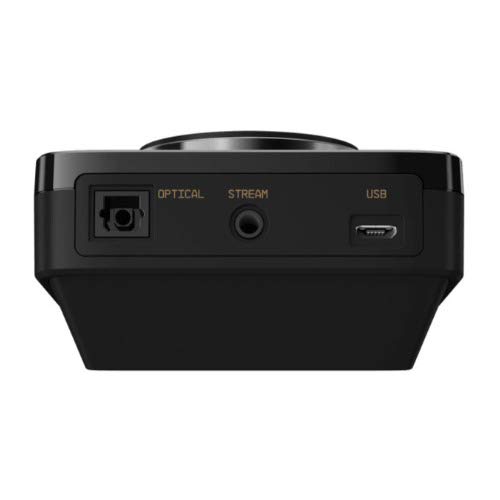
Immagine: Posteriore view of the ASTRO MixAmp Pro TR, highlighting the Optical, USB, AUX, and Stream ports for various connections.
Operating the MixAmp Pro TR
Il mixAmp Pro TR provides intuitive controls for managing your audio experience:
- Manopola del volume principale: The large dial on the left controls the overall volume of your headset. Rotate clockwise to increase volume, counter-clockwise to decrease.
- Bilanciamento gioco/voce: The smaller dial on the right allows you to adjust the balance between game audio and voice chat.
- Rotate towards "GAME" to prioritize game audio.
- Rotate towards "VOICE" to prioritize voice chat.
- EQ Presets Button: Located in the center, this button cycles through four customizable equalizer presets. The active preset is indicated by the illuminated icon (star, headphone, etc.). These presets can be configured using the ASTRO Command Center software.
- Pulsante Dolby: Activates or deactivates Dolby Surround Sound. When active, the Dolby logo will illuminate.
- Pulsante di disattivazione del microfono: Located on the A40 TR Inline Mute Cable, this switch mutes or unmutes your microphone. When muted, the MixAmp's volume dials will typically glow red.
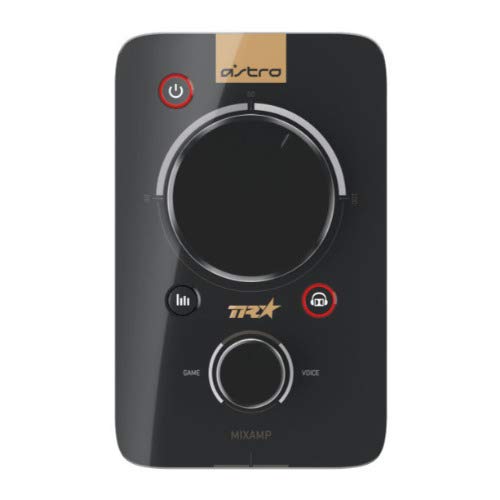
Immagine: in alto view of the ASTRO MixAmp Pro TR, showing the large master volume dial, the smaller game/voice balance dial, and the EQ preset buttons.
Manutenzione
- Pulizia: Use a soft, dry cloth to clean the headset and MixAmpEvitare detergenti abrasivi o solventi.
- Magazzinaggio: Store the headset and MixAmp in un luogo fresco e asciutto, al riparo dalla luce solare diretta e da temperature estreme.
- Cura del cavo: Maneggiare i cavi con cura per evitare danni. Evitare piegature brusche o trazioni eccessive.
- Cuscinetti auricolari: Periodically check ear cushions for wear and tear. Replacement cushions are available from ASTRO Gaming.
Risoluzione dei problemi
If you encounter issues with your ASTRO Gaming A40 TR Headset or MixAmp Pro TR, try the following solutions:
| Problema | Soluzione |
|---|---|
| Nessun audio dalle cuffie. |
|
| Il microfono non funziona. |
|
| Qualità audio distorta o scarsa. |
|
For more detailed troubleshooting, please refer to the official ASTRO Gaming support resources.
Specifiche
- Numero modello: 939-001511
- Risposta in frequenza: 20 - 20,000 Hz
- Impedenza nominale: 48 ohm
- Pressione dell'archetto: 2.6N
- Dimensioni del prodotto: 9.06 x 13.87 x 4.33 pollici
- Peso dell'articolo: 1.06 libbre
- Connettività: Ottico, USB
- Compatibilità: PlayStation 4, PC
Garanzia e supporto
For detailed warranty information and product support, please visit the official ASTRO Gaming websito o fare riferimento alla documentazione fornita:
Ensure you register your product on the ASTRO Gaming website for the latest updates and support.


