1. Introduzione
This manual provides comprehensive instructions for the setup, installation, operation, maintenance, and troubleshooting of your Antec VSK2000-U3 Micro-ATX Desktop Case. Please read this manual thoroughly before beginning installation to ensure proper assembly and optimal performance.
Video 1: Computer Case Display. This video provides a visual overview of a computer case, demonstrating its external features and design.
2. Caratteristiche principali
The Antec VSK2000-U3 Micro-ATX Desktop Case is designed for efficient and compact PC builds. Key features include:
- Supporto scheda madre: fino a Micro-ATX
- Cooling: 1 x 92 mm temperature-controlled fan included
- Power Supply Unit (PSU) Support: TFX form factor
- Drive Bays: Supports up to 1 x 5.25” ODD, 1 x 3.5" HDD & 1 x 2.5" SSD
- Slot di espansione: 4

Figura 1: Fronte view of the Antec VSK2000-U3 case, highlighting the front panel I/O and optical drive bay.
3. Configurazione e installazione
Follow these steps to install your components into the Antec VSK2000-U3 case. Ensure all power is disconnected before handling internal components.
3.1. Preparazione del caso
- Rimuovere i pannelli laterali: Carefully remove the side panels of the case to access the interior.
- Installa I/O Shield: Installare la schermatura I/O fornita con la scheda madre nell'apertura posteriore del case.

Figura 2: lato view of the Antec VSK2000-U3 case with the side panel removed, showing the internal layout.
3.2. Installazione della scheda madre
- Align Motherboard: Carefully align your Micro-ATX motherboard with the standoffs inside the case.
- Scheda madre sicura: Utilizzare le viti fornite per fissare la scheda madre ai distanziatori.
3.3. Installazione dell'alimentatore
- Posizione PSU: Install your TFX form factor power supply into its designated bay.
- Alimentatore sicuro: Fissare l'alimentatore con le viti dalla parte posteriore del case.
- Collegare i cavi di alimentazione: Route and connect the necessary power cables to your motherboard and other components.

Figura 3: Posteriore view of the Antec VSK2000-U3 case, showing the I/O shield area, expansion slots, and PSU mounting.
3.4. Drive Installation (ODD, HDD, SSD)
- Optical Drive (ODD): Install your 5.25" optical drive into the front bay. The case features a tool-less ODD housing system.
- Hard Disk Drive (HDD): Install your 3.5" HDD into the designated bay. The case features a tool-less HDD housing system.
- Solid State Drive (SSD): Install your 2.5" SSD into the designated bay.
- Connetti unità: Collegare i cavi dati e di alimentazione SATA a tutte le unità installate.
3.5. Installazione della scheda di espansione
- Rimuovere le coperture degli slot: Rimuovere le coperture degli slot di espansione necessari dalla parte posteriore del case.
- Installa la scheda: Insert your expansion card (e.g., graphics card) into the appropriate PCI-E slot on the motherboard.
- Carta sicura: Fissare la scheda di espansione con una vite.
3.6. Collegamenti del pannello frontale
Connect the front panel cables (USB 3.0, audio, power switch, reset switch, LED indicators) to the corresponding headers on your motherboard. Refer to your motherboard manual for specific header locations.
3.7. Gestione dei cavi
Route cables neatly to improve airflow and aesthetics. Use cable ties or the case's cable management features to secure cables away from moving parts and airflow paths.
3.8. Video Tutorials for Installation
Video 2: Detailed Installation Tutorial. This video demonstrates the step-by-step process of installing components into a computer case, including the motherboard, power supply, and drives.
Video 3: Micro ATX PC Case Installation. This video illustrates the assembly process for a Micro ATX PC case, covering component placement and cable routing.
4. Istruzioni per l'uso
Once all components are securely installed and connected, replace the side panels. Connect your monitor, keyboard, mouse, and other peripherals to the appropriate ports on the rear I/O panel and front panel. Connect the power cable to the power supply and a wall outlet, then press the power button on the front of the case to start your system.
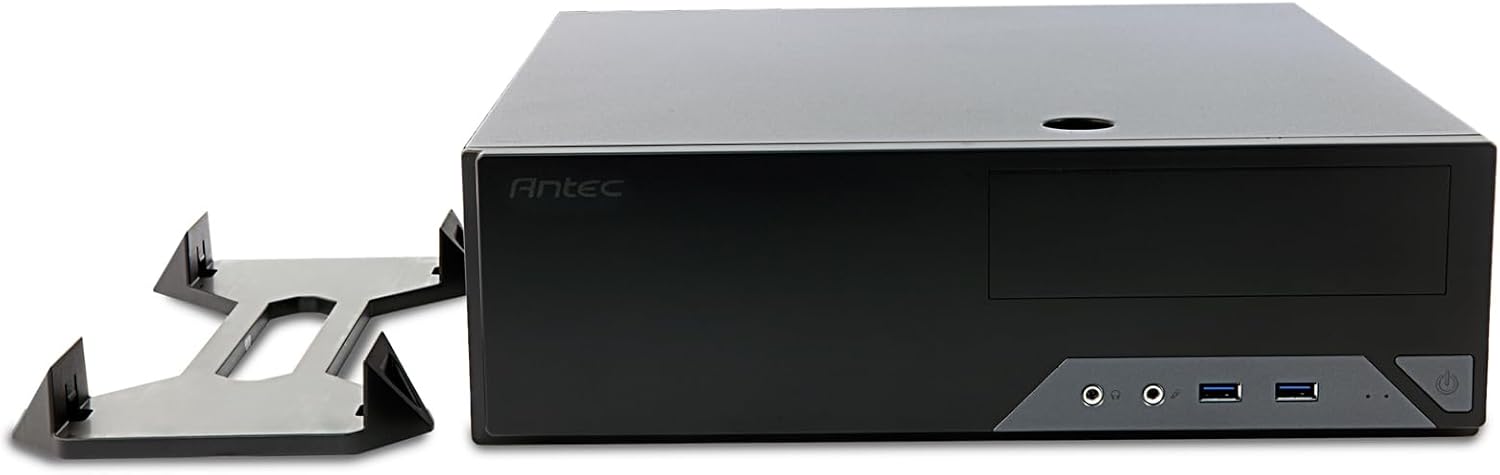
Figure 4: The Antec VSK2000-U3 case shown in a horizontal orientation with its included stand, demonstrating versatile placement options.
5. Manutenzione
Una manutenzione regolare contribuisce a garantire la longevità e le prestazioni ottimali del tuo PC.
- Pulizia della polvere: Periodically clean dust from the case interior, fans, and air vents using compressed air or a soft brush. Ensure the system is powered off and unplugged before cleaning.
- Gestione dei cavi: Check cable routing periodically to ensure no cables are obstructing airflow or fan operation.
- Controllo della ventola: Ensure the included 92mm temperature-controlled fan and any other installed fans are operating correctly and free from obstructions.
6. Risoluzione Dei Problemi
Se riscontri problemi con la configurazione del tuo PC, prendi in considerazione i seguenti passaggi comuni per la risoluzione dei problemi:
- Nessun potere:
- Verify the power cable is securely connected to the PSU and wall outlet.
- Assicurarsi che l'interruttore dell'alimentatore sia in posizione "ON".
- Check all internal power connections (24-pin ATX, 8-pin CPU, GPU power, drive power).
- Confirm front panel power switch cable is correctly connected to the motherboard.
- Nessuna visualizzazione:
- Ensure the monitor is connected to the correct graphics output (dedicated GPU or motherboard integrated graphics).
- Reinstallare la scheda grafica e i moduli RAM.
- Rumore eccessivo:
- Identify the source of the noise (fan, HDD).
- Clean dust from fans.
- Ensure no cables are touching fan blades.
7. Specifiche
| Caratteristica | Dettaglio |
|---|---|
| Marca | Antec |
| Serie | VSK2000-U3 |
| Nome del modello | VSK2000-U3 |
| Compatibilità della scheda madre | Micro-ATX |
| Tipo di caso | Mid Tower (Slim Desktop) |
| Dimensioni (LxWxH) | 18.6 x 15.9 x 7 pollici |
| Peso dell'articolo | 5.28 libbre |
| Colore | Nero |
| Materiale | Painted/Coated Metal (Likely Steel Or Aluminum With Plastic Components) |
| Tipo di montaggio dell'alimentatore | Rear Mount (TFX form factor) |
| Metodo di raffreddamento | Air (1 x 92 mm temperature-controlled fan included) |
| Dimensioni della ventola | 92 millimetri |
| Alloggiamenti unità | 1 x 5.25” ODD, 1 x 3.5" HDD, 1 x 2.5" SSD |
| Slot di espansione | 4 |
8. Garanzia e supporto
The Antec VSK2000-U3 Micro-ATX Desktop Case comes with a Garanzia di 2 anno. For technical support, warranty claims, or additional product information, please visit the official Antec webo contattare il servizio clienti. Conservare la prova d'acquisto per la convalida della garanzia.
Per ulteriore assistenza, fare riferimento a Antec Store.


