1. Introduzione
This manual provides essential information for the safe and efficient installation, operation, and maintenance of the Legrand 048408 Room Controller IP 8Mod. Please read this manual thoroughly before attempting to install or operate the device. Keep this manual for future reference.
The Legrand 048408 is an IP-enabled room controller designed for integrated building management systems, offering control over various room functions. It features 8 modules for flexible configuration within a control panel.
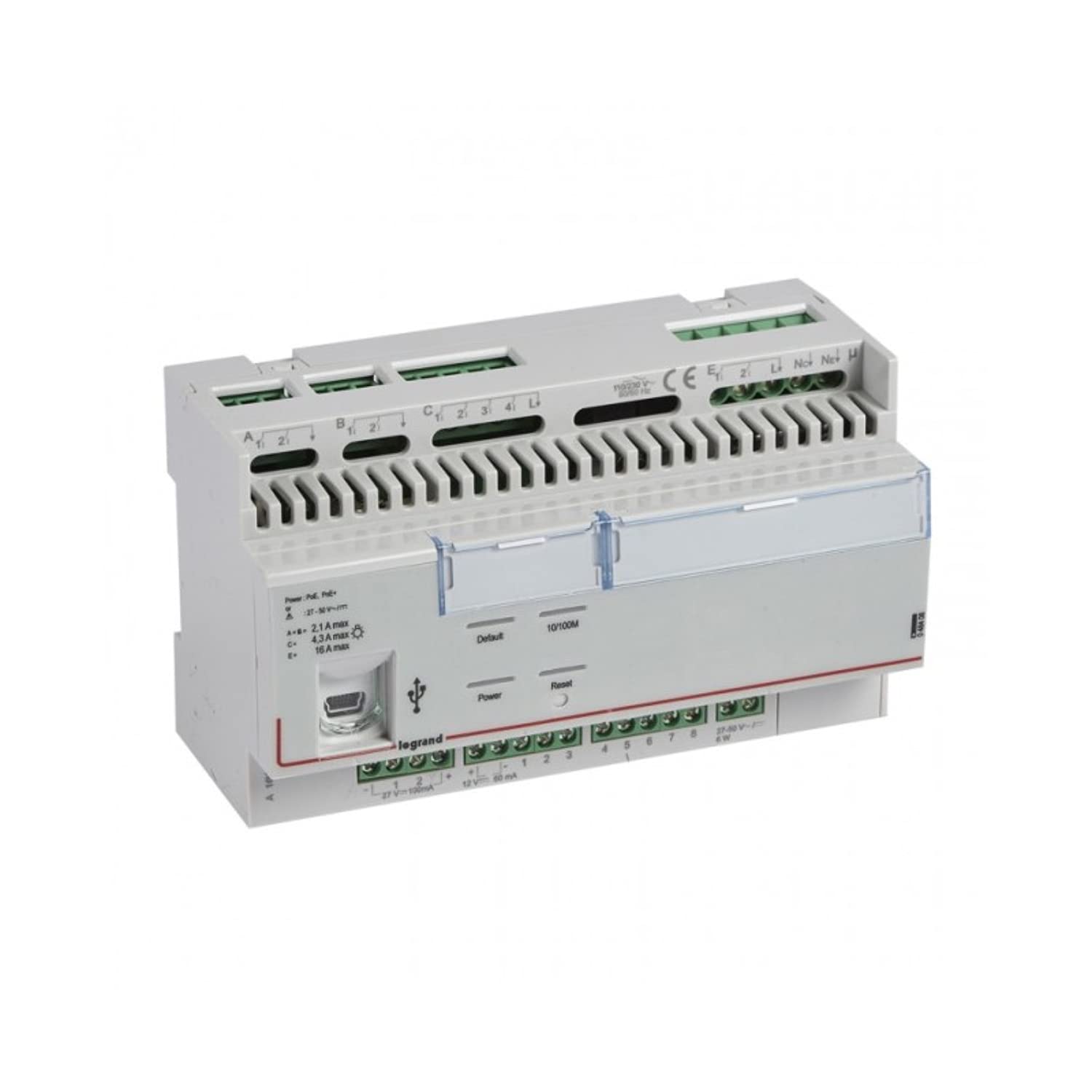
Figura 1: Fronte view of the Legrand 048408 Room Controller IP 8Mod. This image shows the compact design of the 8-module device, typically installed in a control cabinet.
2. Informazioni sulla sicurezza
WARNING: Risk of electric shock. Installation and servicing must be performed by qualified personnel only. Disconnect power before installation or maintenance.
- Rispettare sempre le normative elettriche locali e nazionali.
- Ensure the power supply is disconnected before working on the device or its connections.
- Non esporre il dispositivo a umidità o temperature estreme.
- Utilizzare dispositivi di protezione individuale (DPI) adeguati durante l'installazione.
- Prima di applicare l'alimentazione, verificare che tutti i collegamenti elettrici siano sicuri e corretti.
3. Configurazione e installazione
The Legrand 048408 Room Controller is designed for DIN rail mounting within an electrical enclosure.
3.1. Montaggio
- Ensure the DIN rail is securely installed within the control panel.
- Align the controller's DIN rail clip with the rail.
- Press the controller firmly onto the DIN rail until it clicks into place.
3.2. Collegamenti elettrici
Refer to the wiring diagram provided with the product packaging for specific connection details. General steps include:
- Alimentazione elettrica: Connect the appropriate power supply (e.g., 24V DC) to the designated terminals. Observe polarity.
- IP Network: Connect an Ethernet cable from your network switch or router to the RJ45 port on the controller.
- Collegamenti del modulo: Connect external devices (e.g., sensors, actuators, lighting controls) to the 8 module terminals as per your system design. Ensure correct terminal assignments for inputs and outputs.
3.3. Accensione iniziale
- Controllare attentamente tutti i collegamenti elettrici per verificarne la correttezza e la sicurezza.
- Restore power to the control panel.
- Observe the status indicator LEDs on the controller. A solid green LED typically indicates normal operation.
4. Istruzioni per l'uso
The Legrand 048408 Room Controller is primarily managed through a network interface or integrated building management software. Direct manual operation is limited to status indication.
4.1. Indicatori di stato
- LED di potenza: Indicates power supply status. (e.g., Green = On, Off = No Power)
- LED di rete: Indicates network connectivity and activity. (e.g., Solid Green = Connected, Blinking = Data Transfer)
- Module Status LEDs: Individual LEDs for each of the 8 modules may indicate their operational status or output state. Refer to the product's technical documentation for specific LED behavior.
4.2. Configurazione di rete
Access the controller's web interface or use the provided configuration software to set up IP addresses, subnet masks, gateway, and other network parameters. Consult the Legrand software documentation for detailed instructions on network setup and device integration into your building management system.
5. Manutenzione
The Legrand 048408 Room Controller requires minimal maintenance. Regular checks ensure optimal performance and longevity.
- Pulizia: Pulire periodicamente l'esterno del dispositivo con un panno morbido e asciutto. Non utilizzare detergenti abrasivi o solventi. Assicurarsi che l'alimentazione sia scollegata prima di pulire.
- Aggiornamenti del firmware: Check the official Legrand website for available firmware updates. Follow the provided instructions carefully to update the device firmware, typically via the network interface.
- Verifiche della connessione: Controllare annualmente tutti i collegamenti elettrici per verificarne la tenuta e l'assenza di segni di usura o corrosione.
6. Risoluzione Dei Problemi
Questa sezione fornisce soluzioni ai problemi più comuni che potresti riscontrare.
| Problema | Possibile causa | Soluzione |
|---|---|---|
| Il dispositivo non si accende. | Nessuna alimentazione; cablaggio errato; alimentatore difettoso. | Controllare i collegamenti di alimentazione e la tensione di alimentazionetage. Ensure polarity is correct. Test power supply. |
| Nessuna connettività di rete. | Ethernet cable disconnected or faulty; incorrect IP settings; network switch issue. | Verify Ethernet cable connection. Check network LED status. Confirm IP settings in the controller's configuration. Test network switch. |
| Module outputs not responding. | Incorrect wiring to external device; software configuration error; faulty module. | Check wiring to the external device. Review software configuration for the specific module. Contact support if module appears faulty. |
Se il problema persiste dopo aver provato queste soluzioni, contattare l'assistenza tecnica Legrand.
7. Specifiche
Technical specifications for the Legrand 048408 Room Controller IP 8Mod:
| Caratteristica | Dettaglio |
|---|---|
| Numero di modello | 048408 |
| Marca | Legrand |
| Dimensioni del prodotto | 1.97 x 7.87 x 3.15 pollici |
| Peso dell'articolo | 2.2 libbre (circa 1 chilogrammo) |
| Numero di moduli | 8 |
| Tipo di montaggio | Guida DIN |
| Connettività | IP (Ethernet) |
| Batterie richieste | NO |
| Data prima disponibilità | 23 luglio 2022 |
8. Garanzia e supporto
Legrand products are manufactured to high standards and are backed by a limited warranty. For specific warranty terms and conditions, please refer to the documentation included with your purchase or visit the official Legrand websito.
For technical assistance, troubleshooting beyond this manual, or warranty claims, please contact Legrand customer support:
- Websito: www.legrand.us (o il tuo Legrand regionale websito)
- Informazioni sui contatti: Refer to the "Contact Us" section on the Legrand websito per numeri di telefono e supporto via e-mail.