Introduzione
This manual provides detailed instructions for setting up, operating, and maintaining your Logitech M275 Wireless USB Mouse. Please read this guide thoroughly to ensure optimal performance and longevity of your device. The Logitech M275 mouse is designed for comfortable use with its contoured shape and offers reliable wireless connectivity.

Immagine: dall'alto verso il basso view of the Logitech M275 Wireless Mouse, showcasing its black finish and central scroll wheel.
Impostare
Follow these steps to set up your Logitech M275 Wireless USB Mouse:
- Installare la batteria:
- Individuare il vano batteria sul lato inferiore del mouse.
- Aprire il coperchio del vano batterie.
- Insert one AA battery, ensuring correct polarity (+/-). The mouse includes one AA battery.
- Chiudere saldamente il coperchio del vano batterie.
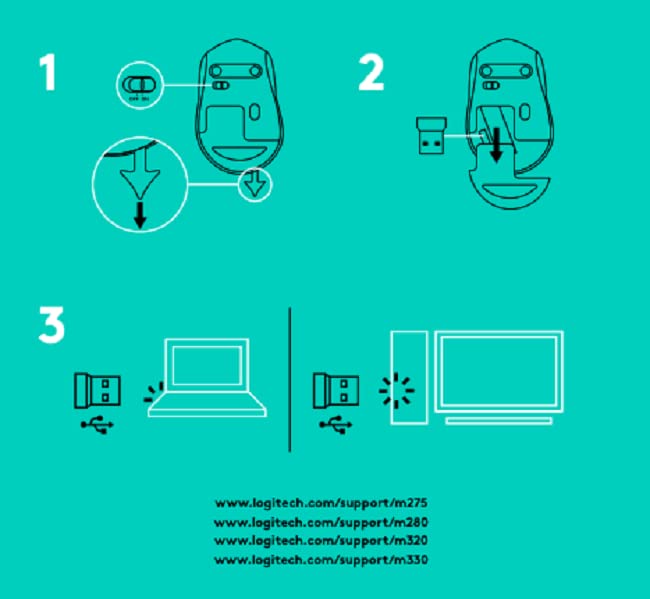
Immagine: In basso view of the Logitech M275 Wireless Mouse, showing the ON/OFF switch, battery compartment, and optical sensor.
- Collegare il ricevitore USB:
- Locate the tiny USB Nano Receiver, typically stored inside the battery compartment or packaged separately.
- Collegare il ricevitore USB Nano a una porta USB disponibile sul computer.
- Il computer dovrebbe rilevare e installare automaticamente i driver necessari.

Image: Close-up of the Logitech Nano Receiver plugged into a laptop's USB port, indicating successful connection.
- Accendere il mouse:
- Spostare l'interruttore ON/OFF sul lato inferiore del mouse in posizione 'ON'.
- Il mouse è ora pronto per l'uso.

Image: A diagram showing the three steps for setting up the mouse: 1) Insert battery, 2) Insert receiver into mouse for storage, 3) Plug receiver into computer's USB port.
Istruzioni per l'uso
The Logitech M275 Wireless USB Mouse offers intuitive control for your computer:
- Funzioni di base:
- Clic sinistro: Pulsante principale per selezionare elementi, aprire link, ecc.
- Clic destro: Pulsante secondario per menu contestuali e opzioni aggiuntive.
- Rotella di scorrimento: Roll up or down to navigate documents and web pagine. La rotellina di scorrimento funziona anche come pulsante centrale cliccabile.
- Sensore ottico avanzato: The mouse utilizes a Logitech Advanced Optical Sensor for smooth and precise cursor control on various surfaces.
- Indicatore della durata della batteria: A small LED light on the mouse indicates battery status. It typically glows green briefly when powered on if the battery is good. A red light indicates that the battery is low and needs replacement. The mouse is designed for an 18-month battery life, which may vary based on usage.

Immagine: in alto view of the Logitech M275 Wireless Mouse, highlighting its ergonomic design and indicating an 18-month battery life.
Manutenzione
Una corretta manutenzione garantisce la longevità e le prestazioni del mouse:
- Sostituzione della batteria: When the battery indicator light turns red, replace the AA battery. Follow the steps outlined in the 'Install the Battery' section under Setup.
- Pulizia del mouse:
- Spegnere il mouse prima di pulirlo.
- Utilizzare un panno morbido e privo di lanugine leggermente dampPulire la superficie del mouse con acqua o una soluzione detergente delicata.
- Evitare l'uso di prodotti chimici aggressivi o materiali abrasivi.
- Evitare che liquidi penetrino nei componenti interni del mouse.
Risoluzione dei problemi
If you encounter issues with your Logitech M275 mouse, refer to the following common solutions:
- No Cursor Movement or Intermittent Connection:
- Assicurarsi che il mouse sia acceso.
- Check the battery. Replace it if the indicator light is red or if the mouse is unresponsive.
- Ensure the USB Nano Receiver is securely plugged into a working USB port on your computer. Try a different USB port.
- Avvicinare il mouse al ricevitore USB per escludere problemi di portata.
- Avoid using the mouse on highly reflective or transparent surfaces. A mouse pad is recommended for optimal tracking.
- Lagging or Unresponsive Cursor:
- Interference from other wireless devices can affect performance. Try moving other wireless devices away from the mouse and receiver.
- Assicurati che il sistema operativo del tuo computer sia aggiornato.
- Mouse Not Detected by Computer:
- Riavvia il computer.
- Try plugging the USB Nano Receiver into a different USB port.
- If you have other Logitech devices, ensure the M275 receiver is the correct one for this mouse, as it is not a Unifying receiver.
Specifiche
| Caratteristica | Dettaglio |
|---|---|
| Marca | Logitech |
| Numero di modello | Numero di modello: M275 |
| Tecnologia di connettività | USB wireless |
| Tecnologia di rilevamento del movimento | Ottico |
| Colore | Nero |
| Fonte di alimentazione | Alimentato a batteria (1 batteria AA) |
| Durata media della batteria | 18 mesi |
| Piattaforma hardware | PC |
| Compatibilità del sistema operativo | Linux, Windows 7, Windows XP |
| Peso dell'articolo | 100 grammi |
| Dimensioni del prodotto | Dimensioni: 21 x 7.6 x 15.2 cm |
| Componenti inclusi | Wireless Mouse, Nano Receiver, 1 AA battery, User Documentation |
Garanzia e supporto
- Garanzia: The Logitech M275 Wireless USB Mouse comes with a 1-year warranty. Please retain your proof of purchase for warranty claims.
- Assistenza clienti: For technical assistance or warranty inquiries, please contact Logitech Customer Care.
- Assistenza clienti Logitech India:
- Numero verde: 1800 572 4730
- Opening Time: 9:00 AM to 6:00 PM (Monday to Friday)
- Note: Weekends & National Holidays closed.


