1. Prodotto finitoview
The Monoprice USB-C 3-Port USB 3.0 Hub and Gigabit Ethernet Adapter (Model 114503) is designed to expand the connectivity options for your USB-C enabled devices. This compact adapter integrates three high-speed USB 3.0 Type-A ports and one Gigabit Ethernet port, providing both data transfer capabilities and a stable wired network connection. It is compatible with a wide range of operating systems, including MacOS, Windows, and Chrome OS, offering a plug-and-play experience without the need for additional driver installations on most modern systems.
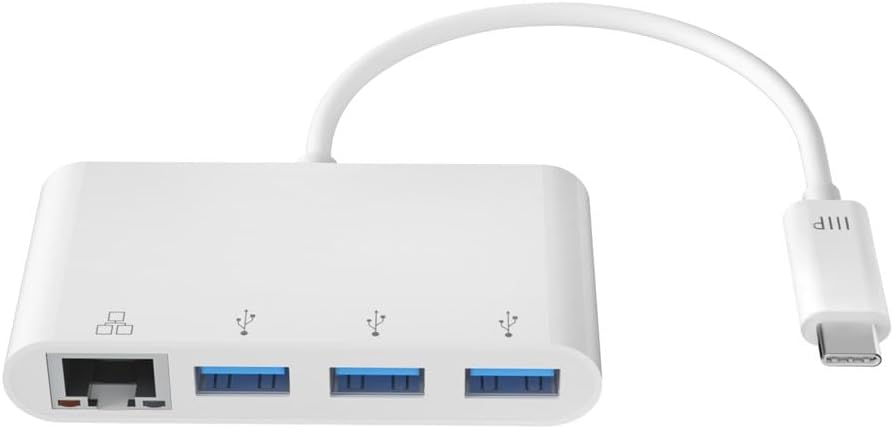
Image: Monoprice USB-C 3-Port USB 3.0 Hub and Gigabit Ethernet Adapter, showcasing the device with its integrated USB-C connector.
2. Cosa c'è nella scatola
- 1x Monoprice USB-C 3-Port USB 3.0 Hub and Gigabit Ethernet Adapter
3. Impostazione
The Monoprice USB-C 3-Port USB 3.0 Hub and Gigabit Ethernet Adapter is designed for simple plug-and-play functionality. No drivers or software installations are typically required for Windows, MacOS, or Chrome OS.
- Connetti al dispositivo host: Collega il connettore USB-C dell'adattatore a una porta USB-C disponibile sul tuo laptop, tablet o smartphone.
- Indicatore di alimentazione: A small LED indicator on the adapter will illuminate to confirm it is powered and ready for use.
- Connetti le periferiche: You can now connect your USB devices (e.g., mouse, keyboard, flash drives, external hard drives) to the USB 3.0 Type-A ports.
- Connetti alla rete: For a wired internet connection, plug an Ethernet cable from your router or modem into the Gigabit Ethernet port on the adapter.

Image: The adapter connected to a laptop, demonstrating simultaneous use of a USB flash drive and a wired Ethernet connection.
4. Istruzioni per l'uso
Utilizzo dell'hub USB 3.0
The adapter features three USB 3.0 Type-A ports. These ports support data transfer speeds up to 5Gbps, making them suitable for connecting high-speed external peripherals such as external hard drives, SSDs, and high-resolution webcams. They can also be used for charging mobile devices, though charging speeds may vary depending on the device and power requirements.

Immagine: Un dettaglio view of the three USB 3.0 Type-A ports on the Monoprice adapter.
Using the Gigabit Ethernet Adapter
The integrated Gigabit Ethernet adapter provides a stable and high-speed wired network connection, supporting speeds up to 1000Mbps. This is ideal for activities requiring consistent bandwidth, such as online gaming, video conferencing, and large file transfers, offering superior security and speed compared to wireless connections.

Image: A close-up of the Gigabit Ethernet port on the Monoprice adapter.
5 Caratteristiche
- Hub USB a 3 porte: Adds three USB 3.0 Type-A ports, each capable of delivering data speeds up to 5Gbps, for connecting high-speed external peripherals and charging mobile devices.
- Wired Gigabit Ethernet: Enjoy the superior security and increased speeds of a wired Ethernet connection using the built-in Gigabit Ethernet Adapter.
- Collega e usa: A true Plug & Play device, no drivers or software installations are required to use the Gigabit adapter on a Windows or Mac OS X machine.
- Design portatile: Small and portable, you can easily slip this adapter into your laptop case and have it ready for use wherever and whenever the need arises.
- Ampia compatibilità: Compatible with USB-C equipped laptops, such as the Apple MacBook and Google Chromebook, as well as the latest tablets, flash drives, and other smart devices.

Image: A diagram illustrating the various connections and devices that can be used with the Monoprice USB-C hub.
6. Specifiche
| Marca | Prezzo singolo |
| Numero di modello | 114503 |
| Dimensioni del prodotto | 6 x 5 x 5 pollici |
| Peso dell'articolo | 1.44 once |
| Colore | Bianco |
| Interfaccia Hardware | USB 3.0 |
| Dispositivi compatibili | Computer portatili, smartphone, tablet |
| Velocità di trasferimento dati (USB) | Fino a 5 Gbps |
| Velocità Ethernet | Gigabit (1000 Mbps) |
7. Risoluzione Dei Problemi
- Nessuna connessione Internet tramite Ethernet:
- Assicurarsi che il cavo Ethernet sia collegato saldamente sia all'adattatore che al router/modem.
- Verify that your host device's network settings recognize the wired connection.
- Restart your computer and network equipment.
- Dispositivi USB non riconosciuti:
- Assicurarsi che il dispositivo USB sia inserito correttamente nella porta USB 3.0 dell'adattatore.
- Try connecting the USB device directly to your computer's USB port to confirm it is functional.
- Some high-power USB devices may require an external power source, which this adapter does not provide.
- Wi-Fi Issues When Adapter is Connected:
- In some rare cases, particularly with certain MacOS versions, connecting an Ethernet adapter might disable Wi-Fi. Check your network preferences to ensure Wi-Fi is still enabled and prioritized correctly.
- Velocità di trasferimento dati lente:
- Ensure you are using USB 3.0 compatible devices and cables to achieve maximum speeds.
- Verifica che il cavo Ethernet sia compatibile con velocità Gigabit (Cat5e o superiore).
8. Manutenzione
- Pulizia: Utilizzare un panno morbido e asciutto per pulire l'adattatore. Evitare detergenti liquidi o solventi.
- Magazzinaggio: Conservare l'adattatore in un luogo fresco e asciutto, lontano dalla luce solare diretta e da temperature estreme.
- Gestione: Avoid dropping the adapter or subjecting it to strong impacts. Do not bend the integrated cable excessively.

Image: The compact size of the adapter, emphasizing its portability for easy storage and travel.
9. Garanzia e supporto
For detailed warranty information and technical support, please refer to the official Monoprice websito o contattare direttamente il servizio clienti. Conservare la ricevuta d'acquisto per eventuali reclami in garanzia.


