1. Introduzione
Thank you for choosing the Paulmann 70621 MaxLED RGB Controller. This device allows you to control RGB LED strips, offering color changing, dimming, and remote control functionalities. Please read this manual carefully before installation and operation to ensure proper use and longevity of the product.
2. Informazioni sulla sicurezza
- Assicurarsi che l'alimentazione sia scollegata prima dell'installazione o della manutenzione.
- Questo prodotto è progettato esclusivamente per uso interno (grado di protezione IP20). Non esporre a umidità o temperature estreme.
- Only use with compatible 24V DC LED strips and power supplies. Exceeding the maximum wattage of 144W can damage the device.
- Tenere il dispositivo lontano dalla portata dei bambini.
- Do not attempt to open or modify the controller or remote control. This will void the warranty.
3. Contenuto della confezione
Verificare che tutti i componenti siano presenti nella confezione:
- 1x Paulmann 70621 MaxLED RGB Controller
- 1x 2.4 GHz RGB Remote Control
- 1x Istruzioni di montaggio (questo manuale)
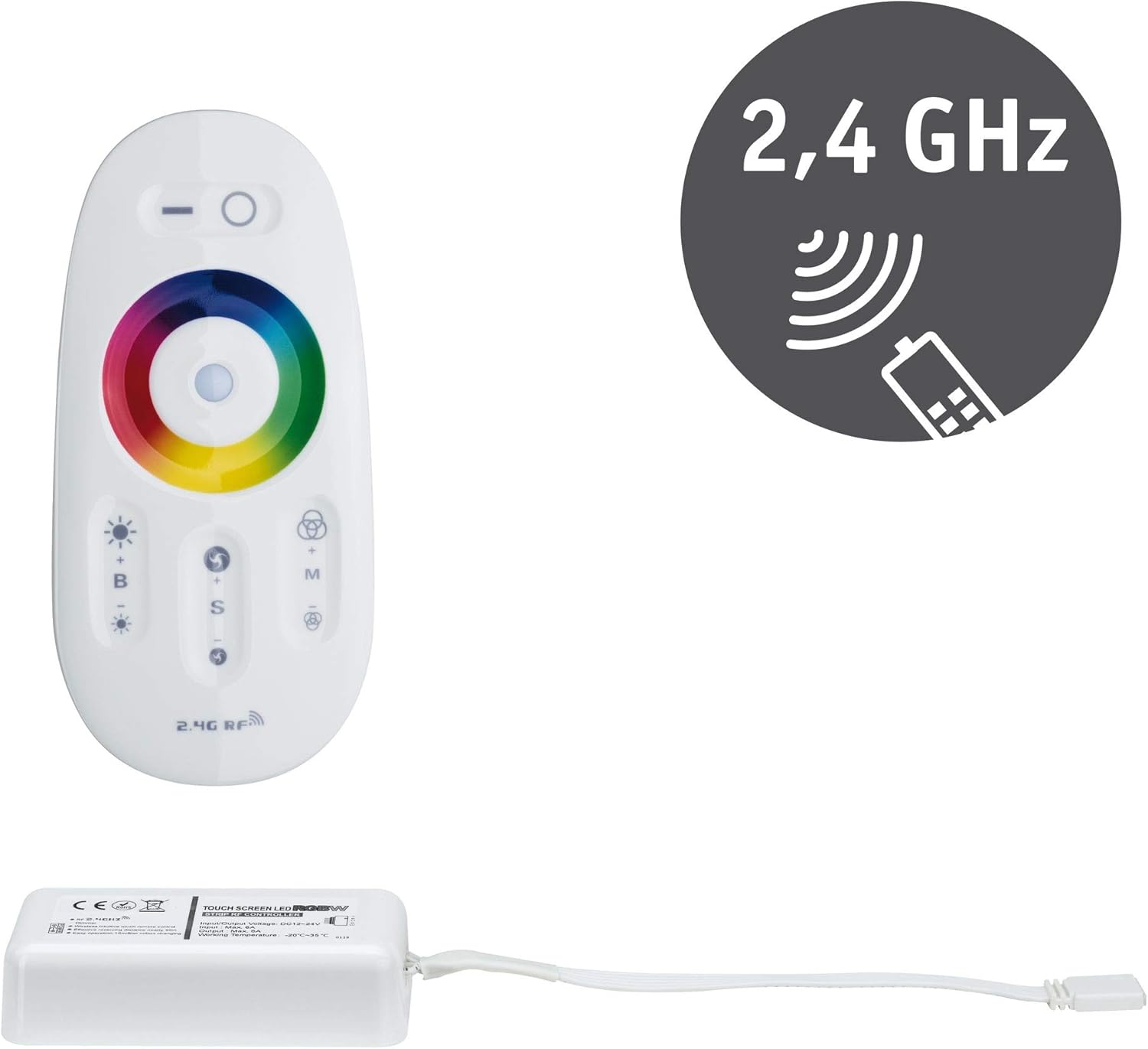
Image 3.1: Paulmann 70621 MaxLED RGB Controller and its accompanying 2.4 GHz remote control. The controller is a white rectangular unit with a cable, and the remote is an oval white unit with a color wheel and various buttons.
4. Configurazione e installazione
Follow these steps to install your MaxLED RGB Controller:
- Preparare il telecomando: Il telecomando richiede 2 batterie AAA (non incluse). Aprire il vano batterie sul retro del telecomando e inserire le batterie, rispettando la polarità corretta.
- Collegare la striscia LED: Connect your 24V DC RGB LED strip to the output connector of the MaxLED RGB Controller. Ensure the connections are secure and correctly aligned according to the strip's markings (e.g., R, G, B, V+).
- Collegare l'alimentatore: Connect a compatible 24V DC power supply (not included) to the input connector of the MaxLED RGB Controller. Ensure the power supply is capable of providing sufficient wattage for your LED strip (up to 144W maximum for the controller).
- Accensione: Once all connections are secure, connect the power supply to a mains outlet. The LED strip should briefly illuminate or be ready for control.
- Abbinamento (se necessario): The controller and remote are usually pre-paired. If the remote does not respond, power off the controller, then power it back on. Within 3 seconds of powering on, press and hold the 'ON' button (top right circle) on the remote control until the LED strip flashes, indicating successful pairing.

Image 4.1: The Paulmann 70621 MaxLED RGB Controller and its remote, illustrating the components involved in the setup process.
5. Istruzioni per l'uso
The 2.4 GHz remote control provides intuitive operation of your MaxLED RGB strip:

Image 5.1: Close-up of the Paulmann 70621 MaxLED RGB Remote Control, highlighting its various buttons and the color wheel.
- Power On/Off (Top Left/Right Buttons): Press the top left button (line icon) to turn off the LED strip. Press the top right button (circle icon) to turn on the LED strip.
- Color Selection (Color Wheel): Touch the color wheel to select your desired static color.
- Brightness Adjustment (B+/-): Use the 'B+' button to increase brightness and 'B-' button to decrease brightness.
- Selezione modalità (M): Press the 'M' button to cycle through various dynamic color changing modes.
- Regolazione della velocità (S+/-): When a dynamic mode is active, use the 'S+' button to increase the speed of the color change and 'S-' button to decrease it.
6. Manutenzione
The Paulmann 70621 MaxLED RGB Controller requires minimal maintenance:
- Pulizia: Wipe the controller and remote control with a soft, dry cloth. Do not use abrasive cleaners or solvents.
- Sostituzione della batteria: When the remote control's range decreases or it becomes unresponsive, replace the 2 AAA batteries. Ensure correct polarity.
7. Risoluzione Dei Problemi
If you encounter issues with your MaxLED RGB Controller, refer to the following common problems and solutions:
| Problema | Possibile causa | Soluzione |
|---|---|---|
| La striscia LED non si accende. | No power, incorrect connections, faulty LED strip or power supply. | Check power supply connection. Verify LED strip and controller connections. Test with a known working LED strip/power supply. |
| Il telecomando non risponde. | Batterie scariche, telecomando non associato, fuori portata. | Replace AAA batteries. Re-pair the remote (see Section 4). Ensure remote is within range of the controller. |
| I colori sono errati o incoerenti. | Incorrect wiring of RGB channels, faulty LED strip. | Double-check the RGB wiring between the controller and the LED strip. Ensure R, G, B, V+ are connected correctly. |
| La striscia LED lampeggia. | Insufficient power supply, loose connection. | Assicurare l'alimentazione elettricatage is adequate for the LED strip. Check all connections for tightness. |
8. Specifiche
| Numero di modello | 70621 |
| Marca | Paulmann |
| Dimensioni del prodotto (L x P x A) | Dimensioni: 8.5 x 4.5 x 2.25 cm |
| Peso | 104 grammi |
| Materiale | Plastica |
| Colore | Bianco |
| Ingresso volumetage | 24 Volt CC |
| Potenza di uscita massima | 144 Watt |
| Caratteristiche speciali | RGB Color Change, Dimmable, Remote Control |
| Frequenza del telecomando | 2.4 GHz |
| Batterie per telecomando | 2 AAA (non incluse) |
| Grado di protezione | IP20 (solo per uso interno) |
9. Garanzia e supporto
Information regarding specific warranty terms and customer support for the Paulmann 70621 MaxLED RGB Controller is not available in this document. Please refer to the product packaging, the official Paulmann website, or contact your retailer for detailed warranty information and support options.