1. Introduzione
This manual provides instructions for the setup, operation, and maintenance of your Insignia RC-801-0A LCD TV Remote Control. This remote is designed for use with various Insignia LCD TV models, ensuring seamless control over your television's functions.
2. Contenuto della confezione
- 1 x Insignia RC-801-0A Remote Control
Note: Batteries and a user manual are not included in the package.
3. Impostazione
3.1 Installazione della batteria
- Individuare il vano batterie sul retro del telecomando.
- Per aprire il coperchio del vano batteria, farlo scorrere verso il basso.
- Inserire due (2) batterie AAA, assicurandosi che i terminali positivo (+) e negativo (-) siano allineati correttamente con le marcature all'interno del vano.
- Riposizionare il coperchio del vano batteria finché non scatta in posizione.
Important: The remote requires 2 AAA batteries (not included).
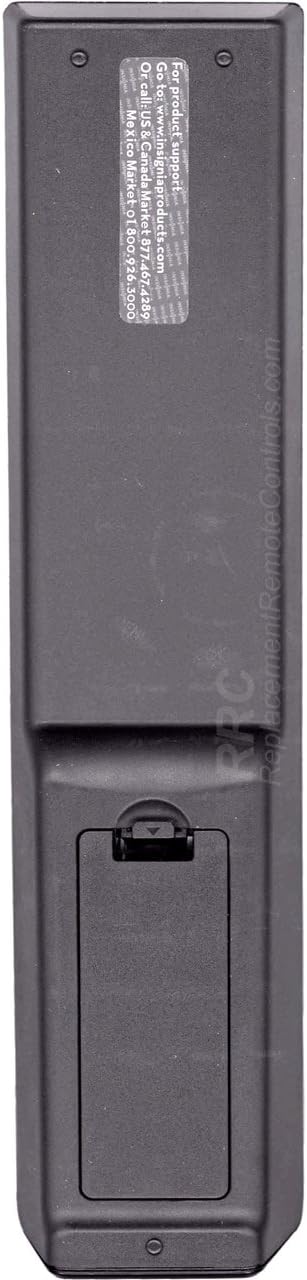
Figura 1: Indietro view of the Insignia RC-801-0A remote control, showing the battery compartment at the bottom. The compartment cover is designed to slide open for battery insertion.
3.2 Uso iniziale
The Insignia RC-801-0A remote control is pre-programmed for compatible Insignia LCD TV models. No additional programming or setup is typically required. Once batteries are installed, the remote should function immediately with your television.
4. Istruzioni per l'uso
Familiarize yourself with the buttons on your remote control to effectively operate your Insignia LCD TV.

Figura 2: Davanti view of the Insignia RC-801-0A remote control, displaying all control buttons. Key sections include power, input selection, number pad, volume/channel controls, menu navigation, and media playback buttons.
4.1 Funzioni dei pulsanti chiave
- Energia (●): Accende o spegne la TV.
- COMP/AV, HDMI, TV: Selects the video input source.
- Tastierino numerico (0-9): Inserisce direttamente i numeri dei canali.
- RICHIAMO: Ritorna a quello precedente viewed canale.
- VOLUME (+/-): Regola il livello del volume.
- CH (▲/▼): Cambia il canale TV in su o in giù.
- MUTO: Disattiva l'audio della TV.
- INGRESSO: Scorre le sorgenti di input disponibili.
- MENU: Apre il menu principale del televisore.
- Pulsanti di navigazione (▲▼◀▶): Consente di navigare tra le opzioni del menu.
- INVIO/OK: Conferma le selezioni nei menu.
- USCITA: Chiude il menu corrente o la visualizzazione sullo schermo.
- GUIDA: Displays the electronic program guide (if available).
- Media Playback Buttons (◀◀, ▶, ▮▮, ▶▶): Controls playback of connected media devices (e.g., DVD player, USB).
- ZOOM: Regola il livello di zoom dello schermo.
5. Manutenzione
5.1 Sostituzione della batteria
Replace batteries when the remote's response becomes inconsistent or stops working. Follow the battery installation steps in Section 3.1. Always replace both batteries at the same time with new AAA batteries.
5.2 Pulizia
Per pulire il telecomando, strofinare delicatamente la superficie con un panno morbido e asciutto. Per lo sporco ostinato, strofinare leggermenteampImmergere il panno in acqua. Evitare l'uso di prodotti chimici aggressivi o detergenti abrasivi, poiché potrebbero danneggiare la finitura del telecomando o i componenti interni.
6. Risoluzione Dei Problemi
- Il telecomando non risponde:
- Assicurarsi che le batterie siano inserite correttamente con la polarità corretta.
- Sostituire le vecchie batterie con quelle nuove.
- Verificare che non vi siano ostacoli tra il telecomando e il sensore IR del televisore.
- Puntare il telecomando direttamente verso il sensore IR del televisore.
- Pulsanti specifici non funzionanti:
- Clean the remote's surface, especially around the non-functional buttons, to remove any debris.
- If the issue persists after battery replacement and cleaning, the remote may require replacement.
7. Specifiche
| Numero di modello | RC-801-0A |
| Marca | INSIGNIA |
| Dimensioni del prodotto | 8 x 2 x 1 pollici |
| Peso dell'articolo | 3.67 once |
| Fonte di alimentazione | 2 x batterie AAA (non incluse) |
| Dispositivi compatibili | Insignia LCD Televisions |
| Colore | Nero |
8. Garanzia e supporto
8.1 Informazioni sulla garanzia
This product comes with a Six Months Warranty from the date of purchase. Please retain your proof of purchase for warranty claims. The warranty covers manufacturing defects but does not cover damage caused by misuse, accidents, or unauthorized modifications.
8.2 Assistenza clienti
For product support or warranty inquiries, please refer to the contact information provided by your retailer or the manufacturer's official website. The back of the remote may contain specific support details (see Figure 3).

Figura 3: Indietro view of the Insignia RC-801-0A remote control, showing a sticker with support information. The text indicates to visit www.insigniaproducts.com for product support and provides phone numbers for US/Canada and Mexico.
Specific support details from the remote's back sticker:
- For product support: Go to www.insigniaproducts.com
- Call US & Canada: 1-877-467-4289
- Messico: 01-800-926-3000


