Prodotto finitoview
La stampante a sublimazione DNP DS-RX1HS da 6 pollici è progettata per la stampa fotografica ad alta velocità e di alta qualità. Offre prestazioni migliorate con una velocità di stampa fino a 290 stampe 4x6 pollici all'ora, rendendola adatta a diverse applicazioni, tra cui cabine fotografiche e fotografia di eventi. Questa stampante combina un basso investimento iniziale con costi dei supporti accessibili, garantendo al contempo risultati di qualità professionale.

Figura 1: La stampante DNP DS-RX1HS, fornita con una custodia protettiva e rotoli di supporto per l'uso immediato.
La DS-RX1HS supporta vari formati di stampa, tra cui 2x6 pollici, 4x6 pollici e 6x8 pollici, ed è compatibile con i MEDIA SET della RX1HS. È dotata di funzionalità USB iSerial per una connettività fluida sia con computer Mac che PC, consentendo di stampare senza problemi su più unità.
Cosa è incluso
Il pacchetto DNP DS-RX1HS in genere include i seguenti componenti:
- Stampante a sublimazione di inchiostro DNP DS-RX1HS da 6"
- CD della stampante con driver per Windows OS7 e 8.1
- Manuale di istruzioni per il conducente
- Guida di installazione rapida
- Cavo di alimentazione
- Cuscinetto della testina di stampa
- 2 rotoli di supporti DNP 4x6" (700 stampe per rotolo)
- Custodia imbottita per stampante
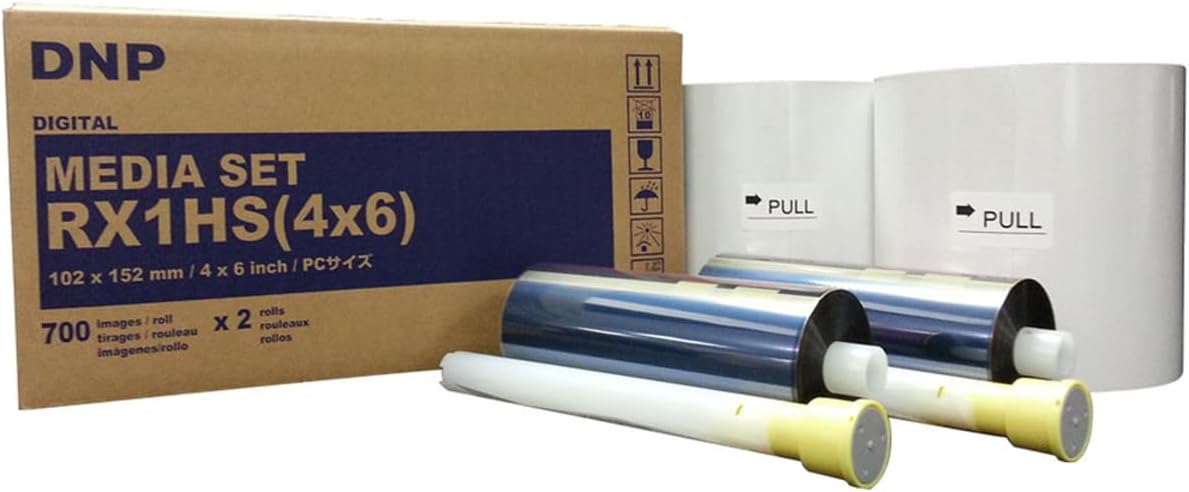
Figura 2: Il set di supporti DNP RX1HS 4x6, che include sia i rotoli di carta che quelli di nastro necessari per la stampa.
Istruzioni di installazione
1. Disimballaggio e posizionamento
- Estrarre con cautela la stampante e tutti gli accessori dalla confezione.
- Posizionare la stampante su una superficie stabile e piana, adeguatamente ventilata. Assicurarsi che vi sia spazio sufficiente attorno alla stampante per il caricamento dei supporti e la stampa.
- Verificare che tutti i componenti inclusi siano presenti come elencato nella sezione "Cosa è incluso".

Figura 3: Un angolo frontale view della stampante DNP DS-RX1HS, che ne mostra il design compatto adatto a diverse configurazioni.
2. Caricamento multimediale
- Aprire il coperchio anteriore della stampante.
- Inserire il rotolo di carta sul perno designato, assicurandosi che sia correttamente allineato.
- Inserire la cartuccia del nastro d'inchiostro nell'apposito alloggiamento, assicurandosi che scatti in posizione.
- Chiudere saldamente il coperchio anteriore.
- Importante: Dopo l'uso, scaricare sempre la carta e il nastro d'inchiostro, soprattutto prima di trasportare la stampante, e inserire la protezione in schiuma per la testina.

Figura 4: Pannello frontale della stampante DNP DS-RX1HS, con le spie di alimentazione, nastro, carta ed errore.
3. Connessione a un computer
- Collegare la stampante al computer (Mac o PC) utilizzando il cavo USB in dotazione.
- Installare i driver della stampante dal CD incluso o scaricare i driver più recenti dal sito ufficiale DNP websito. Seguire le istruzioni sullo schermo per l'installazione.
- Per Windows OS7 e 8.1, sono forniti i driver. Assicurarsi che il sistema operativo sia compatibile.
Istruzioni per l'uso
1. Accensione e inizializzazione
- Collegare il cavo di alimentazione alla stampante e poi a una presa di corrente.
- Premere il pulsante di accensione. La stampante eseguirà una sequenza di inizializzazione.
- Durante l'inizializzazione, la stampante potrebbe stampare alcune pagine vuote. Questo è normale.
2. Stampa di foto
- Apri l'immagine che desideri stampare nel tuo software di fotoritocco o di stampa preferito.
- Seleziona DNP DS-RX1HS come stampante.
- Regola le impostazioni di stampa come le dimensioni di stampa (2x6", 4x6", 6x8"), la risoluzione (300x300 dpi o 300x600 dpi) e la superficie (opaca o lucida) come preferisci.
- Avviare il comando di stampa. La stampante inizierà a elaborare e stampare la foto.
- La DS-RX1HS è in grado di stampare foto da 4x6" in circa 12.4 secondi.
3. Configurazione di più stampanti (USB iSerial)
La funzionalità USB iSerial consente una connettività senza interruzioni e la stampa su più stampanti DS-RX1HS da un'unica piattaforma Windows o Mac. Per procedure di configurazione dettagliate per ambienti con più stampanti, fare riferimento alla Guida alle istruzioni del driver.
Manutenzione
1. Pulizia della testina di stampa
La pulizia regolare della testina di stampa è fondamentale per mantenere la qualità di stampa e prolungare la durata della stampante. Utilizzare il cuscinetto per testina di stampa in dotazione o un panno morbido e privo di lanugine, delicatamenteamparricchito con alcol isopropilico.
- Spegnere e scollegare la stampante.
- Aprire il coperchio anteriore e accedere con cautela alla testina di stampa.
- Pulire delicatamente la superficie della testina di stampa per rimuovere polvere o detriti.
- Lasciare asciugare completamente la testina di stampa prima di chiudere il coperchio e accendere la stampante.
2. Archiviazione multimediale
Conservare i rotoli di carta in un luogo fresco e asciutto, lontano dalla luce solare diretta e da temperature estreme, per preservarne la qualità ed evitare problemi come incollamenti o inceppamenti.
Risoluzione dei problemi
| Problema | Possibile causa | Soluzione |
|---|---|---|
| La stampante non si accende | Cavo di alimentazione scollegato, problema con la presa di corrente | Controllare i collegamenti elettrici, provare una presa diversa. |
| Inceppamento carta / Spia di errore accesa | Caricamento del supporto non corretto, detriti nel percorso della carta, nastro attaccato alla carta | Spegnere la stampante, aprire il coperchio e rimuovere con cautela il supporto inceppato. Assicurarsi che il supporto sia caricato correttamente. Rimuovere sempre il supporto dopo l'uso. |
| Scarsa qualità di stampa (striature, stampe sbiadite) | Testina di stampa sporca, supporti vecchi, impostazioni errate | Pulisci la testina di stampa. Sostituisci il supporto se vecchio. Verifica le impostazioni di stampa (risoluzione, superficie). |
| Stampante non riconosciuta dal computer | Driver non installato o danneggiato, connessione USB allentata | Reinstalla i driver. Controlla la connessione del cavo USB. Prova una porta USB diversa. |
Per una risoluzione dei problemi più dettagliata, fare riferimento alla Guida alle istruzioni del driver o alla Guida di installazione rapida fornite con la stampante.
Specifiche
| Caratteristica | Dettaglio |
|---|---|
| Nome del modello | DS-RX1HS |
| Tecnologia di stampa | Sublimazione del colore |
| Risoluzione di stampa | 300 x 300 DPI (alta velocità), 300 x 600 DPI (alta risoluzione) |
| Velocità di stampa (4x6") | Circa 12.4 secondi per stampa (fino a 290 stampe all'ora) |
| Dimensioni di stampa supportate | 2x6", 4x6", 6x8" |
| Connettività | USB |
| Dispositivi compatibili | PC (Windows OS7, 8.1), Mac |
| Dimensioni (L x P x A) | 22 x 17.75 x 16.75 pollici |
| Peso | 35.7 libbre |
| Consumo energetico | Design a risparmio energetico |
Informazioni sulla garanzia
La stampante DNP DS-RX1HS è dotata di un Garanzia DNP di 3 anniQuesta garanzia copre i difetti di fabbricazione e garantisce il corretto funzionamento della stampante in condizioni di utilizzo normali. Per termini e condizioni specifici, fare riferimento alla documentazione di garanzia inclusa con il prodotto o visitare il sito Web ufficiale DNP. websito.
Supporto e risorse
Per ulteriore supporto, download di driver e domande frequenti, visitare il supporto ufficiale DNP websito. È inoltre possibile fare riferimento alla Guida alle istruzioni del driver e alla Guida di installazione rapida incluse per informazioni dettagliate sull'installazione, il funzionamento e la risoluzione dei problemi.
- DNP ufficiale Websito: www.dnpphoto.com
- Download dei driver: Disponibile sul supporto DNP websito per vari sistemi operativi.
- Assistenza tecnica: Per problemi tecnici non trattati nel presente manuale, contattare l'assistenza clienti DNP.


