Introduzione
This manual provides instructions for the installation and operation of your Satechi Aluminum USB-C 2.5-inch HDD/SSD Enclosure. This enclosure allows you to convert any 2.5-inch SATA hard drive (HDD) or solid-state drive (SSD) into a portable external storage device, utilizing a USB-C connection for data transfer speeds up to 10 Gbps.
Contenuto della confezione
- Satechi Aluminum USB-C 2.5-inch HDD/SSD Enclosure
- Cavo da USB-C a USB-C
- Mini cacciavite
- Viti di montaggio
Configurazione e installazione
Follow these steps to install your 2.5-inch HDD or SSD into the enclosure:
- Aprire l'involucro: Use the provided mini screwdriver to remove the two small screws located on the side of the enclosure. Carefully slide the internal tray out from the aluminum casing.
- Inserisci l'unità: Align your 2.5-inch SATA HDD or SSD with the SATA connector on the internal tray. Gently push the drive into the connector until it is firmly seated.
- Proteggere l'unità: Use the provided mounting screws to secure the HDD/SSD to the internal tray. Ensure the drive is stable and does not move.
- Chiudere l'involucro: Carefully slide the internal tray, with the installed drive, back into the aluminum casing. Re-insert and tighten the two small screws to secure the enclosure.

Image: Enclosure disassembled, revealing the internal tray and screws.
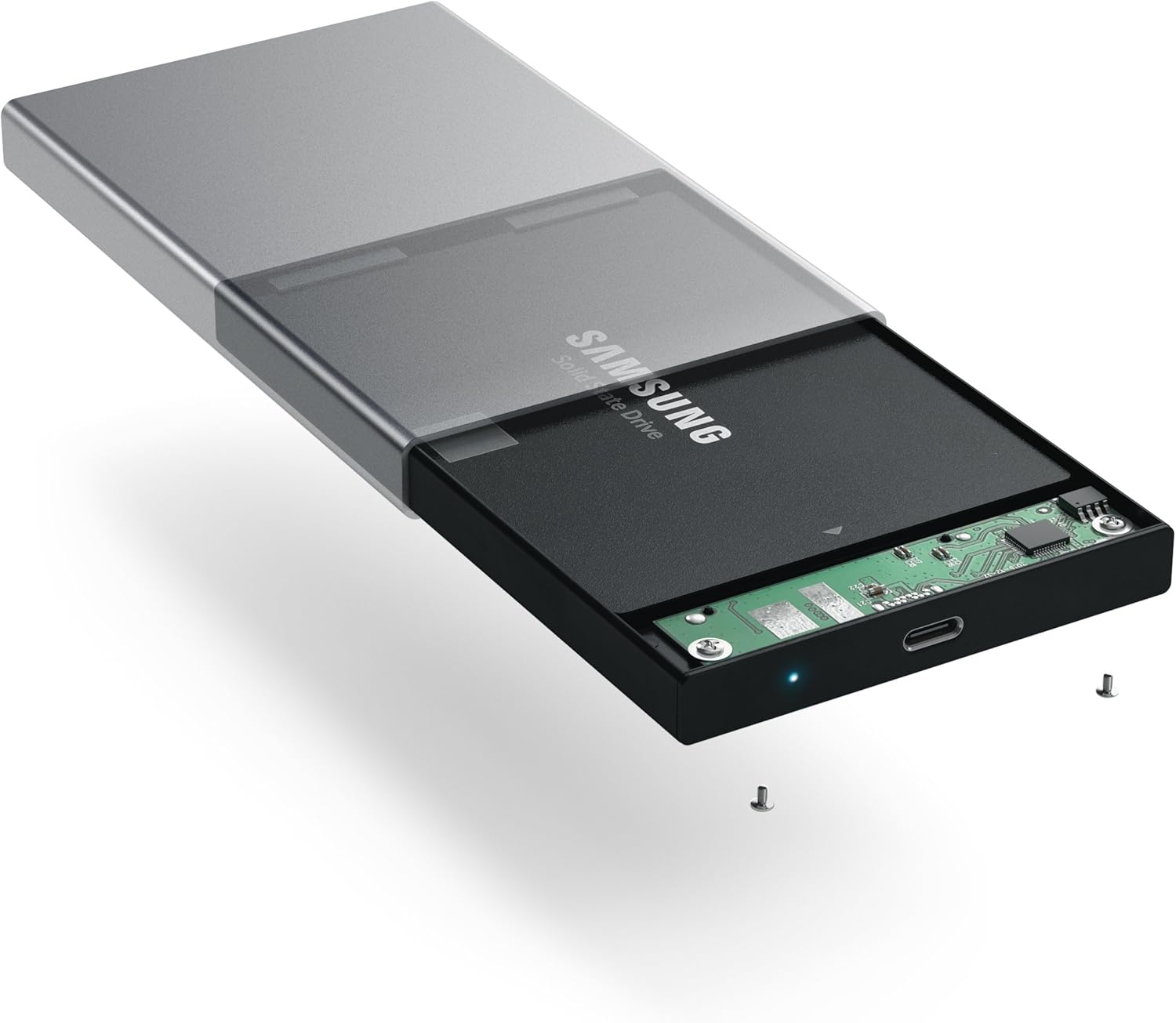
Image: Inserting a 2.5-inch SSD into the internal tray.

Image: SSD fully inserted and secured in the tray.
Istruzioni per l'uso
- Connessione al computer: Use the included USB-C to USB-C cable to connect the enclosure to an available USB-C port on your computer.
- Indicatore di alimentazione: A blue LED indicator light on the enclosure will illuminate when connected and powered, indicating readiness for use. The LED will blink during data transfer activity.
- Accesso all'unità: Your computer should automatically detect the external drive. If it is a new drive, you may need to format it before use. Refer to your operating system's documentation for drive formatting procedures.
- Trasferimento dati: Trascina e rilascia files to and from the external drive as you would with any other storage device. The enclosure supports data transfer speeds up to 10 Gbps, depending on your drive and computer's USB-C port capabilities.
- Rimozione sicura: Always safely eject the external drive from your operating system before disconnecting the cable to prevent data corruption.

Image: Enclosure connected to a laptop.

Image: Enclosure with cable connected, showing the blue LED.
Manutenzione
- Mantenere l'involucro pulito e privo di polvere. Utilizzare un panno morbido e asciutto per la pulizia.
- Evitare di esporre il dispositivo a temperature estreme, umidità o luce solare diretta.
- Do not attempt to disassemble the enclosure beyond the initial drive installation, as this may void the warranty.
Risoluzione dei problemi
- Unità non rilevata:
- Assicurarsi che il cavo USB-C sia collegato saldamente sia all'alloggiamento che al computer.
- Prova a connetterti a una porta USB-C diversa sul tuo computer.
- Verify that the HDD/SSD is correctly seated within the enclosure's SATA connector.
- If it is a new drive, ensure it has been formatted for your operating system.
- Velocità di trasferimento lente:
- Ensure your computer's USB-C port supports USB 3.1 Gen 2 (10 Gbps) for optimal performance.
- The performance of the drive itself (HDD vs. SSD) will impact transfer speeds.
- Consider using a high-quality, certified USB-C cable, especially if experiencing intermittent disconnections or slower-than-expected speeds.
- Il contenitore si disconnette in modo casuale:
- This can sometimes be caused by an incompatible or low-quality USB-C cable. Try using a different, certified USB-C cable.
- Assicurati che le impostazioni di alimentazione del computer non siano configurate per disattivare le porte USB per risparmiare energia.
Specifiche
| Numero di modello | ST-TCDEM |
| Codice UPC | 879961006242 |
| Materiale | Alluminio |
| Tipo di unità compatibile | HDD/SSD SATA da 2.5 pollici |
| Numero massimo di dispositivi supportati | 1 |
| Velocità di trasferimento dati | Fino a 10 Gigabit al secondo (USB 3.1 Gen 2) |
| Tecnologia di connettività | USB-C |
| Peso dell'articolo | 6.4 once (181 grammi) |
| Colore | Grigio siderale |
Garanzia e supporto
For warranty information and technical support, please refer to the official Satechi websito o contattare direttamente il servizio clienti. Conservare la ricevuta d'acquisto per eventuali reclami in garanzia.


