1. Introduzione
This manual provides detailed instructions for the proper use, setup, and maintenance of your SimpTronic True Wireless Earbuds. Please read this manual thoroughly before using the product to ensure optimal performance and longevity.
2. Prodotto finitoview
2.1 Contenuto della confezione
- SimpTronic True Wireless Earbuds (Left and Right)
- Custodia di ricarica
- Cavo di ricarica USB
- Manuale d'uso
2.2 Caratteristiche principali
- Stereo senza fili (TWS): Enjoy a completely cable-free audio experience.
- Bluetooth 5.0: Fornisce connettività stabile e consumo energetico efficiente.
- HD Stereo Sound with Deep Bass: Customized 8mm speaker drivers deliver clear audio.
- Impermeabile (IPX6): Resistant to strong jets of water, suitable for sports and outdoor activities.
- Microfono con cancellazione del rumore: Migliora la chiarezza delle chiamate.
- Tempo di riproduzione esteso: Fino a 30 ore di riproduzione totale con la custodia di ricarica.
- Controllo con un solo pulsante: Manage music, calls, and voice assistant with a single button on each earbud.
- Portata wireless di 15 metri: Strong signal for reliable connection.
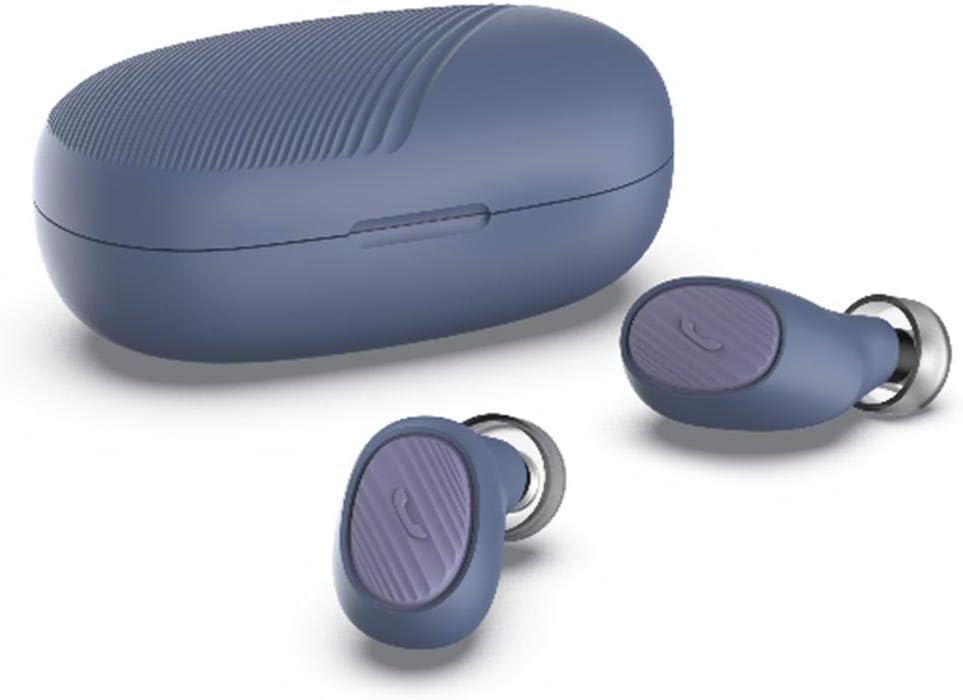
Image: SimpTronic True Wireless Earbuds and their charging case.
3. Impostazione
3.1 Ricarica degli auricolari e della custodia
- Ricarica della custodia: Connect the provided USB charging cable to the charging port on the case and a USB power source. The indicator light on the case will show charging status.
- Ricarica degli auricolari: Place the earbuds into their respective slots in the charging case. Ensure the charging contacts align. The earbuds will automatically begin charging. The indicator lights on the earbuds will show charging status and turn off when fully charged.
3.2 Associazione con un dispositivo
- Accensione: Take both earbuds out of the charging case. They will automatically power on and enter pairing mode. You may hear a voice prompt indicating pairing mode.
- Attiva Bluetooth: Sul tuo smartphone o altro dispositivo abilitato Bluetooth, vai alle impostazioni Bluetooth e abilita il Bluetooth.
- Seleziona dispositivo: Look for "SimpTronic Earbuds" (or similar name) in the list of available devices and select it to connect.
- Conferma: Once connected, you will hear a voice prompt confirming the successful pairing. The earbud indicator lights may change or turn off.
Nota: gli auricolari si riconnetteranno automaticamente all'ultimo dispositivo associato quando vengono estratti dalla custodia, se il Bluetooth è abilitato sul dispositivo.

Image: Illustration showing an earbud with a strong signal icon (V5.0+EDR) connecting to a smartphone, indicating a 15-meter wireless range.
4. Istruzioni per l'uso
4.1 One-Button Control Functions
Each earbud features a multi-function button for easy control of various functions:
- Riproduci/Pausa musica: Premere una volta il pulsante su uno dei due auricolari.
- Rispondi/Termina chiamata: Single press the button on either earbud during an incoming call or active call.
- Rifiuta chiamata: Durante una chiamata in arrivo, tenere premuto il pulsante su uno degli auricolari per 2 secondi.
- Prossima canzone: Double press the button on the right earbud.
- Canzone precedente: Double press the button on the left earbud.
- Aumenta volume: Triple press the button on the right earbud.
- Volume basso: Triple press the button on the left earbud.
- Attiva l'Assistente vocale (Siri/Assistente Google): Press and hold the button on either earbud for 2 seconds (when not on a call).

Image: Visual guide to the one-button control functions on the earbud, including volume, track navigation, call management, and voice assistant activation.
5. Manutenzione
5.1 Pulizia
- Pulisci delicatamente gli auricolari e la custodia di ricarica con un panno morbido, asciutto e privo di lanugine.
- Non utilizzare prodotti chimici aggressivi, solventi per la pulizia o detergenti aggressivi.
- Per garantire una ricarica corretta, pulire regolarmente i contatti di ricarica sia sugli auricolari che sulla custodia.
5.2 Conservazione
- Quando non li usi, riponi gli auricolari nella custodia di ricarica per proteggerli e mantenerli carichi.
- Conservare il dispositivo in un luogo fresco e asciutto, lontano da temperature estreme e dalla luce solare diretta.

Image: The earbuds and charging case are shown on a wet surface, highlighting their IPX6 waterproof rating, indicating resistance to water splashes and sweat.
6. Risoluzione Dei Problemi
If you encounter any issues with your SimpTronic True Wireless Earbuds, please refer to the following common solutions:
- Nessun suono:
- Assicurati che gli auricolari siano carichi.
- Check that the earbuds are properly paired with your device.
- Regola il volume sia sul dispositivo che sugli auricolari.
- Prova a riavviare il dispositivo e a ricollegare gli auricolari.
- Auricolari non accoppiati:
- Make sure both earbuds are out of the charging case and powered on.
- Disattivare il Bluetooth sugli altri dispositivi nelle vicinanze per evitare interferenze.
- Elimina il dispositivo dall'elenco Bluetooth del telefono e riprova ad associarlo.
- Assicurarsi che gli auricolari siano sufficientemente carichi.
- Problemi di ricarica:
- Verificare che il cavo di ricarica sia collegato saldamente sia alla custodia sia alla fonte di alimentazione.
- Assicurarsi che i contatti di ricarica sugli auricolari e all'interno della custodia siano puliti e privi di detriti.
- Prova a utilizzare un cavo di ricarica USB o un adattatore di alimentazione diverso.
- Connessione intermittente:
- Ensure you are within the 15-meter wireless range of your device.
- Evitare ostacoli fisici tra gli auricolari e il dispositivo.
- Ridurre al minimo le interferenze provenienti da altri dispositivi wireless.
7. Specifiche
| Modello | TWS Mini Headset (B01GC4NC6G) |
| Versione Bluetooth | 5.0 + EDR |
| wireless Range | Fino a 15 metri (49 piedi) |
| Driver degli altoparlanti | 8mm customized drivers |
| Grado di impermeabilità | Grado di protezione IPX6 |
| Tempo di gioco totale | Fino a 30 ore (con custodia di ricarica) |
| Peso degli auricolari | Approximately 0.13 oz (3.8g) per earbud |
| Dimensioni del pacco | 8.5 x 6.5 x 1.1 pollici |
| Peso dell'articolo (totale) | 1.6 once |

Immagine: dettagliata view of an 8mm speaker driver, emphasizing the HD stereo sound capability.

Image: An earbud balanced on a fingertip, illustrating its lightweight design at 0.13 ounces (3.8 grams).
8. Garanzia e supporto
SimpTronic is committed to providing high-quality products. Your purchase is backed by a 100% Satisfaction Guarantee.
Per qualsiasi domanda relativa ai prodotti, supporto tecnico o richiesta di garanzia, contatta direttamente il venditore tramite la tua piattaforma di acquisto. Fornisci il numero dell'ordine e una descrizione dettagliata del problema per ricevere assistenza tempestiva.


