Manuale utente del mini proiettore UNIC UC46
Model: UC46 IDSP-011
1. Introduzione
This user manual provides detailed instructions for the operation, setup, and maintenance of your UNIC UC46 Mini Projector. Please read this manual thoroughly before using the product to ensure proper and safe operation. Keep this manual for future reference.
Informazioni sulla sicurezza
- Non guardare direttamente nell'obiettivo del proiettore quando lamp è acceso.
- Ensure proper ventilation around the projector to prevent overheating. It is recommended to rest the projector after 4-5 hours of continuous operation.
- Tenere il proiettore lontano dall'acqua o da altri liquidi.
- Utilizzare solo l'adattatore di alimentazione fornito con il proiettore.
- Non tentare di smontare o riparare il proiettore da soli. Contattare personale qualificato per assistenza.
- This projector is designed for home entertainment and is not suitable for professional teaching, meetings, or business presentations.
2. Caratteristiche del prodotto
- Design portatile: Compact and lightweight, ideal for home use, camping, and outdoor parties.
- Alta luminosità: 1200 lumens LED lamp for clear and vibrant images.
- Risoluzione nativa: 800x480 pixels, supporting up to 1920x1080 (Full HD) via input.
- Grandi dimensioni di proiezione: Proietta immagini da 34 a 130 pollici.
- Molteplici opzioni di connettività: HDMI, VGA, USB, AV, SD Card, and IR.
- Connettività wireless: Supports WiFi, Miracast, and DLNA for seamless smartphone integration (iOS, Android, Windows).
- Lunga durata del LED: Lamp durata di circa 20,000 ore.
3. Contenuto della confezione
Si prega di selezionare la casella per i seguenti elementi:
- Mini proiettore UNIC UC46
- Cavo di alimentazione
- Cavo AV 3 in 1
- Telecomando
- Manuale dell'utente (questo documento)
4. Prodotto finitoview
Familiarize yourself with the different parts and controls of your UNIC UC46 Mini Projector.
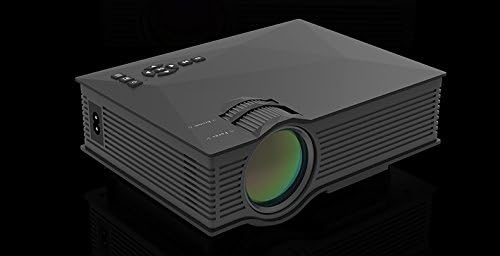
Figura 4.1: Fronte e lato View of the UNIC UC46 Mini Projector. Shows the main lens, focus wheel, and ventilation grilles.

Figura 4.2: Posteriore View of the Projector. Displays various input ports including HDMI, USB, AV, SD card slot, and audio output.

Figura 4.3: in alto View of the Projector. Shows the control panel buttons for navigation, power, and input selection.

Figure 4.4: Lens Focus and Keystone Adjustment Diagram. Illustrates the location of the lens focus and keystone correction wheels, along with a diagram of the remote control functions.
5. Impostazione
5.1 Posizionamento
Place the projector on a stable, flat surface. Ensure there is adequate space around the projector for ventilation. The projection distance will determine the screen size. Refer to the specifications for recommended distances.
5.2 Collegamento di alimentazione
- Connect the power cable to the projector's AC power input port.
- Plug the other end of the power cable into a standard electrical outlet (100-240V, 50/60Hz).
- La spia di alimentazione sul proiettore si illuminerà.
5.3 Accensione iniziale
- Premere il pulsante di accensione sul proiettore o sul telecomando per accendere il dispositivo.
- The projector will display the startup screen.
5.4 Regolazione dell'immagine
- Messa a fuoco: Rotate the focus wheel (located near the lens) until the projected image is clear and sharp.
- Correzione trapezoidale: If the image appears trapezoidal, adjust the keystone correction wheel (usually next to the focus wheel) to square the image.
6. Istruzioni per l'uso
6.1 Collegamento dei dispositivi
The UNIC UC46 projector supports various input sources:
- HDMI: Connect a PC, laptop, DVD player, game console (PS3, PS4), or Smart TV box using an HDMI cable. Select "HDMI" as the input source.
- VGA: Connect a PC or laptop using a VGA cable. Select "VGA" as the input source.
- USB: Inserisci un'unità flash USB per riprodurre contenuti multimediali files (videos, photos, music, text). Select "USB" as the input source and navigate through the files.
- AV: Use the included 3-in-1 AV cable to connect devices with AV output (e.g., older DVD players, VCRs). Select "AV" as the input source.
- Scheda SD: Insert an SD card into the slot to play media files. Select "SD" as the input source.
6.2 Connettività wireless (WiFi)
The projector supports WiFi connectivity for screen mirroring from smartphones (iOS, Android, Windows) and DLNA.
- Go to the "WiFi" or "Wireless" menu on the projector.
- Select your WiFi network and enter the password to connect the projector to your home network.
- For screen mirroring (Miracast/AirPlay):
- Ensure your smartphone and the projector are connected to the same WiFi network.
- On your smartphone, enable screen mirroring (e.g., "Screen Mirroring," "Smart View," "AirPlay," "Wireless Display").
- Selezionare il proiettore dall'elenco dei dispositivi disponibili.
- For DLNA:
- Ensure your smartphone and the projector are connected to the same WiFi network.
- Use a DLNA-compatible app on your smartphone to stream media to the projector.
6.3 Uscita audio
The projector has a built-in speaker. For enhanced audio, you can connect external speakers or a sound system via the 3.5mm audio output port.
7. Manutenzione
7.1 Pulizia della lente
Utilizzare un panno morbido e privo di lanugine, specificamente progettato per lenti ottiche, per pulire delicatamente la lente del proiettore. Non utilizzare detergenti abrasivi o solventi.
7.2 Pulizia del corpo del proiettore
Pulire l'esterno del proiettore con un panno morbido e asciutto. Per lo sporco ostinato, utilizzare un panno leggermenteamp si può usare un panno, seguito da un panno asciutto.
7.3 Ventilazione
Regularly check that the ventilation grilles are not blocked by dust or debris. Use a soft brush or compressed air to clean them if necessary. Proper airflow is crucial for preventing overheating and extending the projector's lifespan.
7.4 Lamp Vita
Il LED lamp has an estimated life of 20,000 hours. To maximize lamp life, avoid frequent on/off cycles and allow the projector to cool down properly after use.
8. Risoluzione Dei Problemi
| Problema | Possibile causa | Soluzione |
|---|---|---|
| Nessuna immagine proiettata | Power cable not connected; Projector not turned on; Incorrect input source selected; Input device not connected or powered on. | Check power connection; Press power button; Select correct input source (HDMI, VGA, USB, AV, SD); Ensure input device is connected and powered on. |
| L'immagine è sfocata | Lens out of focus; Incorrect projection distance. | Adjust the focus wheel; Adjust the projection distance. |
| L'immagine è trapezoidale | Proiettore non perpendicolare allo schermo. | Adjust the keystone correction wheel. |
| Nessun suono | Volume too low; Muted; External audio device not connected or powered on; Audio format not supported. | Increase volume; Unmute; Check external audio connection; Ensure audio format is supported. |
| Il telecomando non funziona | Batteries dead or incorrectly inserted; Obstruction between remote and IR receiver. | Sostituire le batterie; assicurarsi che ci sia una linea di vista libera verso il ricevitore IR del proiettore. |
| Overheating / Shuts down automatically | Ventilazione bloccata; uso prolungato. | Ensure ventilation grilles are clear; Allow projector to rest after 4-5 hours of use. |
9. Specifiche

Figure 9.1: Detailed Specifications of the UNIC UC46 Mini Projector.
| Caratteristica | Dettaglio |
|---|---|
| Sistema di immagine | LCD |
| Lamp | GUIDATO |
| Risoluzione nativa | 800 x 480 pixel |
| Risoluzione massima supportata | 1920 x 1080 pixel (Full HD) |
| Luminosità | 1200 lumen |
| Rapporto di contrasto | 800:1 |
| Consumo energetico | 50-55 Watts |
| Alimentazione elettrica | 100-240 V, 50/60 Hz |
| Livello di rumore | <25dB |
| Dimensioni della proiezione | 34 - 130 pollici |
| Distanza di lancio | da 1.07 a 3.8 metri (da 3.51 a 12.47 piedi) |
| Proporzioni | 4:3 / 16:9 |
| Peso netto | 1 kg |
| Lente | Multi-layer coated glass lens |
| Terminali di ingresso | USB, SD, HDMI, AV, VGA, IR |
| Terminale di uscita | Cuffie, Altoparlanti |
| Senza fili | WiFi 2.4G |
| Dimensioni del prodotto | Dimensioni: 201 mm x 153 mm x 67.5 mm |
10. Garanzia e supporto
Per informazioni sulla garanzia e assistenza tecnica, fare riferimento alla confezione del prodotto o contattare il rivenditore. Conservare la ricevuta d'acquisto come prova d'acquisto.


