1. Introduzione
This manual provides essential instructions for the safe and efficient operation of your QFX PBX-412200BTD Battery Powered Bluetooth Karaoke PA Speaker. This speaker system is designed to deliver powerful sound with wireless Bluetooth streaming, featuring dual 12-inch woofers, two 1-inch tweeters, and a 9-inch LCD screen. It includes a microphone for karaoke functions and is equipped with a built-in 12V 12Ah rechargeable battery for portable use. Please read this manual thoroughly before using the product and retain it for future reference.
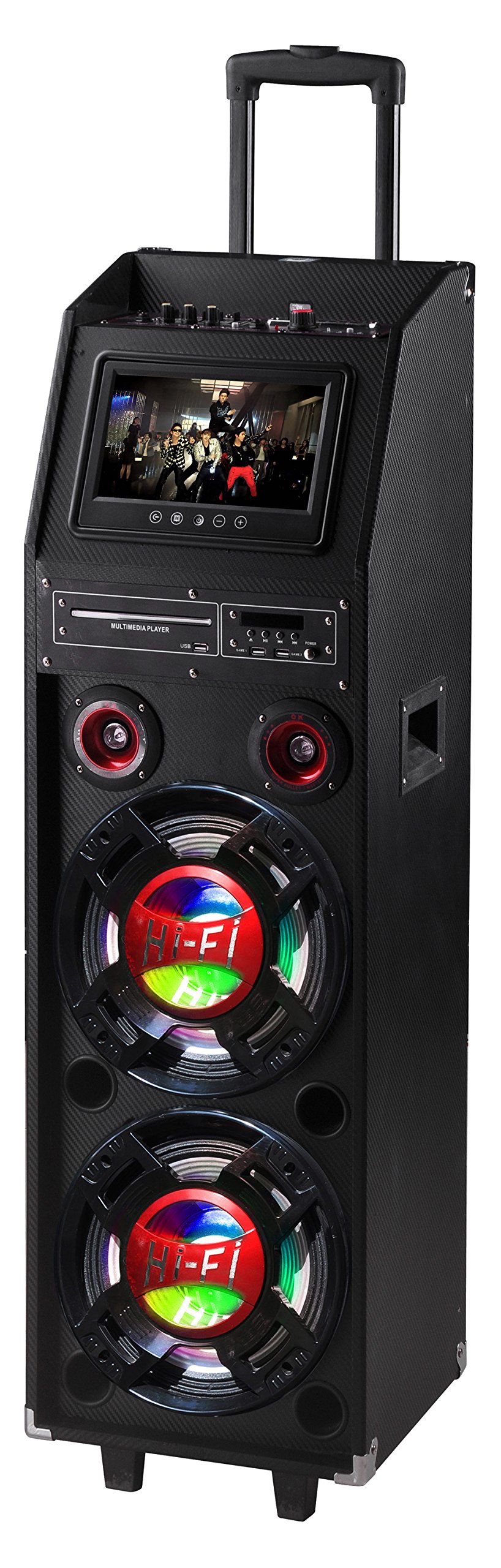
Figure 1: QFX PBX-412200BTD-R Speaker (Red model shown)
2. Informazioni sulla sicurezza
Please observe the following safety precautions to prevent electric shock, fire, or injury.
- Non esporre questo apparecchio a pioggia o umidità.
- Do not remove the cover or back of the unit. There are no user-serviceable parts inside. Refer all servicing to qualified service personnel.
- Assicurare una ventilazione adeguata attorno all'unità. Non ostruire le aperture di ventilazione.
- Proteggere il cavo di alimentazione dall'essere calpestato o schiacciato, in particolare in corrispondenza di spine, prese di corrente e nel punto in cui escono dall'apparecchio.
- Scollegare l'apparecchio durante i temporali o quando non viene utilizzato per lunghi periodi di tempo.
- Pulire solo con un panno asciutto.
- AVVERTIMENTO: Cancro e danni riproduttivi – www.P65Warnings.ca.gov. This warning is provided in compliance with California Proposition 65.
3. Contenuto della confezione
Carefully unpack your QFX PBX-412200BTD speaker and ensure all items listed below are present and in good condition.
- QFX PBX-412200BTD Speaker with Built-In Handle and Wheels
- Game Joysticks (2)
- Microfono
- Telecomando
- Batteria ricaricabile (preinstallata)
4. Caratteristiche del prodotto
The QFX PBX-412200BTD offers a range of features for an enhanced audio experience:
- Integrated Disco Lights for party ambiance.
- Sintonizzatore radio FM integrato.
- USB and SD card player for direct media playback.
- Dual 12-inch Woofers and two 1-inch Tweeters for powerful sound output.
- RCA input/output and Video output for versatile connectivity.
- Convenient Handle and Caster Wheels for easy transport.
- Includes Microphone, 2 Game Joysticks, and Remote Control.
- Schermo LCD da 9 pollici.
- Built-in 12V 12Ah rechargeable battery providing 2-3 hours playing time at 50% volume.
5. Controlli e collegamenti
Familiarizza con il pannello di controllo e le porte di connessione dell'altoparlante.
5.1. Top Panel Controls (Example)
(Image of top panel controls would be placed here, showing volume knobs, mode buttons, etc.)
Description: This image would display the main control panel located on the top of the speaker, highlighting buttons for Power, Mode selection (Bluetooth, FM, USB/SD, AUX), Play/Pause, Track Skip, Master Volume, Microphone Volume, Echo, and Bass/Treble controls.
- Pulsante di accensione: Accende/Spegne l'unità.
- Pulsante Modalità: Switches between Bluetooth, FM Radio, USB/SD, and AUX input modes.
- Pulsante Play/Pausa: Starts or pauses playback in Bluetooth, USB, or SD modes.
- Pulsanti Precedente/Successivo: Passa alla traccia/stazione precedente o successiva.
- Manopola del volume principale: Regola il livello di uscita audio complessivo.
- Manopola del volume del microfono: Regola il volume di ingresso del microfono.
- Manopola Echo: Controlla l'effetto eco del microfono.
- Manopole bassi/acuti: Regola la risposta alle basse e alle alte frequenze.
5.2. Rear Panel Connections (Example)
(Image of rear panel connections would be placed here, showing input/output ports.)
Description: This image would illustrate the rear panel of the speaker, indicating ports such as USB, SD card slot, Microphone Input (6.3mm), AUX Input (RCA), RCA Audio Output, Video Output, and DC Power Input.
- Porta USB: Per collegare unità flash USB.
- Slot per scheda SD: Per inserire schede di memoria SD.
- Ingresso MIC: Jack da 6.3 mm per il collegamento del microfono incluso.
- Ingresso AUX (RCA): Per collegare dispositivi audio esterni tramite cavi RCA.
- Uscita audio RCA: For connecting to another audio system.
- Uscita video: For connecting to an external display to show video content from USB/SD or karaoke lyrics.
- Ingresso alimentazione CC: For connecting the power adapter to charge the battery or operate the unit.
6. Impostazione
6.1. Ricarica iniziale
Before first use, fully charge the speaker's built-in battery.
- Connect the provided power adapter to the DC Power Input port on the rear panel of the speaker.
- Plug the adapter into a standard AC power outlet.
- The charging indicator light (if present) will illuminate. Allow several hours for a full charge.
- Once fully charged, the indicator light may change color or turn off. Disconnect the power adapter.
6.2. Posizionamento dell'altoparlante
Place the speaker on a stable, flat surface. Utilize the built-in handle and caster wheels for easy relocation. Ensure adequate space around the speaker for ventilation.
7. Istruzioni per l'uso
7.1. Accensione/Spegnimento
Premere e tenere premuto il tasto Pulsante di accensione on the top panel to turn the speaker ON or OFF.
7.2. Modalità Bluetooth
- Turn on the speaker. The default mode is usually Bluetooth. If not, press the Pulsante Modalità until "Bluetooth" appears on the LCD screen.
- Sul tuo dispositivo mobile (smartphone, tablet, ecc.), attiva il Bluetooth e cerca i dispositivi disponibili.
- Select "QFX PBX-412200BTD" (or similar name) from the list of devices.
- Once paired, the speaker will emit an audible confirmation. You can now stream audio from your device.
- Utilizzare il Riproduci/Pausa E Precedente/Successivo pulsanti sull'altoparlante o sul dispositivo per controllare la riproduzione.
7.3. Modalità radio FM
- Premere il tasto Pulsante Modalità until "FM" appears on the LCD screen.
- Premere il tasto Pulsante di riproduzione/pausa once to initiate an automatic scan for FM stations. The speaker will save all found stations.
- Utilizzare il Pulsanti Precedente/Successivo per navigare tra le stazioni salvate.
7.4. Riproduzione tramite scheda USB/SD
- Inserisci un'unità flash USB nel Porta USB o una scheda SD nel Slot per scheda SD.
- The speaker should automatically switch to USB or SD mode and begin playing compatible audio files. In caso contrario, premere il tasto Pulsante Modalità per selezionare la sorgente corretta.
- Utilizzare il Riproduci/Pausa E Precedente/Successivo pulsanti per controllare la riproduzione.
- For video playback from USB/SD, connect the Uscita video a un display esterno.
7.5. Ingresso AUX
- Collegare un dispositivo audio esterno (ad esempio, lettore MP3, laptop) al Ingresso RCA-AUX using appropriate RCA cables.
- Premere il tasto Pulsante Modalità until "AUX" appears on the LCD screen.
- Controlla la riproduzione e il volume dal tuo dispositivo esterno.
7.6. Funzione Karaoke
- Collegare il microfono incluso al Ingresso MIC cricco.
- Play your desired karaoke track via Bluetooth, USB/SD, or AUX input.
- Regola il volume del microfono usando il Manopola del volume del microfono.
- Regolare l'effetto eco utilizzando Manopola Eco per il miglioramento vocale desiderato.
- For displaying lyrics, connect the Uscita video to a compatible external display.
8. Manutenzione
8.1. Pulizia
- Prima di pulire l'altoparlante, scollegarlo sempre dalla presa di corrente.
- Utilizzare un panno morbido e asciutto per pulire le superfici esterne dell'altoparlante.
- Do not use liquid cleaners, aerosol sprays, or abrasive chemicals, as these may damage the finish or internal components.
8.2. Cura della batteria
- Per prolungare la durata della batteria, evitare di scaricarla completamente frequentemente.
- Recharge the battery regularly, even if the speaker is not in use for extended periods (e.g., once every 3 months).
- Conservare l'altoparlante in un luogo fresco e asciutto quando non viene utilizzato.
9. Risoluzione Dei Problemi
| Problema | Possibile causa | Soluzione |
|---|---|---|
| Nessun potere | Batteria scarica; cavo di alimentazione non collegato. | Caricare la batteria; assicurarsi che il cavo di alimentazione sia collegato saldamente. |
| Nessun suono | Volume troppo basso; Modalità selezionata non corretta; Dispositivo non associato (Bluetooth). | Increase master volume; Press Mode button to select correct input; Re-pair Bluetooth device. |
| Il Bluetooth non si connette | Altoparlante non in modalità Bluetooth; Dispositivo troppo lontano; Interferenza. | Assicurarsi che l'altoparlante sia in modalità Bluetooth; Avvicinare il dispositivo; Spegnere gli altri dispositivi Bluetooth. |
| Il microfono non funziona | Microfono non collegato; volume del microfono troppo basso. | Ensure microphone is securely plugged in; Increase Mic Volume knob. |
| Problemi di riproduzione USB/SD | Incompatibile file formato; Supporto danneggiato; Modalità non corretta. | Garantire files are in supported format (e.g., MP3); Try a different USB/SD card; Select correct mode. |
10. Specifiche
- Modello: PBX-412200BTD
- Dimensioni del prodotto: 16.5 x 14.75 x 49.6 pollici (41.9 x 37.5 x 126 cm)
- Peso dell'articolo: 69 libbre (31.3 kg)
- Configurazione degli altoparlanti: Two 12-inch Woofers, Two 1-inch Tweeters
- Fonte di energia: Battery Powered (Built-in 12V 12Ah rechargeable battery)
- Durata della batteria: Circa 2-3 ore al 50% del volume
- Connettività: Bluetooth, USB, SD, FM Radio, RCA AUX Input, RCA Audio Output, Video Output, Microphone Input
- Componenti inclusi: Speaker, 2 Game Joysticks, Microphone, Remote Control, Rechargeable Battery
- Produttore: QFX USA
- Data prima disponibilità: 29 luglio 2016
11. Garanzia e supporto
Per informazioni sulla garanzia e supporto tecnico, fare riferimento alla scheda di garanzia inclusa con il prodotto o visitare il sito ufficiale QFX websito. Conservare la ricevuta d'acquisto come prova d'acquisto per eventuali reclami in garanzia.
QFX Ufficiale Websito: While a direct link is not provided in this manual, you can typically find support information by searching for "QFX Electronics" online.


