Introduzione
The TC Electronic SUB 'N' UP OCTAVER is an advanced effects pedal designed to enrich your guitar tone with octave effects. It offers versatile control over upper and lower octaves, along with innovative TonePrint technology for custom sound creation and access to a library of artist presets. This manual provides comprehensive instructions for setting up, operating, and maintaining your SUB 'N' UP OCTAVER pedal.

Figura 1: in alto view of the TC Electronic SUB 'N' UP OCTAVER pedal, highlighting the control knobs and footswitch.
Impostare
Collegamento di potenza
The SUB 'N' UP OCTAVER requires a 9V DC 100mA power supply (center negative). Connect the power adapter to the DC IN jack on the pedal. Ensure the power supply meets the specified requirements to prevent damage.
Connessioni audio
- Collega la tua chitarra al INGRESSO jack on the right side of the pedal using a standard 1/4 inch instrument cable.
- Collegare il PRODUZIONE jack sul lato sinistro del pedale al tuo amplifier or the next pedal in your signal chain using another 1/4 inch instrument cable.
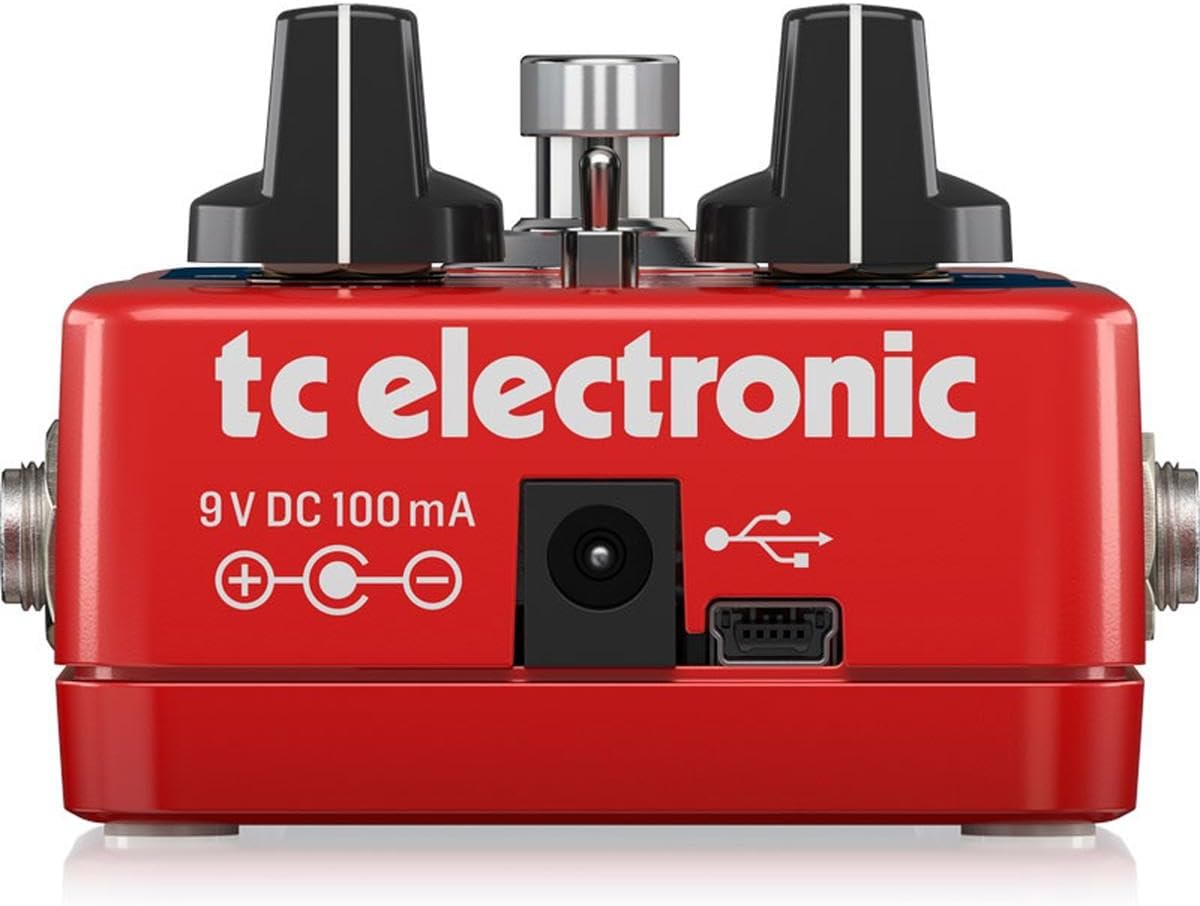
Figura 2: Posteriore view of the pedal, illustrating the 9V DC power input and USB port for connectivity.
Comandi operativi
The SUB 'N' UP OCTAVER features intuitive controls for shaping your octave sound:
- Manopola ASCIUTTO: Controls the level of your original, unprocessed guitar signal.
- UP Knob: Adjusts the level of the octave-up effect.
- SUB Knob: Controls the level of the first octave-down effect.
- SUB 2 Knob: Adjusts the level of the second octave-down effect.
- Mode Switch (POLY/TONEPRINT/CLASSIC): Selects between different octave modes:
- POLI: Polyphonic mode, suitable for chords and complex passages.
- TONEPRINT: Activates a custom TonePrint preset loaded via the TonePrint app.
- CLASSICO: Monophonic mode, ideal for single-note lines and a vintage octave sound.
- Interruttore a pedale: Engages or bypasses the effect. The pedal features True Bypass for signal integrity when off.

Figura 3: Angolato view of the pedal's controls, including the DRY, UP, SUB, SUB 2 knobs, and the mode switch.
TonePrint Technology
TonePrint allows you to customize your octave sounds or load presets created by renowned artists. This feature significantly expands the pedal's sonic capabilities.
Using TonePrint
- Download the free TC Electronic TonePrint App for your smartphone or computer.
- Connect your SUB 'N' UP OCTAVER pedal to your device via the USB port (for computer) or by holding your phone's speaker to your guitar pickup (for smartphone beaming).
- Browse the extensive library of artist TonePrints or create your own custom settings.
- Upload your chosen TonePrint to the pedal. Once uploaded, select the TONEPRINT mode on the pedal's switch to activate your custom sound.

Figure 4: The TonePrint app interface on a smartphone, used for customizing pedal settings.
Video del prodotto
Electro-Harmonix Pico POG Poly Octave Generator Pedal Overview
Questo video fornisce un overview of the Electro-Harmonix Pico POG Poly Octave Generator Pedal, demonstrating its features and sound capabilities. While not the exact model, it showcases similar octave pedal functionalities.
JOYO XVI Octave Effect Pedal (R13) Demonstration
A demonstration of the JOYO XVI Octave Effect Pedal, highlighting its octave effects and controls. This video offers insights into the general operation and sound of octave pedals.
JOYO Voodoo Octave Pedal (JF-12) Overview
This video presents the JOYO Voodoo Octave Pedal, showcasing its features and the octave effects it produces. It serves as a reference for understanding octave pedal functionalities.
Electro-Harmonix/JHS Lizard Queen Octave Fuzz Pedal Demonstration
A demonstration of the Electro-Harmonix/JHS Lizard Queen Octave Fuzz Pedal, illustrating its unique blend of octave and fuzz effects. This video provides context for combined octave and distortion sounds.
Specifiche
| Caratteristica | Dettaglio |
|---|---|
| Peso dell'articolo | 9.2 once (0.26 chilogrammi) |
| Dimensioni del prodotto | 4.8 x 1.97 x 2.87 pollici |
| Materiale del corpo | Plastica |
| Tipo di connettore | Jack audio da 1/4 di pollice |
| Interfaccia Hardware | Audio da 1/4 di pollice |
| Formato del segnale | Analogico |
| Fonte di alimentazione | Elettrico con cavo |
| Voltage | 9V |
| Amprabbia | 0.1 milioneamps |
| Numero modello articolo | Subnup |
Manutenzione
To ensure the longevity and optimal performance of your SUB 'N' UP OCTAVER pedal, follow these maintenance guidelines:
- Mantenere pulito il pedale pulendolo con un panno morbido e asciutto. Evitare l'uso di detergenti abrasivi o solventi.
- Proteggere il pedale da temperature estreme, umidità e luce solare diretta.
- Scollegare l'alimentazione quando il pedale non viene utilizzato per periodi prolungati.
- Maneggiare con cura l'interruttore a pedale e le manopole per evitare danni meccanici.
Risoluzione dei problemi
If you encounter issues with your SUB 'N' UP OCTAVER, refer to the following common troubleshooting steps:
- Nessun suono:
- Assicurarsi che l'alimentatore sia collegato correttamente e funzioni.
- Controllare tutti i cavi audio per verificarne il corretto collegamento e la corretta funzionalità.
- Verify that the pedal is engaged (footswitch LED is on).
- Adjust the DRY, UP, SUB, and SUB 2 knobs to ensure they are not set to minimum.
- Scarsa qualità del suono/rumore:
- Check for faulty cables or power supply.
- Ensure proper impedance matching with other pedals and your amppiù vivace.
- Reduce the gain on your amplifier or preceding pedals if distortion is unwanted.
- TonePrint Issues:
- Ensure the pedal is in TONEPRINT mode.
- Verify that the TonePrint App is updated and the pedal is correctly connected for beaming/uploading.
Garanzia e supporto
TC Electronic products are designed for reliability and performance. For detailed warranty information and technical support, please refer to the official TC Electronic websito o contattare il servizio clienti. Conservare la prova d'acquisto per eventuali reclami in garanzia.