Introduzione
This manual provides essential information for the proper setup, operation, and maintenance of your Polk Audio SB225 Universal Bluetooth Soundbar. Please read these instructions carefully before using the product to ensure optimal performance and longevity.
1. Impostazione
1.1 Disimballaggio
Carefully remove all components from the packaging. Ensure all items listed below are present. If any items are missing or damaged, contact Polk Audio customer support.
- Polk Audio SB225 Soundbar
- Telecomando
- Adattatore di alimentazione
- Cavo ottico (può variare in base alla regione)
- RCA Stereo Audio Cable (may vary by region)
- Guida rapida (questo documento)
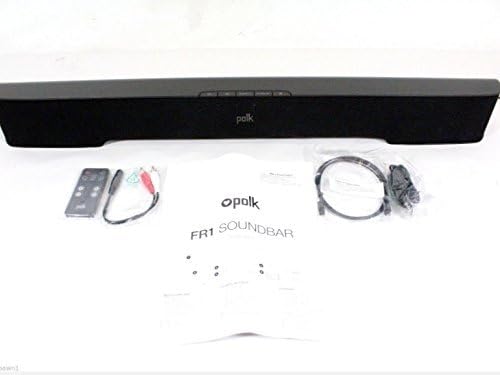
Image: The Polk Audio SB225 soundbar displayed with its remote control, power adapter, and various audio cables, indicating the contents typically found in the product packaging.
1.2 Posizionamento
Position the soundbar centrally below your television for the best audio experience. Ensure there are no obstructions in front of the soundbar that could block the sound or the remote control's infrared signal. The soundbar dimensions are approximately 35 x 5 x 6 inches (W x D x H).

Immagine: A view of the Polk Audio SB225 soundbar, showcasing its sleek black design and compact form factor suitable for placement below a television.
1.3 Connessioni
Collega la soundbar al televisore o ad altre sorgenti audio utilizzando uno dei seguenti metodi:
- Optical Digital Audio (Recommended): Collegare un'estremità del cavo ottico al OTTICA IN port on the soundbar and the other end to the optical digital audio output on your TV.
- Auxiliary Audio: Connect one end of the 3.5mm stereo audio cable (or RCA to 3.5mm adapter) to the AUX IN port on the soundbar and the other end to the headphone jack or RCA audio output on your TV or audio source.

Image: The rear panel of the Polk Audio SB225 soundbar, highlighting the various input ports including Optical, AUX, and the power input, along with mounting points.
1.4 Collegamento di alimentazione
Collegare l'adattatore di alimentazione a ENERGIA input on the back of the soundbar, then plug the adapter into a wall outlet. The soundbar will enter standby mode.
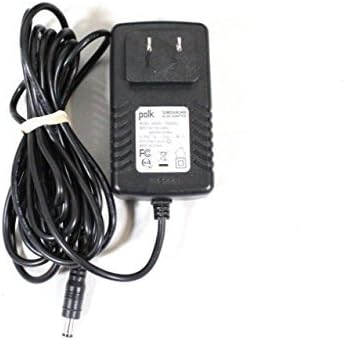
Image: The power adapter for the Polk Audio SB225 soundbar, showing the AC plug and the DC output connector.
2. Istruzioni per l'uso
2.1 Accensione/spegnimento
Premere il tasto ENERGIA button on the soundbar or the remote control to turn the unit on or off. The LED indicator on the soundbar will change color to indicate its status.
2.2 Selezione dell'ingresso
Premere il tasto INGRESSO button on the remote control or the soundbar to cycle through available audio inputs: Optical, Auxiliary, and Bluetooth.
2.3 Controllo del volume
Utilizzare il VOLUME SU (+) E VOLUME BASSO (-) buttons on the remote control or the soundbar to adjust the audio level. The soundbar features Smart Bar Technology, allowing it to learn your TV's remote control volume commands. Refer to the "Smart Bar Technology" section in the full manual for detailed instructions on programming your TV remote.
2.4 Associazione Bluetooth
Per connettere un dispositivo Bluetooth:
- Premere il tasto Bluetooth button on the remote control or the soundbar. The Bluetooth indicator will flash, indicating pairing mode.
- Sul tuo dispositivo mobile (smartphone, tablet, PC), attiva il Bluetooth e cerca i dispositivi disponibili.
- Select "Polk SB225" from the list of devices.
- Once paired, the Bluetooth indicator on the soundbar will glow solid.
Note: The soundbar can remember multiple Bluetooth devices but will only connect to one at a time.
3. Manutenzione
3.1 Pulizia
To clean the soundbar, use a soft, dry cloth. Do not use liquid cleaners or abrasive materials, as these may damage the finish or internal components. Ensure the soundbar is powered off and unplugged before cleaning.
3.2 Conservazione
If storing the soundbar for an extended period, disconnect it from power and store it in a cool, dry place, away from direct sunlight and extreme temperatures. It is recommended to keep the original packaging for storage and transport.
4. Risoluzione Dei Problemi
| Problema | Possibile causa | Soluzione |
|---|---|---|
| Nessun suono dalla soundbar. |
|
|
| Il dispositivo Bluetooth non si accoppia. |
|
|
| Telecomando non funzionante. |
|
|
| Il suono è distorto. |
|
|
5. Specifiche
- Modello: SB225
- Tipo di altoparlante: Barra audio
- Tecnologia di connettività: Bluetooth
- Modalità di uscita audio: Stereo
- Configurazione del canale audio surround: 2.0
- Uscita Wattage: 150 Watt
- Peso dell'articolo: 5 libbre
- Dimensioni del prodotto: 35 x 5 x 6 pollici (L x P x A)
- Componenti inclusi: Remoto
- Fonte di energia: Elettrico con cavo
- Dispositivi compatibili: Computer portatile, smartphone, televisione
- Metodo di controllo: Remoto
6. Informazioni sulla garanzia
The Polk Audio SB225 Soundbar comes with a Limited Warranty. Please refer to the warranty card included with your product or visit the official Polk Audio websito per termini e condizioni dettagliati riguardanti la copertura della garanzia, la durata e le procedure di reclamo.
7. Supporto
For technical assistance, troubleshooting not covered in this manual, or service inquiries, please contact Polk Audio customer support. Contact information can typically be found on the official Polk Audio websito o nella confezione del prodotto.
Supporto online: www.polkaudio.com/support (Exampil collegamento (il collegamento effettivo può variare)


