1. Introduzione
This manual provides essential instructions for the safe and efficient operation of your beFree Sound BFS-6445 Projection Party Light Dome Subwoofer Bluetooth Portable Speaker. Please read this manual thoroughly before using the product and retain it for future reference.
The beFree Sound BFS-6445 is a versatile portable speaker system featuring a 10-inch subwoofer, Bluetooth connectivity, USB/SD input, FM radio, and a unique projection light dome. It includes a wireless microphone and a remote control for enhanced functionality.
2. Prodotto finitoview
2.1 Caratteristiche principali
- Potenza di picco in uscita di 800 Watt
- 10-inch Subwoofer for deep bass
- 7" x 4.5" LED Light Projection Dome
- Connettività wireless Bluetooth
- USB and SD Card Input for media playback
- Sintonizzatore radio FM
- Microphone and Guitar Inputs with priority switch
- Bass, Treble, Echo, Mic Volume, and Guitar Volume Controls
- Built-in Side Handles, Rolling Handle, and Wheels for portability
- Includes Wireless Microphone and Remote Control
2.2 Componenti e controlli degli altoparlanti
Refer to the image below for a visual guide to the speaker's main components and control panel.

Figura 1: Davanti view of the beFree Sound BFS-6445 speaker, showing the projection light dome, control panel, 10-inch subwoofer grille, and included wireless microphone and remote control. The inset images highlight the light dome's color variations (green, blue, red), USB/SD card slots, Bluetooth logo, and FM radio icon.
The control panel, located on the top front of the speaker, provides access to various functions including volume, input selection, equalization, and light dome control.
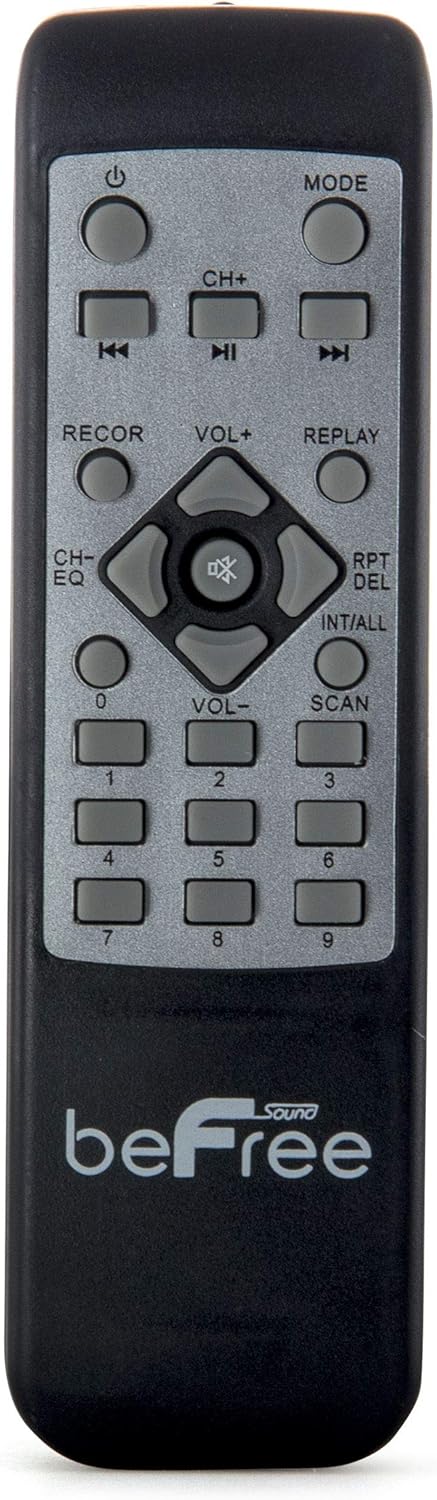
Figura 2: Avvicinamento view of the beFree Sound BFS-6445 remote control. It features buttons for power, mode selection, track navigation, volume adjustment, EQ, record, replay, scan, and numerical input.
The remote control allows for convenient operation of the speaker from a distance.
3. Impostazione
3.1 Disimballaggio e posizionamento
- Estrarre con cautela l'altoparlante e tutti gli accessori dalla confezione.
- Posizionare l'altoparlante su una superficie stabile e piana. Assicurarsi che vi sia un'adeguata ventilazione attorno all'unità.
- The speaker is equipped with rolling wheels and an extendable handle for easy transport.
3.2 Collegamento di alimentazione
- Connect the provided AC power cord to the speaker's AC input port (AC 100-240V, 50/60Hz).
- Collegare l'altra estremità del cavo di alimentazione a una presa a muro adatta.
- The speaker can operate on AC power.
3.3 Battery Installation (Remote Control & Wireless Microphone)
- Telecomando: Open the battery compartment on the back of the remote control. Insert 2 x AAA batteries, ensuring correct polarity (+/-). Close the compartment.
- Microfono senza fili: Open the battery compartment on the microphone. Insert 2 x AA batteries, ensuring correct polarity (+/-). Close the compartment.
4. Istruzioni per l'uso
4.1 Accensione/spegnimento
Premere il tasto ENERGIA pulsante sul pannello di controllo o sul telecomando per accendere o spegnere l'altoparlante.
4.2 Selezione della modalità di input
Premere il tasto MODALITÀ button on the control panel or remote control to cycle through available input modes: Bluetooth, USB, SD, FM Radio, and AUX (if an external device is connected via audio input).
4.3 Associazione Bluetooth
- Turn on the speaker and select Bluetooth mode using the MODE button. The display will indicate Bluetooth mode, and a pairing tone may sound.
- Abilita il Bluetooth sul tuo dispositivo mobile (smartphone, tablet, ecc.).
- Cercare available Bluetooth devices. The speaker will appear as "beFree Sound BFS-6445" or similar.
- Select the speaker from the list to pair. Once paired, a confirmation tone will sound.
- Ora puoi riprodurre l'audio dal tuo dispositivo tramite l'altoparlante.
4.4 Riproduzione da scheda USB/SD
- Inserire una chiavetta USB o una scheda SD nell'apposito slot sul pannello di controllo.
- L'altoparlante passerà automaticamente alla modalità USB o SD e inizierà a riprodurre audio compatibile files. In caso contrario, premere il tasto MODALITÀ pulsante per selezionare l'input corretto.
- Utilizzare il RIPRODUCI/PAUSA, PRECEDENTE, E PROSSIMO buttons on the control panel or remote to control playback.
4.5 Funzionamento della radio FM
- Selezionare Radio FM modalità utilizzando il pulsante MODE.
- Premere e tenere premuto il tasto SCANSIONE button (often the PLAY/PAUSE button) to automatically scan and save available FM stations.
- Utilizzare il PRECEDENTE E PROSSIMO pulsanti per navigare tra le stazioni salvate.
4.6 Ingressi microfono e chitarra
- Connect a wired microphone to the INGRESSO MIC cricco.
- Collega una chitarra al INGRESSO CHITARRA cricco.
- Regolare il VOLUME MICROFONO E VOLUME CHITARRA knobs on the control panel to set desired levels.
- Utilizzare il INTERRUTTORE PRIORITÀ MICROFONO to enable or disable microphone priority. When enabled, the music volume will automatically lower when the microphone is in use.
- Regolare il ECO knob for microphone echo effects.
4.7 Light Projection Dome
The speaker features an integrated LED light projection dome. Use the LIGHT POWER SWITCH on the control panel to turn the light dome on or off. The dome projects various colored patterns to enhance the ambiance.
4.8 Regolazione audio
Utilizzare il BASS E ALTI knobs on the control panel to adjust the low and high frequencies of the audio output.
Il principale VOLUME knob controls the overall output level of the speaker.
4.9 Using as Main or Passive Speaker
This speaker supports dual audio input/output, allowing it to be used in conjunction with another unit. Connect the audio output of one speaker to the audio input of another using an AV cable to amplify sound or create a stereo setup.
5. Manutenzione
5.1 Pulizia
- Prima di pulire l'altoparlante, scollegarlo sempre dalla presa di corrente.
- Utilizzare un panno morbido e asciutto per pulire le superfici esterne dell'altoparlante.
- Non utilizzare detergenti abrasivi, cere o solventi poiché potrebbero danneggiare la finitura.
- Mantenere le griglie degli altoparlanti libere da polvere e detriti.
5.2 Conservazione
Quando non viene utilizzato per lunghi periodi, conservare l'altoparlante in un luogo fresco e asciutto, lontano dalla luce solare diretta e da temperature estreme. Se possibile, utilizzare l'imballaggio originale per proteggerlo.
6. Risoluzione Dei Problemi
| Problema | Possibile causa | Soluzione |
|---|---|---|
| Nessun potere | Cavo di alimentazione non collegato; presa non attiva; interruttore di alimentazione spento. | Ensure power cord is securely connected. Check wall outlet with another device. Turn the speaker's power switch on. |
| Nessun suono | Volume too low; incorrect input mode; device not paired (Bluetooth); media error (USB/SD). | Increase master volume. Select the correct input mode. Re-pair Bluetooth device. Check USB/SD card for compatible files and proper insertion. |
| Il Bluetooth non si connette | Speaker not in Bluetooth mode; device too far; interference; speaker already paired to another device. | Ensure speaker is in Bluetooth mode. Move device closer to speaker. Turn off other Bluetooth devices. Disconnect from previous device. |
| Il microfono non funziona | Microphone not powered; volume too low; incorrect input. | Check microphone batteries (if wireless) or connection (if wired). Increase MIC VOLUME. Ensure MIC PRIORITY switch is set correctly. |
| Light dome not working | Light power switch off. | Ensure the LIGHT POWER SWITCH is in the ON position. |
7. Specifiche
- Tipo di altoparlante: Subwoofer
- Dimensioni altoparlante: 10 pollici
- Potenza massima in uscita dell'altoparlante: 800 Watt
- Tecnologia di connettività: Bluetooth, USB
- Caratteristiche speciali: Portable, Projection Light Dome, FM Radio, USB/SD Input, Microphone/Guitar Input
- Metodo di controllo: Comandi remoti sull'unità
- Fonte di energia: CA 100-240 V, 50/60 Hz
- Dimensioni del prodotto (P x L x A): 13.5" x 12.5" x 29.75"
- Peso dell'articolo: 30.3 libbre
- Batterie del telecomando: 2 x AAA (incluse)
- Wireless Microphone Batteries: 2 x AA (incluse)
- Numero modello: BFS-6445
- Codice UPC: 602573151884
8. Garanzia e supporto
beFree Sound products are designed for reliability and performance. For warranty information, technical support, or service inquiries, please refer to the warranty card included with your purchase or contact beFree Sound customer service directly.
Conservare la prova d'acquisto per eventuali richieste di garanzia.