Introduzione
This manual provides essential instructions for the installation, operation, and maintenance of your Yale YMG40 Digital Door Lock. Please read this manual thoroughly before installation and use to ensure proper function and security.
Contenuto della confezione
Verificare che tutti i componenti siano presenti prima di iniziare l'installazione:
- Yale YMG40 Digital Door Lock (Front and Back Body)
- Gruppo serratura a mortaio
- 2 tasti meccanici
- Installation Hardware (screws, strike plate, etc.)
- Manuale dell'utente (questo documento)
Caratteristiche principali
- Maniglia push-pull: Designed for convenient operation; push to enter, pull to exit.
- Metodi di accesso multipli: Biometric fingerprint recognition, PIN code entry, and mechanical key override.
- Connettività opzionale: Compatible with Z-Wave and Bluetooth modules for smart home integration (modules sold separately).
- Guida vocale: Provides audio prompts for setup and operation.
- Safe Handle Mechanism: Enhances security by preventing unauthorized entry.
- Bloccaggio automatico: Configurable to automatically lock the door after closing.
- Accesso di emergenza: Low battery warning and external power terminal for emergency situations.
Configurazione e installazione
Professional installation is recommended for optimal performance and security. Ensure your door meets the following specifications:
- Spessore della porta: 40-75mm (wooden doors).
- Tipo di porta: Suitable for both inswing and outswing doors.
Fasi iniziali:
- Prepara la porta: Ensure the door is properly prepped according to the provided template (if applicable) for the mortise lock and lock body.
- Install Mortise Lock: Insert the mortise lock into the door edge and secure it.
- Install Lock Bodies: Mount the front and back lock bodies, ensuring cables are correctly routed and connected.
- Inserire le batterie: Install the required batteries into the back body.
- Programmazione iniziale: Follow the voice guide prompts to set up the master PIN code.
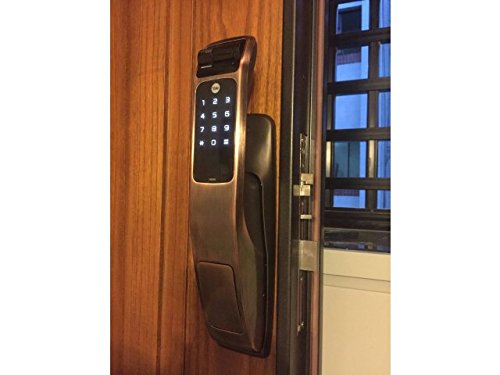
Image: Yale YMG40 Digital Door Lock installed on a wooden door, showing the sleek design and integration.
Istruzioni per l'uso
1. Accessing the Door
a. Fingerprint Access
The lock supports up to 20 different fingerprints. To unlock using a fingerprint:
- Posizionare il dito registrato sullo scanner per impronte digitali.
- The lock will verify the fingerprint and unlock.
- Use the push-pull handle to open the door.
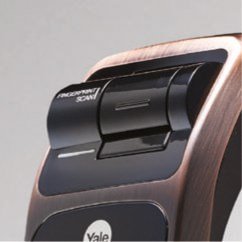
Immagine: Un dettaglio view of the fingerprint scan area on the Yale YMG40 lock.
b. PIN Code Access
The lock supports up to 30 different user codes. To unlock using a PIN code:
- Tocca la tastiera per attivarla.
- Enter your registered PIN code followed by the '*' or '#' button (refer to specific model instructions for exact key).
- The lock will verify the code and unlock.
- Use the push-pull handle to open the door.

Immagine: Frontale view of the Yale YMG40 Digital Door Lock, showcasing the illuminated keypad and push-pull handle.
c. Mechanical Key Override
In case of emergency or battery failure, the lock can be opened using the provided mechanical keys.
- Locate the mechanical key slot, typically hidden under a cover on the front body.
- Insert one of the 2 chiavi meccaniche and turn to unlock.
- Use the push-pull handle to open the door.

Immagine: un primo piano view of the mechanical key override cylinder on the Yale YMG40 lock.
d. Push-Pull Handle Operation
The ergonomic push-pull handle simplifies door opening:
- Da fuori: After successful authentication (fingerprint, PIN, or key), simply spingere the handle down to open the door.
- Dall'interno: Semplicemente tiro the handle down to open the door.
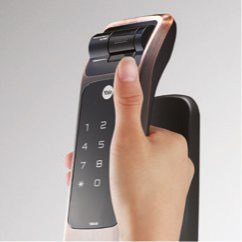
Image: A hand demonstrating the push-pull action of the Yale YMG40 door handle.
2. Bloccaggio automatico
The YMG40 can be configured to automatically lock the door after it closes. Refer to the full programming guide for instructions on enabling or disabling this feature.
3. Optional Accessories (Z-Wave & Bluetooth)
The Yale YMG40 is compatible with optional Z-Wave and Bluetooth modules, allowing integration with smart home systems and remote control capabilities. These modules are sold separately. Consult the specific module's instructions for pairing and setup.
A remote control accessory is also available, utilizing wireless floating ID technology with a range of up to 50 meters.
Manutenzione
- Sostituzione della batteria: The lock will provide a low battery warning. Replace all batteries promptly when this warning appears to ensure continuous operation.
- Pulizia: Pulisci l'esterno della serratura con un panno morbido e asciutto. Evita detergenti abrasivi o solventi che potrebbero danneggiare la finitura o i componenti elettronici.
- Sensore di impronte digitali: Keep the fingerprint sensor clean and free of debris for accurate readings.
- Chiave meccanica: Store the mechanical keys in a safe, accessible location outside the property for emergency use.
Risoluzione dei problemi
- Blocco non risponde: Check battery levels. If batteries are depleted, use the mechanical key or connect a 9V battery to the emergency power terminal (if available on your model) to provide temporary power.
- Impronta digitale non riconosciuta: Assicurati che il dito sia pulito e asciutto. Se il problema persiste, prova a registrare nuovamente l'impronta digitale.
- Codice PIN non funzionante: Verify the correct PIN is being entered. Ensure the keypad is active before entering the code.
- La porta non si blocca/sblocca correttamente: Controllare che non vi siano ostruzioni nel telaio della porta o nel meccanismo di chiusura. Assicurarsi che la serratura sia correttamente allineata con la piastra di battuta.
- Voice Guide Issues: Assicurarsi che il volume sia impostato correttamente.
For persistent issues, consult the full product manual or contact Yale customer support.
Specifiche
| Caratteristica | Dettaglio |
|---|---|
| Modello | YMG40 |
| Tipo di blocco | Mortise Lock, Biometric |
| Metodi di accesso | Impronta digitale, codice PIN, chiave meccanica |
| Capacità dell'impronta digitale | Up to 20 different fingerprints |
| Capacità del codice utente | Up to 30 different user codes |
| Chiavi meccaniche | 2 chiavi incluse |
| Front Body Dimensions (D x W x H) | Dimensioni: 67.6 mm x 76 mm x 359.1 mm |
| Back Body Dimensions (D x W x H) | Dimensioni: 65.2 mm x 76 mm x 359.1 mm |
| Spessore della porta | 40-75mm (Wooden Doors) |
| Materiale | Acciaio inossidabile |
| Connectivity (Optional) | Z-Wave, Bluetooth |
| Peso dell'articolo | 1 kg |
Supporto e garanzia
For technical assistance, warranty information, or service requests, please contact Yale customer support. Refer to your product packaging or the official Yale websito per i dettagli di contatto specifici della tua regione.
Note: Installation charges may be extra and are typically not covered under product warranty.


