Introduzione
This manual provides comprehensive instructions for the setup, operation, maintenance, and troubleshooting of your beats by Dr. Dre beatsX Wireless In-Ear Headphones. Please read this guide thoroughly to ensure proper use and to maximize your listening experience.

Image: The beatsX Wireless In-Ear Headphones in black, featuring the flexible neckband design and magnetic earbuds. The headphones are shown in a typical wearing position around the neck.
Cosa c'è nella scatola
Verify that all the following items are included with your beatsX Wireless In-Ear Headphones:
- beatsX earphones
- Four different sized eartips (various sizes for optimal fit)
- Removable secure-fit wingtips (for added stability during activity)
- Pocket-sized carrying case
- Cavo di ricarica da Lightning a USB-A

Image: The included Lightning to USB-A charging cable and the compact, black oval carrying case for the beatsX headphones.
Impostare
1. Ricarica delle cuffie
Before first use, fully charge your beatsX headphones. A full charge provides up to 8 hours of playback. The Fast Fuel feature allows for 2 hours of playback from a 5-minute charge when the battery is low.
- Connect the Lightning end of the charging cable to the charging port on your beatsX headphones.
- Connect the USB-A end of the charging cable to a USB power adapter or a powered USB port.
- The LED indicator light will show charging status. It will turn white when fully charged.
2. Associazione con il tuo dispositivo
The beatsX headphones utilize Apple's W1 chip for seamless pairing with Apple devices and standard Bluetooth for other devices.
Per dispositivi Apple (iOS 10 o versioni successive):
- Ensure your iPhone, iPad, or iPod touch is unlocked and near your beatsX headphones.
- Press and hold the power button on your beatsX headphones for 1 second.
- A setup animation will appear on your iOS device. Follow the on-screen instructions.
- Your beatsX headphones are now connected and set up with all Apple devices signed into iCloud.
Per altri dispositivi Bluetooth:
- Press and hold the power button on your beatsX headphones for 5 seconds until the LED indicator light flashes white. This puts the headphones in pairing mode.
- Sul tuo dispositivo, vai alle impostazioni Bluetooth e assicurati che il Bluetooth sia abilitato.
- Select "beatsX" from the list of available devices.
- Once paired, the LED indicator light will stop flashing and remain solid white.
3. Finding Your Optimal Fit
Proper fit is crucial for sound quality and comfort. Experiment with the included ear tips and wingtips.
- Suggerimenti per le orecchie: Choose the size that creates a comfortable seal in your ear canal. This helps with sound isolation and bass response.
- Wingtips: If desired, attach the secure-fit wingtips for added stability, especially during physical activity.
Utilizzo delle cuffie
The RemoteTalk control on the left cable allows you to manage music, calls, and Siri.
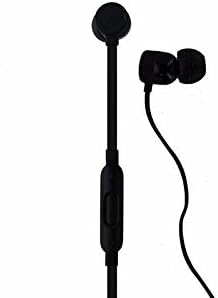
Immagine: Un dettaglio view of the beatsX earbud and the in-line RemoteTalk control, which features volume buttons and a multi-function button.
RemoteTalk Controls:
| Azione | Funzione |
|---|---|
| Press center button once | Riproduci/Metti in pausa l'audio, Rispondi/Termina chiamata |
| Press center button twice | Salta avanti |
| Press center button three times | Salta indietro |
| Press and hold center button | Activate Siri or voice assistant |
| Premere il pulsante di aumento del volume | Aumentare il volume |
| Premere il pulsante di riduzione del volume | Diminuire il volume |
Accensione/spegnimento:
- To power on, press and hold the power button until the LED indicator light illuminates.
- To power off, press and hold the power button until the LED indicator light turns off.
Auricolari magnetici:
The earbuds are magnetic, allowing them to snap together when not in use. This helps prevent tangling and keeps them securely around your neck.
Manutenzione
Proper care will extend the life of your beatsX headphones.
- Pulizia: Use a soft, dry, lint-free cloth to clean the headphones. Do not use abrasive cleaners or solvents.
- Suggerimenti per le orecchie: Rimuovere periodicamente i gommini auricolari e pulirli con un panno.amp panno e sapone neutro, quindi risciacquare e asciugare accuratamente prima di riattaccarlo.
- Magazzinaggio: When not in use, store your headphones in the provided carrying case to protect them from dust and damage. The magnetic earbuds help keep them tangle-free.
- Resistenza all'acqua: Queste cuffie sono non resistente all'acqua. Avoid exposure to excessive moisture, rain, or submersion in liquids.
- Temperatura: Evitare di esporre le cuffie a temperature estreme.
Risoluzione dei problemi
If you encounter issues with your beatsX headphones, try the following solutions:
- Nessun potere:
- Ensure the headphones are charged. Connect them to a power source using the Lightning to USB-A cable.
- Controllare che il cavo di ricarica e l'adattatore di alimentazione non siano danneggiati.
- Impossibile associare:
- Make sure the headphones are in pairing mode (LED flashing white).
- Ensure Bluetooth is enabled on your device and it is within range (typically 30 feet or 10 meters).
- Prova a disattivare e riattivare il Bluetooth sul tuo dispositivo.
- Se è già stato associato, prova a "dimenticare" il dispositivo nelle impostazioni Bluetooth e ad associarlo nuovamente.
- Nessun suono o scarsa qualità del suono:
- Controlla il livello del volume sia delle cuffie che del dispositivo collegato.
- Assicurarsi che le cuffie siano correttamente associate e collegate.
- Prova auricolari di diverse dimensioni per garantire una tenuta adeguata nel condotto uditivo.
- Pulisci eventuali detriti dagli auricolari e dalle griglie degli altoparlanti.
- Avvicinati al dispositivo per evitare interferenze.
- RemoteTalk Not Responding:
- Assicurati che le cuffie siano accese e collegate al dispositivo.
- Riavvia il dispositivo connesso.
If issues persist, you may need to reset your beatsX headphones. Consult the official beats support websito per istruzioni specifiche sul reset.
Specifiche
| Caratteristica | Dettaglio |
|---|---|
| Nome del modello | beatsX Wireless In-Ear Headphones |
| Numero di modello | MLYE2LL/A |
| Marca | beats by Dr. Dre |
| Colore | Nero |
| Tecnologia di connettività | Bluetooth (Class 1 with Apple W1 chip) |
| Tecnologia di comunicazione wireless | Bluetooth |
| Durata della batteria | Fino a 8 ore |
| Ricarica rapida del carburante | Ricarica di 5 minuti per 2 ore di riproduzione |
| Tipo di controllo | RemoteTalk (in-line control) |
| Posizionamento dell'orecchio | Nell'orecchio |
| Fattore di forma | Nell'orecchio |
| Controllo del rumore | Isolamento acustico |
| Livello di resistenza all'acqua | Non resistente all'acqua |
| Peso dell'articolo | 3.52 once |
| Codice UPC | 817689015474 |
Informazioni sulla garanzia
As this product is a renewed item, warranty coverage may vary. Please refer to the specific warranty details provided by the seller at the time of purchase. For standard manufacturer warranty information on new products, please visit the official beats by Dr. Dre websito.
Supporto
For further assistance, technical support, or additional product information, please visit the official beats by Dr. Dre support website or contact their customer service. You can typically find support resources, FAQs, and contact options on their official websito.
For issues related to your renewed product purchase, please contact the seller directly.


