1. Prodotto finitoview
The Yaskawa V1000 is a compact, high-performance AC microdrive designed for a wide range of industrial applications. It offers precise motor control, energy efficiency, and ease of use. This manual provides essential information for the safe and effective operation of your V1000 AC Drive.
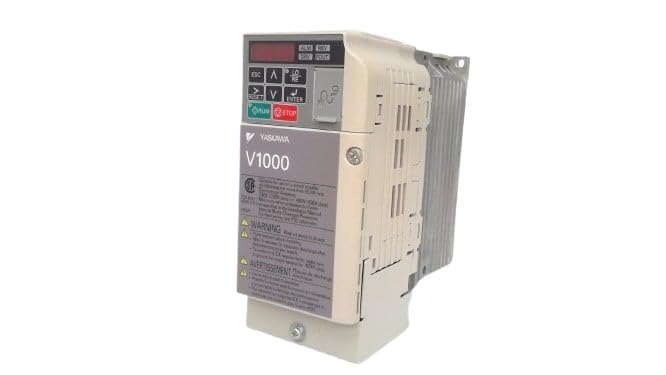
Figura 1: Fronte view of the Yaskawa V1000 AC Drive (Model CIMR-VU2A0006FAA). This image shows the drive's compact design, control panel with display and buttons, and ventilation fins on the side.
2. Informazioni sulla sicurezza
WARNING: Risk of electric shock. Ensure power is disconnected before installation or maintenance.
Read this manual thoroughly before installing, operating, or performing maintenance on the V1000 AC Drive. Failure to follow these instructions may result in serious injury or equipment damage.
2.1 Precauzioni generali di sicurezza
- Solo personale qualificato può installare, utilizzare e manutenere questa apparecchiatura.
- Do not operate the drive with damaged cables or if the enclosure is open.
- Assicurare una corretta messa a terra secondo le normative elettriche locali.
- Verificare il volume immessotage matches the drive's specifications.
- Non toccare i componenti interni subito dopo lo spegnimento, poiché la carica residuatage may be present. Wait for the charge lamp to extinguish.
2.2 Considerazioni ambientali
- Install the drive in a clean, dry, and well-ventilated area.
- Evitare la luce solare diretta, la polvere eccessiva, i gas corrosivi e le vibrazioni.
- Intervallo di temperatura di funzionamento: da 0°C a 50°C (da 32°F a 122°F).
3. Impostazione
Proper installation and wiring are crucial for the safe and reliable operation of the V1000 AC Drive.
3.1 Montaggio
Mount the drive vertically on a flat, stable surface. Ensure adequate clearance for ventilation around the drive (minimum 50mm above and below, 25mm on sides).
3.2 Cablaggio
Refer to the wiring diagram provided in the full product manual for detailed connections. Key connections include:
- Potenza in ingresso (R/L1, S/L2, T/L3): Connect the 3-phase 200-240V AC power supply.
- Uscita motore (U, V, W): Collegare ai terminali del motore.
- Terra (PE): Collegare a una messa a terra affidabile.
- Terminali di controllo: For external control signals (e.g., run/stop, speed reference, fault output).
Always use appropriate wire gauges and circuit protection devices as specified in local electrical codes and the drive's technical specifications.
4. Operating the V1000 AC Drive
The V1000 drive can be operated via its integrated control panel or external control signals.
4.1 Pannello di controllo Sopraview
Il pannello di controllo è dotato di un display digitale e di diversi pulsanti:
- ESC: Escape/Back button.
- Frecce SU/GIÙ: Navigate menus, adjust parameters.
- Frecce SINISTRA/DESTRA: Shift cursor, change digits.
- ACCEDERE: Confirm selection, enter parameter edit mode.
- CORRERE: Start motor operation.
- FERMARE: Stop motor operation.
4.2 Passaggi operativi di base
- Accensione: Alimentare l'unità. Il display si illuminerà.
- Configurazione dei parametri: Configure essential parameters such as motor data (voltage, current, frequency), acceleration/deceleration times, and control mode (V/f, vector control). Refer to the parameter list in the detailed manual.
- Start Command: Premere il tasto CORRERE button on the control panel or activate the external run command.
- Regolazione della velocità: Adjust the motor speed using the UP/DOWN arrows (if in local control mode) or via external speed reference.
- Stop Command: Premere il tasto FERMARE button or deactivate the external stop command.
5. Manutenzione
Regular maintenance ensures the longevity and optimal performance of your V1000 AC Drive.
5.1 Controlli di routine
- Quotidiano: Check for unusual noises, vibrations, or odors. Verify display for error codes.
- Mensile: Inspect cooling fans for proper operation and cleanliness. Clean dust from ventilation openings.
- Annualmente: Check terminal connections for tightness. Inspect wiring for signs of wear or damage. Measure input/output voltage correnti.
5.2 Pulizia
Use a soft, dry cloth to clean the exterior of the drive. For internal cleaning (only by qualified personnel with power disconnected), use compressed air to remove dust from heat sinks and circuit boards.
Always disconnect power and wait for the charge lamp to extinguish before performing any maintenance.
6. Risoluzione Dei Problemi
This section provides common issues and their potential solutions. For complex problems, consult a qualified technician or Yaskawa support.
| Problema | Possibile causa | Soluzione |
|---|---|---|
| L'unità non si accende. | No input power; Blown fuse. | Check power supply; Replace fuse (after identifying cause). |
| Il motore non funziona. | No run command; Incorrect wiring; Motor fault. | Verify run command; Check motor and drive wiring; Inspect motor. |
| Overcurrent fault (OC). | Motor overload; Short circuit; Rapid acceleration. | Reduce load; Check motor/cables for shorts; Increase acceleration time. |
| Sovravoltage fault (OV). | Alto volume di ingressotage; Rapid deceleration. | Controllare l'input voltage; Increase deceleration time; Install braking resistor if needed. |
7. Specifiche
Key technical specifications for the Yaskawa V1000 AC Drive (CIMR-VU2A0006FAA):
- Modello: CIMR-VU2A0006FAA
- Serie: V1000 AC Drive
- Ingresso volumetage: 200-240V AC, 3-Phase
- Volume di uscitatage: 240 V CA
- Corrente di uscita nominale: 6.0A (Heavy Duty) / 5.0A (Normal Duty)
- Potenza nominale del motore: 1 CV (0.75 kW)
- Produttore: YASKAWA ELECTRIC
- Data prima disponibilità: 14 febbraio 2025
8. Garanzia e supporto
For detailed warranty information, please refer to the official Yaskawa warranty statement or contact your authorized Yaskawa distributor.
For technical support, service, or to obtain a full copy of the V1000 technical manual, please visit the official Yaskawa websito o contattare il loro servizio clienti.
Yaskawa Electric Corporation
Websito: www.yaskawa.com