1. Prodotto finitoview
The Fender Monterey Bluetooth Speaker delivers clear, powerful audio with a design inspired by classic Fender amplifiers. This speaker is engineered for high-fidelity sound reproduction, featuring 120 watts of power, two woofers, and two tweeters. It supports audio streaming via Bluetooth and direct connection through a 3.5mm auxiliary jack or RCA inputs.
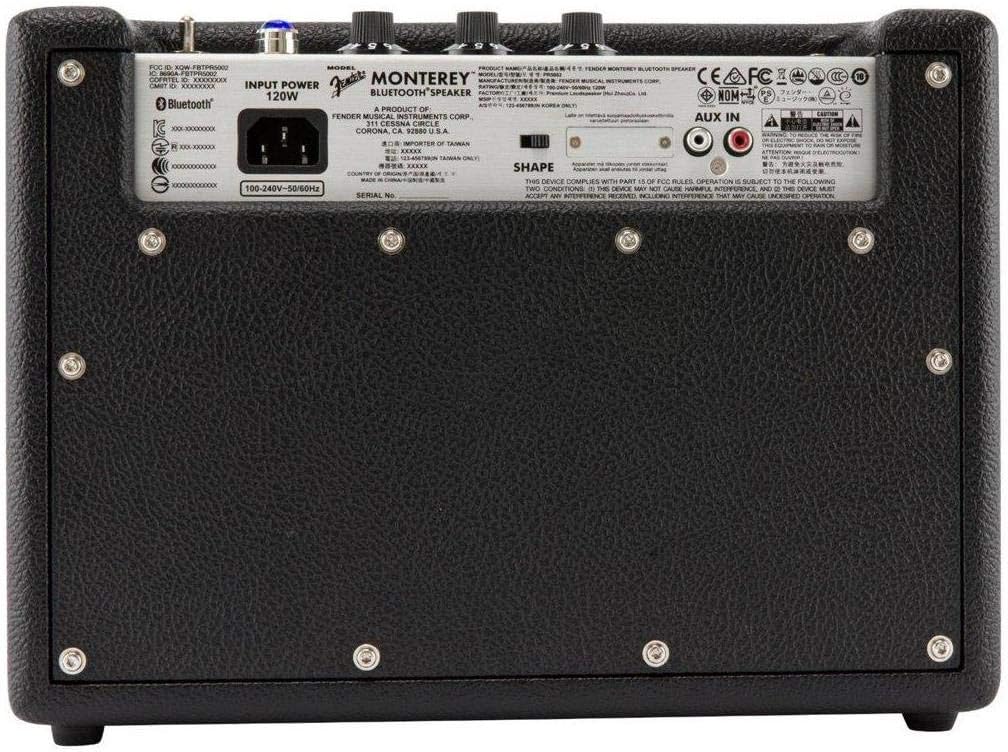
Figura 1: Fronte view of the Fender Monterey Bluetooth Speaker, showcasing its classic amplifier-inspired grille and Fender logo.
2. Cosa c'è nella scatola
Verifica che tutti gli articoli elencati di seguito siano inclusi nel tuo pacchetto:
- Fender Monterey Bluetooth Speaker
- Cavo ausiliario da 3.5 mm
- RCA
- Cavo di alimentazione
3. Guida all'installazione
3.1 Collegamento di alimentazione
- Ensure the speaker's volume control is set to minimum before connecting power.
- Collegare il cavo di alimentazione in dotazione all'ingresso CA sul pannello posteriore dell'altoparlante.
- Collegare l'altra estremità del cavo di alimentazione a una presa a muro adatta (100-240 V, 50/60 Hz).
- Flip the power switch on the top panel to the "ON" position. The speaker will emit a chime indicating it is powered on.
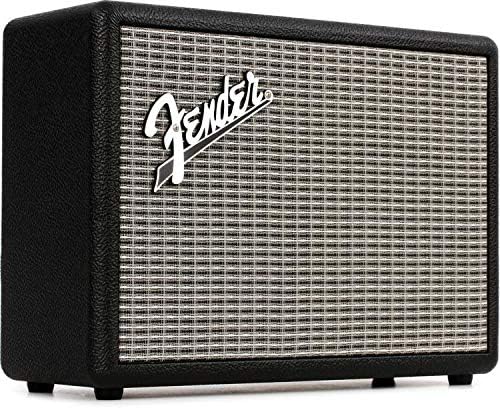
Figure 2: Rear panel of the Fender Monterey speaker, showing the power input and auxiliary connections.
3.2 Associazione Bluetooth
- Con l'altoparlante acceso, premere il tasto PAIO button on the top panel. The Bluetooth indicator light will begin to flash, indicating it is in pairing mode.
- Sul tuo dispositivo audio (smartphone, tablet, computer), vai alle impostazioni Bluetooth.
- Select "Fender Monterey" from the list of available devices.
- Once successfully paired, the Bluetooth indicator light on the speaker will turn solid blue, and a confirmation chime will sound.
3.3 Collegamento dell'ingresso ausiliario
For devices without Bluetooth, use the provided 3.5mm auxiliary cable or RCA cable.
- 3.5mm Aux: Connect one end of the 3.5mm cable to your audio device's headphone jack and the other end to the MINI input on the speaker's top panel.
- RCA: Connect the RCA cable to your audio device's RCA outputs and the other end to the RCA inputs on the speaker's rear panel.
Select the appropriate source (Bluetooth, MINI, O RCA) usando il FONTE pulsante sul pannello superiore.

Figure 3: Top panel controls of the Fender Monterey speaker, including Volume, Treble, Bass, Source, and Pair buttons.
4. Istruzioni per l'uso
4.1 Riproduzione audio
- Ensure your audio source is connected and selected (Bluetooth, Mini, or RCA).
- Avvia la riproduzione dell'audio dal dispositivo connesso.
- Regolare il VOLUME knob on the speaker's top panel to your desired listening level.
4.2 Controlli di tono
The Fender Monterey speaker features dedicated controls for customizing your sound:
- ALTI: Adjusts the high-frequency response of the audio. Turn clockwise for brighter sound, counter-clockwise for warmer sound.
- BASSO: Adjusts the low-frequency response of the audio. Turn clockwise for more bass, counter-clockwise for less bass.
- FORMA: A toggle switch located on the rear panel. This control modifies the overall tonal character, offering different sound profiles. Experiment with both positions to find your preferred sound.
5. Manutenzione
- Pulizia: Use a soft, dry cloth to clean the speaker's exterior. Avoid abrasive cleaners, solvents, or sprays that may damage the finish.
- Magazzinaggio: Quando non viene utilizzato per lunghi periodi, conservare l'altoparlante in un luogo fresco e asciutto, lontano dalla luce solare diretta e da temperature estreme.
- Ventilazione: Ensure proper ventilation around the speaker to prevent overheating. Do not block any ventilation openings.
- Esposizione al liquido: Keep the speaker away from liquids. In case of accidental spills, immediately disconnect power and allow it to dry completely before re-use.
6. Risoluzione Dei Problemi
Nessun potere
- Assicurarsi che il cavo di alimentazione sia collegato saldamente sia all'altoparlante sia a una presa a muro funzionante.
- Verify the power switch on the top panel is in the "ON" position.
- Verificare che la presa a muro funzioni collegandovi un altro dispositivo.
Nessun suono
- Confirm the correct audio source (Bluetooth, Mini, or RCA) is selected using the FONTE pulsante.
- Aumentare il VOLUME knob on the speaker and the volume on your connected audio device.
- If using Bluetooth, ensure the device is properly paired and connected. Try re-pairing if necessary.
- If using auxiliary inputs, ensure cables are fully inserted and not damaged.
Problemi di accoppiamento Bluetooth
- Ensure the speaker is in pairing mode (flashing Bluetooth indicator). Press the PAIO button if it's not flashing.
- Move your audio device closer to the speaker to ensure it's within range.
- Turn off and on the Bluetooth function on your audio device.
- If the speaker was previously paired with another device, disconnect it from that device first.
7. Specifiche tecniche
| Numero di modello | 6960200000 |
| Marca | Parafango |
| Uscita Wattage | 120 Watt |
| Configurazione degli altoparlanti | Two woofers, two tweeters |
| Connettività | Bluetooth, 3.5mm Auxiliary Input, RCA Input |
| Dimensioni del prodotto (P x L x A) | 9.3" x 16.8" x 14.6" (23.6 cm x 42.7 cm x 37.1 cm) |
| Peso dell'articolo | 18.6 libbre (8.44 kg) |
| Colore | Nero |
| Produttore | Fender Musical Instruments Corp. |
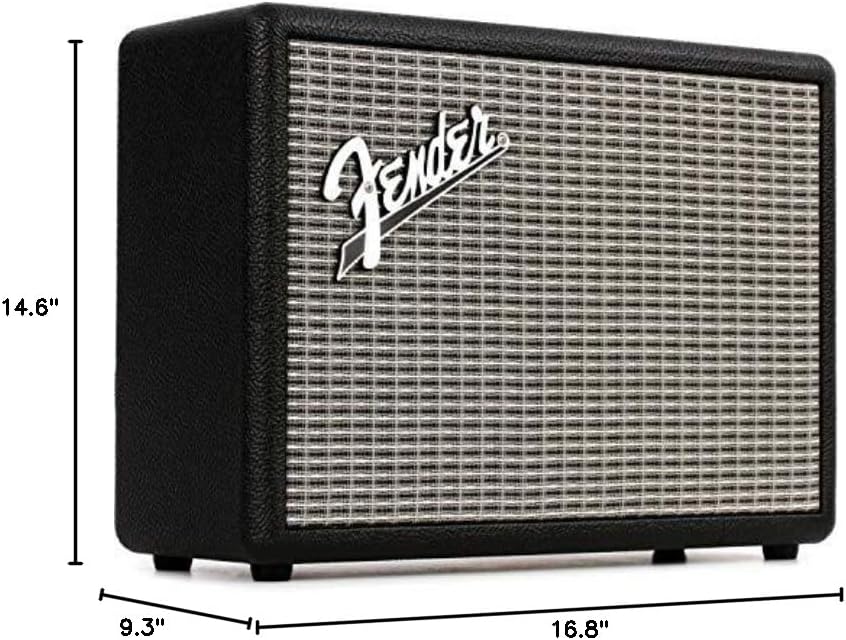
Figure 4: Dimensions of the Fender Monterey Bluetooth Speaker.
8. Garanzia e supporto
For warranty information, product registration, or technical support, please refer to the official Fender webo contattare il servizio clienti Fender. Conservare la prova d'acquisto per eventuali reclami in garanzia.
Risorse online: www.fender.com


