1. Introduzione e oltreview
The Ewent EW7012 USB 3.1 Gen1 Docking Station provides a convenient and efficient solution for connecting 2.5-inch and 3.5-inch SATA hard disk drives (HDDs) or solid-state drives (SSDs) to your computer via a USB port. This docking station is ideal for quick data transfers, backups, and accessing data from multiple drives without needing to install them internally. It supports SuperSpeed USB 3.1 Gen1 (USB 3.0) for high-speed data transfer and is backward compatible with USB 2.0.

Figura 1: Fronte view of the Ewent EW7012 USB 3.1 Gen1 Docking Station with its blue LED indicator.
2. Cosa c'è nella scatola
Si prega di controllare il contenuto della confezione per assicurarsi che siano presenti tutti gli articoli:
- Ewent EW7012 USB 3.1 Gen1 Docking Station
- USB 3.1 Gen1 (USB 3.0) Cable
- Adattatore di alimentazione CA.
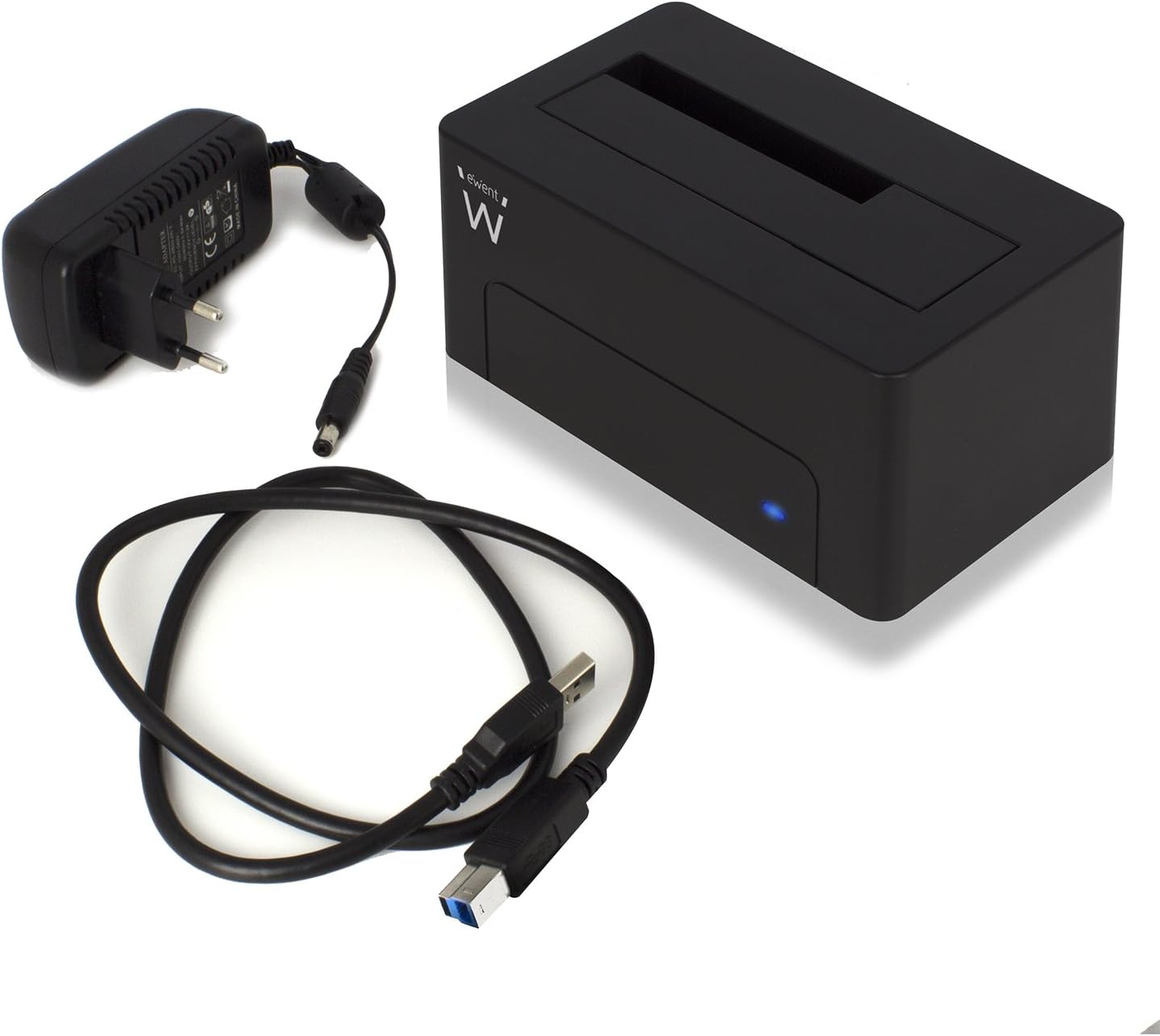
Figure 2: The Ewent EW7012 docking station, USB 3.1 Gen1 cable, and AC power adapter included in the package.
3 Caratteristiche
- Compatibilità universale: Supports both 2.5-inch and 3.5-inch SATA I/II/III HDDs and SSDs.
- Trasferimento dati SuperSpeed: Equipped with USB 3.1 Gen1 (USB 3.0) interface, offering data transfer rates up to 5 Gbps.
- Compatibilità con le versioni precedenti: Fully compatible with USB 2.0 ports, though at USB 2.0 speeds.
- Collega e usa: Per la maggior parte dei sistemi operativi non è richiesta l'installazione di alcun driver.
- Indicatore LED: A blue LED light indicates power status and data activity.
- Design compatto: Space-saving and portable, with dimensions of approximately 4.92 x 2.91 x 2.24 inches.
- Alimentazione esterna: Includes an AC adapter for stable power delivery to the drive.
4. Guida all'installazione
- Connetti alimentazione: Plug the AC power adapter into the "POWER" port on the back of the docking station. Connect the other end of the adapter to a wall outlet.
- Connessione al computer: Connect one end of the supplied USB 3.1 Gen1 cable to the "USB 3.1" port on the back of the docking station. Connect the other end of the USB cable to an available USB port on your computer. For optimal performance, use a USB 3.0 or USB 3.1 port.
- Inserire il disco rigido: Gently slide your 2.5-inch or 3.5-inch SATA HDD/SSD into the top slot of the docking station, ensuring the SATA connectors align properly. Apply gentle pressure until the drive is fully seated.
- Accensione: Flip the "ON/OFF" switch on the back of the docking station to the "ON" position. The blue LED indicator on the front will illuminate, indicating the device is powered on.

Figura 3: Posteriore view of the docking station showing the USB 3.1 port, power input, and ON/OFF switch.

Figure 4: A 3.5-inch hard drive being inserted into the docking station.
5. Istruzioni per l'uso
Once the docking station is set up and powered on, your operating system should automatically detect the connected hard drive. The blue LED on the front will blink during data transfer activity.
- Accesso ai dati: The connected drive will appear as a removable disk in your computer's file explorer (e.g., "This PC" on Windows, "Finder" on macOS). You can then access, copy, or move filecome faresti con qualsiasi altro dispositivo di archiviazione.
- Backup dei dati: The docking station is ideal for creating backups of your valuable photos, videos, and files. Simply drag and drop files to and from the docked drive.
- Rimozione di un'unità: Before removing a drive, always safely eject it from your operating system to prevent data corruption. On Windows, use the "Safely Remove Hardware and Eject Media" icon in the system tray. On macOS, drag the drive icon to the Trash or use the Eject button in Finder. Once safely ejected, gently pull the drive out of the docking station.

Figure 5: A hard drive fully inserted into the docking station, ready for use. Note the QR code on the drive for additional information: http://qr.wdc.com/wdred
6. Manutenzione
To ensure the longevity and optimal performance of your Ewent EW7012 docking station, follow these simple maintenance guidelines:
- Pulizia: Use a soft, dry, lint-free cloth to clean the exterior of the docking station. Do not use liquid cleaners or aerosols.
- Magazzinaggio: Quando non in uso, conservare la docking station in un luogo fresco e asciutto, lontano dalla luce solare diretta e da temperature estreme.
- Gestione: Maneggiare il dispositivo con cura. Evitare di farlo cadere o di sottoporlo a forti urti.
- Ventilazione: Ensure the docking station is placed in an area with adequate ventilation to prevent overheating, especially during prolonged use.
7. Risoluzione Dei Problemi
| Problema | Possibile causa | Soluzione |
|---|---|---|
| Unità non rilevata dal computer. |
|
|
| Bassa velocità di trasferimento dati. |
|
|
| Il LED blu non si illumina. |
|
|
8. Specifiche
| Numero di modello | EW7012 |
| Marca | Ewent |
| Tipi di unità compatibili | 2.5-inch and 3.5-inch SATA I/II/III HDD/SSD |
| Capacità massima di archiviazione | Up to 4 TB (as per listed specifications) |
| Interfaccia | USB 3.1 Gen1 (USB 3.0) |
| Velocità di trasferimento dati | Fino a 5 Gbps (USB 3.1 Gen1) |
| Materiale | Plastica |
| Colore | Nero |
| Dimensioni del prodotto (L x P x A) | 4.92 x 2.91 x 2.24 pollici (12.5 x 7.4 x 5.7 cm) |
| Peso dell'articolo | 8.7 once (248 grammi) |
| Alimentazione elettrica | Adattatore CA (incluso) |
| Compatibilità del sistema operativo | Windows, macOS, Linux (Plug & Play) |
9. Garanzia e supporto
The Ewent EW7012 USB 3.1 Gen1 Docking Station comes with a Garanzia di 5 anno, garantendo tranquillità per quanto riguarda la sua qualità e durata.
For technical support, product information, or warranty claims, please visit the official Ewent websito:

Figure 6: Product packaging highlighting the 5-year warranty and webindirizzo del sito.


