Introduzione
This manual provides instructions for the proper use and care of your PwrON USB 3.0 data cable. This cable is designed to connect ADATA SH14 series portable external hard drives (models ASH14-1TU3, ASH14-500GU3-CRD, ASH14-750GU3-CRD, ASH14-500GU3-CBK) to a computer for data transfer and power supply.
Please read this manual carefully before using the product to ensure optimal performance and longevity.
Impostazione e connessione
Follow these steps to connect your ADATA SH14 external hard drive to your computer using the PwrON USB 3.0 cable.
- Identificare i connettori: The PwrON USB 3.0 cable features two distinct connectors:
- A standard USB Type-A connector (rectangular, typically blue inside for USB 3.0) for your computer.
- A USB 3.0 Micro-B connector (a wider, two-part connector) for your ADATA SH14 external hard drive.
- Connect to Hard Drive: Carefully insert the USB 3.0 Micro-B connector into the corresponding port on your ADATA SH14 external hard drive. Ensure the connector is oriented correctly to avoid damage.
- Connessione al computer: Insert the standard USB Type-A connector into an available USB 3.0 port on your computer. USB 3.0 ports are often colored blue internally, but can also be black. For optimal performance, use a USB 3.0 port. The cable is backward compatible with USB 2.0 ports, but data transfer speeds will be limited.
- Verifica: Once connected, your computer should automatically detect the external hard drive. You may see a notification or the drive will appear in "My Computer" (Windows) or "Finder" (macOS).
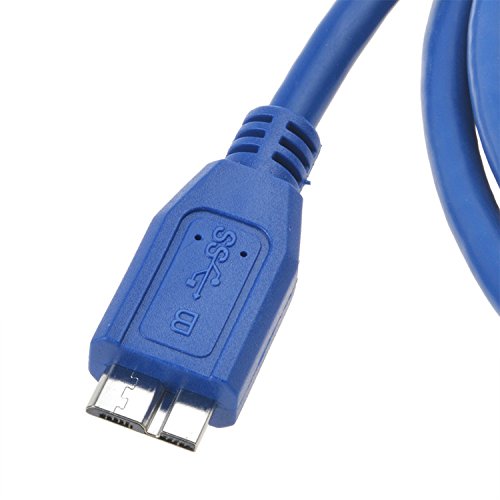
Figure 1: USB 3.0 Micro-B connector. This end connects to your ADATA SH14 external hard drive.

Figure 2: PwrON USB 3.0 cable showing both Type-A (left) and Micro-B (right) connectors.
Istruzioni per l'uso
The PwrON USB 3.0 cable facilitates high-speed data transfer and provides power to your ADATA SH14 external hard drive.
- Trasferimento dati: Once the hard drive is recognized by your computer, you can drag and drop files, copy, or move data between your computer and the external drive as you would with any other storage device.
- Alimentazione elettrica: The cable draws power directly from the USB port of your computer to operate the external hard drive. No separate power adapter is typically required for the ADATA SH14 series when using this cable.
- Rimozione sicura: Always safely eject the external hard drive from your operating system before disconnecting the cable to prevent data corruption.
Manutenzione e cura
Proper care will extend the life of your PwrON USB 3.0 cable.
- Magazzinaggio: Store the cable in a cool, dry place away from direct sunlight and extreme temperatures. Avoid tightly coiling or bending the cable sharply.
- Pulizia: If necessary, gently wipe the cable with a soft, dry cloth. Do not use liquid cleaners or solvents.
- Gestione: Always grasp the connector housing when plugging or unplugging the cable, not the cable itself, to prevent damage to the internal wires.
- Evita lo stress: Do not place heavy objects on the cable or allow it to be pinched.
Risoluzione dei problemi
In caso di problemi, fare riferimento ai seguenti problemi comuni e alle relative soluzioni.
- Disco rigido non rilevato:
- Assicurarsi che entrambe le estremità del cavo siano collegate saldamente.
- Prova a collegare il cavo a una porta USB diversa del computer.
- If using a desktop computer, try a USB port on the back of the computer, which often provides more stable power.
- Test the cable with another compatible device or try a different USB 3.0 cable with your hard drive to isolate the issue.
- Controlla Gestione dispositivi (Windows) o Informazioni di sistema (macOS) del tuo computer per verificare se l'unità è elencata.
- Velocità di trasferimento dati lente:
- Ensure you are connected to a USB 3.0 port on your computer. USB 2.0 ports will limit speeds.
- Verify that your ADATA SH14 hard drive is functioning correctly.
- Chiudere tutte le applicazioni non necessarie in esecuzione in background che potrebbero consumare risorse di sistema.
- Connessione intermittente:
- Controllare eventuali danni fisici al cavo o ai connettori.
- Ensure the cable is not being bent or stressed during use.
- Prova una porta USB o un computer diverso.
Specifiche
| Caratteristica | Dettaglio |
|---|---|
| Marca | PwrON |
| Tipo di connettore | USB 3.0 Type-A to USB 3.0 Micro-B |
| Tipo di cavo | Cavo dati USB |
| Dispositivi compatibili | ADATA SH14 Series External Hard Drives (e.g., ASH14-1TU3, ASH14-500GU3-CRD, ASH14-750GU3-CRD, ASH14-500GU3-CBK), PC |
| Caratteristica speciale | Portatile |
| Colore | Black (Note: Product images show blue cable, but specification lists black. User should refer to actual product received.) |
| Connector Gender | da maschio a maschio |
| Codice UPC | 794959948185 |
| ASIN | B072LCDW22 |
Garanzia e supporto
PwrON products are designed for reliability. For compatibility concerns, please ensure your original part number matches or consult with the manufacturer. Customers are responsible for compatibility verification.
This product is typically covered by a standard return policy, allowing for refunds or replacements within 30 days of purchase. For specific warranty details or technical support, please refer to the retailer's policy or contact PwrON directly through their official channels.


