1. Impostazione
1.1 Installazione della batteria
The Insignia NS-RC03A-13 remote control requires two AAA batteries for operation. Follow these steps to install them:
- Individuare il coperchio del vano batterie sul retro del telecomando.
- Per aprirlo, far scorrere il coperchio verso il basso oppure premere il fermo.
- Inserire due batterie AAA, assicurandosi che i terminali positivo (+) e negativo (-) siano allineati correttamente con le marcature all'interno del vano.
- Riposizionare il coperchio del vano batteria finché non scatta in posizione.
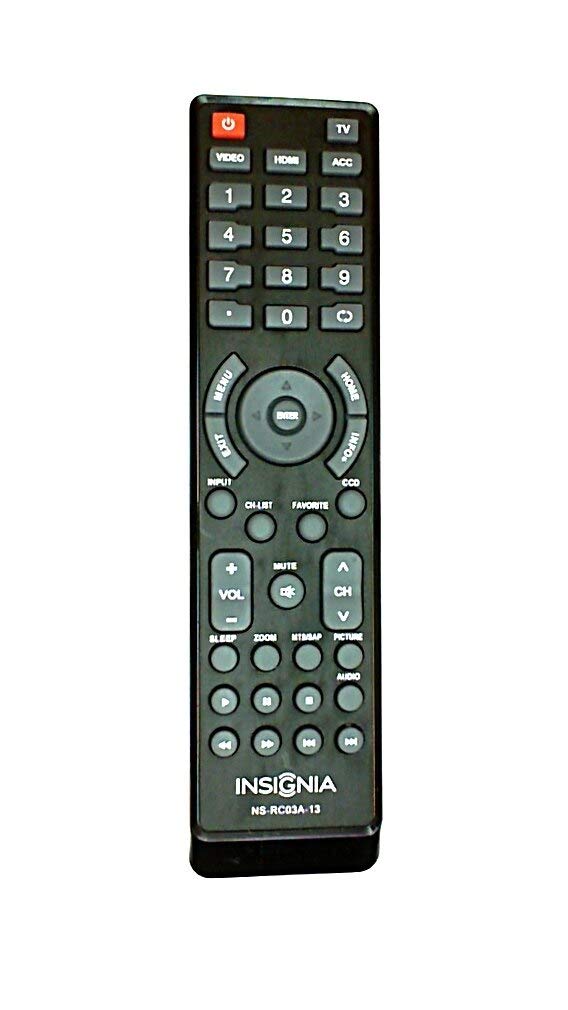
Immagine: Posteriore view of the Insignia NS-RC03A-13 remote control, showing the battery compartment open with two AAA batteries inserted. The remote is black with gray buttons.
2. Istruzioni per l'uso
This section details the primary functions and usage of your Insignia NS-RC03A-13 remote control.
Immagine: Frontale view of the Insignia NS-RC03A-13 remote control, displaying all buttons and their labels. The remote is black with gray buttons and white text.
2.1 Accensione/spegnimento
Premere il tasto ENERGIA button (usually located at the top left) to turn your television on or off.
2.2 Selezione dell'ingresso
To switch between different video sources (e.g., HDMI 1, HDMI 2, Video), press the INGRESSO button. Continue pressing to cycle through available inputs until your desired source is selected.
2.3 Channel and Volume Control
- Volume: Utilizzare il VOL+ E VOL- pulsanti per aumentare o diminuire il volume audio.
- Disattiva audio: Premere il tasto MUTE button to instantly silence the television audio. Press it again to restore sound.
- Canali: Utilizzare il CH+ E CH - buttons to navigate through television channels.
- Tastierino numerico: Directly enter channel numbers using the numeric keypad (0-9).
2.4 Navigazione nel menu
Use the directional arrow buttons (Up, Down, Left, Right) around the ENTRARE button to navigate through on-screen menus. Press ENTRARE to confirm a selection. The MENU button typically opens the main menu, and EXIT lo chiude.
3. Manutenzione
Una cura adeguata garantisce la longevità e le prestazioni ottimali del tuo telecomando.
- Pulizia: Wipe the remote control with a soft, dry cloth. Avoid using liquid cleaners, abrasive materials, or chemical solvents, as these can damage the surface or internal components.
- Sostituzione della batteria: Sostituisci le batterie quando la reattività del telecomando diminuisce. Sostituisci sempre entrambe le batterie contemporaneamente con batterie nuove dello stesso tipo (AAA).
- Magazzinaggio: Conservare il telecomando in un luogo asciutto, lontano dalla luce solare diretta, da temperature estreme e da elevata umidità.
- Evitare gocce: Proteggere il telecomando dagli urti fisici, poiché le cadute possono danneggiare i circuiti interni.
4. Risoluzione Dei Problemi
Se riscontri problemi con il telecomando, prova le seguenti soluzioni:
- Il telecomando non risponde:
- Controllare se le batterie sono inserite correttamente con la giusta polarità.
- Sostituisci le vecchie batterie con nuove batterie AAA.
- Assicurarsi che non vi siano ostacoli tra il telecomando e il ricevitore a infrarossi (IR) del televisore.
- Puntare il telecomando direttamente verso il ricevitore IR del televisore.
- Pulsanti specifici non funzionanti:
- Clean around the unresponsive buttons with a soft, slightly damp cloth to remove any debris or stickiness.
- If cleaning does not resolve the issue, the button mechanism may be faulty, and the remote might require replacement.
- La TV non risponde ai cambiamenti di input:
- Ensure the remote is correctly paired or compatible with your Insignia TV model.
- Prova a premere il tasto INGRESSO button multiple times to cycle through all available sources.
5. Specifiche
| Numero di modello | NS-RC03A-13 |
| Marca | INSIGNIA |
| Dispositivi compatibili | Televisione |
| Numero massimo di dispositivi supportati | 1 |
| Batterie richieste | 2 batterie AAA |
| Colore | Nero |
| Caratteristica speciale | Ergonomic |
| Peso dell'articolo | 2.39 once |
| Dimensioni del pacco | 7 x 2 x 1 pollici |
6. Garanzia e supporto
For detailed warranty information, product registration, or technical support, please visit the official Insignia webo contattare il servizio clienti. Conservare la ricevuta d'acquisto come prova d'acquisto per eventuali reclami in garanzia.
Supporto online: www.insigniaproducts.com
Nota: i termini specifici della garanzia possono variare in base alla regione e al rivenditore.


