Introduzione
Thank you for choosing the Veho ZB-6 On-Ear Wireless Bluetooth Headphones. This manual provides essential information for setting up, operating, and maintaining your headphones to ensure optimal performance and longevity. Please read this manual thoroughly before using the product.
Contenuto della confezione
Si prega di selezionare la casella per i seguenti elementi:
- Veho ZB-6 Bluetooth Headphones
- 120cm Auxiliary Cable with 3.5mm Jack
- Micro USB to USB-A Charging Cable
- Multi-lingual User Manual (English, French, Spanish, German, Italian, Portuguese, Japanese & Chinese)
Prodotto finitoview
Familiarize yourself with the components and controls of your Veho ZB-6 headphones.
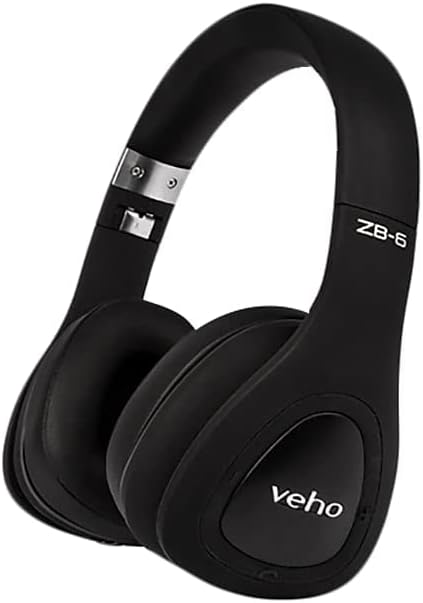
Figura 1: Complessivamente view of the Veho ZB-6 On-Ear Wireless Bluetooth Headphones in black. The image displays the adjustable headband, soft earcups, and the 'veho' logo on the left earcup.

Figura 2: Lato view of the Veho ZB-6 headphones, highlighting the control buttons located on the earcup. These controls include power, volume, and track selection buttons, along with the charging port and 3.5mm auxiliary input.

Figura 3: The Veho ZB-6 headphones shown in their folded configuration, demonstrating their compact design for easy portability and storage.
Impostare
Caricare le cuffie
Before first use, fully charge your Veho ZB-6 headphones. A full charge provides up to 24 hours of continuous music playback.
- Connect the Micro USB end of the charging cable to the charging port on the headphone earcup.
- Collegare l'estremità USB-A del cavo di ricarica a una fonte di alimentazione USB (ad esempio, una porta USB del computer, un adattatore da parete USB).
- The LED indicator on the headphones will illuminate during charging and change color or turn off when fully charged.
Accoppiamento Bluetooth
Pair your Veho ZB-6 headphones with your Bluetooth-enabled device (smartphone, tablet, PC, MP3 player).
- Assicurati che le cuffie siano spente.
- Press and hold the Power button on the earcup for approximately 6 seconds until the LED indicator flashes blue and red alternately. This indicates the headphones are in pairing mode.
- Attiva il Bluetooth sul tuo dispositivo e cerca i dispositivi disponibili.
- Select "Veho ZB-6" from the list of found devices.
- Once paired, the LED indicator on the headphones will flash blue slowly, and you will hear a confirmation tone.
- The headphones will automatically connect to the last paired device when turned on, if it is within range.
Istruzioni per l'uso
Controlli di base
- Accensione/spegnimento: Tenere premuto il pulsante di accensione per 3 secondi.
- Riproduci/Pausa: Premi una volta il pulsante Riproduci/Pausa.
- Aumenta volume: Premere il pulsante Volume su (+).
- Volume basso: Premere il pulsante Volume giù (-).
- Traccia successiva: Tieni premuto il pulsante Volume su (+).
- Traccia precedente: Premere e tenere premuto il pulsante Volume giù (-).
Gestione delle chiamate
Il microfono integrato consente di effettuare chiamate in vivavoce.
- Rispondi/Termina chiamata: Premere una volta il pulsante Riproduci/Pausa durante una chiamata in arrivo o una chiamata attiva.
- Rifiuta chiamata: Durante una chiamata in arrivo, tenere premuto il pulsante Riproduci/Pausa per 2 secondi.
- Ricomponi l'ultimo numero: Premi due volte il pulsante Riproduci/Pausa.
Voice Commands (Siri/Google Now)
The Veho ZB-6 headphones support voice commands for compatible devices.
- Attiva l'assistente vocale: Press the Play/Pause button twice quickly.
Modalità ausiliaria
Use the included 3.5mm auxiliary cable to connect the headphones to devices without Bluetooth connectivity, or when the headphone battery is depleted.
- Connect one end of the 3.5mm auxiliary cable to the headphone's AUX port.
- Collegare l'altra estremità al jack di uscita audio del dispositivo.
- In auxiliary mode, the headphone's power and Bluetooth functions are disabled, and audio is transmitted directly via the cable.
Manutenzione e cura
- Pulizia: Pulisci le cuffie con un panno morbido e asciutto. Non utilizzare detergenti abrasivi o solventi.
- Magazzinaggio: When not in use, store the headphones in a cool, dry place. The folding design allows for compact storage.
- Evitare l'umidità: Non esporre le cuffie all'acqua o a umidità eccessiva.
- Temperatura: Evitare temperature estreme, poiché possono influire sulla durata della batteria e sulle prestazioni generali.
Risoluzione dei problemi
| Problema | Soluzione |
|---|---|
| Le cuffie non si accendono. | Ensure the headphones are fully charged. Connect to a power source using the supplied USB cable. |
| Impossibile associare il dispositivo. |
|
| Nessun suono o volume basso. |
|
| Distorsione del suono. |
|
Specifiche
| Caratteristica | Dettaglio |
|---|---|
| Modello | VEP-014-ZB6 |
| Tecnologia di connettività | Senza fili, Bluetooth 4.1 |
| Tecnologia di comunicazione wireless | Bluetooth |
| Durata della batteria | Up to 24 hours continuous music playback |
| Tipo di batteria | Ioni di litio ricaricabile |
| Voltage | 3.7 Volt |
| Formato del microfono | Incorporato |
| Tipo di controllo | Voice Control, Buttons |
| Materiale | Gomma |
| Fattore di forma | Sull'orecchio |
| Controllo del rumore | Isolamento acustico |
| Presa per cuffie | 3.5 mm Jack |
| Peso dell'articolo | 290 grammi |
| Dimensioni del prodotto | Dimensioni: 18.8 x 17.78 x 7.37 cm |
Garanzia e supporto
Veho products are designed to meet high quality standards. For information regarding warranty coverage, technical support, or service, please refer to the warranty card included with your product or visit the official Veho websito. Conservare la prova d'acquisto per eventuali reclami in garanzia.
For further assistance, please contact Veho customer support.


