Radioddity Raddy RF23 AM FM Portable Pocket Radio MP3 Player User Manual
Modello: RF23
Introduzione
This manual provides detailed instructions for the Radioddity Raddy RF23, a compact and versatile portable radio and MP3 player. It features AM/FM radio reception, MP3 playback from Micro TF cards and USB disks, and an integrated flashlight. Please read this manual thoroughly before using the device to ensure proper operation and longevity.
Contenuto della confezione
- 1 x Radioddity Raddy RF23 AM/FM Radio
- 1 cavo di ricarica USB
- 1 x Rechargeable Lithium-Ion Battery (BL-5C type)
- Cinturino da polso 1 x
Prodotto finitoview
Familiarizza con le varie parti e i comandi della tua radio Raddy RF23.

Figura 1: Fronte View of Raddy RF23 - Displays the speaker grille, digital display, and numeric keypad with function buttons.

Figura 2: Indietro View of Raddy RF23 - Shows the battery cover, USB port, DC 5V charging port, and the wrist strap with its stand attachment.
Controlli e porte
- Interruttore di alimentazione: Slide switch on the side to turn the device ON or OFF.
- Antenna: Antenna telescopica estensibile per una migliore ricezione radio.
- Display digitale: Mostra informazioni su frequenza, modalità e traccia.
- Oratore: Altoparlante integrato per l'uscita audio.
- Tastierino numerico (0-9): Used for direct frequency input or track selection.
- Pulsante MODE: Switches between AM, FM, and MP3 playback modes.
- Pulsante Play/Pausa (▶⏸): Plays or pauses MP3 tracks.
- Previous/Rewind Button (◀◀): Skips to the previous track or rewinds during MP3 playback. In radio mode, short press for previous station, long press for auto-scan down.
- Next/Fast Forward Button (▶▶): Skips to the next track or fast forwards during MP3 playback. In radio mode, short press for next station, long press for auto-scan up.
- Pulsante LED: Attiva o disattiva la torcia integrata.
- Ingresso CC 5 V: Porta micro USB per caricare il dispositivo.
- Porta USB: Per collegare una chiavetta USB per la riproduzione di file MP3.
- Slot per schede TF: For inserting a Micro TF (Micro SD) card for MP3 playback.
- Jack per cuffie (3.5 mm): Per collegare le cuffie per l'ascolto privato.
Impostare
1. Installazione della batteria
- Individuare il coperchio del vano batteria sul retro della radio.
- Far scorrere il coperchio per aprirlo.
- Insert the provided BL-5C Lithium-Ion battery, ensuring the contacts align correctly.
- Chiudere saldamente il coperchio del vano batterie.

Figura 3: Installazione della batteria - Open the battery compartment and insert the BL-5C battery.
2. Carica della batteria
- Connect the small end of the included USB charging cable to the DC 5V input port on the side of the radio.
- Collegare l'estremità più grande del cavo USB a un adattatore di alimentazione USB (non incluso) o alla porta USB di un computer.
- The charging indicator light will illuminate. The light typically turns off or changes color when charging is complete.
- Una carica completa richiede circa 2-3 ore.
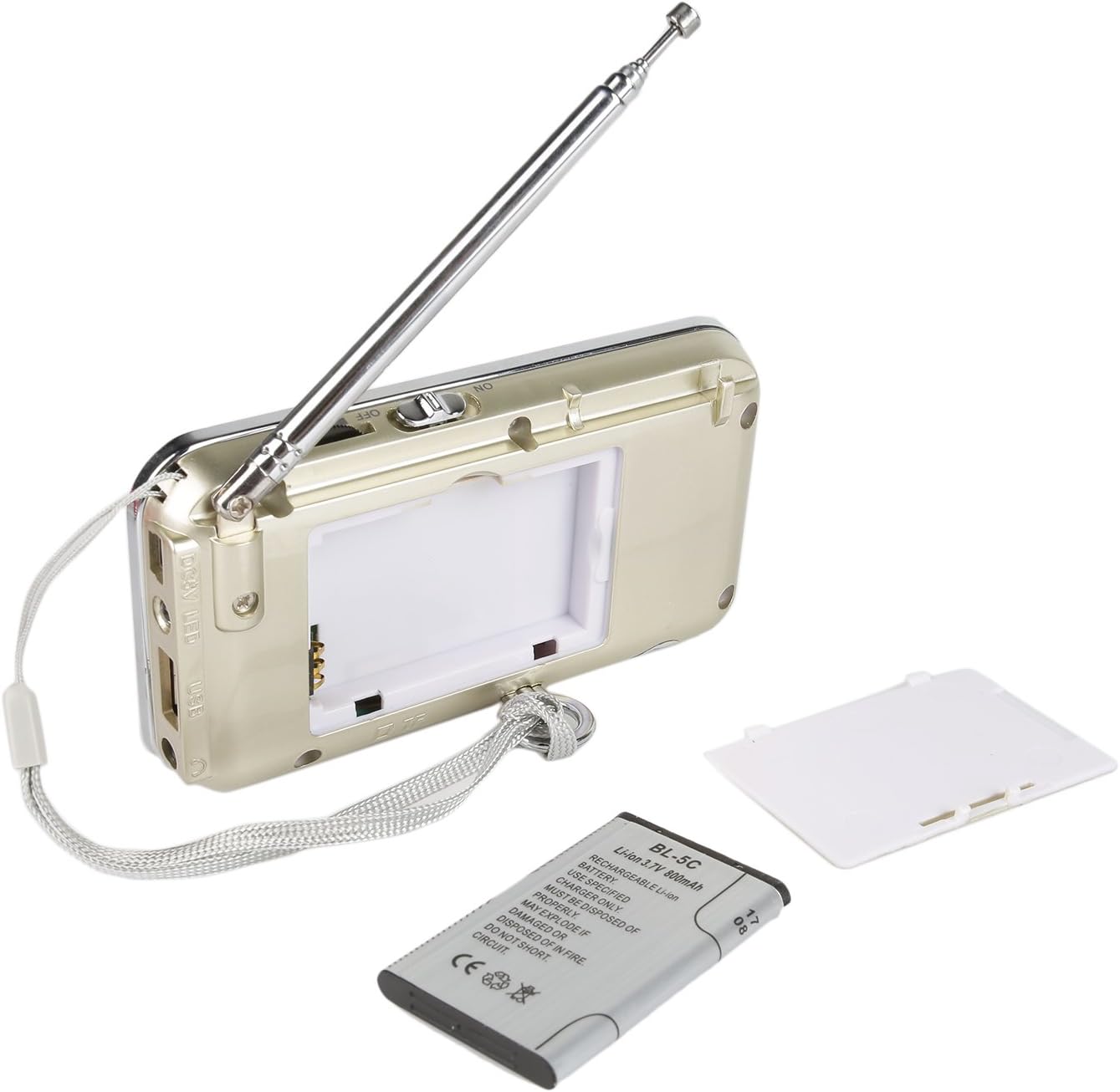
Figura 4: Ricarica USB - Connect the radio to a USB power source using the provided cable.
3. Inserting a Micro TF Card or USB Disk (for MP3 Playback)
- Assicurarsi che la radio sia spenta.
- For a Micro TF card: Gently insert the card into the TF card slot until it clicks into place.
- For a USB disk: Insert the USB disk into the USB port.
- The radio will automatically detect the storage device when powered on and switched to MP3 mode.

Figura 5: Inserimento della scheda TF - Insert a Micro TF card into the designated slot.
Istruzioni per l'uso
1. Accensione/spegnimento
Slide the power switch located on the side of the radio to the "ON" position to power on. Slide it to "OFF" to power off.
2. Selezione della modalità
Premere il tasto MODALITÀ button repeatedly to cycle through the available modes: FM Radio, AM Radio, and MP3 Player (if a TF card or USB disk is inserted).
3. Funzionamento della radio FM/AM
- Seleziona la modalità radio: Premere il tasto MODALITÀ finché sul display non compare la scritta "FM" o "AM".
- Estendi antenna: Per una ricezione ottimale, estendere completamente l'antenna telescopica.
- Scansione automatica della stazione: Premere a lungo il tasto Precedente (◀◀) or Next (▶▶) button to automatically scan for and stop at the next available station.
- Sintonizzazione manuale: Use the numeric keypad to directly enter a frequency (e.g., for 106.7 FM, press 1-0-6-7).
- Regolazione del volume: Adjust the volume using the dedicated volume controls, typically located on the side of the device or integrated with other function buttons.
4. MP3 Playback Operation
- Seleziona la modalità MP3: Premere il tasto MODALITÀ button until "MP3" or a track number appears on the display.
- Riproduci/Pausa: Premere il tasto Riproduci/Pausa (▶⏸) pulsante per avviare o mettere in pausa la riproduzione.
- Traccia successiva / precedente: Premere il tasto Next (▶▶) pulsante per passare al brano successivo. premi il Precedente (◀◀) button to go to the beginning of the current track, or press it again to go to the previous track.
- Regolazione del volume: Adjust the volume using the dedicated volume controls, typically located on the side of the device or integrated with other function buttons.
- Selezione diretta della traccia: Use the numeric keypad to enter the track number directly.
5. Funzione torcia
Premere il tasto GUIDATO button to turn the built-in flashlight ON. Press it again to turn the flashlight OFF.
Manutenzione
- Pulizia: Wipe the radio with a soft, dry cloth. Do not use liquid cleaners or solvents.
- Magazzinaggio: Quando non si utilizza la radio per lunghi periodi, conservarla in un luogo fresco e asciutto.
- Cura della batteria: If the radio will not be used for a long time, remove the battery to prevent leakage. Recharge the battery periodically to maintain its lifespan.
- Cura dell'antenna: Maneggiare con cura l'antenna telescopica per evitare piegature o rotture.
Risoluzione dei problemi
| Problema | Possibile causa | Soluzione |
|---|---|---|
| La radio non si accende. | La batteria è scarica o non è installata correttamente. | Caricare la batteria o assicurarsi che sia inserita con la polarità corretta. |
| Ricezione radiofonica scadente. | Antenna non estesa, segnale debole o interferenza. | Fully extend the antenna. Try repositioning the radio. Move away from electronic devices that may cause interference. |
| Nessun suono dal lettore MP3. | Volume too low, incorrect mode, or no valid media. | Increase volume. Ensure MP3 mode is selected. Verify TF card/USB disk contains MP3 files ed è inserito correttamente. |
| La torcia non funziona. | Battery low or flashlight not activated. | Charge the battery. Press the LED button to turn on the flashlight. |
| Il dispositivo si spegne inaspettatamente. | Batteria scarica. | Ricaricare completamente la batteria. |
Specifiche
- Marca: Radiodità
- Modello: RF23
- Dimensioni del prodotto: 4.61 x 0.79 x 2.5 pollici
- Peso dell'articolo: 6.7 once
- Fonte di energia: Alimentato a batteria (è necessaria 1 batteria agli ioni di litio)
- Tipo di batteria: BL-5C (ricaricabile)
- Tecnologia di connettività: USB
- Tecnologia del sintonizzatore: AM, FM
- Bande radio supportate: AM, FM
- Gamma di frequenza: FM (87.5-108 MHz), AM (520-1710 KHz)
- Caratteristica speciale: Built-In Flashlight, Portable
- Dispositivi compatibili: Earphone, Micro TF Card, USB Disk
- Produttore: Radiodità
Garanzia e supporto
For warranty information or technical support, please refer to the documentation provided with your purchase or visit the official Radioddity websito. Conservare la ricevuta d'acquisto come prova d'acquisto per eventuali reclami in garanzia.
Ufficiale di Radioddity Websito: www.radioddity.com