Introduzione
This user manual provides essential information for the safe and efficient operation, maintenance, and troubleshooting of your BLACK+DECKER HCUA525J POWERSERIES Pro 20V Lithium 2-in-1 Cordless Vacuum. Please read this manual thoroughly before first use and retain it for future reference.
The BLACK+DECKER HCUA525J POWERSERIES PRO 20V Lithium 2-in-1 Vacuum is designed for versatile cleaning, offering strong suction and extended runtime. Its innovative design allows for easy conversion from an upright vacuum to a portable canister for comprehensive floor-to-ceiling cleaning. Key features include SMARTECH technology with AUTOSENSE for automatic suction adjustment, BATTERYSENSE for battery level indication, and FILTERSENSE for filter cleaning alerts. The vacuum also features touchpad controls, swivel steering, a low-profile design, and an LED light for enhanced visibility.
Importanti istruzioni di sicurezza
Seguire sempre le precauzioni di sicurezza di base quando si utilizzano apparecchi elettrici per ridurre il rischio di incendi, scosse elettriche e lesioni personali. Queste includono, a titolo esemplificativo ma non esaustivo:
- Leggere tutte le istruzioni prima di utilizzare l'apparecchio.
- Non utilizzare all'aperto o su superfici bagnate.
- Non permettere che venga utilizzato come giocattolo. È necessaria molta attenzione quando viene utilizzato da bambini o in loro prossimità.
- Utilizzare solo come descritto nel presente manuale. Utilizzare solo gli accessori consigliati dal produttore.
- Non utilizzare con cavo o spina danneggiati. Se l'apparecchio non funziona come dovrebbe, è caduto, è stato danneggiato, è stato lasciato all'aperto o è caduto in acqua, riportarlo a un centro di assistenza.
- Non tirare o trasportare l'apparecchio tramite il cavo, non usare il cavo come maniglia, non chiudere una porta sul cavo e non tirare il cavo attorno a spigoli o angoli taglienti. Non far passare l'apparecchio sul cavo. Tenere il cavo lontano dalle superfici calde.
- Non staccare la spina tirando il cavo. Per staccare la spina, afferrare la spina, non il cavo.
- Non maneggiare la spina o l'apparecchio con le mani bagnate.
- Non inserire alcun oggetto nelle aperture. Non utilizzare con aperture bloccate; tenere lontano da polvere, lanugine, capelli e qualsiasi cosa possa ridurre il flusso d'aria.
- Tenere capelli, abiti larghi, dita e tutte le parti del corpo lontani dalle aperture e dalle parti mobili.
- Non raccogliere nulla che stia bruciando o che stia producendo fumo, come sigarette, fiammiferi o cenere calda.
- Non utilizzare senza il sacchetto antipolvere e/o i filtri inseriti.
- Prima di scollegare la spina, spegnere tutti i comandi.
- Prestare particolare attenzione quando si puliscono le scale.
- Non utilizzare per aspirare liquidi infiammabili o combustibili, come la benzina, né in aree in cui potrebbero essere presenti.
- Riporre l'apparecchio al chiuso.
- Caricare solo con il caricabatterie specificato dal produttore.
- Non incenerire l'apparecchio anche se gravemente danneggiato. Le batterie possono esplodere in caso di incendio.
Componenti del prodotto
Familiarize yourself with the main components of your BLACK+DECKER POWERSERIES Pro 2-in-1 Cordless Vacuum.

Figura 1: Davanti view of the BLACK+DECKER HCUA525J POWERSERIES Pro 2-in-1 Cordless Vacuum in upright mode.

Figura 2: The vacuum with its portable canister detached, showcasinla sua versatilità 2 in 1.

Figura 3: Dettagliato view of the removable canister and flexible hose for handheld cleaning.
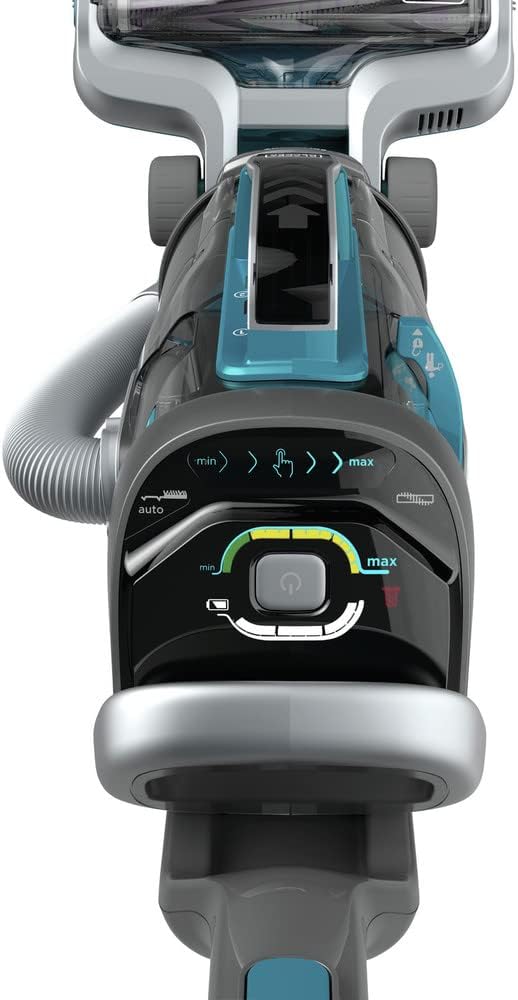
Figura 4: The top control panel with touchpad controls for suction speed, AUTOSENSE, and LED light.

Figura 5: The versatile 3-in-1 accessory tool, including a 6-inch nozzle, crevice tool, and upholstery brush.
Componenti inclusi:
- 1) HCUA525J 2-in-2 Cordless Vacuum
- 1) Jack Plug charger
- 1) 3-in-1 Accessory Tool (6-inch nozzle, crevice tool, and upholstery brush)
- 1) CUABF10 washable filter kit
Installazione e assemblaggio
Seguire questi passaggi per assemblare l'aspirapolvere prima del primo utilizzo.
- Disimballare i componenti: Estrarre con cautela tutti i componenti dall'imballaggio. Assicurarsi che siano presenti tutti i componenti elencati.
- Attacca la maniglia: Inserire la maniglia nel corpo principale dell'aspirapolvere finché non scatta saldamente in posizione.
- Mettere in carica la batteria: Before initial use, fully charge the vacuum's lithium-ion battery. Connect the Jack Plug charger to the charging port on the vacuum and plug it into a standard electrical outlet. The BATTERYSENSE indicator lights will show charging progress. A full charge takes approximately 6 hours.
- Installa filtro: Ensure the CUABF10 washable filter is correctly installed in the dust canister. Refer to the "Maintenance" section for detailed filter installation and cleaning instructions.
Istruzioni per l'uso
Your BLACK+DECKER POWERSERIES Pro vacuum offers versatile cleaning modes and smart features.
Upright Vacuum Mode
- Accensione: Press the power button on the touchpad control panel (Figure 4).
- Regola la velocità di aspirazione: Use the touchpad controls to adjust suction speed between minimum (min) and maximum (max) settings.
- Activate AUTOSENSE: Enable the AUTOSENSE feature via the touchpad. This automatically adjusts suction power based on the floor type, optimizing performance and battery life.
- Luce LED: Control the integrated LED light from the touchpad to illuminate cleaning surfaces, especially in dimly lit areas or under furniture.
- Manovrabilità: The swivel steering and low-profile design allow for easy navigation around furniture and access to hard-to-reach areas.
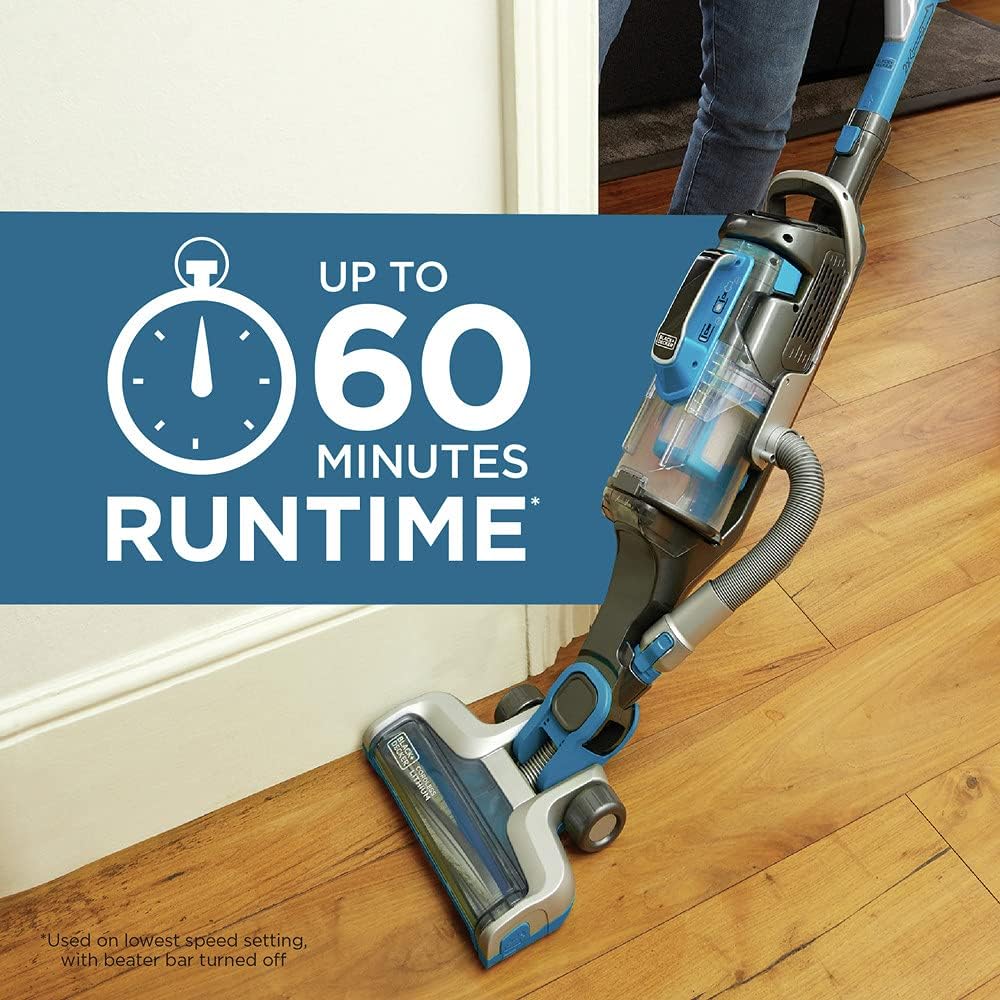
Figura 6: The vacuum in operation on a hard floor, highlighting its impressive runtime of up to 60 minutes on the lowest speed setting with the beater bar turned off.
Portable Canister Mode (Grab+Go)
- Detach Canister: Press the release button to detach the portable canister from the main vacuum body.
- Collegare gli accessori: Connect the 3-in-1 accessory tool (6-inch nozzle, crevice tool, or upholstery brush) to the end of the flexible hose for specialized cleaning tasks.
- Pulizia versatile: Use the portable canister for cleaning stairs, upholstery, car interiors, and other elevated or confined spaces.
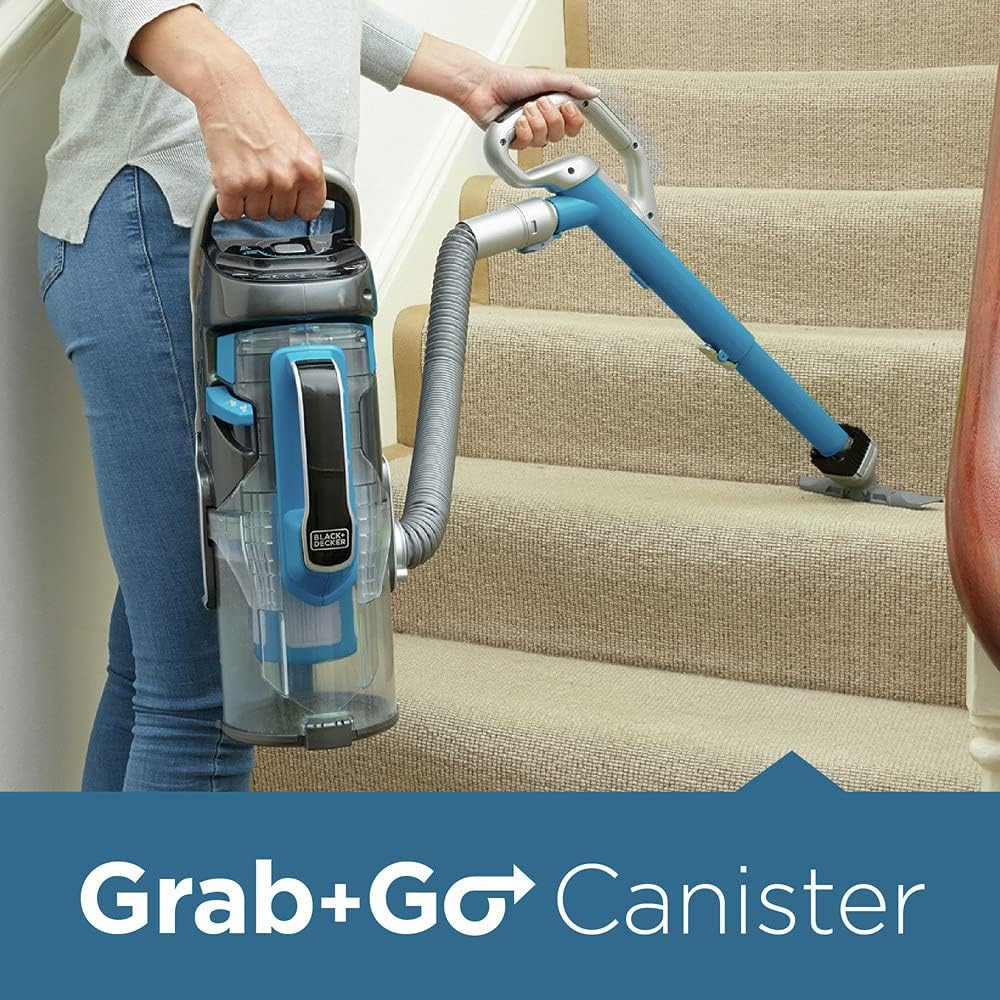
Figura 7: A user demonstrating the "Grab+Go" feature, using the detached canister and hose to clean stairs, providing excellent versatility.
Video ufficiale del prodotto
1 video: An official product video demonstrating the features and versatility of the BLACK+DECKER POWERSERIES PRO Cordless Vacuum, 2 in 1, Blue (HCUA525J). This video showcases the vacuum's powerful suction, 2-in-1 design, SMARTECH sensors, and ease of use for various cleaning tasks.
Manutenzione
Una manutenzione regolare garantisce prestazioni ottimali e prolunga la durata del tuo aspirapolvere.
Svuotamento del contenitore della polvere
The dust canister features a unique dust compactor, allowing it to hold more dirt and reducing the frequency of emptying. Empty the canister when the dirt reaches the "Max Fill" line or when the FILTERSENSE indicator alerts you.
- Spegni: Prima di svuotare, assicurarsi che l'aspirapolvere sia spento.
- Detach Canister: Press the release button to detach the dust canister.
- Contenuto vuoto: Position the canister over a trash bin and press the release button to open the bottom flap, allowing dirt and debris to fall out.
- Reattach Canister: Close the bottom flap securely and reattach the canister to the vacuum until it clicks into place.
Pulizia del filtro
The CUABF10 washable filter kit should be cleaned regularly to maintain suction power. The FILTERSENSE feature will alert you when cleaning is needed.
- Rimuovi filtro: With the dust canister detached, carefully remove the filter assembly.
- Filtro di lavaggio: Risciacquare il filtro sotto l'acqua corrente fredda finché l'acqua non scorre limpida. Non utilizzare acqua calda o detergenti.
- Filtro a secco: Lasciare asciugare completamente il filtro all'aria per almeno 24 ore prima di reinserirlo. Non utilizzare un'asciugatrice o altri dispositivi di riscaldamento.
- Reinstalla filtro: Once completely dry, reinsert the filter into the dust canister and reattach the canister to the vacuum.
Pulizia della barra delle spazzole
Periodically check the brush bar for tangled hair or debris. The brush bar detaches easily for quick cleaning.
- Spegni: Assicurarsi che l'aspirapolvere sia spento.
- Remove Brush Bar: Follow the instructions in the manual to release and remove the brush bar from the vacuum head.
- Detriti puliti: Use scissors or a brush to remove any tangled hair, strings, or debris from the brush bar.
- Reinstall Brush Bar: Reinsert the clean brush bar securely into the vacuum head.
Risoluzione dei problemi
Questa sezione affronta i problemi più comuni che potresti riscontrare con il tuo aspirapolvere.
| Problema | Possibile causa | Soluzione |
|---|---|---|
| L'aspirapolvere non si accende. | La batteria non è carica. | Charge the battery fully (approx. 6 hours). Check BATTERYSENSE indicator. |
| Il pulsante di accensione non è stato premuto correttamente. | Ensure the power button on the touchpad is pressed firmly. | |
| Potenza di aspirazione ridotta. | Il contenitore della polvere è pieno. | Svuotare il contenitore della polvere. |
| Il filtro è intasato. | Clean or replace the filter (CUABF10). The FILTERSENSE indicator will alert you. | |
| Brush bar is tangled or blocked. | Remove and clean the brush bar. Check for obstructions in the nozzle. | |
| Il tubo o gli accessori sono bloccati. | Check the hose and accessory tools for blockages and clear them. | |
| Il vuoto si interrompe inaspettatamente. | La batteria è scarica. | Ricaricare la batteria. |
| Protezione contro il surriscaldamento attivata. | Turn off the vacuum and allow it to cool down for at least 30 minutes. Clear any blockages. |
If the problem persists after attempting these solutions, please contact BLACK+DECKER customer support for assistance.
Specifiche
| Caratteristica | Dettaglio |
|---|---|
| Marca | NERO+DECKER |
| Nome del modello | BLACK+DECKER HCUA525J POWERSERIES™ PRO 20V Lithium 2-in-1 Vacuum |
| Numero di modello | HCUA525J |
| Fonte di alimentazione | Alimentato a batteria (20 V agli ioni di litio) |
| Durata | Fino a 60 minuti (alla velocità più bassa) |
| Tempo di ricarica | Circa 6 ore |
| Tipo di filtro | Disk (CUABF10 washable filter kit) |
| Fattore di forma | Upright / Handheld (2-in-1) |
| Colore | Blu |
| Peso dell'articolo | 11 libbre |
| Dimensioni del prodotto | 8.9 x 11.8 x 33.67 pollici |
| Livello di rumore | 78 dB |
| Caratteristiche speciali | SMARTECH (AUTOSENSE, BATTERYSENSE, FILTERSENSE), Touchpad Controls, LED Light, Dust Compactor, Swivel Steering |
Garanzia e supporto
Your BLACK+DECKER HCUA525J POWERSERIES Pro 20V Lithium 2-in-1 Cordless Vacuum is backed by BLACK+DECKER'S 2-year limited warranty. This warranty covers defects in material or workmanship for a period of two years from the date of purchase.
For warranty claims, technical support, or to purchase replacement parts (such as the CUABF10 washable filter kit), please contact BLACK+DECKER customer service. You may also refer to the official user manual PDF for more detailed information, available at https://manuals.plus/m/680ddf346521725983c53d4fc3d2c4b0ba3c31edbc0ebe10a410a6040819e918.
Informazioni sui contatti:
- Visita il sito ufficiale BLACK+DECKER websito per le risorse di supporto.
- Refer to the contact details provided in your product packaging or on the BLACK+DECKER websito per il servizio clienti.


