1. Introduzione
This manual provides detailed instructions for the setup, operation, and maintenance of your CHERRY DW 5100 Wireless Keyboard and Mouse Combo. Please read this manual thoroughly before using the product to ensure optimal performance and longevity.
Contenuto della confezione
The CHERRY DW 5100 package includes the following items:
- CHERRY DW 5100 Wireless Keyboard
- CHERRY DW 5100 Wireless Mouse
- Ricevitore USB
- 4 x AAA Batteries (2 for keyboard, 2 for mouse)
- Manuale di istruzioni (questo documento)

Image 1.1: The CHERRY DW 5100 Wireless Keyboard and Mouse Combo. The image displays the full-size black keyboard with a numeric keypad and media keys, alongside the ergonomic black wireless mouse.
2. Impostazione
2.1 Installazione della batteria
The CHERRY DW 5100 keyboard and mouse require AAA batteries for operation. Two AAA batteries are needed for the keyboard and two for the mouse.
- Per la tastiera: Individuare il vano batterie sul lato inferiore della tastiera. Aprire il coperchio, inserire due batterie AAA, assicurandosi della corretta polarità (+/-), quindi chiudere il coperchio.
- Per il topo: Locate the battery compartment on the underside of the mouse. Open the cover, insert two AAA batteries, ensuring correct polarity (+/-), and close the cover.

Image 2.1: The CHERRY DW 5100 Wireless Mouse shown with its USB receiver. The receiver is compact and designed to be plugged into a computer's USB port.
2.2 Collegamento dei dispositivi
The keyboard and mouse connect wirelessly to your computer via a single USB receiver.
- Inserisci il ricevitore USB in una porta USB disponibile sul tuo computer.
- Ensure the keyboard and mouse are powered on (check for an on/off switch, usually on the underside).
- Il computer dovrebbe rilevare e installare automaticamente i driver necessari. Questo processo potrebbe richiedere alcuni istanti.
- Una volta installati i driver, la tastiera e il mouse sono pronti per l'uso.
The wireless connection operates on a 2.4 GHz frequency, providing a range of up to 10 meters (approximately 33 feet).
3. Istruzioni per l'uso
3.1 Funzioni della tastiera
The CHERRY DW 5100 keyboard features a standard QWERTY layout with 10 additional keys for enhanced functionality.
Immagine 3.1: Primo piano view of the CHERRY DW 5100 Wireless Keyboard. This image highlights the full QWERTY layout, numeric keypad, and the additional function keys located above the numeric pad and below the spacebar.
Chiavi aggiuntive:
- Controllo multimediale: Dedicated keys for volume up, volume down, mute, play/pause, previous track, and next track.
- Scorciatoie dell'applicazione: Keys for launching common applications such as email, web browser e calcolatrice.
- Modalità risparmio: A key to put your computer into sleep mode.
Refer to your operating system's settings for potential customization of these additional keys.
3.2 Funzioni del mouse
The CHERRY DW 5100 mouse is ergonomically designed for right-handed users and features multiple buttons for efficient navigation.

Immagine 3.2: In alto view of the CHERRY DW 5100 Wireless Mouse. This image shows the left and right click buttons, the scroll wheel, and the DPI switch button located below the scroll wheel.
- Clic sinistro/destro: Pulsanti standard del mouse.
- Rotella di scorrimento: Per lo scorrimento verticale e come pulsante centrale.
- Interruttore DPI: Located below the scroll wheel, this button allows you to adjust the mouse's resolution (DPI) on the fly, changing cursor speed and precision. Press the button to cycle through available DPI settings.
- Pulsanti per il pollice: Two side buttons located on the left side of the mouse, typically used for "back" and "forward" navigation in web browser e file esploratori.
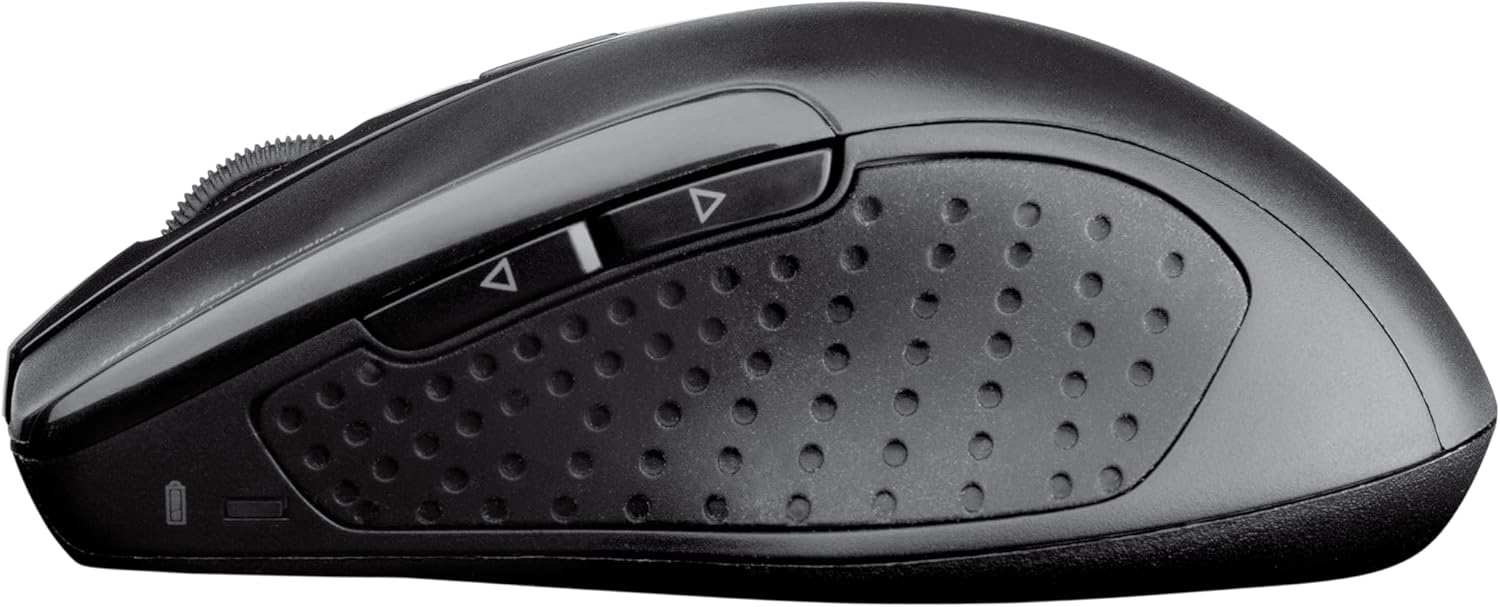
Immagine 3.3: Lato view of the CHERRY DW 5100 Wireless Mouse. This image clearly shows the two thumb buttons on the left side and the textured rubber grip for enhanced comfort and control.
4. Manutenzione
4.1 Pulizia
- Prima di pulire il ricevitore USB, scollegarlo dal computer.
- Utilizzare un panno morbido e privo di lanugine leggermente dampened with water or a mild cleaning solution to wipe the surfaces of the keyboard and mouse.
- Evitare l'uso di prodotti chimici aggressivi, detergenti abrasivi o solventi, poiché potrebbero danneggiare la finitura del prodotto.
- For cleaning between keyboard keys, use compressed air to remove dust and debris.
4.2 Sostituzione della batteria
The CHERRY DW 5100 is designed for a long battery life of up to two years. When batteries are low, the performance may degrade, or the devices may stop responding.
- Replace batteries as described in Section 2.1.
- Always use fresh, high-quality AAA alkaline batteries.
- Smaltire le batterie usate secondo le normative locali.
5. Risoluzione Dei Problemi
| Problema | Possibile causa | Soluzione |
|---|---|---|
| Tastiera/mouse non rispondono |
|
|
| Laggy or erratic mouse movement |
|
|
| I tasti della tastiera non vengono registrati |
|
|
6. Specifiche
| Caratteristica | Dettaglio |
|---|---|
| Nome del modello | CHERRY DW 5100 |
| Numero modello articolo | JD-0520EU-2 |
| Tecnologia di connettività | Senza fili (2.4 GHz) |
| wireless Range | Fino a 10 metri (33 piedi) |
| Disposizione della tastiera | EU Layout, QWERTY |
| Additional Keyboard Keys | 10 multimedia and application keys |
| Tipo di topo | Ergonomic, Right-handed, 6-button with DPI switch |
| Fonte di alimentazione | Alimentato a batteria |
| Batterie richieste | 4 x AAA (2 for keyboard, 2 for mouse) |
| Durata stimata della batteria | Fino a 2 anni |
| Sistemi operativi compatibili | Windows 10, Windows 7, Windows 8 |
| Piattaforma hardware | PC, laptop |
| Colore | Nero |
| Dimensioni del prodotto (tastiera) | Circa 18.43 x 6.7 x 0.87 pollici (46.8 x 17 x 2.2 cm) |
| Peso dell'articolo | Circa 2.05 libbre (0.93 kg) |
| Produttore | CILIEGIA |
7. Garanzia e supporto
Per informazioni sulla garanzia e supporto tecnico, fare riferimento al sito ufficiale Cherry websito o contattare il servizio clienti. I dettagli sono in genere reperibili sulla confezione del prodotto o sul foglietto illustrativo del produttore. websito.
Produttore: CILIEGIA
Websito: www.cherry.de/en/ (General Cherry websito, il collegamento di supporto specifico può variare in base alla regione)