1. Introduzione
The Compustar ADS NI3 Plug-N-Play T-Harness (model ADS-THR-NI3) is an automotive electrical component designed to simplify the installation of remote start systems in specific Nissan vehicles. This T-harness provides a direct connection interface, reducing the need for extensive wire cutting and splicing, thereby streamlining the installation process for compatible remote start modules.
This manual provides essential information regarding the setup, operation, maintenance, and troubleshooting of your ADS NI3 T-Harness. For optimal performance and safety, it is recommended that installation be performed by a qualified professional.
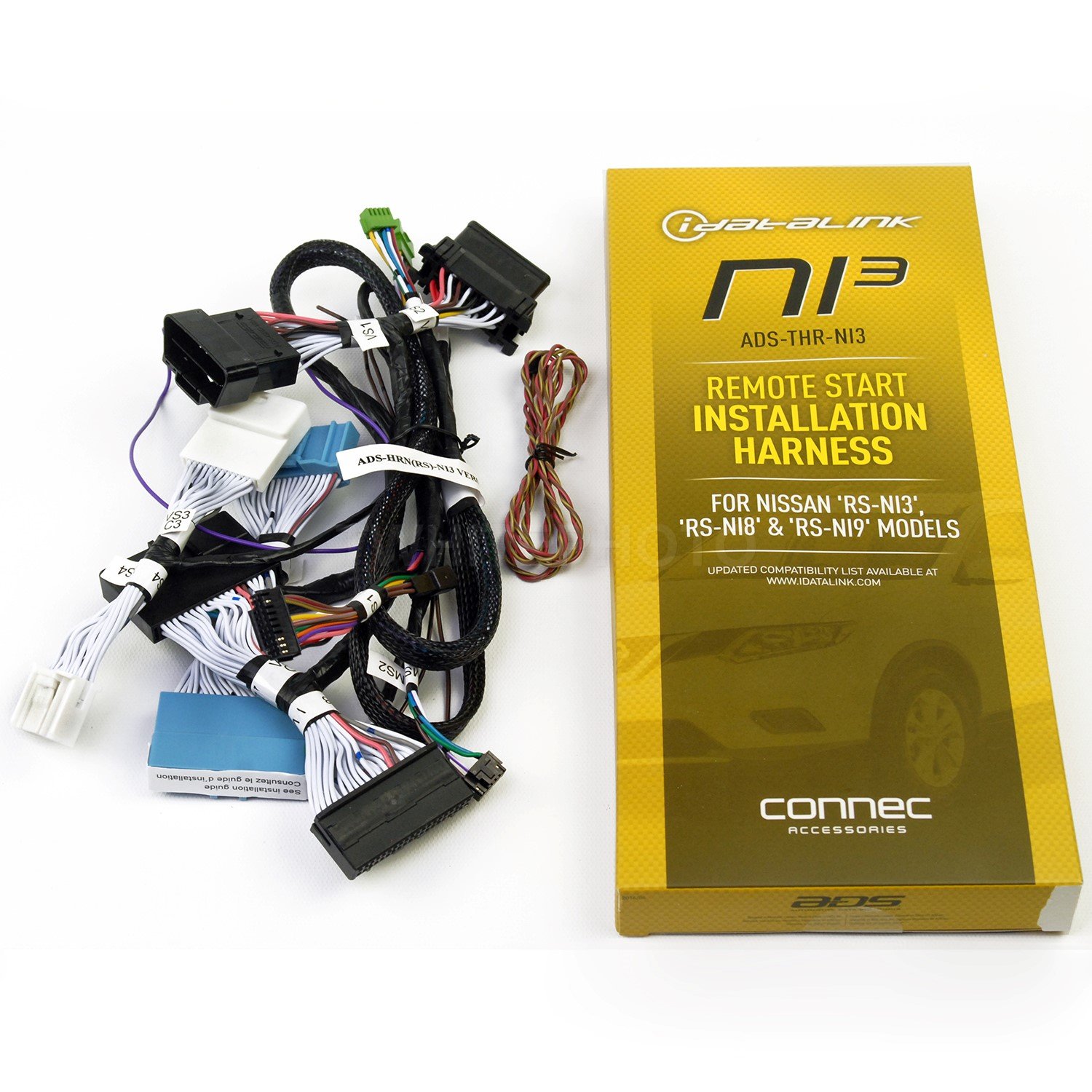
This image displays the product packaging for the ADS-THR-NI3 Remote Start Installation Harness. The packaging is primarily yellow and black, featuring the iDataLINK logo, the model number NI3, and the full product name 'ADS-THR-NI3 Remote Start Installation Harness'. It also indicates compatibility with Nissan 'RS-NI3', 'RS-NI8', and 'RS-NI9' models, and directs users to www.idatalink.com for an updated compatibility list. The 'connec ACCESSORIES' logo is visible at the bottom.
2. Configurazione e installazione
The ADS NI3 T-Harness is designed for integration with compatible remote start systems. Proper installation is crucial for functionality and vehicle safety. Due to the complexity of automotive electrical systems, professional installation is strongly recommended.
2.1. Elenco di controllo pre-installazione
- Verifica di compatibilità: Confirm that your vehicle (Nissan 'RS-NI3', 'RS-NI8', or 'RS-NI9' models) and your remote start module are compatible with the ADS NI3 T-Harness. Refer to the latest compatibility list on the iDataLINK webposto (www.idatalink.com).
- Strumenti necessari: Basic automotive tools may be needed for accessing vehicle wiring, such as panel removal tools, screwdrivers, and possibly a multimeter for testing.
- Precauzioni di sicurezza: Disconnect the vehicle's battery before beginning any electrical work to prevent short circuits or damage to vehicle components.
- Leggi le istruzioni: Thoroughly read this manual and the instructions provided with your remote start module before starting the installation.
2.2. Fasi di installazione (linee guida generali)
- Cablaggio del veicolo di accesso: Carefully remove necessary trim panels to gain access to the vehicle's ignition and other relevant wiring harnesses.
- Individuare i punti di connessione: Identify the specific OEM connectors in your vehicle that correspond to the ADS NI3 T-Harness. These are typically found near the steering column or behind the dashboard.
- Collegare il cablaggio a T: Plug the ADS NI3 T-Harness directly into the identified OEM connectors. Ensure all connections are secure and fully seated.
- Integrate with Remote Start Module: Connect the other end of the ADS NI3 T-Harness to your compatible remote start module according to the module's specific wiring diagram.
- Cablaggio sicuro: Route and secure all wiring to prevent interference with moving parts or accidental disconnections. Use zip ties or electrical tape as needed.
- Sistema di test: Reconnect the vehicle battery and test the remote start system's functionality before reassembling the vehicle's interior.
- Rimontare: Once confirmed operational, carefully reassemble all removed trim panels.
Nota: Specific installation details, including exact wire colors and connector locations, vary by vehicle model and remote start system. Always consult the detailed installation guides provided by Compustar and iDataLINK for your specific application.
3. Operating the T-Harness
The ADS NI3 T-Harness is a passive component designed to facilitate the connection between your vehicle's electrical system and a remote start module. It does not have independent operational controls. Its function is to provide the necessary electrical pathways for the remote start system to communicate with and control vehicle functions such as ignition, door locks, and security systems.
Operation of the remote start system itself will depend on the specific remote start module installed and its associated remote control or smartphone application. Refer to the user manual provided with your remote start module for instructions on how to use its features.
4. Manutenzione
The ADS NI3 T-Harness requires minimal maintenance. Once properly installed, it is designed for long-term, reliable operation within your vehicle's electrical system.
- Ispezione periodica: If you experience issues with your remote start system, a professional installer may inspect the T-harness connections to ensure they remain secure and free from corrosion or damage.
- Protezione ambientale: Ensure the harness and its connections are protected from excessive moisture, heat, and physical abrasion during installation and throughout the vehicle's use.
- Pulizia: Avoid direct application of cleaning agents to electrical connections. If cleaning is necessary, use a dry, lint-free cloth.
5. Risoluzione Dei Problemi
If your remote start system is not functioning as expected, the issue may not directly stem from the T-Harness itself, but rather from the remote start module, its programming, or other vehicle components. However, the T-Harness's connections can be a point of failure if not installed correctly.
5.1. Problemi comuni e soluzioni
- Remote Start System Not Responding:
- Controllare le connessioni: Ensure all T-Harness connectors are fully seated and secure. Loose connections can interrupt signals.
- Verify Module Power: Confirm the remote start module is receiving power.
- Programmazione del modulo: The remote start module may require reprogramming or re-initialization. Consult the module's manual.
- Funzionalità intermittente:
- Ispezionare per danni: Check the T-Harness wires and connectors for any signs of physical damage, pinching, or corrosion.
- Fattori ambientali: Extreme temperatures or moisture could affect electrical connections.
- Vehicle Warning Lights:
- If new warning lights appear after installation, immediately consult a professional installer. This could indicate an incorrect connection or a conflict with the vehicle's onboard diagnostics.
If troubleshooting steps do not resolve the issue, it is highly recommended to contact a certified automotive electronics technician or the Compustar/iDataLINK support for assistance.
6. Specifiche
| Caratteristica | Dettaglio |
|---|---|
| Numero di modello | ADS-THR-NI3 |
| Marca | Compustar |
| Materiale | Cloruro di polivinile (PVC) |
| Tipo di connettore | Connettore a T |
| Codice UPC | 700191259491 |
| Dimensioni del pacco | 10 x 2 x 2 pollici |
| Peso dell'articolo | 1 libbra |
| Compatibilità | Nissan 'RS-NI3', 'RS-NI8', 'RS-NI9' models (verify on idatalink.com) |
7. Garanzia e supporto
7.1. Garanzia del prodotto
The Compustar ADS NI3 T-Harness is covered by a manufacturer's warranty against defects in materials and workmanship. The specific terms and duration of the warranty may vary. Please refer to the official Compustar or iDataLINK website, or the documentation included with your purchase, for detailed warranty information.
Nota: Damage resulting from improper installation, misuse, or unauthorized modifications may void the product warranty.
7.2. Supporto tecnico
Per assistenza tecnica, guida all'installazione o risoluzione dei problemi che esulano dall'ambito del presente manuale, contattare:
- Your authorized Compustar or iDataLINK dealer/installer.
- Compustar Customer Support (refer to their official websito per i dettagli di contatto).
- iDataLINK Support (www.idatalink.com).
When contacting support, please have your product model number (ADS-THR-NI3) and vehicle information readily available.


