1. Introduzione
This manual provides comprehensive instructions for the assembly, operation, and maintenance of your Zinus Tresa Metal Desk with Storage and Monitor Stand, Large. Designed for home office or den use, this desk features a durable metal frame, an espresso wood-like finish tabletop, a movable monitor stand, a hanging hook, a side storage tray, and a built-in cable organizer. Please read all instructions carefully before assembly and use to ensure proper function and safety.

Figure 1: Zinus Tresa Metal Desk, Large. This image shows the assembled desk with a monitor, lamp, and small plant, highlighting its functional design.
2. Informazioni sulla sicurezza
Per evitare lesioni o danni al prodotto, attenersi alle seguenti norme di sicurezza:
- Montare sempre la scrivania seguendo le istruzioni fornite.
- Non superare il limite di peso di 100 libbre (45 kg).
- Prima dell'uso, assicurarsi che la scrivania sia stabile e sicura.
- Keep the work area clear of obstacles to prevent accidents.
- Non stare in piedi o seduto sulla scrivania.
- Durante il montaggio, tenere le parti di piccole dimensioni lontano dalla portata dei bambini.
3. Contenuto della confezione
Verificare che tutti i componenti siano presenti prima di iniziare il montaggio. Se qualche componente risulta mancante o danneggiato, contattare l'assistenza clienti.

Figure 2: Product Packaging. The desk components are efficiently packed in one compact box for shipping.
Componenti inclusi:
- Desk Tabletop (Espresso Finish)
- Desk Legs and Frame (Steel)
- Supporto per monitor
- Side Storage Tray
- Gancio per appendere
- Cable Management Organizer
- Ferramenta di montaggio (viti, bulloni, ecc.)
- Assembly Tools (ratchet tool)
- Manuale di istruzioni
4. Istruzioni di montaggio
Assembly is designed to be straightforward and typically takes under 30 minutes with one person. All necessary tools are included.
- Disimballare i componenti: Estrarre con attenzione tutti i componenti dall'imballaggio e disporli su una superficie pulita e morbida per evitare graffi. Verificare che tutti i componenti siano presenti, in base all'elenco del contenuto della confezione.
- Fissare le gambe al telaio: Securely attach the desk legs to the main frame using the provided hardware. Ensure all connections are tight but do not overtighten.
- Montaggio su tavolo: Carefully place the tabletop onto the assembled frame. Align the pre-drilled holes and secure the tabletop using the designated screws.
- Installare gli accessori: Attach the monitor stand, side storage tray, hanging hook, and cable organizer to their respective positions as indicated in the detailed assembly diagram (refer to the included printed manual for specific diagrams).
- Controllo finale: Once assembled, gently lift and move the desk to its desired location. Ensure all connections are secure and the desk is stable before placing any items on it.
5. Utilizzo
Supporto per monitor
The movable monitor stand helps elevate your screen to an ergonomic height, reducing neck and back strain. It can be positioned anywhere on the desk surface to suit your setup.
Side Storage Tray
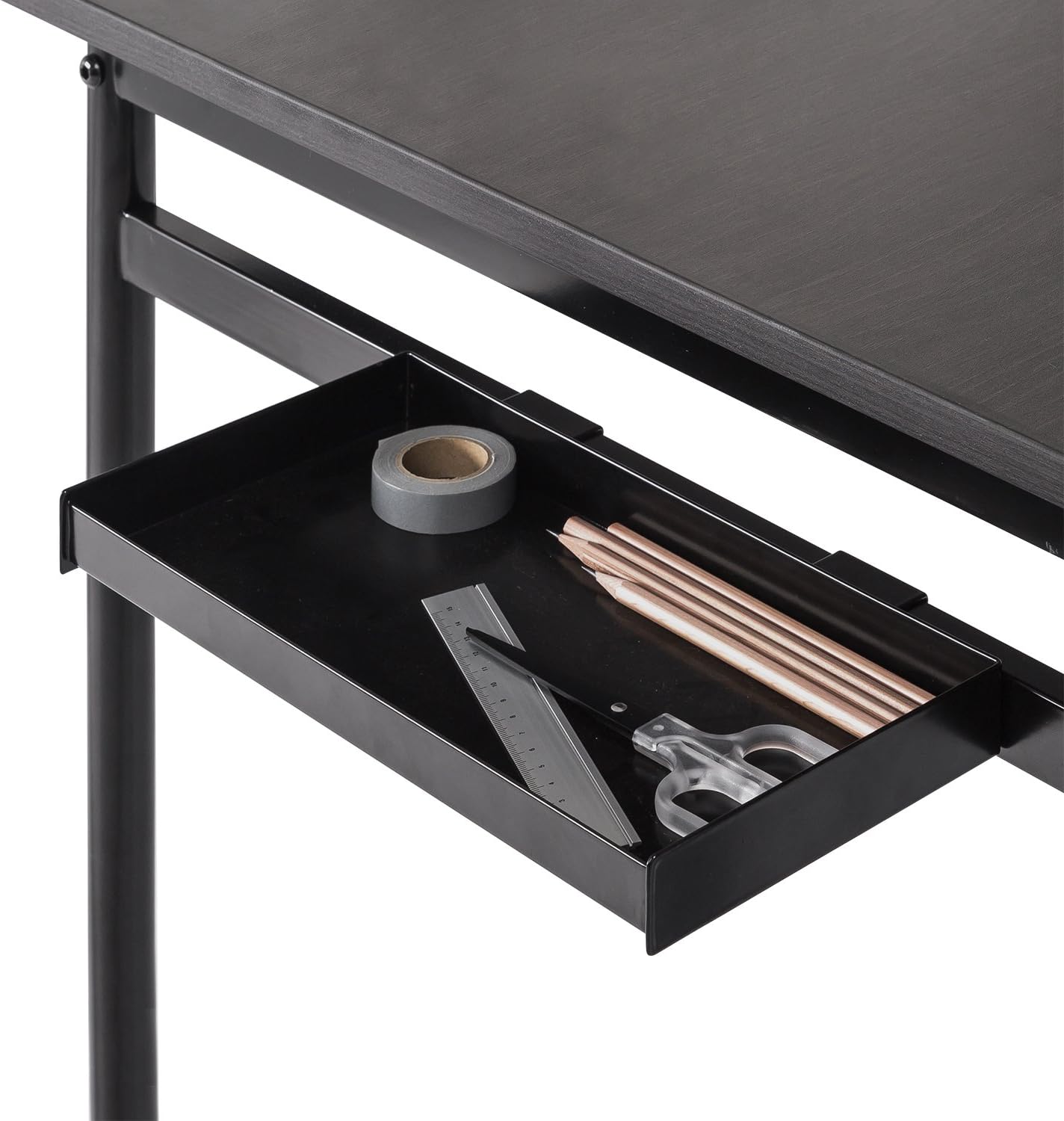
Figure 3: Side Storage Tray. This tray provides convenient access for small office supplies like pens, pencils, and rulers.
The integrated side storage tray is ideal for keeping small office essentials, such as pens, pencils, and other accessories, within easy reach.
Gancio per appendere

Figure 4: Hanging Hook. A bag is shown hanging from the hook, demonstrating its use for personal items.
Utilize the hanging hook to keep bags, headphones, or other items off the floor and within easy access, helping to maintain a tidy workspace.
Cable Management Organizer

Figure 5: Cable Management Organizer. This image illustrates how cables can be routed through the organizer to keep them neat and prevent tangling.
The built-in cable organizer helps manage and route power cords and other cables, preventing clutter and ensuring a clean, organized desk surface.
6. Manutenzione
To maintain the appearance and longevity of your Zinus Tresa Metal Desk, follow these simple care instructions:
- Pulizia: Pulisci le superfici della scrivania con un pannoamp panno. Evitare l'uso di prodotti chimici aggressivi o detergenti abrasivi, che possono danneggiare la finitura.
- Ispezione: Controllare periodicamente tutte le viti e i collegamenti per assicurarsi che siano ben serrati. Serrare nuovamente se necessario.
- Evitare l'eccessiva umidità: Do not expose the desk to excessive moisture or direct sunlight for prolonged periods.
7. Risoluzione Dei Problemi
Se riscontri problemi con la tua scrivania, fai riferimento alle seguenti soluzioni comuni:
- La scrivania è traballante: Ensure all bolts and screws are securely tightened. Check that the desk is on a level surface. If the floor is uneven, consider using furniture pads to stabilize.
- Parti mancanti: If any parts were missing upon unboxing, please contact Zinus customer support immediately for assistance.
- Danni durante il montaggio: If a part was damaged during assembly, cease assembly and contact customer support.
8. Specifiche

Figure 6: Desk Dimensions. This image provides a visual representation of the desk's key measurements in centimeters.
| Caratteristica | Dettaglio |
|---|---|
| Marca | Zino |
| Nome del modello | Tresa |
| Numero di modello | OLB-DS-PL55 |
| Dimensioni del prodotto (L x P x A) | 55"P x 22.53"L x 32.52"A (circa 139.7 cm x 57.2 cm x 82.6 cm) |
| Peso dell'articolo | 53.73 libbre (circa 24.37 kg) |
| Peso massimo raccomandato | 100 libbre (circa 45 kg) |
| Tipo di materiale | Legno ingegnerizzato, acciaio |
| Tipo di finitura | Steel frame, Espresso wood-like tabletop |
| Caratteristiche speciali | Adjustable Monitor Stand, Side Storage Tray, Hanging Hook, Cable Organizer |
| Assemblaggio richiesto | Yes (Tools included, 1 person recommended) |
| Tipologia di camera | Dormitory, Office, Study Room |
9. Garanzia e supporto
Informazioni sulla garanzia
The Zinus Tresa Metal Desk is covered by a Garanzia di 1 anni senza pensieri dalla data di acquisto. La presente garanzia copre i difetti di fabbricazione relativi a materiali e manodopera. Si prega di conservare la prova d'acquisto per eventuali reclami in garanzia.
Assistenza clienti
For any questions, missing parts, or warranty claims, please contact Zinus customer support. Refer to the contact information provided in your product packaging or visit the official Zinus websito per assistenza.


