1. Introduzione
This manual provides essential information for the safe and efficient operation of your AUXUS iRis AX32LSP01-SM 32-inch Smart Android LED TV. Please read these instructions thoroughly before using the product and retain them for future reference.
The AUXUS iRis AX32LSP01-SM features a 32-inch HD Ready LED display, integrated Android operating system for smart functionality, wireless display capabilities, and multiple connectivity options. It is designed to provide an immersive viewing and interactive experience.

Figura 1.1: Fronte view of the AUXUS iRis 32-inch Smart Android LED TV, showcasing il suo display.
2. Informazioni sulla sicurezza
Per evitare danni al televisore e garantire la sicurezza personale, osservare le seguenti precauzioni di sicurezza:
- Non esporre il televisore alla pioggia o all'umidità per evitare incendi o scosse elettriche.
- Non aprire la TV casing. Affidare tutti gli interventi di manutenzione a personale qualificato.
- Assicurare una ventilazione adeguata. Non ostruire le aperture di ventilazione.
- Posizionare il televisore su una superficie stabile e piana per evitare che cada.
- Proteggere il cavo di alimentazione per evitare che venga calpestato o schiacciato.
- Scollegare il televisore durante i temporali o quando non viene utilizzato per lunghi periodi.
3. Contenuto della confezione
Verificare che tutti gli articoli siano presenti nel pacco:
- 1 x AUXUS iRis 32-inch LED TV
- 1 x supporto da tavolo (set)
- 1 x Manuale utente (questo documento)
- 1 x Scheda di garanzia
- 1 x telecomando
4. Impostazione
4.1 Disimballaggio
Carefully remove the TV and all accessories from the packaging. Retain the packaging materials for future transport or servicing.
4.2 Installazione dello stand
If using the table-top stand, attach the stand bases to the bottom of the TV using the provided screws. Ensure the stand is securely fastened before placing the TV on a flat, stable surface.
4.3 Montaggio a parete
The TV supports VESA-compatible wall mounts (not included). Consult a professional for wall mounting to ensure proper installation and safety.
4.4 Collegamento delle periferiche
Refer to the back panel diagram for port locations. Ensure the TV is powered off before making any connections.
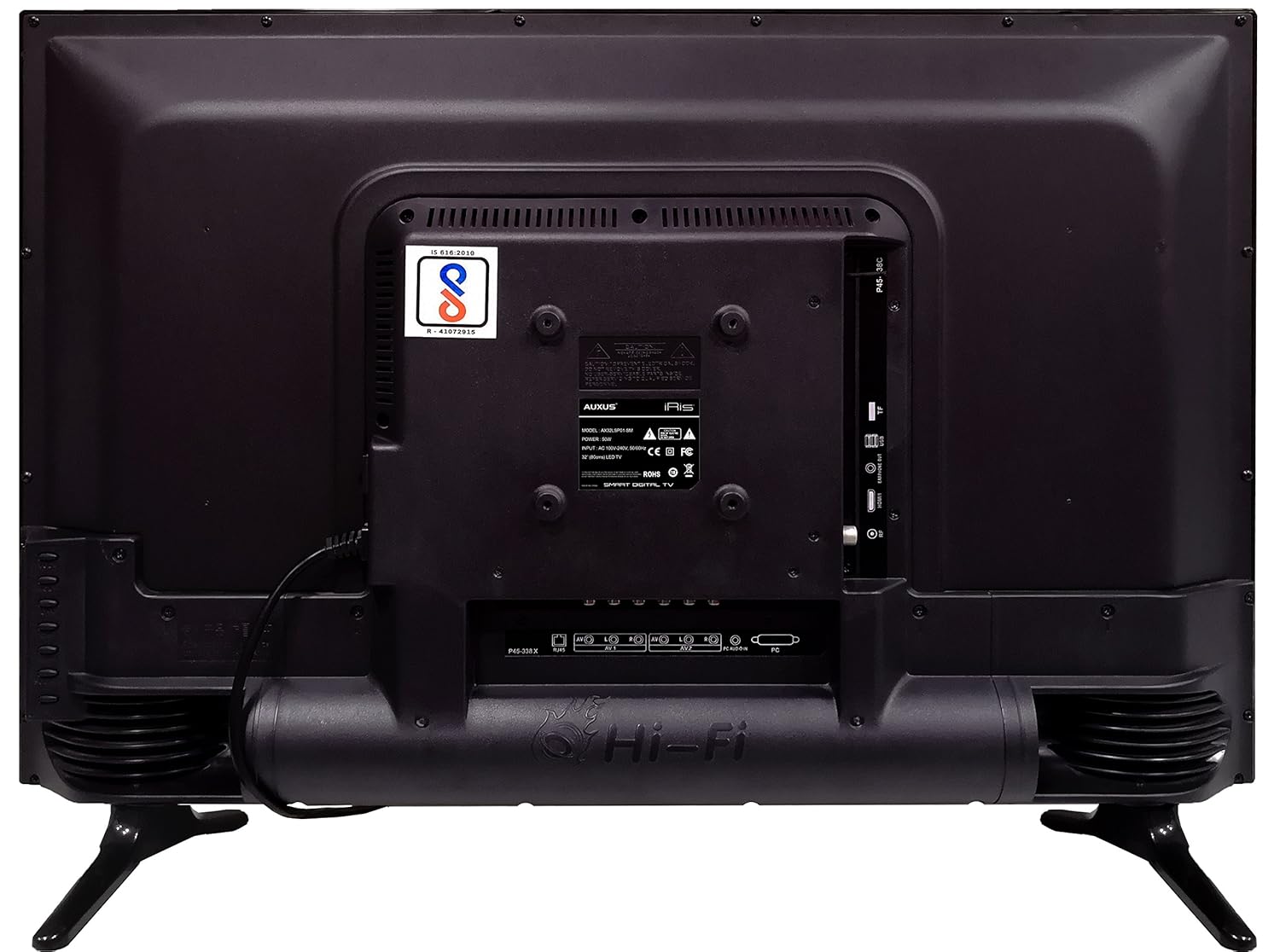
Figure 4.1: Rear panel of the TV with various input/output ports.

Figura 4.2: dettagliata view of the bottom interface ports.

Figure 4.3: Icons representing multiple connectivity options.
- Energia: Collegare il cavo di alimentazione al televisore e poi a una presa a muro.
- Antenna/cavo: Connect an antenna or cable TV signal to the RF port.
- USB: Insert USB drives for media playback or software updates into the USB ports. The TV has 2 USB ports.
- Ethernet (RJ45): Collegare un cavo Ethernet per una connessione Internet cablata.
- AV (Audio/Video): Use RCA cables for older devices. The TV has AV1 and AV2 inputs.
- PC IN (VGA): Connect a computer using a VGA cable for video and a 3.5mm audio cable for sound (PC AUDIO IN).
- Cuffia: Connect headphones to the 3.5mm jack for private listening.
5. Utilizzo del televisore
5.1 Prima configurazione
- After connecting the power, press the Power button on the remote control or TV.
- Segui le istruzioni sullo schermo per selezionare la lingua, il Paese e il fuso orario.
- Connect to your network: Choose Wi-Fi and enter your password, or ensure an Ethernet cable is connected.
- Complete the channel scan if connecting an antenna/cable.
5.2 telecomando
The remote control allows you to navigate menus, adjust volume, change channels, and access smart features. Familiarize yourself with its buttons for optimal use.
5.3 Funzionalità Smart TV (sistema operativo Android)
Your TV runs on the Android operating system, providing access to a variety of applications and internet services.

Figure 5.1: TV displaying a smart interface, such as Netflix.
- Navigazione: Use the directional pad and 'OK' button on the remote to browse the Android interface.
- Schermo senza fili: Utilize the built-in wireless display feature to mirror content from compatible smartphones or tablets to your TV.
- Internet Browsing & Apps: Connect to the internet to browse websites or download and use applications from the app store.
- Gioco: The Android platform supports various games, offering an adrenaline-pumping gaming experience.
5.4 Impostazioni immagine e audio
Access the TV's settings menu to customize picture and sound preferences.
- Immagine: Regola luminosità, contrasto, colore, nitidezza e seleziona le modalità immagine (ad esempio, Standard, Dinamica, Film).
- Suono: Optimize audio with settings for volume, balance, equalizer, and sound modes. The TV features 'Boomr Speakers' for enhanced audio output.
5.5 Selezione della sorgente di input
Press the 'Source' or 'Input' button on your remote to switch between connected devices (HDMI 1, HDMI 2, AV 1, AV 2, PC, TV).
6. Manutenzione
6.1 Pulizia del televisore
- Scollegare sempre la TV prima di pulirla.
- Use a soft, dry cloth to wipe the screen and TV casing.
- For stubborn marks on the screen, use a screen cleaner specifically designed for LED displays, applied to the cloth, not directly to the screen.
- Evitare l'uso di detergenti abrasivi, cere o solventi.
6.2 Aggiornamenti software
Controllare periodicamente la disponibilità di aggiornamenti software tramite il menu delle impostazioni del televisore per garantire prestazioni ottimali e l'accesso alle funzionalità più recenti.
7. Risoluzione Dei Problemi
Se riscontri problemi con il tuo televisore, fai riferimento ai seguenti problemi comuni e alle relative soluzioni:
| Problema | Possibile soluzione |
|---|---|
| Nessun potere | Check if the power cord is securely connected and the power outlet is working. |
| Nessuna immagine, ma l'audio è presente | Assicurarsi che sia selezionata la sorgente di ingresso corretta. Controllare i collegamenti dei cavi ai dispositivi esterni. |
| Nessun suono, ma l'immagine è presente | Check volume level and mute status. Verify audio cable connections. |
| Il telecomando non funziona | Sostituisci le batterie. Assicurati che non ci siano ostacoli tra il telecomando e la TV. |
| Android system hangs or is slow | Restart the TV by unplugging it for a few minutes. Close unused applications. |
| Problemi di connessione di rete | Check Wi-Fi password or Ethernet cable connection. Restart your router. |
8. Specifiche
| Caratteristica | Specificazione |
|---|---|
| Marca | ALTRI |
| Nome del modello | AX32LSP01-SM |
| Dimensioni dello schermo | 32 pollici (82 cm) |
| Tecnologia di visualizzazione | LED, pannello IPS |
| Risoluzione | Pronto per l'HD (1366 x 768p) |
| Viewangolo di ing | 178 gradi |
| Sistema operativo | Android |
| Capacità di archiviazione digitale | 8 GB |
| Memoria RAM | 1 GB |
| Modalità di uscita audio | Surround (Boomr Speakers) |
| Porte HDMI | Multiplo |
| Porte USB | 2 |
| Tecnologia di connettività | Ethernet, Wi-Fi (Wireless Display) |
| Altre porte | AV (RCA), PC IN (VGA), PC Audio In, Headphone (3.5mm), RF (Antenna) |
| Tipo di montaggio | Wall Mount / Table Top Stand |
| Dimensioni del prodotto (LxWxH) | Dimensioni: 84 x 13 x 59 cm |
| Peso dell'articolo | 6.5 kg |
9. Garanzia e supporto
Your AUXUS iRis AX32LSP01-SM TV comes with a warranty. Please refer to the included Warranty Card for specific terms, conditions, and duration of the warranty coverage.
For technical support, service requests, or further inquiries, please contact AUXUS customer service. Contact details can typically be found on the warranty card or the official AUXUS websito.


