1. Introduzione
Grazie per l'acquistoasing the PNI Clementine 9545 Car MP5 Stereo Player. This manual provides essential information for the correct installation, operation, and maintenance of your new car stereo. Please read this manual thoroughly before using the device to ensure optimal performance and safety.
The PNI Clementine 9545 is a versatile 1DIN car multimedia player featuring a 4-inch color LCD screen, Bluetooth connectivity, FM/AM radio, USB and SD card playback, and video input/output capabilities. Enjoy your favorite music and videos on the go, make hands-free calls, and connect a reverse camera for enhanced safety.
2. Informazioni sulla sicurezza
- Installazione professionale consigliata: For safety and proper functionality, it is highly recommended to have this product installed by a qualified professional.
- Alimentazione elettrica: Ensure the device is connected to a 12V DC power supply with proper grounding. Incorrect wiring can cause damage or fire.
- Evita le distrazioni: Do not operate the device or watch videos while driving. This can lead to accidents. Always prioritize road safety.
- Temperatura: Non esporre il dispositivo a temperature estreme, alla luce solare diretta o a elevata umidità.
- Pulizia: Per la pulizia, utilizzare un panno morbido e asciutto. Evitare detergenti abrasivi o solventi.
- Ventilazione: Assicurare un'adeguata ventilazione attorno all'unità per evitare il surriscaldamento.
3. Prodotto finitoview
3.1 Controlli e porte del pannello frontale
The front panel of the PNI Clementine 9545 features a 4-inch LCD touchscreen display and various buttons and ports for easy operation.

Descrizione dell'immagine: This image displays a detailed, labeled diagram of the PNI Clementine 9545 car stereo's front panel. Key components include the power/mode/end call button, menu button, equalizer button, band/AMS button, a central main knob for volume control, and various numbered buttons for functions like pause, repeat, file list, and track navigation. On the right side, there's an IR receiver, microphone, Micro SD slot, USB port, AUX in, and a reset button. The central part is dominated by the 4-inch touchscreen display.

Descrizione dell'immagine: Un primo piano frontale view of the PNI Clementine 9545 car stereo. The left side features several control buttons and a prominent central rotary knob with red backlighting. The right side is dominated by the 4-inch color display, currently showing FM radio information with frequency 87.5 MHz. Below the display, there are touch-sensitive buttons for radio presets. The overall design is sleek and functional.
3.2 Contenuto della confezione
Il pacchetto in genere include i seguenti articoli:
- PNI Clementine 9545 Car MP5 Stereo Player
- Barra di montaggio
- Telecomando
- Cavi di collegamento
- Manuale d'uso
4. Configurazione e installazione
This device is designed for 1 DIN installation. Proper wiring is crucial for safe and correct operation. Refer to the wiring diagram below.
4.1 Schema elettrico

Descrizione dell'immagine: This image displays a detailed wiring diagram for the PNI Clementine 9545 car stereo. It shows color-coded wires for speaker connections (Right rear, Right front, Left front, Left rear, with positive and negative terminals), and power connections (Rear view camera sensor, positive pole, car antenna, negative pole, lighter plug). Each wire is clearly labeled with its function and corresponding color, facilitating correct installation.
4.2 Passaggi generali di installazione
- Scollegare la batteria: Prima di iniziare qualsiasi lavoro elettrico, scollegare il terminale negativo della batteria del veicolo per evitare cortocircuiti.
- Montaggio: Install the mounting bar into your car's dashboard opening (1 DIN size). Secure the player into the mounting bar.
- Cablaggio: Connect the power wires (12V DC, ground), speaker wires (4 x 50W output), and any auxiliary inputs/outputs (RCA, AUX, USB, SD) according to the diagram.
- Telecamera posteriore (opzionale): If installing a reverse camera, connect its video output to the dedicated RCA video input on the player. Connect the camera's power to the reverse light circuit.
- Ricollegare la batteria: Una volta che tutti i collegamenti sono sicuri, ricollegare il terminale negativo della batteria del veicolo.
- Funzionalità di prova: Turn on the car stereo and test all functions (radio, media playback, Bluetooth, camera) to ensure correct installation.
5. Istruzioni per l'uso
5.1 Controlli di base
- Power/Mode (PWR MOD): Press to turn the unit ON/OFF. Short press to switch between modes (Radio, USB, SD, AUX, Bluetooth).
- Volume Control (Main Knob): Ruotare la manopola centrale per regolare il livello del volume.
- Menu: Press to access the main menu or settings.
- EQ (Equalizzatore): Press to cycle through preset equalizer settings or access custom EQ adjustments.
- Band/AMS (BND AMS): In radio mode, press to switch between FM bands (FM1, FM2, FM3) or AM bands. Long press for Automatic Memory Store (AMS).
- Navigation Buttons (◀◀ / ▶▶): Use to skip tracks, fast forward/rewind, or tune radio frequencies.
- 1/PAU (Pause): Play/Pause media playback.
- 2/LIST: In media mode, press to view IL file lista.
- Reimposta (RST): Use a thin object to press the reset button to restore factory settings if the unit malfunctions.
5.2 Funzionamento della radio
The unit supports FM (87.5 – 108.0 MHz) and AM (522 KHz - 1620 KHz) radio bands.
- tuning: Use the navigation buttons (◀◀ / ▶▶) to manually tune frequencies.
- Ricerca automatica: Long press the navigation buttons to automatically search for the next strong station.
- Stazioni preimpostate: The unit can store up to 18 FM preset stations. Use the numbered buttons (1-6) to select or save presets. Long press a numbered button to save the current station to that preset.
5.3 Riproduzione multimediale (USB/SD)
Insert a USB drive into the USB port or an SD card into the SD card slot. The unit will automatically switch to USB/SD mode and begin playback of supported files (MP5, MP3, MP4, WMA, WAV, etc.).
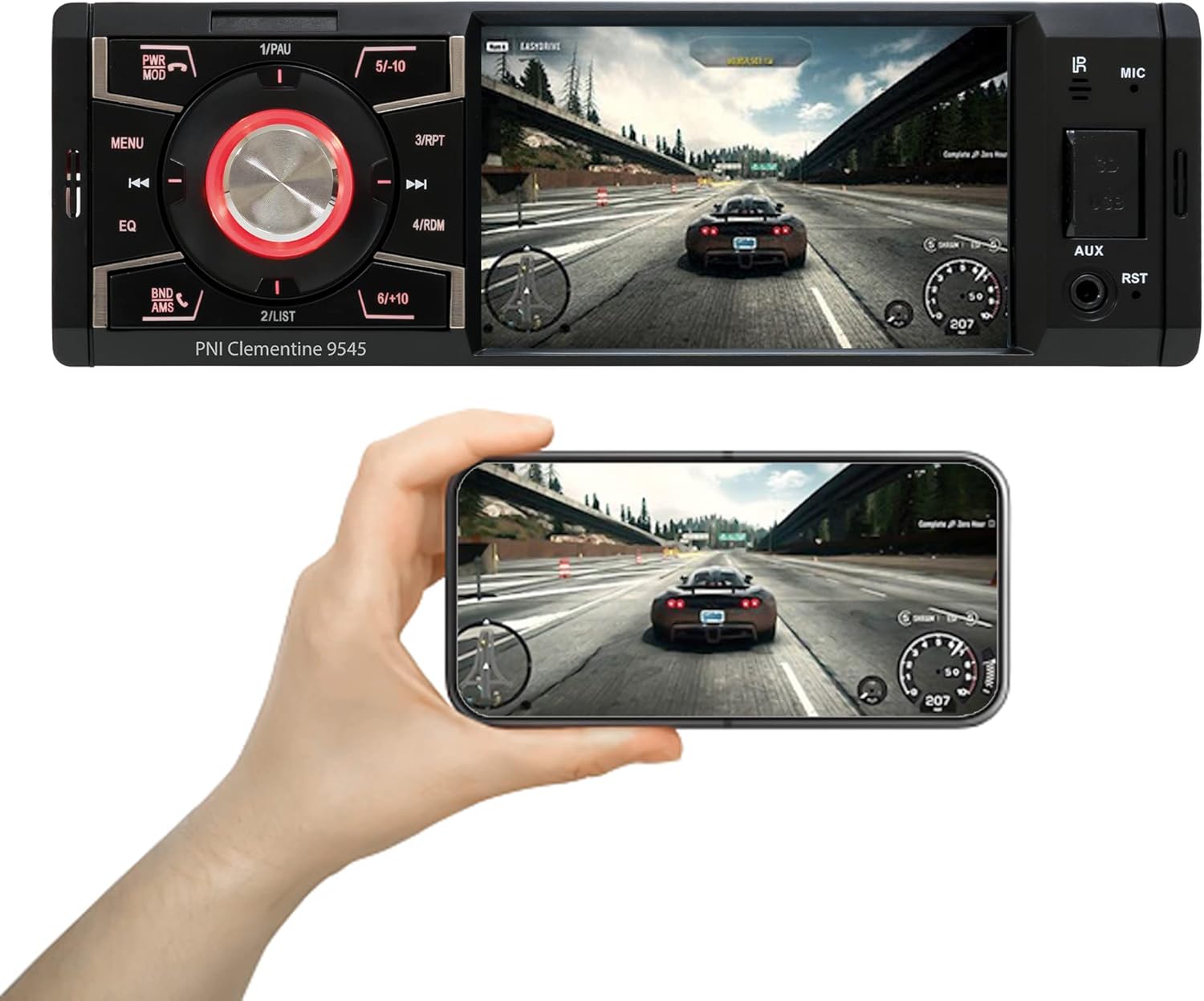
Descrizione dell'immagine: The PNI Clementine 9545 car stereo is shown playing a video game scene on its 4-inch display. Below the stereo, a hand holds a smartphone that mirrors the same video content, demonstrating the unit's video playback capabilities and potential for screen mirroring or external display connection.
5.4 Funzionalità Bluetooth
The integrated Bluetooth feature allows for hands-free calling and audio streaming.
- Abbinamento: Enable Bluetooth on your mobile device and search for "PNI Clementine 9545". Select it to pair.
- Chiamate in vivavoce: Once paired, you can make and receive calls directly through the car stereo. Use the PWR MOD button to answer/end calls.
- Streaming audio: Play music from your paired phone through the car's audio system.
5.5 Ingresso AUX
Connect external audio devices (e.g., MP3 players, smartphones) to the 3.5mm AUX input jack on the front panel using an audio cable.
5.6 Funzionamento del touchscreen
The 4-inch LCD display is a touchscreen, allowing for intuitive control of various functions and settings.

Descrizione dell'immagine: A human finger is shown touching the 4-inch touchscreen display of the PNI Clementine 9545 car stereo. The screen displays a 'HOME' menu with various media and function icons, indicating the interactive nature of the display for navigating the stereo's features.
5.7 Funzione telecamera di retromarcia
When an optional reverse camera is connected and the vehicle is put into reverse gear, the player's display will automatically switch to show the reverse camera feed, assisting with parking and maneuvering.

Descrizione dell'immagine: The PNI Clementine 9545 car stereo's display shows a reverse camera view of a parking garage, complete with colored parking guidelines (red, yellow, green) overlaid on the image. Below the stereo, a small image of an optional rear view camera is shown, indicating the unit's compatibility with such accessories.
6. Manutenzione
- Pulizia dell'unità: Utilizzare un panno morbido e asciutto per pulire il pannello frontale e il display. Per lo sporco ostinato, pulire leggermenteampen the cloth with water. Do not use harsh chemicals, abrasive cleaners, or solvents as they may damage the finish or screen.
- Cleaning Ports: Periodically check USB and SD card slots for dust or debris. Use a can of compressed air to gently clear them if necessary.
- Cura generale: Avoid placing heavy objects on the unit. Protect it from direct sunlight and extreme temperatures when the vehicle is parked for extended periods.
7. Risoluzione Dei Problemi
If you encounter issues with your PNI Clementine 9545, refer to the following common problems and solutions:
| Problema | Possibile causa | Soluzione |
|---|---|---|
| Nessun potere | Cablaggio errato; Fusibile bruciato; Batteria del veicolo scarica. | Check power connections and fuses. Ensure battery voltage is sufficient. Consult a professional for wiring inspection. |
| Nessun suono | Volume troppo basso; Disattivazione audio attivata; Cavi degli altoparlanti scollegati; Sorgente audio errata. | Aumenta il volume. Controlla se la modalità muto è attiva. Verifica i collegamenti degli altoparlanti. Seleziona la sorgente audio corretta. |
| Bluetooth non si connette | Bluetooth not enabled on phone; Device not in pairing mode; Interference. | Ensure Bluetooth is active on your phone. Put the stereo in Bluetooth pairing mode. Try restarting both devices. |
| USB/SD non in riproduzione | Non supportato file formato; Supporto danneggiato; Inserito in modo errato. | Controllo file formats (MP5, MP3, MP4, WMA, WAV). Ensure media is not corrupted. Reinsert USB/SD card correctly. |
| Screen Frozen/Unresponsive | Problema software. | Press the RST (Reset) button with a thin object to restart the unit. |
Se il problema persiste dopo aver provato queste soluzioni, contattare l'assistenza clienti o un tecnico qualificato.
8. Specifiche
| Caratteristica | Specificazione |
|---|---|
| Modello | Clementine 9545 |
| Volume di fornituratage | 12V CC |
| Impedenza | 4 Ohm |
| Potenza audio massima in uscita | 4 x 50W |
| Frequenza radio FM | 87.5 – 108.0 MHz |
| Frequenza radio AM | 522 kHz - 1620 kHz |
| Porta USB | USB 2.0 |
| Slot per scheda | Scheda SD |
| Rapporto segnale/rumore | > 40 dB |
| Dimensioni (L x A x P) | Dimensioni: 178 x 50 x 110 mm |
| Peso | 0.627 kg |
| Consumo di corrente massimo | 10 Amperi |
| Ingresso audio AUX | Mini-jack da 3.5 mm |
| Tipo di installazione | 1 DIN |
| Display | 4-inch LCD, 800 x 480 pixels, Red button illumination |
| Video Playback | Full HD 1920 x 1080px (AVI format) |
| Riproduzione audio | MP5, MP3, MP4, WMA, WAV, etc. (Stereo output) |
| Temperatura di esercizio | Temperatura di esercizio -26°C ~ +80°C |
| Bluetooth | Integrated Bluetooth for calls and audio streaming |
| Ingresso / uscita video | 1 x RCA Video Input/Output, 1 x RCA Video Input for Reverse Camera |
9. Garanzia e supporto
9.1 Informazioni sulla garanzia
Your PNI Clementine 9545 Car MP5 Stereo Player is covered by a manufacturer's warranty. Please refer to the warranty card included in your package or contact your retailer for specific warranty terms and conditions. Keep your proof of purchase for any warranty claims.
9.2 Assistenza clienti
For technical assistance, troubleshooting beyond this manual, or warranty inquiries, please contact the retailer where you purchased the product or visit the official PNI websito per le risorse di supporto.


