1. Prodotto finitoview
The UGREEN 10Gbps USB C Female to USB Male Adapter is designed to convert a standard USB-A port into a USB-C port. This allows for the connection of USB-C peripherals such as smartphones, tablets, and flash drives to devices equipped with USB-A ports, including laptops, hubs, and chargers. This adapter supports high-speed data transfer and efficient charging.

Image: UGREEN USB C Female to USB Male Adapter, showcasing il suo design compatto.
2. Configurazione e installazione
This adapter features a plug-and-play design, requiring no driver installation for operation. Simply connect the adapter to your device's USB-A port, and then connect your USB-C cable or peripheral to the adapter's USB-C female port.
Collegamento dell'adattatore:
- Locate an available USB-A port on your host device (e.g., laptop, charger, car USB port).
- Insert the USB-A male end of the UGREEN adapter into the USB-A port.
- Connect your USB-C cable or device into the USB-C female port of the adapter.

Image: Illustration of plugging a USB-C device into the UGREEN adapter, which is then connected to a USB-A port.
Nota: This adapter does not support connecting USB-C to HDMI adapters.
3. Istruzioni per l'uso
Trasferimento dati:
When connected to a USB 3.0 port, the adapter supports data syncing at a maximum speed of 10Gbps. This allows for rapid transfer of large files between your USB-C device and the host device. The adapter is also backward compatible with USB 2.0 and USB 1.1, operating at their respective speeds.

Image: Diagram illustrating 10Gbps data transfer speed compared to USB 3.0 and USB 2.0, showing a USB-C flash drive connected via the adapter.
Ricarica:
The adapter supports up to 3 Amps of power output, enabling fast charging for your compatible USB-C devices. Ensure your charger and cable also support fast charging for optimal performance.

Image: Two smartphones charging via UGREEN adapters connected to a wall charger, demonstrating fast charging capability.
4. Caratteristiche e design
- Costruzione durevole: The adapter features an aluminum alloy case for enhanced durability and a built-in 56KΩ resistance to protect internal circuits, ensuring safe and stable performance.
- Dimensioni compatte: With dimensions of approximately 35mm × 12mm, the adapter is ultra-compact and easy to carry, minimizing space usage.
- Foro per cordino: A small hole is integrated into the design, allowing users to attach a lanyard or keychain to prevent loss.
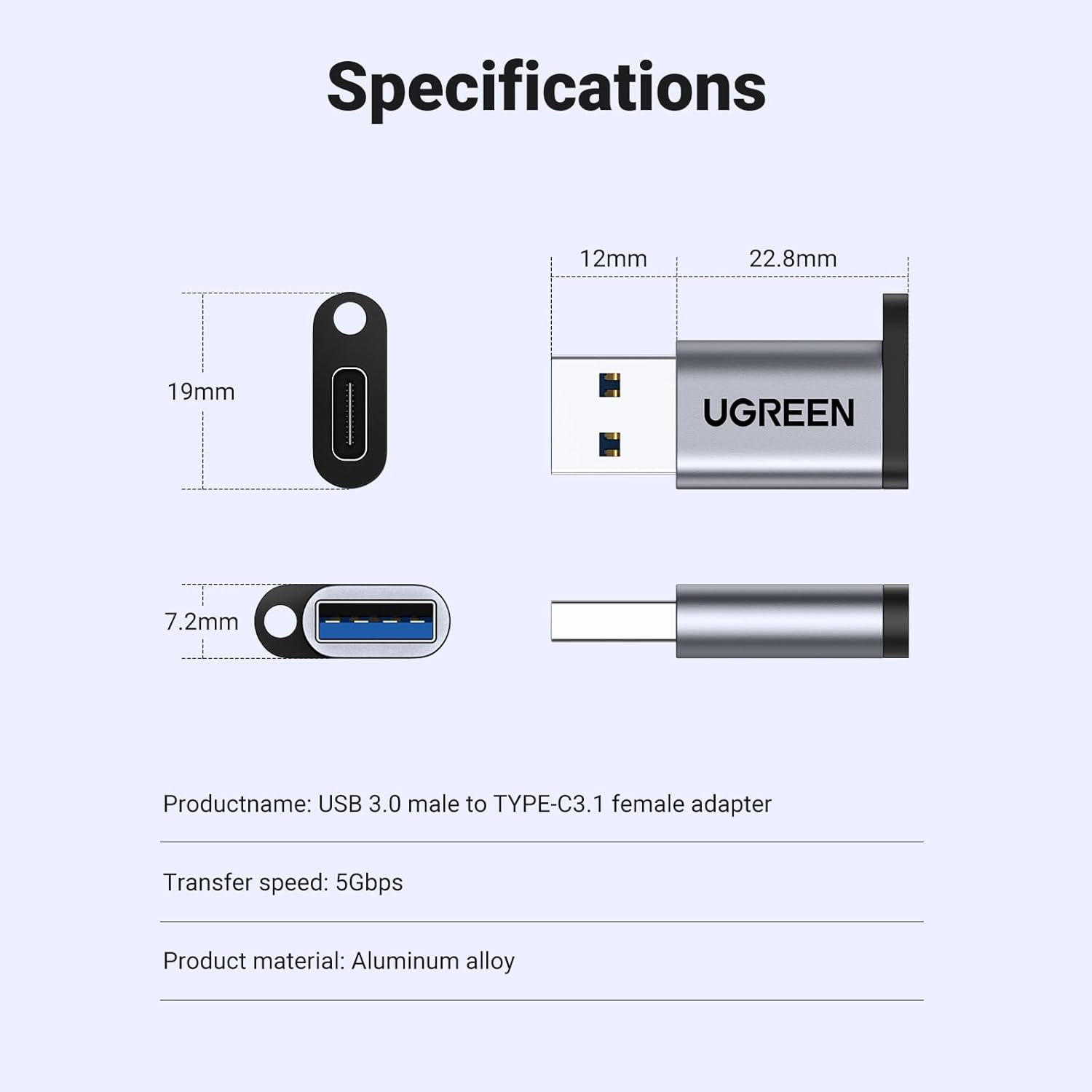
Image: Technical diagram showing the dimensions (12mm x 22.8mm x 7.2mm) and material (aluminum alloy) of the UGREEN adapter.
5. Compatibilità
The USB-A male connector is widely compatible with various devices, including:
- Computers and Laptops with USB Type-A ports
- USB chargers with USB Type-A ports
- Car USB ports (for charging and data, e.g., CarPlay)
The USB-C female port is compatible with a broad range of USB-C enabled devices, such as:
- Smartphones (e.g., iPhone 15 series, Samsung Galaxy, Google Pixel)
- Tablets (e.g., iPad Air)
- USB-C enabled hard drives and flash disks
- Apple Watch Magnetic Chargers
- USB-C headphones (Note: Only supported on Windows 10/11 and macOS)

Image: Visual chart displaying various compatible devices for both USB 3.0 (USB-A) and USB-C connections.

Image: Demonstrates the adapter's use in a car for connecting a smartphone to a car's USB-A port, enabling features like CarPlay.

Image: A person using the UGREEN adapter to connect USB-C headphones to a laptop's USB-A port.
6. Specifiche
| Nome del prodotto | UGREEN USB C Female to USB Male Adapter |
| Numero di modello | 50533 |
| Tipo di connettore | USB C Female to USB Male |
| Velocità di trasferimento dati | Up to 10Gbps (when connected to USB 3.0 port) |
| Potenza in uscita | Fino a 3 Amps |
| Materiale | Custodia in lega di alluminio |
| Dimensioni (L x P x A) | Approximately 0.3 x 0.11 x 0.35 inches (35mm x 12mm) |
| Peso dell'articolo | 0.141 once |
| Colore | Grigio |
7. Manutenzione
Per garantire la longevità e le prestazioni ottimali del tuo adattatore UGREEN, segui queste linee guida per la manutenzione:
- Pulizia: Utilizzare un panno morbido e asciutto per pulire delicatamente l'adattatore. Evitare l'uso di detergenti liquidi o materiali abrasivi.
- Magazzinaggio: Conservare l'adattatore in un luogo fresco e asciutto, lontano dalla luce solare diretta e da temperature estreme.
- Gestione: Avoid excessive force when plugging or unplugging the adapter to prevent damage to the connectors.
8. Risoluzione Dei Problemi
If you encounter issues with your UGREEN adapter, consider the following troubleshooting steps:
- Nessuna connessione: Ensure both the USB-A end of the adapter and the USB-C device/cable are fully and correctly inserted. Try connecting to a different USB-A port or with a different USB-C cable/device to rule out other component issues.
- Trasferimento dati/ricarica lenta: Verify that the host USB-A port supports USB 3.0 (often indicated by a blue interior) for 10Gbps speeds. Ensure your USB-C cable and connected device also support the desired speed and charging rate.
- Adattatore non riconosciuto: Restart your host device (computer, laptop). For specific functionalities like USB-C headphones, ensure your operating system (Windows 10/11 or macOS) is supported.
- Incompatibility with HDMI Adapters: As noted, this adapter does not support USB-C to HDMI video output.
9. Garanzia e supporto
UGREEN products are designed for reliability and performance. For warranty information, technical support, or further assistance, please visit the official UGREEN websito o contattare direttamente il servizio clienti. Conservare la ricevuta d'acquisto per eventuali reclami in garanzia.
Negozio ufficiale UGREEN: Negozio UGREEN su Amazon


