Prodotto finitoview
This manual provides essential information for the setup, operation, and maintenance of your LG 65SK8000 65-Inch 4K UHD Smart LED TV. Please read thoroughly before use.
The LG 65SK8000 is a 65-inch 4K Ultra HD Smart LED TV designed to enhance your viewing experience. It features an Intelligent Processor that optimizes color, depth, and sharpness for a realistic picture. With Dolby Atmos support, it delivers theater-quality audio.
Cosa c'è nella scatola
Verificare che tutti gli elementi siano presenti prima di procedere con la configurazione:
- LG 65SK8000 65-Inch 4K UHD Smart LED TV
- Cavo di alimentazione
- TV Stand (components for assembly)
- Telecomando
- 2 batterie AA (per il telecomando)
Impostare
1. Disimballaggio e posizionamento
Carefully remove the TV from its packaging. It is recommended to have at least two people for safe handling due to the size and weight of the unit.
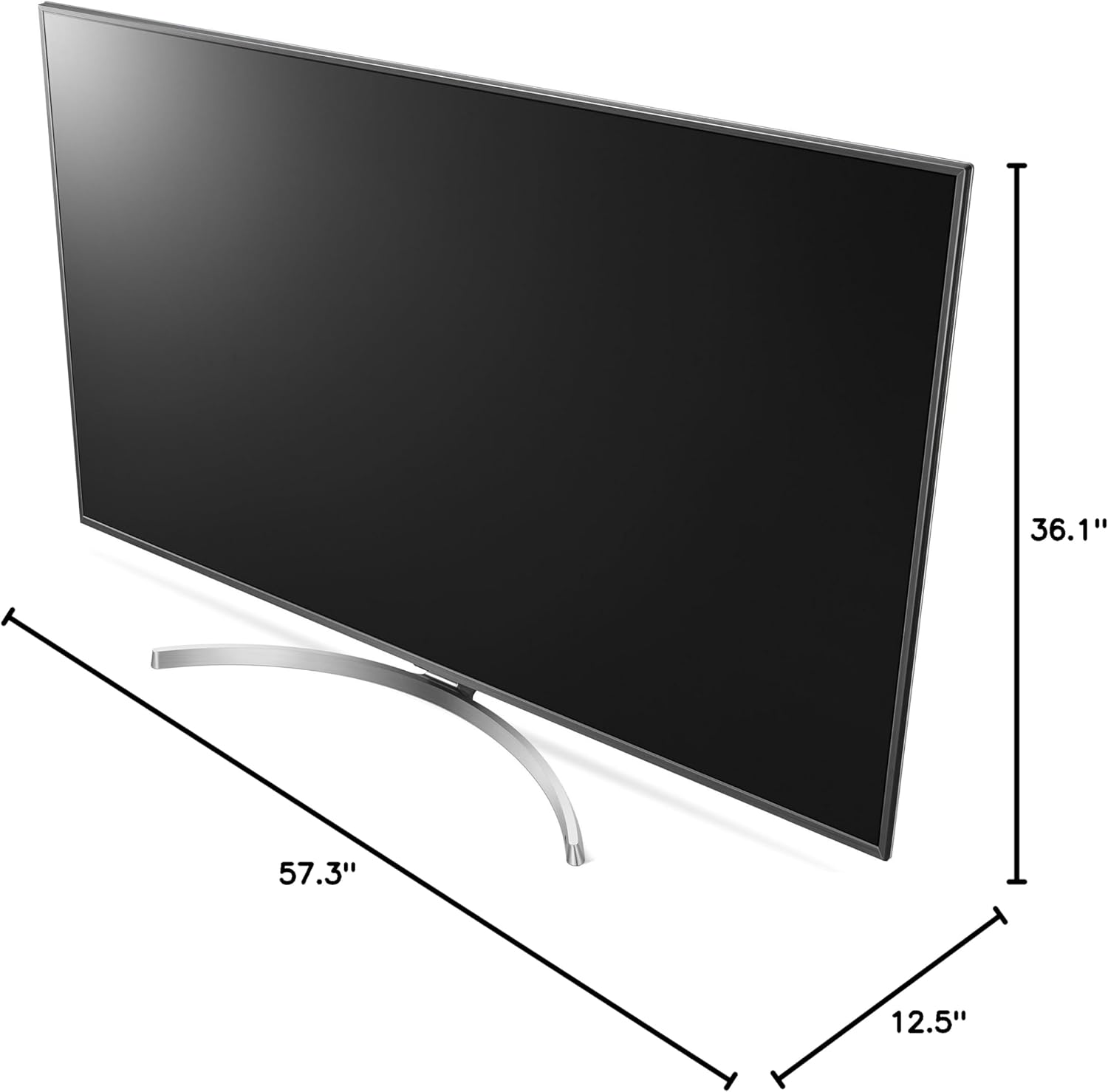
Figure 1: Product dimensions for placement planning. The TV measures approximately 12.5"D x 57.3"W x 36.1"H.
Scegli una superficie stabile e piana o una posizione adatta per il montaggio a parete. Assicurati che ci sia un'adeguata ventilazione attorno al televisore.
2. Fissaggio del supporto (se non montato a parete)
Follow the instructions provided with the stand components to securely attach the stand to the TV. Ensure all screws are tightened properly.
3. Collegamento di periferiche
Connect your external devices (e.g., cable box, Blu-ray player, gaming console) to the appropriate ports on the back of the TV. The LG 65SK8000 features multiple HDMI and USB ports, along with Ethernet connectivity.

Figura 2: Posteriore view of the LG 65SK8000 TV, highlighting the various input ports for connecting external devices.

Figure 3: A closer look at the input ports on the LG 65SK8000, including HDMI, USB, and Ethernet connections.
4. Collegamento elettrico
Connect the power cable to the TV and then to a wall outlet. Insert the supplied AA batteries into the remote control.
5. Accensione iniziale e procedura guidata di configurazione
Press the power button on the remote control or the TV. The TV will guide you through an initial setup wizard to configure language, network settings, and channel scanning.
Istruzioni per l'uso
Caratteristiche della qualità dell'immagine
- High Dynamic Range (HDR10, HLG, Dolby Vision, Advanced HDR by Technicolor): This feature extends picture contrast and brightness, providing a more vivid and detailed image when viewing HDR content from connected sources or built-in apps.
- TruMotion 240 Blur Reduction (120Hz Refresh Rate): Enhances motion clarity, reducing blur in fast-moving scenes for a smoother viewesperienza di acquisizione.
- IPS (In-Plane Switching) LCD Panel: Fornisce ampio viewing angles, ensuring consistent picture quality even when viewed di lato.
- Expanded Color Range with Billion Rich Colors: Utilizes an 8-bit panel with 10-bit dithering to display a broader spectrum of colors, resulting in richer and more accurate hues.
- Upscaler 4K: Automatically upconverts standard-definition and high-definition video content to near-4K quality, improving clarity and detail for non-4K sources.
Caratteristiche audio
The LG 65SK8000 supports Dolby Atmos, delivering immersive, theater-quality audio. Adjust audio settings via the TV's on-screen menu to optimize your sound experience.
Funzionalità SmartTV
Access a variety of streaming services and apps directly from your TV. The intuitive interface allows for easy navigation. Connect to your home network via Wi-Fi or Ethernet to utilize smart features.
Manutenzione
Pulizia dello schermo
Pulisci delicatamente lo schermo con un panno in microfibra morbido e asciutto. Per le macchie ostinate, dampPulire il panno con acqua o con una soluzione detergente specifica per schermi (evitare prodotti chimici aggressivi).
Pulizia del corpo del televisore
Use a soft, dry cloth to clean the frame and back of the TV. Do not use abrasive cleaners or solvents.
Aggiornamenti software
Periodically check for and install software updates to ensure optimal performance and access to the latest features. This can usually be done through the TV's settings menu under "Support" or "Software Update."
Risoluzione dei problemi
| Problema | Possibile causa | Soluzione |
|---|---|---|
| Nessun potere | Cavo di alimentazione scollegato; problema con la presa | Ensure power cable is securely connected to TV and a working outlet. Test outlet with another device. |
| Nessuna immagine, ma l'audio è presente | Ingresso selezionato non corretto; cavo HDMI difettoso | Verify correct input source. Try a different HDMI cable or port. |
| Nessun suono, ma l'immagine è presente | Volume muted/low; external audio system issue | Check TV volume and mute status. If using external audio, ensure it's powered on and correctly configured. |
| Il telecomando non funziona | Batterie scariche; ostruzione; problema di associazione | Replace batteries. Remove obstructions. Re-pair the remote if it's a smart remote (refer to TV's on-screen guide). |
| Smart features not working/slow | Network connectivity issues; outdated software | Check Wi-Fi connection or Ethernet cable. Restart router. Update TV software. |
Specifiche
| Caratteristica | Dettaglio |
|---|---|
| Marca | LG |
| Numero di modello | 65SK8000 |
| Dimensioni dello schermo | 65 pollici |
| Tecnologia di visualizzazione | GUIDATO |
| Risoluzione | Risoluzione 4K (3840 x 2160) |
| Frequenza di aggiornamento | 120 Hz (TruMotion 240) |
| Caratteristica speciale | Flat, Smart TV, HDR (HDR10, HLG, Dolby Vision, Advanced HDR by Technicolor) |
| Tecnologia di connettività | Ethernet, HDMI, USB |
| Proporzioni | 16:9 |
| Dimensioni del prodotto (P x L x A) | 12.5" x 57.3" x 36.1" |
| Peso dell'articolo | 57.8 libbre |
| Cosatage | 100 watt |
| Componenti inclusi | Cavo di alimentazione, telecomando, supporto |
Garanzia e supporto
Per informazioni sulla garanzia e supporto tecnico, fare riferimento al sito ufficiale LG weboppure contatta direttamente il servizio clienti LG. Conserva la ricevuta d'acquisto e il numero di serie del prodotto per qualsiasi domanda.
Online resources and FAQs are available on the Supporto LG websito.