1. Introduzione
This manual provides essential information and instructions for the safe and efficient use of your Nokia 8 Sirocco TA-1005 smartphone. Please read this guide thoroughly before operating your device to ensure optimal performance and longevity. This device is designed for use with GSM, 3G, and 4G LTE networks. Compatibility with CDMA networks, including Verizon, Sprint, and US Cellular, is not supported. Verify network compatibility with your service provider prior to use.
2. Cosa c'è nella scatola
Upon unboxing your Nokia 8 Sirocco TA-1005, verify that all components are present:
- Nokia 8 Sirocco TA-1005 Device
- Cavo USB di tipo C.
- Adattatore di alimentazione
- Cuffia
- Strumento di espulsione della SIM
- Guida rapida
- Informazioni sulla sicurezza e sulla garanzia
3. Disposizione del dispositivo
Familiarize yourself with the physical components of your Nokia 8 Sirocco TA-1005.
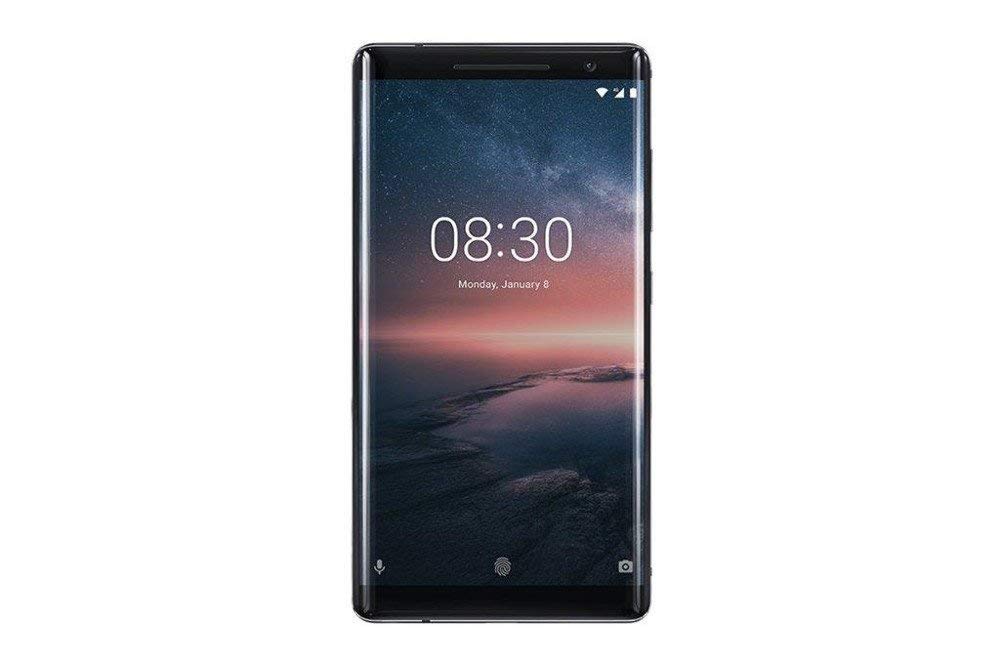
Figura 3.1: Posteriore view of the Nokia 8 Sirocco TA-1005. This image displays the dual camera setup with ZEISS optics, the circular fingerprint sensor below the camera, and the Nokia logo centrally placed. The 'androidone' branding is visible towards the bottom.
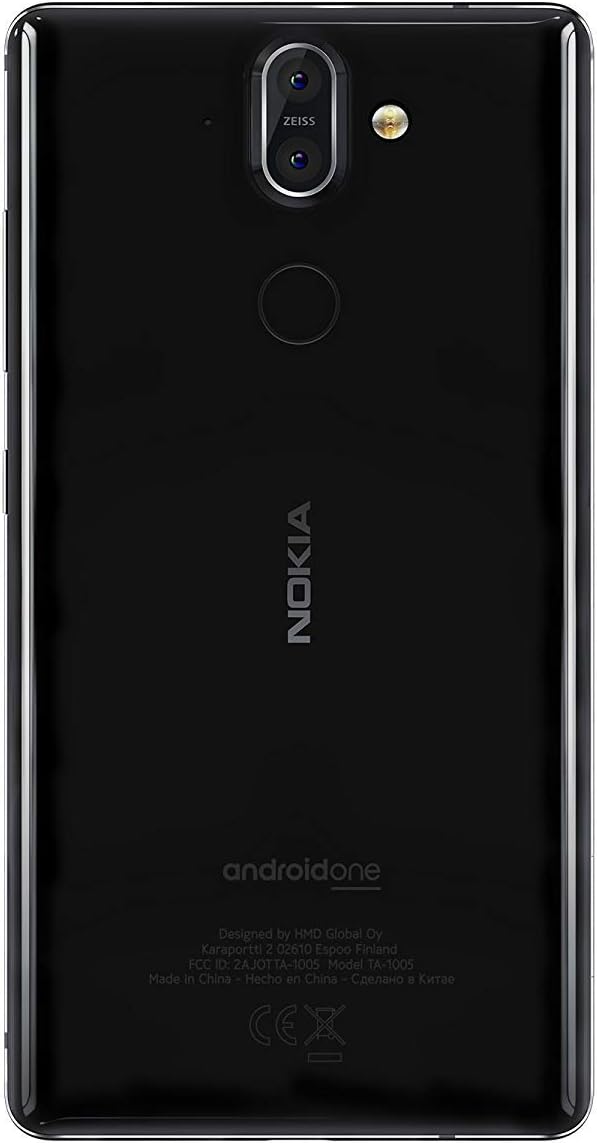
Figura 3.2: Davanti view of the Nokia 8 Sirocco TA-1005. The image highlights the 5.5-inch P-OLED curved display, the front-facing camera at the top, and the on-screen navigation buttons. The device features minimal bezels.

Figura 3.3: Lato view of the Nokia 8 Sirocco TA-1005. This image illustrates the slim profile of the device, with the power button and volume rocker located on the right side for easy access.
Componenti chiave:
- Fotocamera frontale: Situato nella parte superiore del display.
- Auricolare: For calls, located above the display.
- Display: 5.5-inch P-OLED capacitive touchscreen.
- Pulsanti del volume: On the right side, to adjust audio levels.
- Pulsante di accensione/blocco: On the right side, to power on/off or lock/unlock the screen.
- Porta USB di tipo C: In basso, per la ricarica e il trasferimento dati.
- Microfono: Situati in basso e in alto.
- Oratore: Situato in basso.
- Vassoio SIM/scheda di memoria: On the side, for inserting SIM cards.
- Telecamere posteriori: Dual cameras with ZEISS optics on the back.
- Flash: Dual-tone flash next to the rear cameras.
- Sensore di impronte digitali: On the back, below the rear cameras.
4. Impostazione
4.1. Inserimento della scheda SIM
- Individua il vassoio della scheda SIM sul lato del dispositivo.
- Inserire lo strumento di espulsione della SIM nel piccolo foro sul vassoio per aprirlo.
- Place your Nano-SIM card(s) into the designated slot(s) on the tray, ensuring the gold contacts face downwards.
- Spingere con attenzione il vassoio nuovamente nel dispositivo finché non scatta in posizione.
Nota: This device does not support external memory cards.
4.2. Accensione e spegnimento
- Per accendere: Press and hold the Power/Lock button until the Nokia logo appears.
- Per spegnere: Press and hold the Power/Lock button until the power options menu appears, then select "Power off".
4.3. Configurazione iniziale
Upon first power-on, the device will guide you through the initial setup process. This includes selecting your language, connecting to a Wi-Fi network, setting up your Google account, and configuring security features like fingerprint unlock or a PIN/pattern.
5. Istruzioni per l'uso
5.1. Effettuare chiamate
- Open the "Phone" application.
- Inserisci il numero di telefono utilizzando il tastierino numerico oppure seleziona un contatto dalla rubrica.
- Tocca l'icona della chiamata per avviare la chiamata.
5.2. Invio di messaggi
- Open the "Messages" application.
- Tocca l'icona "Avvia chat" o "Nuovo messaggio".
- Inserisci il numero del destinatario o selezionalo dai contatti.
- Digita il tuo messaggio nel campo di testo.
- Tocca l'icona Invia.
5.3. Utilizzo della fotocamera
- Aprire l'applicazione "Fotocamera".
- Inquadra il soggetto sullo schermo.
- Tocca il pulsante di scatto per scattare una foto.
- Switch between photo and video modes, or access advanced settings like portrait mode or panorama, as desired.
5.4. Connettività Internet
- Wifi: Vai a Impostazioni > Rete e Internet > Wi-Fi. Turn Wi-Fi on and select an available network. Enter the password if required.
- Dati mobili: Vai a Impostazioni > Rete e Internet > Rete mobileAssicurati che "Dati mobili" sia abilitato.
5.5. Funzionalità di sicurezza
Your Nokia 8 Sirocco TA-1005 offers various security options:
- Sblocco delle impronte digitali: Registra le tue impronte digitali tramite Settings > Security & Location > Fingerprint.
- Blocco schermo: Set a PIN, pattern, or password via Settings > Security & Location > Screen lock.
6. Manutenzione
6.1. Pulizia del dispositivo
Use a soft, lint-free cloth to clean your device. Avoid using harsh chemicals or abrasive materials, which can damage the screen or finish.
6.2. Cura della batteria
- Charge your device using only Nokia-approved chargers and cables.
- Evitare di esporre il dispositivo a temperature estreme.
- Non lasciare che la batteria si scarichi completamente frequentemente.
6.3. Aggiornamenti software
Controlla e installa regolarmente gli aggiornamenti software per assicurarti che il tuo dispositivo abbia le ultime funzionalità, patch di sicurezza e miglioramenti delle prestazioni. Vai a Impostazioni > Sistema > Aggiornamento di sistema.
7. Risoluzione Dei Problemi
Se riscontri problemi con il tuo dispositivo, fai riferimento alle seguenti soluzioni comuni:
| Problema | Soluzione |
|---|---|
| Il dispositivo non si accende | Assicurarsi che la batteria sia carica. Collegare il dispositivo a un caricabatterie per almeno 30 minuti. Se il dispositivo non risponde, eseguire un riavvio forzato tenendo premuto il pulsante di accensione per 10-15 secondi. |
| Segnale di rete scarso | Check SIM card insertion. Move to an area with better network coverage. Restart the device. Verify network settings in Impostazioni > Rete e Internet > Rete mobile. |
| Applications are crashing | Cancella la cache dell'app (Impostazioni > App e notifiche > [Nome app] > Archiviazione e cache > Cancella cache). Aggiorna l'app dal Google Play Store. Se il problema persiste, disinstalla e reinstalla l'app. |
| La batteria si scarica rapidamente | Reduce screen brightness. Close unused background apps. Disable Wi-Fi, Bluetooth, and GPS when not in use. Check battery usage in Impostazioni> Batteria per identificare le app che consumano molta energia. |
| Il dispositivo non risponde | Perform a force restart by holding the Power button for 10-15 seconds. If the issue continues, consider a factory reset (Impostazioni > Sistema > Opzioni di ripristino > Cancella tutti i dati (ripristino delle impostazioni di fabbrica)). Avvertimento: Un ripristino delle impostazioni di fabbrica cancellerà tutti i dati presenti sul dispositivo. Esegui il backup dei dati importanti prima di procedere. |
8. Specifiche
Detailed technical specifications for the Nokia 8 Sirocco TA-1005:
| Caratteristica | Dettaglio |
|---|---|
| Nome del modello | 8 Sirocco |
| Numero di modello | TA-1005 |
| Sistema operativo | Android 8.0 (Oreo) |
| Processore | Qualcomm MSM8998 Snapdragon 835, Octa-core (4x2.5 GHz Kryo & 4x1.8 GHz Kryo) |
| Scheda grafica | Adreno 540 |
| Memoria RAM | 6 GB |
| Memoria interna | 128 GB |
| Display | 5.5 inches, P-OLED capacitive touchscreen, 1440 x 2560 pixels, Corning Gorilla Glass 5 |
| Telecamera posteriore | 12MP Wide (f/1.7) + 13 MP Tele (f/2.6), dual-tone flash |
| Fotocamera frontale | 5MP |
| Capacità della batteria | 3250 mAh |
| Ricarica | Supporto per la ricarica rapida |
| Connettività | Wi-Fi 802.11a/b/g/n, Bluetooth, USB Type-C |
| Dimensioni | Dimensioni: 43.36 x 43.17 x 0.75 cm |
| Peso | 181 grammi |
| Tipo di SIM | Nano SIM |
| Supporto di rete | 2G GSM, 3G, 4G LTE (Note: Not compatible with CDMA networks) |
9. Safety and Warranty Information
9.1. Linee guida di sicurezza
- Non utilizzare il dispositivo in aree vietate, come aerei o ospedali.
- Evitare di esporre il dispositivo all'acqua o a umidità eccessiva.
- Utilizzare solo accessori originali o approvati.
- Non tentare di smontare o riparare il dispositivo da soli.
- Smaltire il dispositivo e la batteria in modo responsabile, nel rispetto delle normative locali.
9.2. Informazioni sulla garanzia
Your Nokia 8 Sirocco TA-1005 is covered by a limited manufacturer's warranty. Please refer to the separate warranty document included in your product packaging or visit the official Nokia support websito per termini e condizioni dettagliati. Conservare la prova d'acquisto per eventuali reclami in garanzia.


