1. Introduzione
Grazie per l'acquistoasing the Ematic EMHD130LED HD 16GB Music Player. This compact and portable device allows you to enjoy your favorite music on the go. Featuring a 1.3-inch OLED display and a MicroSD slot for expanded storage, it is designed for ease of use and portability. This manual provides detailed instructions for setting up, operating, and maintaining your music player.
2. Informazioni importanti sulla sicurezza
- Non esporre il dispositivo a temperature estreme, alla luce solare diretta o a elevata umidità.
- Evitare di far cadere o sottoporre il dispositivo a forti impatti.
- Non tentare di smontare o riparare il dispositivo da soli. Per qualsiasi intervento di assistenza, rivolgersi a personale qualificato.
- Tenere il dispositivo lontano dall'acqua e da altri liquidi.
- Utilizzare solo accessori approvati dal produttore.
- Smaltire il dispositivo e la batteria in modo responsabile, nel rispetto delle normative locali.
3. Contenuto della confezione
Si prega di controllare la confezione per verificare la presenza dei seguenti elementi:
- Ematic EMHD130LED HD 16GB Music Player
- Manuale dell'utente (questo documento)
- Note: A USB charging/data transfer cable is typically required and may be sold separately.
4. Prodotto finitoview
Familiarize yourself with the components and controls of your Ematic music player.
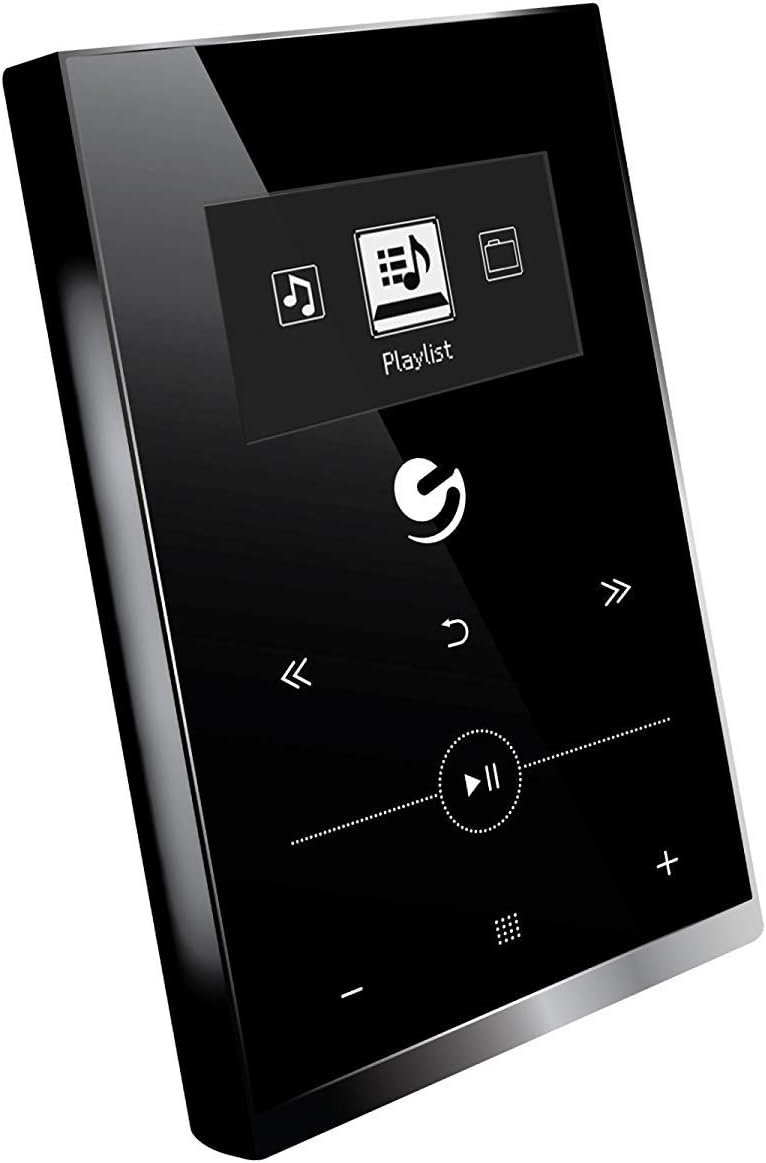
Figura 4.1: Davanti view of the Ematic EMHD130LED Music Player, highlighting its 1.3-inch OLED display and touch-sensitive controls for navigation and playback.

Figura 4.2: The Ematic EMHD130LED Music Player shown in a typical usage scenario, demonstrating its small form factor suitable for connection to a computer for media transfer.
Controlli e porte:
- Display OLED: 1.3-inch screen for track information and menu navigation.
- Pulsanti di navigazione: (Implied from image) Up, Down, Left, Right, Select/Play/Pause.
- Controlli del volume: (Implied from image) Plus (+) and Minus (-) buttons for adjusting audio output.
- Slot MicroSD: For expanding storage capacity beyond the internal 16GB.
- Porta USB: For connecting to a computer for charging and data transfer.
5. Impostazione
5.1 Ricarica del dispositivo
Before first use, fully charge your music player. Connect the device to a computer's USB port or a compatible USB wall adapter using a USB cable. The OLED display will indicate charging status. A full charge typically takes a few hours.
5.2 Caricamento della musica
The Ematic EMHD130LED has 16GB of internal storage. You can add more music using a MicroSD card (sold separately).
- Tramite computer: Plug your media player directly into your computer using a USB cable. The device will appear as a removable drive. Drag and drop your MP3 audio filenella cartella musicale del lettore.
- Tramite scheda MicroSD: Insert a MicroSD card into the designated slot on the player. You can transfer music files directly to the MicroSD card via a card reader on your computer, or transfer them to the card once it's in the player and connected to the computer.
6. Istruzioni per l'uso
6.1 Accensione/spegnimento
Press and hold the Power button (location not specified, typically a side button or integrated with Play/Pause) for a few seconds to turn the device on or off.
6.2 Navigazione di base
Use the navigation buttons (Up, Down, Left, Right) to browse through menus and select options on the 1.3-inch OLED display. Press the central Select button to confirm a selection or play a track.
6.3 Riproduzione di musica
- From the main menu, navigate to 'Music' or 'Playlist'.
- Browse through your stored music by artist, album, genre, or all songs.
- Select a track and press the Play/Pause button to begin playback.
- Use the Skip Forward/Backward buttons to change tracks.
- Adjust the volume using the Volume Up (+) and Volume Down (-) buttons.
6.4 Using the MicroSD Card
Once a MicroSD card is inserted and contains music, the player will automatically detect it. You can typically switch between internal storage and MicroSD card content through the music menu settings.
7. Manutenzione
- Pulizia: Per pulire il dispositivo, utilizzare un panno morbido, asciutto e privo di lanugine. Non utilizzare detergenti abrasivi o solventi.
- Magazzinaggio: Quando non viene utilizzato per lunghi periodi, conservare il dispositivo in un luogo fresco e asciutto, lontano dalla luce solare diretta.
- Cura della batteria: Per prolungare la durata della batteria, evitare di scaricarla completamente frequentemente. Caricare il dispositivo regolarmente, anche se non in uso.
8. Risoluzione Dei Problemi
| Problema | Possibile causa | Soluzione |
|---|---|---|
| Il dispositivo non si accende. | La batteria è scarica. | Caricare il dispositivo per almeno 30 minuti. |
| Nessun suono. | Volume is too low or muted; Headphones not connected properly. | Increase volume; Ensure headphones are fully plugged in. |
| Impossibile trasferire files. | Incorrect USB connection; Driver issue; Corrupted files. | Ensure USB cable is securely connected; Try a different USB port or cable; Restart computer and player; Check file format (only MP3 supported). |
| Lo schermo è vuoto o bloccato. | Problema software. | Per forzare il riavvio, tenere premuto il pulsante di accensione per 10-15 secondi. |
9. Specifiche
| Caratteristica | Dettaglio |
|---|---|
| Marca | Ematico |
| Modello | EMHD130LED |
| Nome del modello | 16GB High Definition Music Player with 1.3-inch OLED Display |
| Capacità di archiviazione della memoria | 16 GB (interni) |
| Capacità di archiviazione digitale | 16 GB |
| Dispositivi compatibili | Computer portatile, personal computer |
| Tipo di visualizzazione | OLED |
| Dimensioni dello schermo | 1.3 pollici |
| Tipo di connettore | USB |
| Tipo di supporto compatibile | MP3 |
| Tipo di supporto | Scheda microSD |
| Dimensioni del prodotto | 11.99 x 8.48 x 2.84 cm; 312.98 g |
| Composizione delle celle della batteria | Ioni di litio |
| Batteria ricaricabile | SÌ |
| Produttore | Shaghai LTD |
| Prima data disponibile | 26 marzo 2018 |
10. Garanzia e supporto
For warranty information and customer support, please refer to the warranty card included with your product or visit the official Ematic website. You may also contact Ematic customer service directly for assistance with product issues or inquiries.
Ematic Official Websito: www.ematic.us (Note: This is a general placeholder link for Ematic's website. Please verify the correct support URL per la tua regione.)


