1. Introduzione
Thank you for choosing the TecTake Corner Computer Desk, Model 402405. This L-shaped workstation is designed to provide a practical and spacious area for your computer and work essentials. Its modern design, featuring a refined tabletop and stable steel construction, ensures durability and a timeless aesthetic. This manual provides essential information for the safe assembly, operation, and maintenance of your new desk.
Si prega di leggere attentamente il presente manuale prima del montaggio e dell'uso e di conservarlo per riferimento futuro.
2. Istruzioni di sicurezza
Per garantire un utilizzo sicuro ed evitare danni, osservare le seguenti linee guida di sicurezza:
- Montaggio: Assemble the desk on a soft, clean surface to prevent scratches. Ensure all components are correctly aligned and securely fastened according to the provided assembly instructions.
- Stabilità: Do not overload the desk. The maximum load capacity is 100 kg (220 lbs). Distribute weight evenly across the surface.
- Posizionamento: Place the desk on a level and stable floor. Avoid placing it near heat sources, direct sunlight, or in excessively humid environments.
- Bambini: Per evitare rischi di soffocamento, tenere le parti di piccole dimensioni e i materiali di imballaggio lontano dalla portata dei bambini.
- Manutenzione: Controllare regolarmente tutte le viti e i collegamenti per assicurarsi che siano ben serrati. Stringere se necessario.
- In movimento: Quando si sposta la scrivania, sollevarla anziché trascinarla per evitare di danneggiare le gambe e il pavimento.
3. Contenuto della confezione
Before beginning assembly, please verify that all parts are present and undamaged. The package should contain:
- 1x Corner Desk (comprising main tabletop sections and frame components)
- 1x Computer Tower Holder
- 1x Istruzioni di montaggio illustrate
- All necessary screws, fittings, and tools for assembly (as specified in the assembly instructions)

Figure 1: Assembled TecTake Corner Computer Desk (Dark Wood Finish). This image shows the overall L-shaped design, the spacious work surface, and the integrated keyboard tray.
4. Installazione e assemblaggio
The TecTake Corner Computer Desk requires assembly. Please follow the detailed, illustrated instructions provided in your package. It is recommended to have two people for assembly to ensure ease and safety.
- Disimballare: Carefully unpack all components and lay them out on a clean, soft surface to prevent damage.
- Identificare le parti: Per identificare ciascun componente, fare riferimento all'elenco dei componenti nel manuale di montaggio.
- Segui i passaggi: Proceed step-by-step according to the illustrated assembly guide. Ensure all screws and connectors are tightened securely but do not overtighten.
- Vassoio per tastiera: Install the sliding keyboard tray as indicated in the instructions. Ensure it slides smoothly.
- Computer Tower Holder: Position the included computer tower holder as desired.
- Controllo finale: Once assembled, gently test the desk's stability and ensure all parts are firmly connected.

Figura 2: Dall'alto verso il basso view of the TecTake Corner Computer Desk (White Finish). This perspective highlights the L-shape and the ample surface area for multiple monitors or work items.
5. Istruzioni per l'uso
Your TecTake Corner Computer Desk is designed for efficient and comfortable use. Here are some operational aspects:
- Superficie di lavoro: Utilize the large L-shaped surface for your monitor(s), laptop, documents, and other office supplies. The design provides ampspazio per il multitasking.
- Vassoio per tastiera: The integrated sliding keyboard tray allows you to store your keyboard and mouse neatly under the desk when not in use, freeing up valuable desktop space. Gently pull it out for use and push it back in for storage.
- Computer Tower Holder: The included holder is designed to keep your computer tower off the floor, protecting it from dust and allowing for better airflow. It accommodates towers with a maximum width of 25 cm.
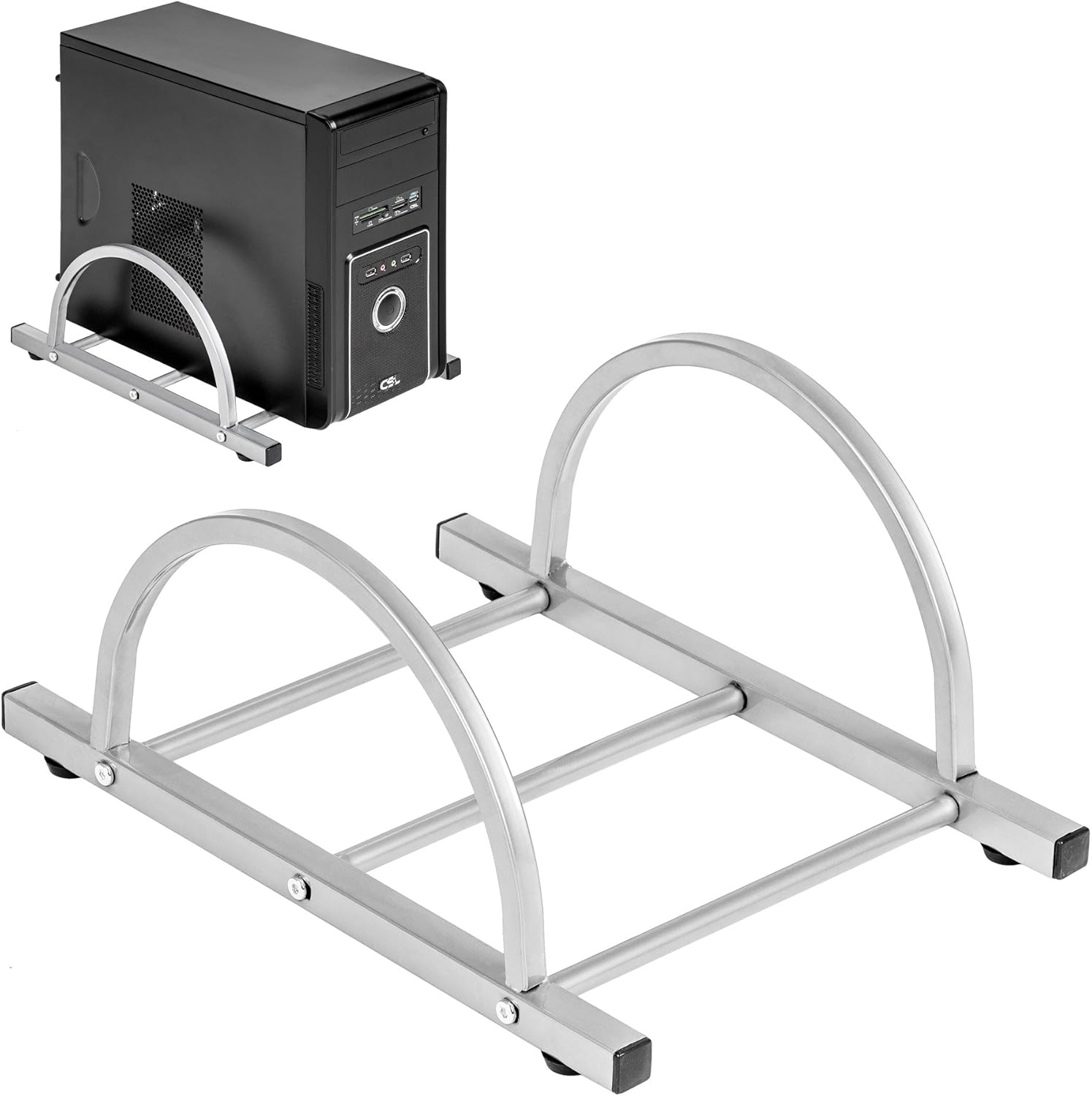
Figure 3: TecTake Computer Tower Holder. This image displays the separate holder designed to keep your PC tower elevated and secure.
6. Manutenzione
Una cura adeguata prolungherà la durata e l'aspetto della tua scrivania:
- Pulizia: Pulire le superfici con un panno morbido, damp cloth. For stubborn marks, use a mild soap solution and immediately dry with a clean cloth. Avoid abrasive cleaners or harsh chemicals.
- Fuoriuscite: Clean up spills immediately to prevent staining or damage to the MDF surface.
- Hardware: Periodically check all screws and fittings for tightness. Re-tighten as necessary to maintain stability.
- Protezione: Utilizzare sottobicchieri per le bevande e cuscinetti protettivi sotto gli oggetti caldi per evitare di danneggiare il piano del tavolo.
7. Risoluzione Dei Problemi
Se riscontri problemi con la tua scrivania, prendi in considerazione le seguenti soluzioni comuni:
- La scrivania è traballante:
- Assicurarsi che la scrivania sia su una superficie piana.
- Controllare tutte le viti e i bulloni di montaggio. Serrare eventuali collegamenti allentati.
- Verify that all leg caps are properly installed and making full contact with the floor.
- Il vassoio della tastiera non scorre fluidamente:
- Controllare che non vi siano ostruzioni nel meccanismo di scorrimento.
- Ensure the rails are correctly installed and aligned.
- Clean the rails if dust or debris is present.
- Parti mancanti: If you find any parts missing upon unpacking, please refer to the "Warranty and Support" section to contact customer service.
8. Specifiche
| Caratteristica | Dettaglio |
|---|---|
| Marca | TecTake |
| Numero di modello | 402405 |
| Dimensioni complessive (L x P x A) | 170 x 135 x 75 cm (66.9 x 53.1 x 29.5 pollici) |
| Altezza del piano di lavoro | 75 cm (29.5 pollici) |
| Large Tabletop Section (L x W) | 115 x 55 cm (45.3 x 21.7 pollici) |
| Small Tabletop Section (L x W) | 80 x 55 cm (31.5 x 21.7 pollici) |
| Rounded Corner Section (L x W) | 55 x 55 cm (21.7 x 21.7 pollici) |
| Spessore del piano del tavolo | 1.5 cm (0.6 pollici) |
| Sliding Keyboard Tray (L x W) | 56.5 x 35 cm (22.2 x 13.8 pollici) |
| Steel Tube Dimensions | 3x2 cm; 2x2 cm; 1.5x1.5 cm |
| Computer Tower Holder Width (Max) | 25 cm (9.8 pollici) |
| Capacità di carico massima | 100 kg (220 libbre) |
| Materiale | Veneered MDF surface, powder-coated steel tube frame, plastic feet and end caps |
| Color (as per model) | Bianco |
9. Garanzia e supporto
TecTake products are manufactured with quality and durability in mind. For information regarding warranty coverage, please refer to the warranty card included with your product or visit the official TecTake websito.
If you have any questions, require assistance with assembly, or need to report missing/damaged parts, please contact TecTake customer service. Contact details can typically be found on the product packaging, the included assembly instructions, or the official TecTake websito.
Supporto online: www.tectake.it (Si prega di verificare la propria regione) websito per informazioni di contatto specifiche).


