1. Prodotto finitoview
The PDP Afterglow Prismatic LED Wired Controller is officially licensed by Microsoft for Xbox One, designed to enhance your gaming experience. It features dimmable Prismatic LED lighting with a full color range, allowing users to customize the controller's appearance. The transparent polycarbonate housing showcases the internal circuitry, adding to its unique design. This controller includes a 3.5mm headset jack with onboard audio controls for convenient access to game and chat audio levels. It also provides enhanced gameplay through vibration feedback.

Image: The PDP Afterglow Prismatic LED Wired Controller illuminated with blue lighting, showcasing its transparent design.
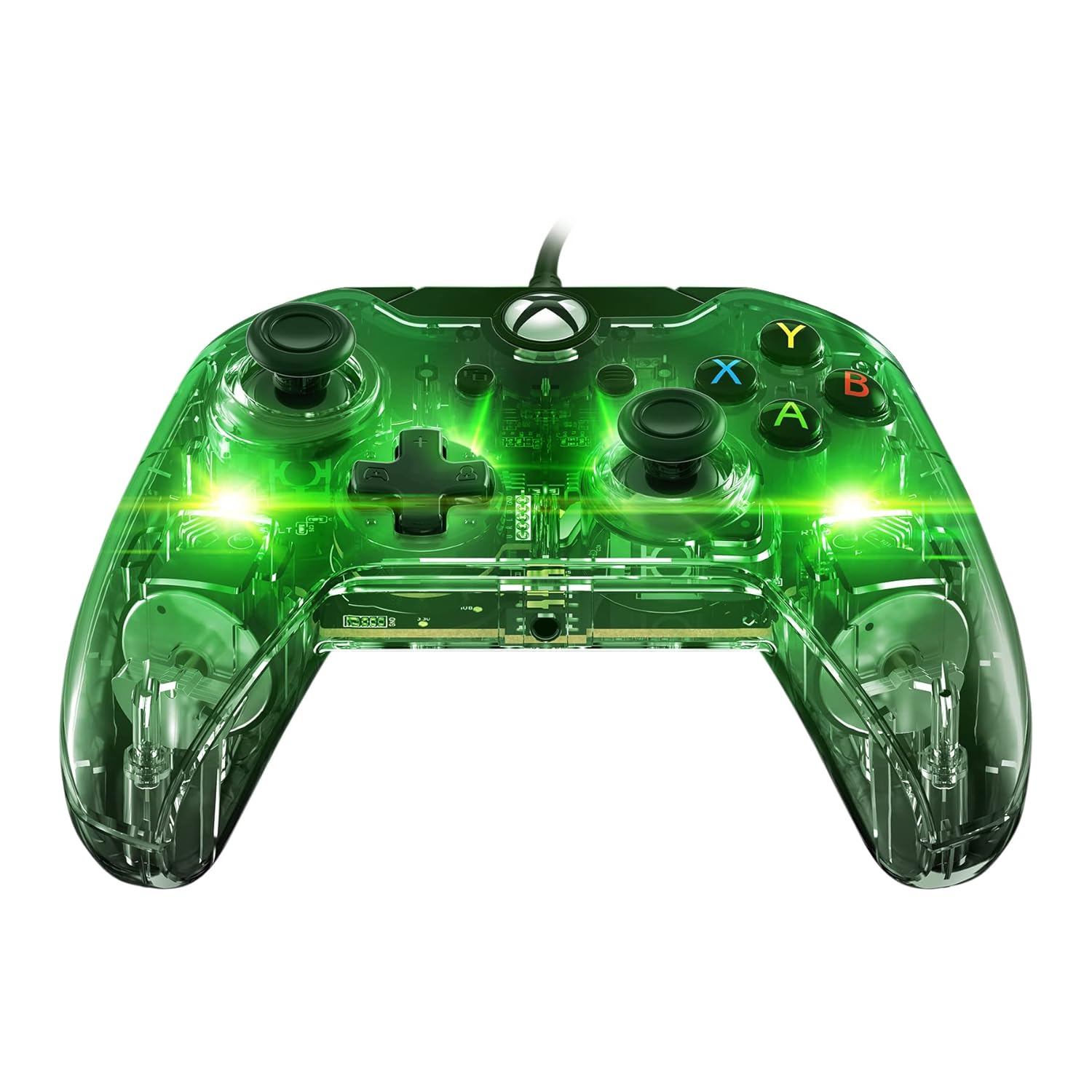
Image: The PDP Afterglow Prismatic LED Wired Controller illuminated with green lighting.

Image: The PDP Afterglow Prismatic LED Wired Controller illuminated with purple lighting.

Image: The PDP Afterglow Prismatic LED Wired Controller illuminated with red lighting.
Caratteristiche principali:
- Officially licensed by Microsoft for Xbox One.
- Dimmable Prismatic LED lighting with full color range.
- Clear polycarbonate housing revealing internal circuitry.
- Integrated 3.5mm headset jack for game and chat audio.
- Onboard audio controls for volume adjustment.
- Enhanced gameplay with vibration feedback.
- Detachable 10-foot micro USB cable for easy connection.
- Compatible with Xbox One, Xbox One S, Xbox One X, and Windows.
2. Guida all'installazione
Connecting Your Controller:
- Locate the detachable 10-foot micro USB cable included with your controller.
- Connect the micro USB end of the cable to the port on the top of the controller.
- Plug the standard USB end of the cable into an available USB port on your Xbox One console (Xbox One, Xbox One S, Xbox One X) or your Windows PC.
- The controller will automatically be recognized by your system. The LED lighting will illuminate upon successful connection.
For advanced customization, including button remapping, sensitivity settings, and LED lighting adjustments, download the Hub di controllo PDP app from the Microsoft Store on your Xbox One or Windows 10 PC. Settings saved within the controller via the app will persist even when connected to other compatible devices.
3. Istruzioni per l'uso
Controlli di base:
The Afterglow controller features standard Xbox One button layouts, including dual analog sticks, a D-pad, A/B/X/Y buttons, shoulder buttons (LB, RB), and triggers (LT, RT). All buttons are designed for responsive and smooth operation.
Illuminazione LED prismatica:
The controller's signature Prismatic LED lighting can be customized to your preference. You can select a specific color, set it to cycle through a rainbow of colors, or turn the lighting off completely. These adjustments are typically made through the PDP Control Hub app.
Video: Un funzionario sopraview of the Afterglow Wired Controller for Xbox, demonstrating its key features and LED lighting capabilities.
Video: A brief official demonstration of the PDP Afterglow Wired Controller for Xbox One (048-121-NA), highlighting its design and functionality.
Controlli audio:
Plug your compatible headset into the 3.5mm audio jack located at the bottom of the controller. The onboard audio controls allow you to adjust game volume and chat balance directly without pausing your game or navigating through console menus.
4. Manutenzione
To ensure the longevity and optimal performance of your PDP Afterglow controller, follow these simple maintenance guidelines:
- Pulizia: Use a soft, dry, lint-free cloth to wipe down the controller's surface. For stubborn smudges, slightly dampen the cloth with water. Avoid using harsh chemicals, abrasive cleaners, or solvents, as these can damage the transparent housing and internal components.
- Cura del cavo: The detachable micro USB cable should be handled with care. Avoid sharp bends, kinks, or excessive pulling, which can damage the cable or the controller's port. When storing, coil the cable loosely.
- Magazzinaggio: Conservare il controller in un luogo fresco e asciutto, lontano dalla luce solare diretta, da temperature estreme e da polvere eccessiva.
5. Risoluzione Dei Problemi
If you encounter issues with your PDP Afterglow controller, try the following troubleshooting steps:
- Il controller non risponde:
- Assicurarsi che il cavo USB sia collegato saldamente sia al controller che alla console/PC.
- Try plugging the controller into a different USB port on your console/PC.
- Riavvia la console Xbox One o il PC.
- Problemi di illuminazione a LED:
- Check the settings in the PDP Control Hub app to ensure the lighting is enabled and configured as desired.
- Ensure the controller is receiving sufficient power from the USB port.
- Audio Problems (Headset Jack):
- Verifica che le cuffie siano ben collegate al jack da 3.5 mm del controller.
- Check the audio settings on your Xbox One or PC, and use the onboard audio controls on the controller to adjust volume and chat mix.
- Prova le cuffie con un altro dispositivo per verificare che funzionino correttamente.
- Aggiornamento del firmware:
Periodically check for and install firmware updates for your controller via the PDP Control Hub app. Updates can resolve bugs and improve performance.
6. Specifiche
| Caratteristica | Dettaglio |
|---|---|
| Marca | PDP |
| Numero di modello | 048-121-NA |
| Connettività | Wired (Detachable 10-foot Micro USB Cable) |
| Compatibilità | Xbox One, Xbox One S, Xbox One X, Windows |
| Illuminazione | Dimmable Prismatic LED (Full Color Range) |
| Caratteristiche audio | 3.5mm Headset Jack, Onboard Audio Controls |
| Vibration feedback | SÌ |
| Dimensioni del prodotto | 0.31 x 0.43 x 0.83 pollici |
| Peso dell'articolo | 7.1 once |
| Data di rilascio | 15 giugno 2018 |
7. Garanzia e supporto
Per informazioni dettagliate sulla garanzia e sull'assistenza clienti, fare riferimento al PDP ufficiale webo contattare direttamente il servizio clienti. Conservare la prova d'acquisto per eventuali reclami in garanzia.
È possibile scaricare la Guida utente ufficiale (PDF): Scarica Guida per l'utente


