1. Introduzione e oltreview
The Dio DiOCAMRI01 is an advanced 360° HD WiFi camera designed for indoor surveillance, offering comprehensive monitoring while prioritizing user privacy. This camera features a motorized lens, 1080p resolution, and infrared night vision, ensuring clear visuals day and night. Its unique geo-fencing capability automatically activates a privacy mode when you are home, retracting the lens to ensure your personal space remains private. The camera also includes motion and noise detection, two-way audio communication, and local recording options via a Micro SD card.
This manual provides essential information for the proper installation, operation, and maintenance of your DiOCAMRI01 camera.
2. Informazioni sulla sicurezza
- Leggere attentamente tutte le istruzioni prima dell'uso.
- Utilizzare solo l'alimentatore fornito con il dispositivo.
- Non esporre la fotocamera ad acqua, umidità o temperature estreme.
- Evitare di posizionare la fotocamera vicino a fonti di calore o alla luce diretta del sole.
- Non tentare di smontare o riparare la fotocamera da soli. Per qualsiasi intervento di assistenza, rivolgersi a personale qualificato.
- Ensure the camera is securely mounted if using wall or ceiling installation.
3. Contenuto della confezione
Verifica che tutti i componenti siano presenti nel tuo pacchetto:
- DiOCAMRI01 HD WiFi Camera
- Adattatore di alimentazione
- Mounting Kit (screws, wall plugs, mounting bracket)
- Manuale dell'utente (questo documento)
4. Caratteristiche del prodotto
- Monitoraggio remoto: Day and night vision (infrared night vision up to 10m).
- Wide-Angle Motorized Lens: Offre una rotazione orizzontale di 360° e verticale di 150° per una copertura completa.
- Tutela della privacy: Geo-fencing feature automatically puts the camera in standby mode and closes the lens when the owner is present. Manual standby mode is also available via the app.
- Motion and Noise Detection: Adjustable sensitivity with 3 levels. Sends direct notifications to your smartphone.
- Audio bidirezionale: Built-in microphone and intercom function allow you to hear and speak through the camera.
- Registrazione locale: Supports Micro SD card (up to 128GB, not included) for manual or automatic recording upon detection. Remote viewing of recordings is available via the smartphone app.
- Configurazione semplice: Quick and intuitive installation via the DiO Cam+ mobile application.
- Montaggio flessibile: Designed for discreet integration, can be mounted on a wall, ceiling, or placed on a shelf.
5. Impostazione
5.1 Configurazione iniziale
- Collegamento elettrico: Connect the camera to a power outlet using the provided power adapter. The camera will power on.
- Download DiO Cam+ App: Cercare "DiO Cam+" in your smartphone's app store (iOS or Android) and download the application.
- Registrati/Accedi: Apri l'app e segui le istruzioni sullo schermo per creare un account o effettuare l'accesso se ne hai già uno.
- Aggiungi fotocamera: Within the DiO Cam+ app, select the option to add a new device. Follow the in-app wizard to connect your camera to your Wi-Fi network. This typically involves scanning a QR code on the camera or entering Wi-Fi credentials.
- Posizionamento: Position the camera in your desired location. It can be placed on a flat surface, or mounted on a wall or ceiling using the included mounting kit. Ensure the camera has a clear line of sight to the area you wish to monitor.
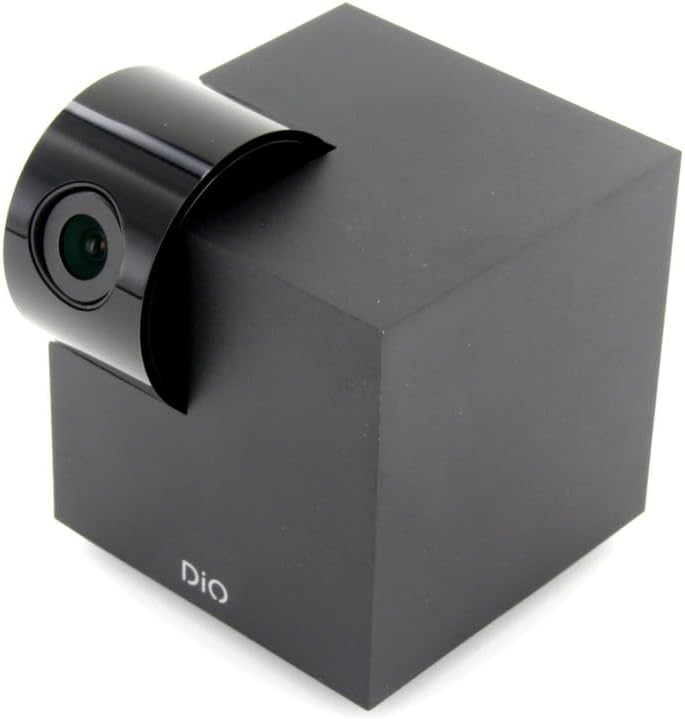
Figure 5.1: The DiOCAMRI01 camera in its standard upright position.

Figure 5.2: Camera placed on a shelf, demonstrating discreet integration.

Figure 5.3: Camera mounted on a ceiling for overhead surveillance.
5.2 Installazione della scheda Micro SD (facoltativa)
To enable local video recording, insert a Micro SD card (up to 128GB, not included) into the designated slot on the camera. Ensure the camera is powered off before inserting or removing the card.
5.3 Condivisione dell'accesso alla telecamera
The DiO Cam+ app allows you to easily share access to your camera with family members or trusted friends. Navigate to the camera settings within the app and select the sharing option to invite others to view il feed live e le registrazioni.
6. Istruzioni per l'uso
6.1 Vivere View e controllo remoto
Once connected, open the DiO Cam+ app to access the live video feed from your camera. From the live view schermo, puoi:
- Regolare View Angolo: Use the on-screen controls to remotely rotate the camera lens up to 350° horizontally and 150° vertically to cover all corners of your room.
- Audio bidirezionale: Tap the microphone icon to speak through the camera's speaker, and listen to audio from the camera's microphone.
- Take Snapshots/Record Video: Capture still images or start manual video recordings directly from the live view.

Figure 6.1: Camera interacting with the DiO Cam+ smartphone application.

Figura 6.2: lato view of the camera, highlighting the rotating lens mechanism.
6.2 Privacy Features (Geo-Fencing and Manual Standby)
The DiOCAMRI01 camera offers advanced privacy protection:
- Geo-Fencing: Configure geo-fencing in the app to automatically switch the camera to privacy mode when your smartphone enters a predefined home zone. In privacy mode, the camera lens will retract, ensuring no recording or live viewsi verifica.
- Standby manuale: You can manually activate or deactivate the camera's standby mode (privacy mode) at any time through the DiO Cam+ app.
- Scheduled Standby: Set a schedule within the app for the camera to automatically enter or exit standby mode at specific times.

Figure 6.3: Camera with lens retracted, indicating privacy mode.
6.3 Rilevamento del movimento e del rumore
The camera can detect motion and noise within its field of view. When triggered, it will send a notification to your smartphone and can automatically begin recording to the Micro SD card.
- Regolazione della sensibilità: Adjust the detection sensitivity (3 levels) in the app settings to minimize false alarms.
- Opzioni di registrazione: Configure recording duration (1, 3, or 5 minutes per clip) or continuous recording if a Micro SD card is installed.
7. Manutenzione
- Pulizia: Utilizzare un panno morbido e asciutto per pulire il corpo macchina e l'obiettivo. Non utilizzare detergenti liquidi o materiali abrasivi.
- Aggiornamenti software: Regularly check the DiO Cam+ app for firmware updates to ensure optimal performance and security. Follow the in-app instructions for any available updates.
- Gestione della scheda Micro SD: Periodicamente riview and manage recordings on your Micro SD card. Format the card through the app if necessary to maintain performance.
8. Risoluzione Dei Problemi
- Fotocamera non in linea: Ensure the camera is powered on and connected to your Wi-Fi network. Check your Wi-Fi router and internet connection. Try restarting the camera and your router.
- Impossibile connettersi all'app: Verify your Wi-Fi password. Ensure your smartphone is connected to a 2.4GHz Wi-Fi network during initial setup, as the camera may not support 5GHz networks.
- Scarsa qualità video: Check your internet connection speed. Ensure the camera lens is clean and free from obstructions. Adjust camera placement for optimal lighting.
- Motion/Noise Detection Not Working: Check the sensitivity settings in the app. Ensure the detection zones are correctly configured.
- Nessuna registrazione sulla scheda SD: Ensure the Micro SD card is correctly inserted and formatted. Check if the card is full. The camera supports up to 128GB.
- Modalità privacy non attiva: Verify that geo-fencing is enabled and configured correctly in the app, and that your smartphone's location services are active.
9. Specifiche
| Caratteristica | Specificazione |
|---|---|
| Numero di modello | DIOCAM-RI01 |
| Tipo di montaggio | Montaggio a parete |
| Risoluzione di acquisizione video | Formato: 1080p |
| Colore | Bianco |
| Numero di articoli | 1 |
| Componenti inclusi | DiOCAMRI01 WiFi HD 360° Rotating 1080P 2MP Camera with Geo-Fencing |
| Tecnologia di comunicazione wireless | Wifi |
| Fattore di forma | Dome (Cube with rotating lens) |
| Risoluzione video efficace | 1080 |
| Viewangolo di ing | 360 gradi (orizzontale) |
| Gamma di visione notturna | 10 metri |
| Materiale | Metallo |
| Voltage | 5 Volt |
| Cosatage | 5 watt |
| Dimensioni articolo (L x P x A) | 9.4 x 4.9 x 31.9 centimetri |
| Produttore | CHACON |
| Caratteristiche speciali | Local Recording, Night Vision |
| Batterie incluse | NO |
| Batterie richieste | NO |
| Usi consigliati | Rilevamento del movimento, visione notturna |
| Tecnologia di connettività | Senza fili |
| Uso interno/esterno | Al chiuso |
| Dispositivi compatibili | Smartphone |
| Fonte di alimentazione | Battery Powered (Note: Product specs indicate 'No batteries required', implying external power) |
| Protocollo di connettività | Wifi |
| Tipo di controllore | Android |
10. Garanzia e supporto
For information regarding warranty coverage, technical support, or service, please refer to the official Dio webo contatta il tuo punto vendita. Conserva la prova d'acquisto per eventuali reclami in garanzia.
Produttore: CHACON


