Introduzione
This instruction manual provides detailed guidance for the safe and efficient use of your Lenco Xemio-768 Digital Media Player. Please read this manual thoroughly before operating the device and retain it for future reference.
The Lenco Xemio-768 is a versatile digital media player capable of playing MP3/MP4 files, displaying photos, reading e-books, and recording voice memos. It features Bluetooth connectivity for wireless audio and an expandable memory via Micro SD card.
Contenuto della confezione
- Lenco Xemio-768 Digital Media Player
- Cavo USB
- Cuffie In-Ear
- Scheda Micro SD da 8 GB (preinstallata o inclusa separatamente)
- Manuale di istruzioni (questo documento)
Dispositivo suview
Familiarize yourself with the various parts and controls of your Xemio-768 player.
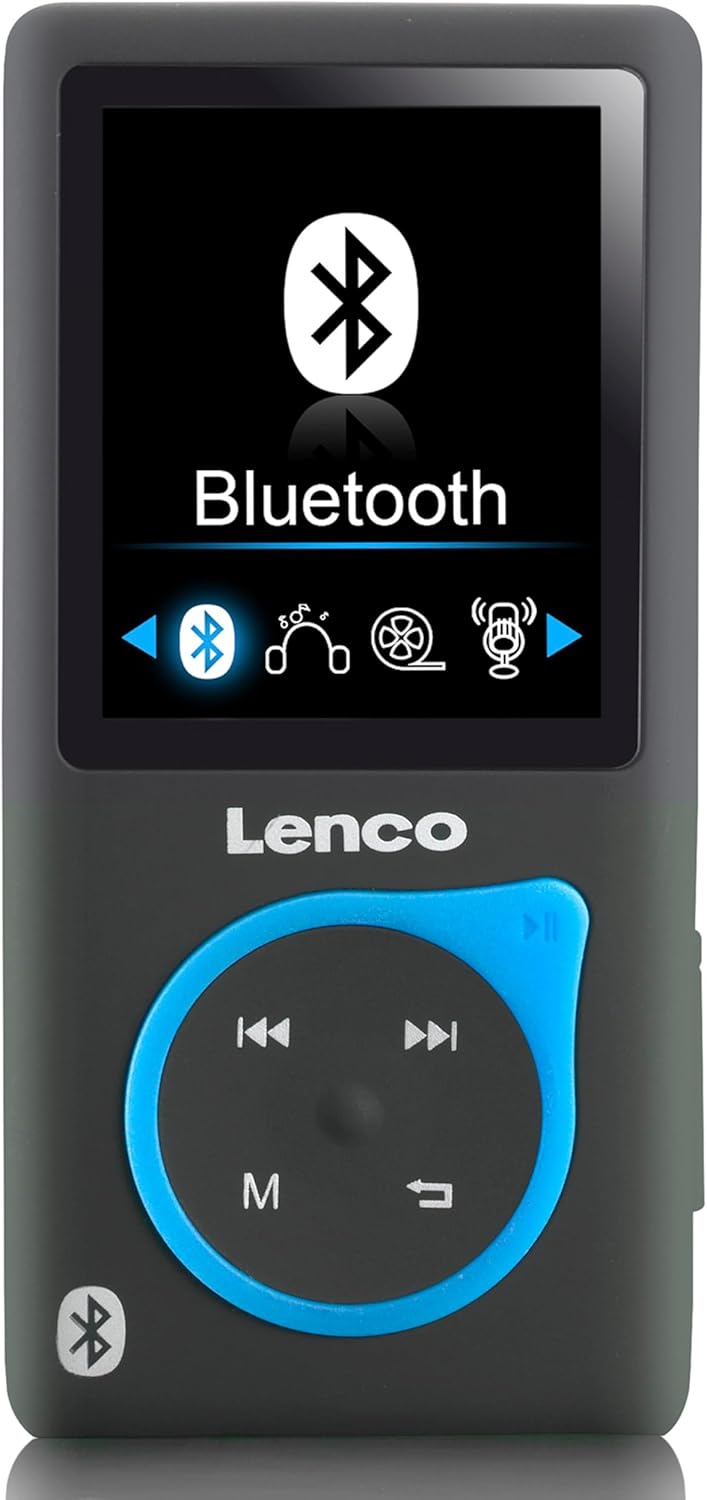
Immagine 1: Davanti view of the Lenco Xemio-768 Digital Media Player. The screen displays the Bluetooth menu option. Below the screen are the Lenco logo and a circular control pad with playback buttons (previous, next, play/pause) and a menu button (M). A Bluetooth symbol is also visible on the bottom left of the device.
Controlli e porte chiave:
- Schermo LCD TFT da 1.8 pollici: Displays menus, media, and settings.
- Pannello di controllo: Navigation and playback controls (Play/Pause, Next/Fast Forward, Previous/Rewind, Menu).
- Porta micro USB: Per la ricarica e il trasferimento dei dati.
- Slot per scheda microSD: For memory expansion (supports up to 32GB).
- Jack per cuffie da 3.5 mm: Per il collegamento delle cuffie cablate.
- Microfono incorporato: Per la registrazione vocale.
Impostare
1. Carica del dispositivo
- Connect the small end of the included USB cable to the Micro USB port on the player.
- Connect the larger end of the USB cable to a powered USB port on a computer or a USB wall adapter (not included).
- L'indicatore della batteria sullo schermo mostrerà lo stato di carica. Una ricarica completa richiede in genere circa 3 ore.
- Disconnect the USB cable once fully charged.
2. Inserimento di una scheda Micro SD (facoltativo)
The player comes with an 8GB Micro SD card. If you wish to expand the storage, you can replace it with a card up to 32GB.
- Individuare lo slot per la scheda Micro SD sul lato del lettore.
- Inserire delicatamente la scheda Micro SD con i contatti dorati rivolti verso il basso finché non scatta in posizione.
- Per rimuoverla, spingere delicatamente la scheda finché non scatta, quindi rilasciarla e la scheda uscirà.
3. Collegamento delle cuffie
- Cuffie cablate: Plug the 3.5 mm jack of the included in-ear headphones (or your own compatible headphones) into the headphone port on the player.
- Cuffie/altoparlanti Bluetooth: Refer to the "Bluetooth Connectivity" section under Operating for wireless connection instructions.
4. Trasferimento Files
- Collega il lettore al computer utilizzando il cavo USB.
- Il lettore apparirà come un'unità disco rimovibile sul tuo computer.
- Drag and drop your desired music (MP3, WMA), videos (AMV, AVI), photos (JPG, BMP, GIF), or e-books (TXT) into the appropriate folders on the player's internal memory or Micro SD card.
- Una volta filevengono trasferiti, espellere in modo sicuro il disco rimovibile dal computer prima di scollegare il cavo USB.
Istruzioni per l'uso
Accensione/spegnimento
- To power on, press and hold the Power button (usually on the side) until the screen lights up.
- Per spegnere, tieni premuto il pulsante di accensione finché il dispositivo non si spegne.
Navigazione nei menu
- Use the directional buttons on the control pad to navigate through menu options.
- Press the central button (often Play/Pause) to select an option.
- Press the 'M' (Menu) button to go back to the previous menu or to access context-sensitive options during playback.
Riproduzione musicale
- Dal menu principale, seleziona "Musica".
- Browse through your folders and files to find the desired track.
- Press the central button to play the selected track.
- Utilizzare il Precedente E Prossimo pulsanti per saltare le tracce.
- Press the central button again to pause/resume playback.
Video Playback
- Dal menu principale, seleziona "Video".
- Vai al tuo video files (AMV, AVI format).
- Select a video to begin playback.
Foto Viewer
- From the main menu, select "Photos".
- Sfoglia la tua immagine files (JPG, BMP, GIF format).
- Seleziona un'immagine per view Esso.
E-book Reader
- Dal menu principale, seleziona "E-book".
- Navigate to your text files (formato TXT).
- Seleziona un file da aprire e leggere.
Registrazione vocale
- From the main menu, select "Recorder" or "Voice Memo".
- Selezionare "Avvia registrazione" per iniziare.
- Press the central button to stop recording.
- Recordings are saved and can be accessed from the "Recordings" menu.
Connettività Bluetooth
- Ensure your Bluetooth headphones or speaker are in pairing mode. Refer to their respective manuals for instructions.
- On the Xemio-768, navigate to the "Bluetooth" menu.
- Seleziona "Cercare Devices" or "Pair New Device".
- Once your device appears in the list, select it to initiate pairing.
- Se richiesto, confermare l'associazione su entrambi i dispositivi.
- Once connected, audio will be routed wirelessly to your Bluetooth device.
Manutenzione
Pulizia
- Per pulire la parte esterna del dispositivo, utilizzare un panno morbido, asciutto e privo di lanugine.
- Non utilizzare detergenti abrasivi, alcol o solventi, poiché potrebbero danneggiare la superficie.
- Evitare che l'umidità penetri nelle aperture.
Cura della batteria
- Per prolungare la durata della batteria, evitare di scaricarla completamente frequentemente.
- Caricare regolarmente il dispositivo, anche se non lo si utilizza per periodi prolungati.
- Conservare il dispositivo in un luogo fresco e asciutto, lontano dalla luce solare diretta e da temperature estreme.
Risoluzione dei problemi
| Problema | Possibile causa | Soluzione |
|---|---|---|
| Il dispositivo non si accende. | La batteria è scarica. | Carica il dispositivo utilizzando il cavo USB in dotazione. |
| Impossibile connettersi tramite Bluetooth. | Bluetooth device not in pairing mode; interference; device out of range. | Ensure your Bluetooth headphones/speaker are in pairing mode. Move closer to the player. Try restarting both devices. |
| Files are not recognized or played. | Non corretto file formato; danneggiato file; Micro SD card issue. | Garantire files are in supported formats (MP3, WMA, AMV, AVI, JPG, BMP, GIF, TXT). Check if the Micro SD card is properly inserted or try another card. |
| Nessun suono dalle cuffie. | Cuffie non collegate correttamente; volume troppo basso; audio corrotto file. | Check headphone connection. Increase volume. Test with different headphones or audio files. |
Specifiche
- Modello: Xemio-768
- Display: 1.8-inch TFT LCD
- Memoria interna: 8 GB (via Micro SD card)
- Memoria espandibile: Fino a 32 GB (scheda Micro SD)
- Formati audio supportati: Formato MP3, WMA
- Formati video supportati: AMV, AVI
- Formati immagine supportati: JPG, BMP, GIF
- Formato e-book supportato: TXT
- Connettività: Bluetooth, Micro USB
- Jack per cuffie: 3.5 millimetri
- Tipo di batteria: Polimero di litio
- Durata della batteria: Approximately 3 hours (playback)
- Dimensioni: Dimensioni: 0.09 x 4.15 x 8.5 cm
- Peso: 28.5 grammi
Garanzia e supporto
Per informazioni sulla garanzia e supporto tecnico, fare riferimento alla scheda di garanzia inclusa con il prodotto o visitare il sito ufficiale Lenco websito. Conservare la prova d'acquisto per eventuali reclami in garanzia.


