Introduzione
The DigiTech Multi-Function LCD Wall Clock (Model XC0225) is a versatile device designed to provide convenient time display along with additional environmental information. This clock features a large LCD screen displaying time, date, day of the week, indoor temperature, and humidity. It also includes alarm and snooze functions, making it suitable for various settings, whether mounted on a wall or placed on a desktop.
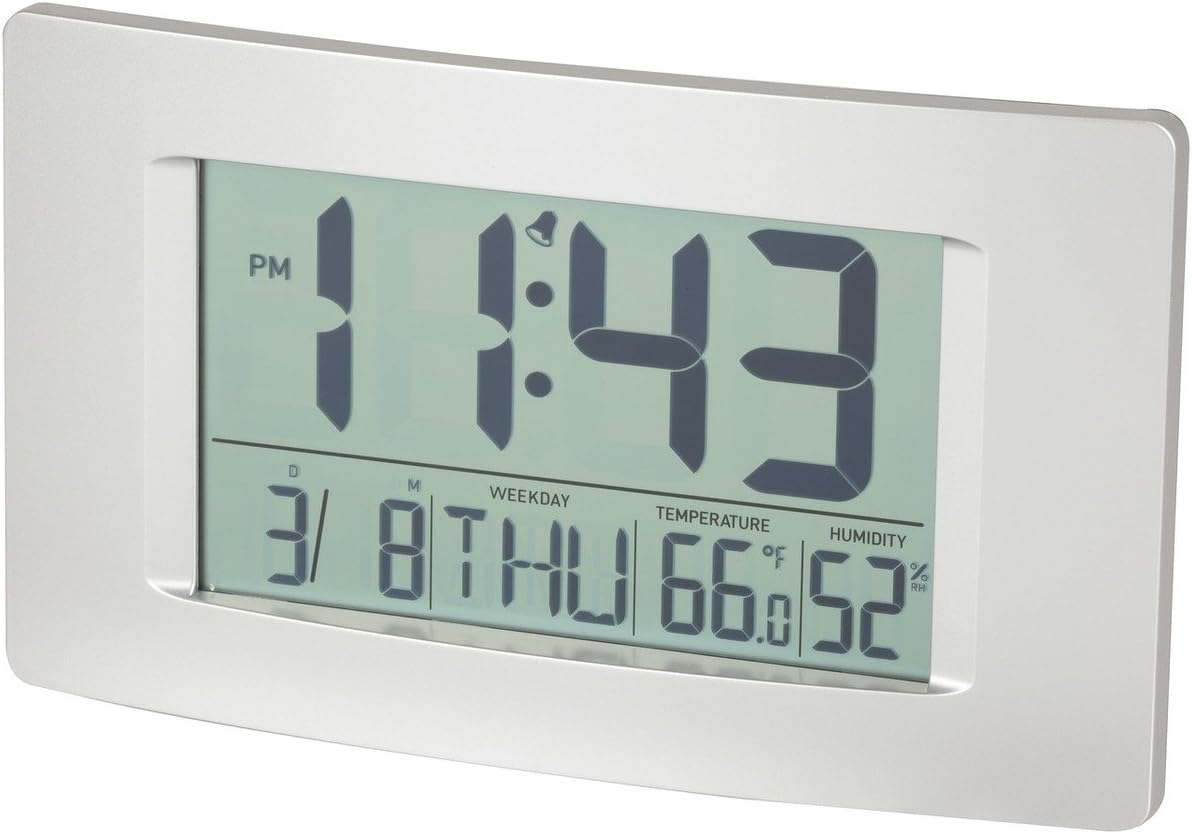
Figura 1: Fronte view of the Multi-Function LCD Wall Clock.
Contenuto della confezione
- DigiTech Multi-Function LCD Wall Clock (Model XC0225)
- Manuale dell'utente (questo documento)
Nota: Per il funzionamento sono necessarie 3 batterie AA, non incluse nella confezione.

Figure 2: Product packaging illustrating the clock and its features.
Impostare
1. Installazione della batteria
- Individuare il vano batteria sul retro dell'orologio.
- Aprire il coperchio del vano batterie.
- Inserire 3 batterie AA, assicurandosi che la polarità sia corretta (+ e -) come indicato all'interno del vano.
- Chiudere saldamente il coperchio del vano batterie.
2. Accensione iniziale
Upon battery installation, the clock will power on automatically and display default settings. You may need to adjust the time, date, and other settings as described in the "Operating Instructions" section.
3. Opzioni di montaggio
- Posizionamento sul desktop: Utilize the integrated stand on the back of the clock to place it on any flat surface.
- Montaggio a parete: Use the integrated hang-hole on the back of the clock to mount it securely on a wall using a suitable screw or hook (not included).
Istruzioni per l'uso
The clock features several buttons on the back for setting and adjusting functions. Refer to the labels next to each button for their specific functions (e.g., MODE, UP, DOWN, ALARM, SNOOZE/LIGHT).
1. Impostazione di ora e data
- Premere il tasto MODALITÀ ripetutamente il pulsante finché il display dell'ora non inizia a lampeggiare.
- Utilizzare il UP or GIÙ pulsanti per regolare l'ora.
- Premere MODALITÀ di nuovo per passare ai minuti, quindi utilizzare UP or GIÙ per adattarsi.
- Continua a premere MODALITÀ per scorrere le impostazioni di anno, mese e giorno, regolando ciascuna con UP or GIÙ.
- Premere MODALITÀ un'ultima volta per uscire dalla modalità di impostazione.
2. Impostazione della sveglia
- Premere il tasto ALLARME premere una volta il pulsante per visualizzare l'ora corrente della sveglia.
- Premere e tenere premuto il tasto ALLARME finché l'ora della sveglia non inizia a lampeggiare.
- Utilizzare il UP or GIÙ pulsanti per regolare l'ora della sveglia.
- Premere ALLARME again to move to alarm minutes, then use UP or GIÙ per adattarsi.
- Premere ALLARME un'ultima volta per confermare e uscire dalla modalità di impostazione della sveglia.
- Per attivare/disattivare l'allarme, premere il tasto ALLARME button briefly when not in setting mode. An alarm icon will appear/disappear on the display.
3. Funzione snooze
Quando suona la sveglia, premere il tasto SNOOZE / LIGHT button to activate the snooze function. The alarm will temporarily stop and sound again after the set snooze interval (1-60 minutes, adjustable in settings).
4. Selezione dell'unità di temperatura (°C/°F)
Premere brevemente il tasto UP button (or a dedicated °C/°F button if present) to toggle between Celsius (°C) and Fahrenheit (°F) temperature display.
5. Formato 12/24 ore
Premere brevemente il tasto GIÙ button (or a dedicated 12/24H button if present) to switch between 12-hour and 24-hour time formats.
Manutenzione
1. Pulizia
- Pulire la superficie dell'orologio con un panno morbido e asciutto.
- Non utilizzare detergenti abrasivi, solventi o spray chimici, poiché potrebbero danneggiare il display o il casing.
2. Sostituzione della batteria
When the display becomes dim or functions become erratic, it is time to replace the batteries. Follow the "Battery Installation" steps in the Setup section to replace the 3 x AA batteries. Always replace all batteries at the same time with new ones.
Risoluzione dei problemi
| Problema | Possibile causa | Soluzione |
|---|---|---|
| Il display è vuoto o poco luminoso. | Le batterie sono scariche o installate in modo errato. | Sostituire le batterie con 3 batterie AA nuove, assicurandosi della corretta polarità. |
| L'ora/data non è corretta. | Non impostato correttamente dopo l'installazione della batteria o un'interruzione di corrente. | Per reimpostare, seguire le istruzioni "Impostazione di ora e data". |
| L'allarme non suona. | La sveglia non è attivata oppure l'orario della sveglia non è corretto. | Ensure the alarm icon is displayed. Verify the alarm time setting. |
| Le letture di temperatura/umidità sembrano imprecise. | Clock placed near heat sources, vents, or in direct sunlight. | Relocate the clock to an area with stable ambient temperature and humidity. Allow time for readings to stabilize. |
Specifiche
| Caratteristica | Dettaglio |
|---|---|
| Modello | XC0225 |
| Tipo di visualizzazione | LCD digitale |
| Dimensioni LCD | 194 mm (larghezza) x 110 mm (altezza) |
| Funzioni | Time, Date, Day of Week, Alarm, Snooze, Indoor Temperature, Indoor Humidity |
| Formato ora | 12 Hour / 24 Hour selectable |
| Intervallo di temperatura | Da -9.9°C a +50°C (da 14.1°F a 122.0°F) |
| Umidità ambiente | Dal 20% al 95% di umidità relativa (UR) |
| Durata del posticipo | 1 - 60 minutes (adjustable) |
| Fonte di alimentazione | 3 batterie AA (non incluse) |
| Dimensions (Overall, W x H x D) | 306 mm x 176 mm x 36 mm (circa) |
| Peso | 540g (without batteries) / 660g (shipping weight) |
| Opzioni di montaggio | Integrated Stand, Wall Hang-hole |

Figure 3: Main display area dimensions of the clock for reference.
Garanzia e supporto
This DigiTech product comes with a Garanzia di 1 anno dalla data di acquisto. Questa garanzia copre difetti di materiali e lavorazione in condizioni di normale utilizzo.
For technical support, warranty claims, or further assistance, please contact your retailer or the DigiTech customer service department. Please have your model number (XC0225) and proof of purchase ready when contacting support.


