Introduzione
This manual provides essential information for the proper installation, operation, and maintenance of your Intel Xeon Silver 4116 Twelve-Core Skylake Processor. Please read this guide thoroughly before proceeding with any installation or configuration to ensure optimal performance and system stability.
Informazioni sulla sicurezza
Quando si maneggiano i componenti del computer, osservare sempre le seguenti precauzioni di sicurezza:
- Ensure your system is powered off and unplugged from the electrical outlet before installation.
- Discharge static electricity by touching a grounded metal object or wearing an anti-static wrist strap.
- Handle the processor by its edges to avoid touching the gold contacts or the integrated heat spreader (IHS).
- Keep the processor in its protective packaging until ready for installation.
Configurazione e installazione
1. Controlli pre-installazione
- Verify that your motherboard supports the Intel Xeon Silver 4116 processor and has an LGA 3647 socket. Consult your motherboard's manual for compatibility.
- Ensure you have a compatible CPU cooler designed for the LGA 3647 socket and appropriate thermal paste.
- Procuratevi gli strumenti necessari, come un cacciavite a croce.
2. Installazione del processore
- Carefully open the CPU socket retention mechanism on the motherboard.
- Align the processor with the socket. The processor has specific notches that must align with the socket keys. Do not force the processor into the socket.
- Gently lower the processor into the socket.
- Close the socket retention mechanism to secure the processor.
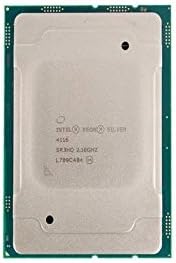
Immagine: in alto view of the Intel Xeon Silver 4116 processor, showing the integrated heat spreader and Intel branding.

Immagine: affiancata view of the Intel Xeon Silver 4116 processor, displaying both the top (integrated heat spreader) and bottom (LGA 3647 contact array) surfaces.
3. Installazione del dissipatore della CPU
- Apply a thin, even layer of thermal paste to the center of the processor's integrated heat spreader (IHS). Refer to the thermal paste manufacturer's instructions for specific application methods.
- Montare il dissipatore della CPU seguendo le istruzioni del produttore, assicurandosi che la pressione sia distribuita uniformemente.
- Connect the CPU cooler's fan cable to the designated CPU fan header on the motherboard.
Istruzioni per l'uso
1. Initial System Boot
- After completing hardware installation, connect all necessary peripherals and power cables.
- Power on your system. The system should initiate the boot process.
- Access the BIOS/UEFI setup utility (typically by pressing DEL, F2, O F10 during startup, depending on your motherboard).
2. Configurazione BIOS/UEFI
- Verify that the BIOS/UEFI recognizes the Intel Xeon Silver 4116 processor correctly.
- Configure memory settings (e.g., XMP profiles) if applicable.
- Adjust fan speed curves for the CPU cooler to maintain optimal temperatures.
- Salvare le modifiche e uscire dal BIOS/UEFI.
3. Installazione del driver
- Installare il sistema operativo.
- Install the latest chipset drivers for your motherboard, typically available from the motherboard manufacturer's website. These drivers ensure proper communication between the CPU and other system components.
Manutenzione
Regular maintenance helps ensure the longevity and stable operation of your processor and system.
- Pulizia della polvere: Periodically clean dust from the CPU cooler heatsink and fan using compressed air. Ensure the system is powered off and unplugged before cleaning.
- Pasta termica: If CPU temperatures become consistently high, consider reapplying thermal paste. This typically involves removing the CPU cooler, cleaning off old thermal paste from both the CPU and cooler base, and applying new thermal paste.
- Monitoraggio della temperatura: Use system monitoring software to keep track of CPU temperatures, especially under load, to prevent overheating.
Risoluzione dei problemi
In caso di problemi, fare riferimento ai seguenti passaggi comuni per la risoluzione dei problemi:
- Nessun avvio/Nessuna visualizzazione:
- Verificare tutti i collegamenti di alimentazione alla scheda madre e alla CPU.
- Reseat the CPU, RAM, and graphics card.
- Check for bent pins on the CPU or in the socket (handle with extreme care).
- Instabilità/arresti anomali del sistema:
- Ensure CPU temperatures are within acceptable limits.
- Eseguire strumenti di diagnostica della memoria per verificare l'integrità della RAM.
- Aggiornare il BIOS/UEFI della scheda madre all'ultima versione.
- Surriscaldamento:
- Verificare che il dissipatore della CPU sia installato correttamente e che faccia un buon contatto con la CPU.
- Check if the CPU fan is spinning correctly.
- Assicurare un adeguato flusso d'aria all'interno del case del computer.
For persistent issues, consult your motherboard's manual for specific diagnostic LED codes or beep codes.
Specifiche
| Caratteristica | Specificazione |
|---|---|
| Marca | Intel |
| Numero di modello | SR3HQ |
| Produttore CPU | Intel |
| Modello CPU | Xeon Silver 4116 (Twelve-Core) |
| Velocità della CPU | 2.1 GHz |
| Presa CPU | LGA3647 |
| Cache L3 | 16.5 MB |
| Data prima disponibilità | 19 maggio 2018 |
Informazioni sulla garanzia
Intel processors typically come with a limited warranty. For detailed information regarding the warranty period, terms, and conditions for your Intel Xeon Silver 4116 processor, please refer to the official Intel websito o la documentazione fornita con l'acquisto. Conservare la prova d'acquisto per eventuali reclami in garanzia.
Supporto
Per ulteriore assistenza tecnica, download di driver o informazioni aggiuntive sul prodotto, visitare il supporto ufficiale Intel websito:
You may also consult your system integrator or motherboard manufacturer for system-specific support.


