Introduzione
This manual provides detailed instructions for the proper setup, operation, and maintenance of your Integra CDC-3.4 6-Disc CD Carousel Changer. Please read this manual thoroughly before using the unit to ensure optimal performance and longevity. The Integra CDC-3.4 is designed for high-fidelity audio playback from compact discs, featuring a robust carousel mechanism for convenient disc management.
Informazioni importanti sulla sicurezza
Per ridurre il rischio di scosse elettriche, incendi o danni all'unità, osservare le seguenti precauzioni di sicurezza:
- Leggi le istruzioni: Leggere tutte le istruzioni di sicurezza e di funzionamento prima di utilizzare l'apparecchio.
- Conservare le istruzioni: Conservare le istruzioni di sicurezza e operative per riferimento futuro.
- Attenzione alle avvertenze: Attenersi a tutte le avvertenze sull'apparecchio e nelle istruzioni per l'uso.
- Seguire le istruzioni: Seguire tutte le istruzioni per l'uso e il funzionamento.
- Acqua e umidità: Non utilizzare questo apparecchio vicino all'acqua.
- Pulizia: Pulire solo con un panno asciutto.
- Ventilazione: Non ostruire le aperture di ventilazione. Installare secondo le istruzioni del produttore.
- Calore: Non installare vicino a fonti di calore come radiatori, bocchette di riscaldamento, stufe o altri apparecchi (inclusi amplificatori) che producono calore.
- Protezione del cavo di alimentazione: Proteggere il cavo di alimentazione per evitare che venga calpestato o schiacciato, in particolare in corrispondenza delle spine, delle prese di corrente e del punto in cui esce dall'apparecchio.
- Scollegare durante i temporali: Scollegare l'apparecchio durante i temporali o quando non viene utilizzato per lunghi periodi di tempo.
- Manutenzione: Affidare tutti gli interventi di assistenza a personale di assistenza qualificato. L'assistenza è richiesta quando l'apparecchio è stato danneggiato in qualsiasi modo, ad esempio se il cavo di alimentazione o la spina sono danneggiati, se è stato versato del liquido o sono caduti degli oggetti nell'apparecchio, se l'apparecchio è stato esposto a pioggia o umidità, se non funziona normalmente o se è caduto.
Cosa c'è nella scatola
Carefully unpack your Integra CDC-3.4 and ensure all the following items are present:
- Integra CDC-3.4 CD Player
- Cavo di alimentazione
- Basic manual (this document)
- RCA Cable (for analog audio connection)
- RI Cable (for system remote integration)
- Telecomando (RC-778C)
- 2 batterie AAA (per il telecomando)
Impostare
1. Posizionamento
Place the Integra CDC-3.4 on a stable, level surface with adequate ventilation. Ensure there is sufficient space around the unit for proper airflow to prevent overheating. Avoid placing it near heat sources or in direct sunlight.
2. Collegamento dei cavi audio
The CDC-3.4 offers multiple audio output options. Choose the connection type that best suits your audio receiver or amplificatore:
- Uscita audio analogica (RCA): Connect the supplied RCA cable from the ANALOG OUTPUT (L/R) jacks on the CDC-3.4 to the corresponding analog audio input jacks on your receiver/amppiù vivace.
- Uscita coassiale digitale: For a digital audio connection, use a coaxial digital cable (not supplied) to connect the COAXIAL jack on the CDC-3.4 to a digital coaxial input on your receiver/amppiù vivace.
- Uscita ottica digitale: For an optical digital audio connection, use an optical digital cable (not supplied) to connect the OPTICAL jack on the CDC-3.4 to a digital optical input on your receiver/amppiù vivace.
3. Connecting RI Cable (Remote Interactive)
Se il tuo ricevitore/amplifier supports Integra's RI (Remote Interactive) system, connect the supplied RI cable from the REMOTE CONTROL (RI) jack on the CDC-3.4 to the RI jack on your receiver/amplifier. This allows for integrated control functions between the components.
4. Collegamento dell'alimentazione
After all audio and control cables are connected, plug the supplied power cord into the AC INLET on the rear of the CDC-3.4, and then plug the other end into a wall outlet.
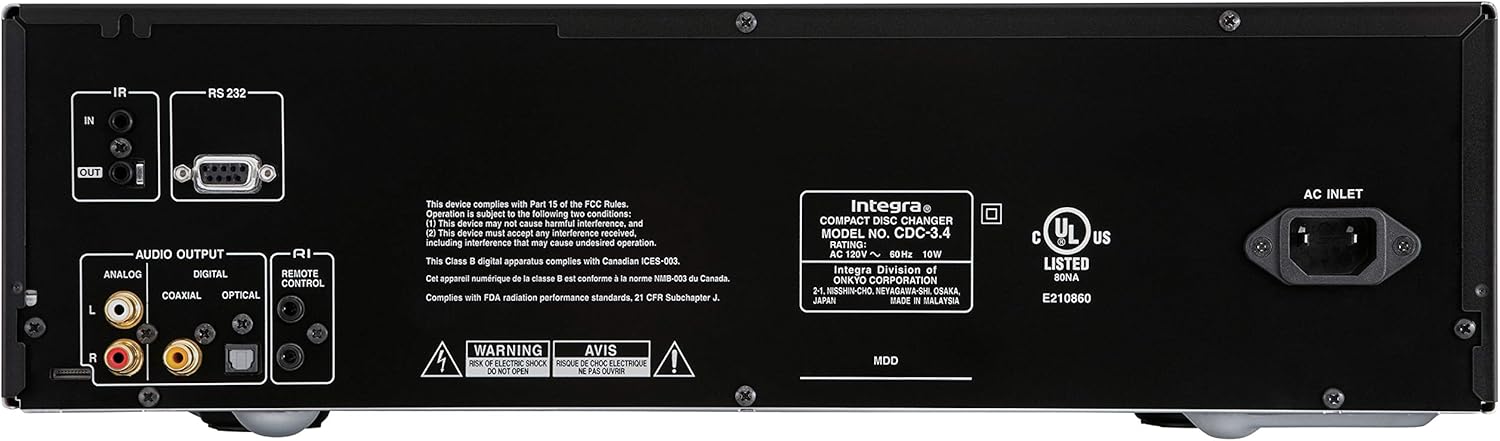
Figure 1: Rear panel connections of the Integra CDC-3.4.
Istruzioni per l'uso
1. Accensione/spegnimento
Premere il tasto Standby/Acceso pulsante sul pannello frontale o sul On pulsante sul telecomando per accendere o spegnere l'unità.
2. Caricamento dei dischi
The CDC-3.4 is a 6-disc carousel changer. To load discs:
- Premere il tasto Apri/Chiudi pulsante sul pannello frontale o sul telecomando per aprire il vassoio del disco.
- Place a CD onto an empty disc well, ensuring it is seated correctly. The disc wells are numbered 1 through 6.
- You can swap up to 5 discs while the 6th disc continues to play.
- Premere Apri/Chiudi di nuovo per chiudere il vassoio.
3. Selezione del disco
To select a specific disc for playback:
- On the front panel, use the Seleziona disco buttons (1-6) to directly choose a disc.
- On the remote control, use the numbered buttons (1-6) to select a disc.
4. Controlli di riproduzione
Use the following buttons on the front panel or remote control for playback:
- Play/Pause (►/▐▐): Avvia o mette in pausa la riproduzione.
- Fermare): Interrompe la riproduzione.
- Skip (◀◀/►►): Passa alla traccia precedente o successiva.
- Search (◀◀◀/►►►): Fast forwards or reverses within a track (hold down).
5. Modalità di riproduzione
- Casuale: Premere il tasto Casuale pulsante per riprodurre le tracce in ordine casuale.
- Ripetere: Premere il tasto Ripetere pulsante per ripetere la traccia corrente, il disco corrente o tutti i dischi.

Figure 2: Front panel controls of the Integra CDC-3.4.

Figure 3: Integra RC-778C Remote Control.
Manutenzione
Pulizia dell'unità
To clean the exterior of the unit, use a soft, dry cloth. For stubborn stains, slightly dampen the cloth with water or a mild, non-abrasive cleaner. Do not use harsh chemicals, solvents, or abrasive cleaning pads, as these can damage the finish.
Cura del disco
Handle CDs by their edges to avoid fingerprints and scratches. Store discs in their cases when not in use. If a disc is dirty, wipe it gently from the center outwards with a soft, lint-free cloth. Do not use abrasive materials or solvents.
Manutenzione interna
The Integra CDC-3.4 contains no user-serviceable parts. Do not attempt to open the casing or perform any internal maintenance. Refer all servicing to qualified service personnel.
Risoluzione dei problemi
If you experience issues with your Integra CDC-3.4, please consult the table below before contacting support.
| Problema | Possibile causa | Soluzione |
|---|---|---|
| Nessun potere | Cavo di alimentazione non collegato saldamente. | Assicurarsi che il cavo di alimentazione sia saldamente collegato all'unità e alla presa a muro. |
| La presa a muro non è attiva. | Testare la presa con un altro dispositivo. | |
| Nessun suono | Cavi audio non collegati correttamente. | Check all audio cable connections between the CDC-3.4 and your receiver/amppiù vivace. |
| Incorrect input selected on receiver/amppiù vivace. | Select the correct input source on your receiver/amppiù vivace. | |
| Disc not playing or reading | Il disco è sporco o graffiato. | Pulisci il disco con un panno morbido e privo di lanugine. Prova con un altro disco. |
| Il disco è inserito in modo errato. | Ensure the disc is placed correctly in the disc well with the label side up. | |
| Il telecomando non funziona | Le batterie sono scariche o inserite in modo errato. | Sostituire le batterie con nuove batterie AAA, assicurandosi della corretta polarità. |
| Ostruzione tra il telecomando e l'unità. | Ensure there is a clear line of sight between the remote and the unit's IR sensor. |
Specifiche
| Caratteristica | Dettaglio |
|---|---|
| Numero di modello | CDC-3.4 |
| Capacità del disco | 6 Discs (CD Carousel Changer) |
| Digital to Analog Converters (DACs) | Dual High Quality Wolfson 192 kHz / 24-bit |
| Oversampmolva | 128 times oversampmolva |
| Signal Path Technology | Vector Linear Shaping Circuitry (VLSC) for Noise-free Signal Path, Proprietary Direct Digital Path |
| Uscite audio | Analog (RCA L/R), Digital Coaxial, Digital Optical |
| Interfacce di controllo | RS232, IR (Infrared), RI (Remote Interactive) |
| Dimensioni del prodotto (L x A x P) | Circa 17.1 x 9.8 x 21 pollici (43.4 x 24.9 x 53.3 cm) |
| Peso dell'articolo | 15.2 libbre (6.9 kg) |
| Requisiti di potenza | CA 120 V ~ 60 Hz |
| Accessori inclusi | Remote Control, RCA Cable, RI Cable, Power Cord, AAA Batteries |
Garanzia e supporto
Garanzia del produttore
The Integra CDC-3.4 typically comes with a manufacturer's warranty, which may vary by region. Please refer to the warranty card included with your product or visit the official Integra (Onkyo) website for specific warranty terms and conditions. It is recommended to retain your proof of purchase for warranty claims.
Assistenza clienti
For technical assistance, troubleshooting beyond this manual, or warranty inquiries, please contact Integra customer support. You can find contact information, including phone numbers and online support resources, on the official Onkyo/Integra websito.


