Introduzione
The EARTEC ULSR-HD Ultralite HD Single Ear Remote Headset is designed to provide clear, full-duplex wireless communication for professional environments. This headset functions as an add-on or replacement unit for existing UltraLite HD systems, enabling hands-free communication without the need for beltpacks or external transceivers. Its all-in-one design integrates the radio directly into the earcup, offering a compact and efficient solution for team coordination.
Key features include a noise-cancelling microphone with an auto-mute function when pivoted upwards, a long wireless range of up to 1,000 feet line-of-sight, and approximately 6 hours of talk time on a single charge. The pivoting microphone allows for versatile wear on either the left or right ear.
Compatibilità
It is crucial to ensure that this Remote headset is compatible with your existing system. The ULSR-HD headset is designed exclusively for use with the Versione HD of UltraLite systems. It is non compatibile with Classic Ultralite models.

This image illustrates the difference between compatible UltraLite HD models (right, with a checkmark) and incompatible Classic UltraLite models (left, with an X). Always verify your system is UltraLite HD.
Each system containing a Main (no HUB) headset can support up to 4 Remote units. Each HUB-based system (no Main headset) can support up to 8 Remote units.
Impostare
1. Caricare l'auricolare
Before initial use, fully charge the headset's internal battery. The charging time is approximately 3 hours. A full charge provides up to 6 hours of talk time.
- Connect the charging cable (not included, typically comes with the main system) to the charging port on the headset.
- Connect the other end of the charging cable to a compatible USB power source.
- The LED indicator on the headset will show charging status (refer to the LED indications section for details).
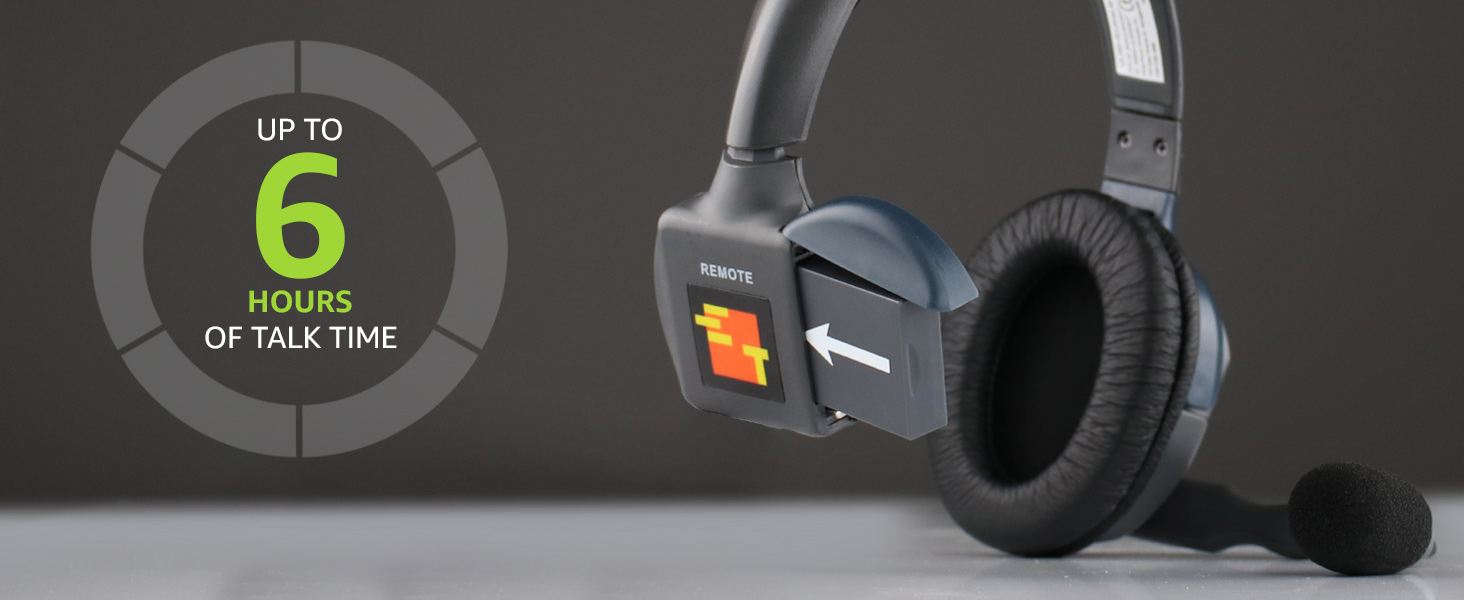
This image highlights the headset's battery life, providing up to 6 hours of talk time on a single charge.
2. Abbinamento iniziale (se richiesto)
Remote headsets typically pair automatically with a Main headset or HUB within an UltraLite HD system. If the headset does not connect automatically, ensure it is within range and powered on. For specific pairing procedures, consult the manual for your Main headset or HUB unit.

Un dettagliato view of the EARTEC ULSR-HD Ultralite HD Single Ear Remote Headset, showcasing il suo design e i suoi controlli.
Istruzioni per l'uso
1. Accensione/Spegnimento
- To power on: Locate the power button (usually integrated with the volume controls or a separate small button) and press and hold until the indicator light illuminates.
- Per spegnere: tenere premuto il pulsante di accensione finché la spia non si spegne.
2. Indossare l'auricolare
The microphone boom is designed to pivot 270 degrees, allowing the headset to be worn comfortably on either the left or right ear. Adjust the headband for a secure and comfortable fit.
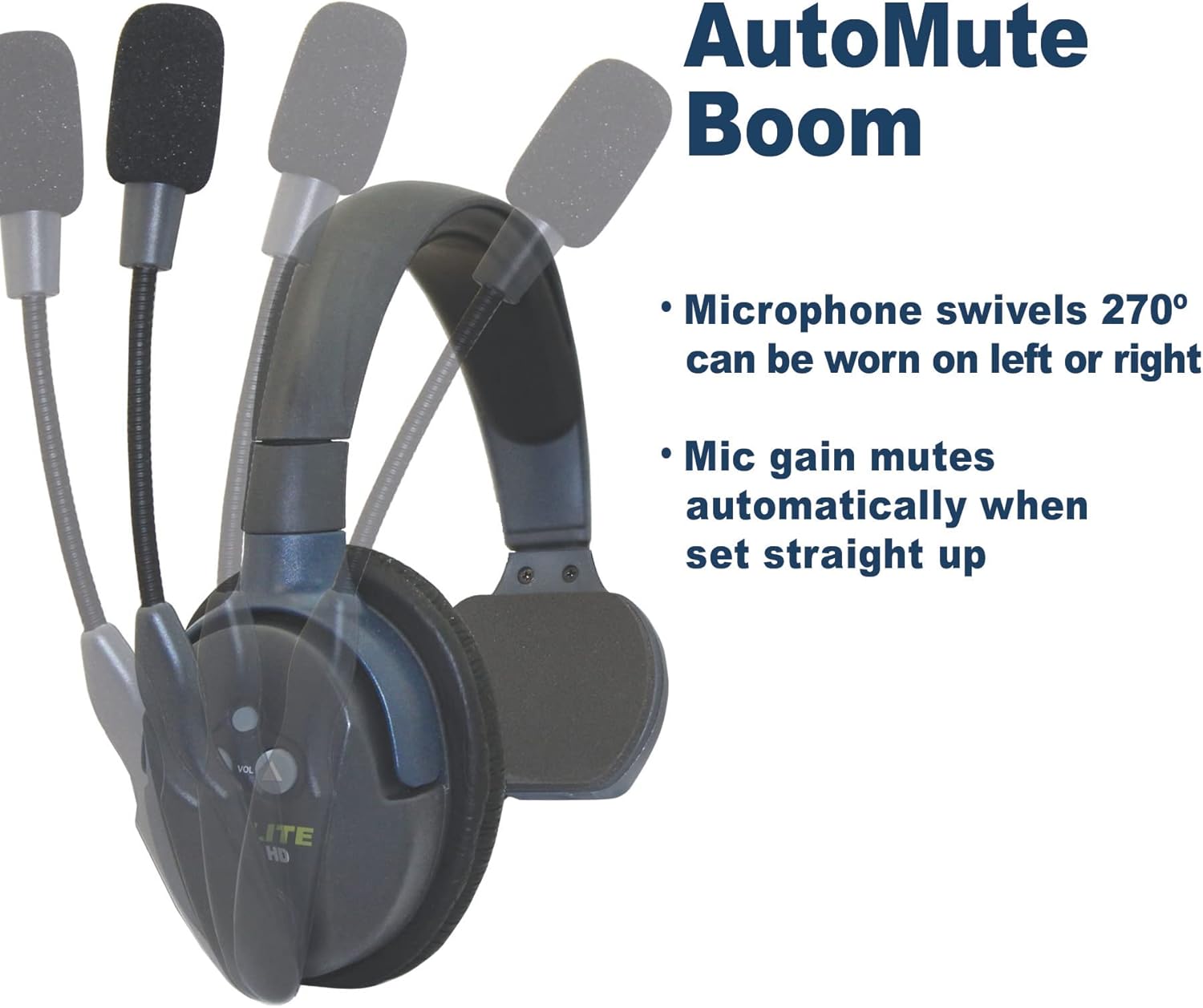
This image illustrates the microphone's 270-degree swivel capability and the automatic mute function when the boom is raised straight up.
3. Microphone Auto-Mute Function
The noise-cancelling microphone features an automatic mute function. When the microphone boom is pivoted upwards (straight up), the microphone gain automatically mutes, preventing unwanted audio transmission. To unmute, simply pivot the microphone boom back down towards your mouth.

A visual representation of the microphone's movement, indicating the active (green microphone icon) and muted (red microphone icon) positions.
4. Controllo del volume
Use the volume up (▲) and volume down (▼) buttons located on the earcup to adjust the listening volume to a comfortable level.
5. Raggio di comunicazione
The headset provides an effective wireless range of up to 1,000 feet line-of-sight (LOS). Obstructions such as walls, metal structures, and dense foliage can reduce this range. For optimal performance, maintain a clear line of sight between the remote headset and the Main headset or HUB.
Manutenzione
1. Pulizia
- Pulire le superfici delle cuffie con un panno morbido eamp stoffa.
- Non utilizzare prodotti chimici aggressivi, solventi o detergenti abrasivi.
- Assicurarsi che la porta di ricarica sia priva di polvere e detriti.
2. Cura della batteria
- Recharge the battery regularly, even if the headset is not in frequent use, to maintain battery health.
- Evitare di scaricare completamente la batteria per periodi prolungati.
- Quando non vengono utilizzate, conservare le cuffie in un luogo fresco e asciutto.
3. Conservazione
When storing the headset, especially for long periods, ensure it is powered off and fully charged. Store it in a protective case or a safe environment to prevent physical damage.
Risoluzione dei problemi
| Problema | Possibile causa | Soluzione |
|---|---|---|
| No audio or intermittent audio. |
|
|
| Raggio di comunicazione ridotto. |
|
|
| L'auricolare non si carica. |
|
|
Specifiche
| Caratteristica | Dettaglio |
|---|---|
| Nome del modello | ULSR-HD |
| Marca | EARTEC |
| Tecnologia di connettività | Senza fili |
| Tecnologia di comunicazione wireless | Senza fili |
| Dispositivi compatibili | Versione HD dei sistemi UltraLite |
| Gamma di frequenza | 1.9 GHz |
| Durata della batteria | Fino a 6 ore (tempo di conversazione) |
| Tempo di ricarica | Circa 3 ore |
| Tipo di microfono | Noise-cancelling, Auto-mute pivoting boom |
| Livello di resistenza all'acqua | Resistente all'acqua |
| Materiale | Plastica |
| Peso dell'articolo | 6 pounds (Note: This may refer to package weight) |
Garanzia e supporto
For detailed warranty information, please refer to the official EARTEC website or the documentation included with your complete UltraLite HD system. Warranty terms and conditions may vary.
Additional support and resources, including a downloadable Instructions for Use (IFU) PDF, may be available from the manufacturer. You can often find these resources on the product support page of the EARTEC websito.
For technical assistance or further inquiries, please contact EARTEC customer support directly.


