1. Introduzione e oltreview
The Optoma X343 is a professional XGA DLP projector designed for clear and vibrant presentations in various environments, including meeting rooms, classrooms, and home use. It features 3,600 lumens of brightness and a 22,000:1 contrast ratio, ensuring sharp text and graphics even in well-lit conditions. The projector includes an integrated 10-watt speaker for audio playback and offers a long lamp durata fino a 15,000 ore.
Le caratteristiche principali includono:
- Qualità dell'immagine: XGA resolution (1024x768) and 22,000:1 contrast ratio for vibrant and sharp images.
- Alta luminosità: 3,600 lumens for clear projection in various lighting conditions.
- Opzioni di connettività: Multiple input options including HDMI, VGA, and composite.
- Lungo Lamp Vita: Up to 15,000 hours, reducing maintenance needs.
- Installazione semplice: Vertical keystone correction and 1.1x zoom for flexible placement.
- Altoparlante integrato: A 10-watt speaker provides room-filling audio.
- Dimensioni portatili: Weighing less than 7 pounds, it is easy to transport.
- Distanza di lancio: Projects a 120-inch image from approximately 18 feet away.
2. Cosa c'è nella scatola
Upon unpacking your Optoma X343 projector, please ensure all the following items are present:
- Proiettore X343
- Cavo di alimentazione
- Telecomando
- Batterie per telecomando
If any items are missing or damaged, please contact your retailer or Optoma customer support immediately.
3. Componenti del prodotto

Figura 3.1: Fronte view of the Optoma X343 Projector, showcasing the lens and ventilation grilles.

Figura 3.2: in alto view of the Optoma X343 Projector, highlighting the focus and zoom rings, and the control panel buttons.

Figura 3.3: lato view of the Optoma X343 Projector with dimensions (9.6 x 12.4 x 3.9 inches) indicated.
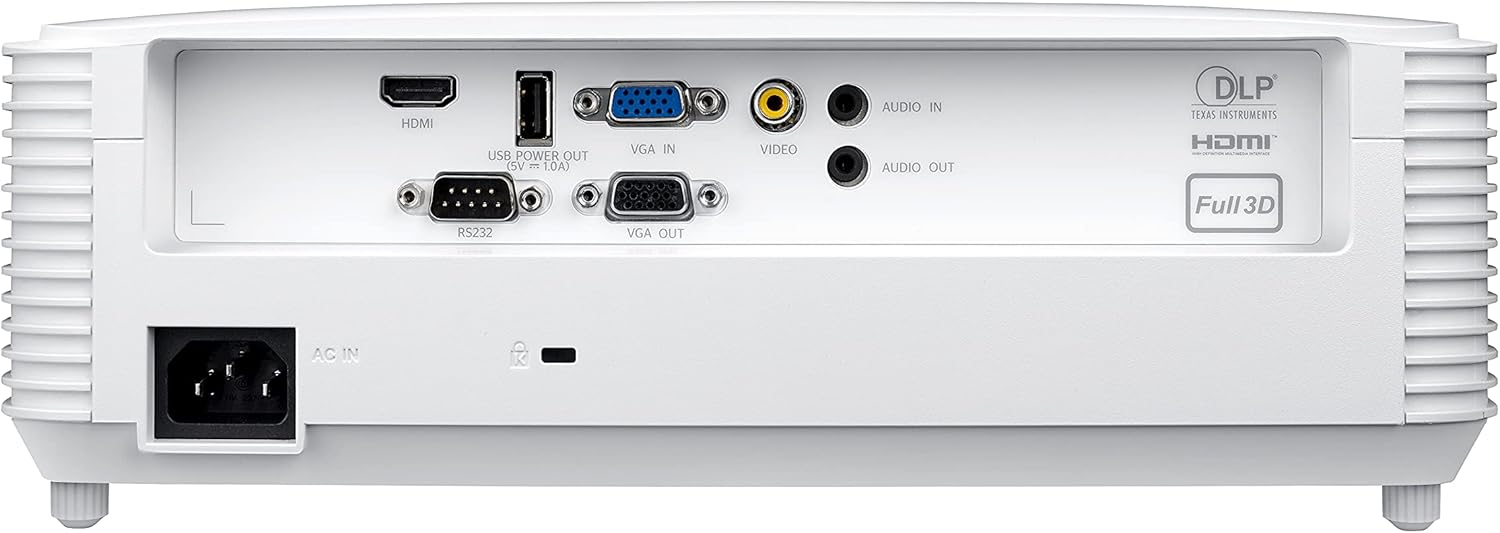
Figure 3.4: Rear panel of the Optoma X343 Projector, showing various input and output ports including HDMI, VGA, USB, and audio connections.
4. Guida all'installazione
4.1 Posizionamento
Position the projector on a stable, flat surface or mount it securely. Ensure adequate ventilation around the projector to prevent overheating. For a 120-inch image, the projector should be approximately 18 feet from the screen. The 1.1x zoom and vertical keystone correction features allow for minor adjustments to image size and shape.
4.2 Collegamento di alimentazione
- Connect the power cord to the 'AC IN' port on the rear of the projector.
- Collegare l'altra estremità del cavo di alimentazione a una presa elettrica con messa a terra.
4.3 Connessione a un dispositivo sorgente
The X343 offers multiple connectivity options:
- HDMI: For high-definition digital video and audio. Connect an HDMI cable from your source device (e.g., laptop, Blu-ray player) to the HDMI port on the projector.
- VGA: For analog video. Connect a VGA cable from your computer to the 'VGA IN' port. If audio is required, connect a separate audio cable to the 'AUDIO IN' port.
- Video composito: For standard definition analog video. Connect a composite video cable (yellow RCA) to the 'VIDEO' port.
- USB Power Out (5V=1.0A): This port can be used to power external devices such as HDMI dongles.
5. Istruzioni per l'uso
5.1 Accensione/Spegnimento
- Per accendere: Premere il pulsante di accensione sul pannello di controllo del proiettore o sul telecomando. La spia di accensione diventerà blu.
- Per spegnere: Press the power button again. A confirmation message may appear. Press the power button a second time to confirm shutdown. The power indicator light will turn red.
5.2 Regolazione dell'immagine
- Messa a fuoco: Rotate the focus ring around the lens until the image is sharp and clear.
- Ingrandisci: Rotate the zoom ring around the lens to adjust the image size.
- Correzione trapezoidale: Use the 'Keystone' function in the projector menu or dedicated buttons on the remote to correct trapezoidal image distortion.
5.3 Selezione della sorgente
Press the 'Source' button on the remote control or projector panel to cycle through available input sources (HDMI, VGA, Video). Select the input corresponding to your connected device.
6. Manutenzione
6.1 Lamp Vita
The Optoma X343 lamp has a life expectancy of up to 15,000 hours. When the lamp approaches its end of life, a warning message may appear on the screen. Refer to the full user manual for lamp procedure di sostituzione.
6.2 Pulizia
- Lente: Utilizzare un panno morbido e privo di lanugine, specificamente progettato per lenti ottiche. Evitare detergenti abrasivi.
- Casing: Pulisci il proiettore casing with a soft, dry cloth. Do not use harsh chemicals or solvents.
- Prese d'aria: Ensure air vents are clear of dust and obstructions to maintain proper airflow and prevent overheating.
7. Risoluzione Dei Problemi
This section addresses common issues you might encounter with your Optoma X343 projector.
7.1 Nessuna immagine sullo schermo
- Assicurarsi che il proiettore sia acceso e che la spia di alimentazione sia blu.
- Verificare che il cavo video (HDMI, VGA) sia collegato saldamente sia al proiettore sia al dispositivo sorgente.
- Verificare che sul proiettore sia selezionata la sorgente di ingresso corretta.
- Verificare che il dispositivo sorgente sia acceso e che emetta un segnale.
7.2 Nessun suono
- If using HDMI, ensure the source device's audio output is set to HDMI.
- If using VGA or composite, ensure a separate audio cable is connected to the 'AUDIO IN' port.
- Controllare le impostazioni del volume sia sul proiettore che sul dispositivo sorgente.
7.3 Surriscaldamento del proiettore
- Assicurarsi che tutte le griglie di ventilazione siano libere e non ostruite.
- Utilizzare il proiettore in un'area ben ventilata.
- If the issue persists, power off the projector, allow it to cool, and then restart. If overheating continues, contact support.
8. Specifiche
| Specificazione | Valore |
|---|---|
| Numero di modello | X343 |
| Tecnologia di visualizzazione | DLP |
| Risoluzione nativa | XGA (1024×768) |
| Luminosità | 3600 lumen |
| Rapporto di contrasto | 22,000:1 |
| Lamp Vita | Fino a 15,000 ore |
| Rapporto di lancio | 1.94 – 2.15:1 |
| Ingrandire | 1.1x Manuale |
| Correzione Keystone | Verticale |
| Altoparlante integrato | 10 watt |
| Connettività | HDMI, VGA In, VGA Out, Composite Video, Audio In, Audio Out, RS232, USB Power (5V=1.0A) |
| Peso dell'articolo | 6.7 libbre |
| Dimensioni del prodotto | 9.6 x 12.4 x 3.9 pollici |
9. Video ufficiale del prodotto
Video 9.1: Optoma Home Projection Technology. This video provides an overview of Optoma's projection capabilities, showcasing various applications and features of their projectors, including home cinema, gaming, and sports viewing.
10. Garanzia e supporto
For detailed warranty information, technical support, or service inquiries, please refer to the official Optoma website or contact Optoma customer service directly. Keep your purchase receipt and product serial number handy for any support requests.
Puoi trovare risorse aggiuntive e informazioni di contatto su Optoma Store on Amazon.


