Introduzione
Welcome to the user manual for the TC Electronic Ditto JAM X2 Looper Pedal. This intuitive looper pedal is designed for musicians seeking intelligent loop synchronization that responds to their band's rhythm. It features innovative BeatSense technology, allowing for automatic adjustment of loop tracks to your beat, and offers both Record-then-Play and Record-then-Overdub functionalities with unlimited overdubs and undo/redo capabilities. This manual provides essential information for setting up, operating, maintaining, and troubleshooting your Ditto JAM X2 Looper.
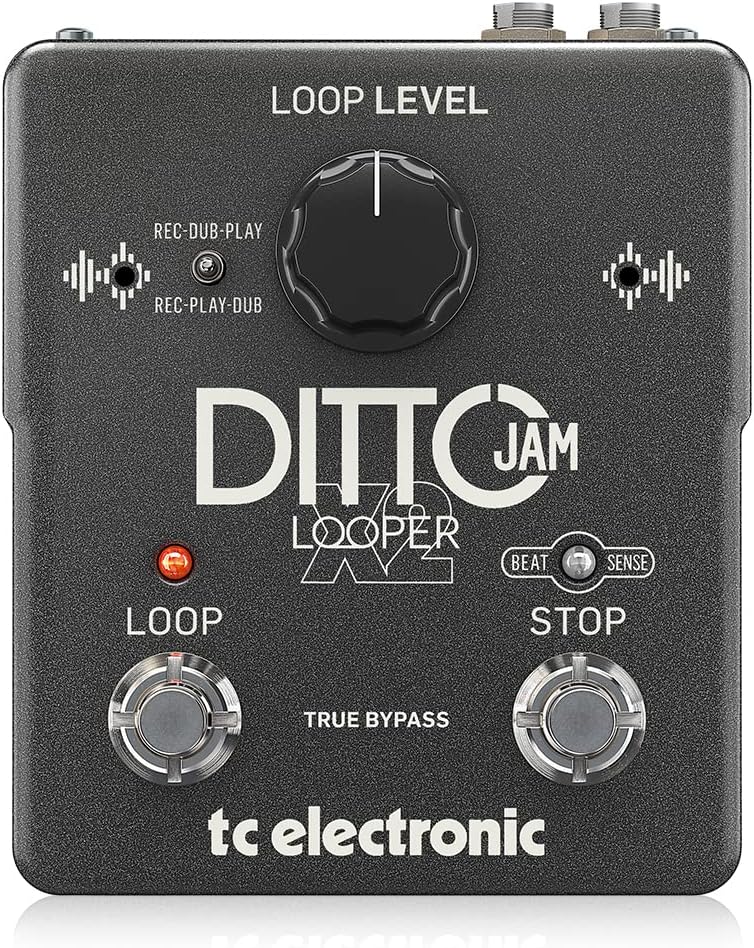
Immagine: Frontale view of the TC Electronic Ditto JAM X2 Looper Pedal, showcasing the 'LOOP LEVEL' knob, 'REC-DUB-PLAY' and 'REC-PLAY-DUB' switches, 'LOOP' and 'STOP' footswitches, and 'BEAT SENSE' indicator.
Caratteristiche principali
- Intuitive looper pedal with intelligent loop synchronization that responds to your band.
- Innovative responsive BeatSense technology automatically adjusts loop tracks to your beat.
- Choose between Record-then-Play or Record-then-Overdub functionalities.
- Unlimited overdubs and undo/redo for total creative freedom.
- Dual built-in mics accurately track band tempo by focusing only on rhythmic elements.

Immagine: un primo piano view of the "BEAT SENSE" indicator on the pedal, highlighting its function.

Image: An external microphone, likely used for the BeatSense technology, clipped onto a drum kit component.
Impostare
Alimentazione elettrica
The Ditto JAM X2 Looper requires a 9V power supply. Ensure you use a compatible power adapter (not included) to power the unit.
Connessioni
- Collega il tuo strumento (ad esempio, la chitarra) al INGRESSO jack utilizzando un cavo per strumenti standard da 1/4 di pollice.
- Collegare il PRODUZIONE jack per il tuo amplifier or next pedal in the signal chain using a standard 1/4-inch instrument cable.
- An MIC.EST input is available for connecting an external microphone to enhance BeatSense accuracy, particularly in complex rhythmic environments.

Immagine: Posteriore view of the Ditto JAM X2 pedal, clearly showing the INPUT, OUTPUT, EXT MIC jacks, and the power input.
Istruzioni per l'uso
Ciclo di base
- Registrazione: Premere il tasto CICLO CONTINUO footswitch once to start recording your loop. The LED will illuminate red.
- Playback/Overdub: Premere il tasto CICLO CONTINUO footswitch again to stop recording and begin playback. If you press it again during playback, you will start overdubbing.
- Stop: Premere il tasto FERMARE footswitch once to stop playback.
- Annulla/Ripristina: Premere e tenere premuto il tasto FERMARE footswitch to undo the last overdub. Press and hold again to redo it.
- Ciclo chiaro: Premere e tenere premuto il tasto CICLO CONTINUO interruttore a pedale per cancellare il loop corrente.
Loop Level Control
IL LIVELLO DI LOOP knob adjusts the overall volume of your recorded loop. Turn clockwise to increase volume, counter-clockwise to decrease.
Record Modes (REC-DUB-PLAY / REC-PLAY-DUB)
The Ditto JAM X2 offers two recording modes, selectable via the small toggle switch:
- REC-DUB-PLAY: In this mode, the first press of the LOOP footswitch records, the second press starts overdubbing, and a third press initiates playback without further overdubbing.
- REC-PLAY-DUB: In this mode, the first press records, the second press starts playback, and a third press initiates overdubbing.

Immagine: Un dettaglio view of the toggle switch for selecting between REC-DUB-PLAY and REC-PLAY-DUB modes.
BeatSense Technology
The innovative BeatSense technology uses dual built-in microphones to listen to your band's rhythmic elements (like drums) and automatically synchronize your loops to the detected tempo. This ensures your loops stay perfectly in time with the rest of the band.

Image: A musician's feet operating the Ditto JAM X2 pedal on a stage floor, demonstrating its use in a live setting.
Manutenzione
- Mantenere il pedale pulito e privo di polvere e detriti. Utilizzare un panno morbido e asciutto per la pulizia.
- Evitare di esporre il pedale a temperature estreme, umidità o luce solare diretta.
- Do not attempt to open the unit or perform repairs yourself, as this will void the warranty. Refer to qualified service personnel for any issues.
- Ensure proper ventilation around the pedal during use.

Image: The bottom label of the Ditto JAM X2 pedal, displaying compliance information, manufacturer details, and power requirements.
Risoluzione dei problemi
Nessuna uscita audio
- Controllare tutti i collegamenti dei cavi (ingresso, uscita, alimentazione).
- Ensure the pedal is receiving power.
- Verify the LOOP LEVEL knob is not set to minimum.
- Test with different cables and amplifier/instrument to isolate the issue.
Loop Not Synchronizing
- Ensure the BeatSense microphones are not obstructed.
- Verify the external microphone (if used) is properly connected and functioning.
- The BeatSense technology works best with clear, consistent rhythmic input (e.g., drums). Complex or irregular rhythms may affect synchronization accuracy.
- Ensure the pedal is placed in an optimal position to pick up rhythmic sounds from the band.
Gli interruttori a pedale non rispondono
- Controllare l'alimentazione elettrica.
- Se il problema persiste, contatta l'assistenza clienti.
Specifiche
| Caratteristica | Specificazione |
|---|---|
| Modello | Idem JAM X2 LOOPER |
| Marca | TC Electronic |
| Peso dell'articolo | 1.26 libbre (570 grammi) |
| Dimensioni del prodotto | 4.45 x 5.31 x 2.13 pollici (5.31"L x 4.45"W x 2.13"H) |
| Colore | Nero |
| Fonte di alimentazione | Alimentato a batteria (9 Volt) |
| Interfaccia Hardware | Audio da 1/4 di pollice |
| Formato del segnale | Analogico |
Garanzia e supporto
For warranty information and technical support, please refer to the official TC Electronic webo contattare direttamente il servizio clienti. Conservare la prova d'acquisto per eventuali reclami in garanzia.
Risorse online: Visitare il TC Electronic Store on Amazon per ulteriori informazioni e risorse sul prodotto.


