Introduzione
This manual provides detailed instructions for the THOKWOK TK-X2 Motorcycle Bluetooth Headset. Please read thoroughly to ensure proper use, optimal performance, and to familiarize yourself with all features and functions.
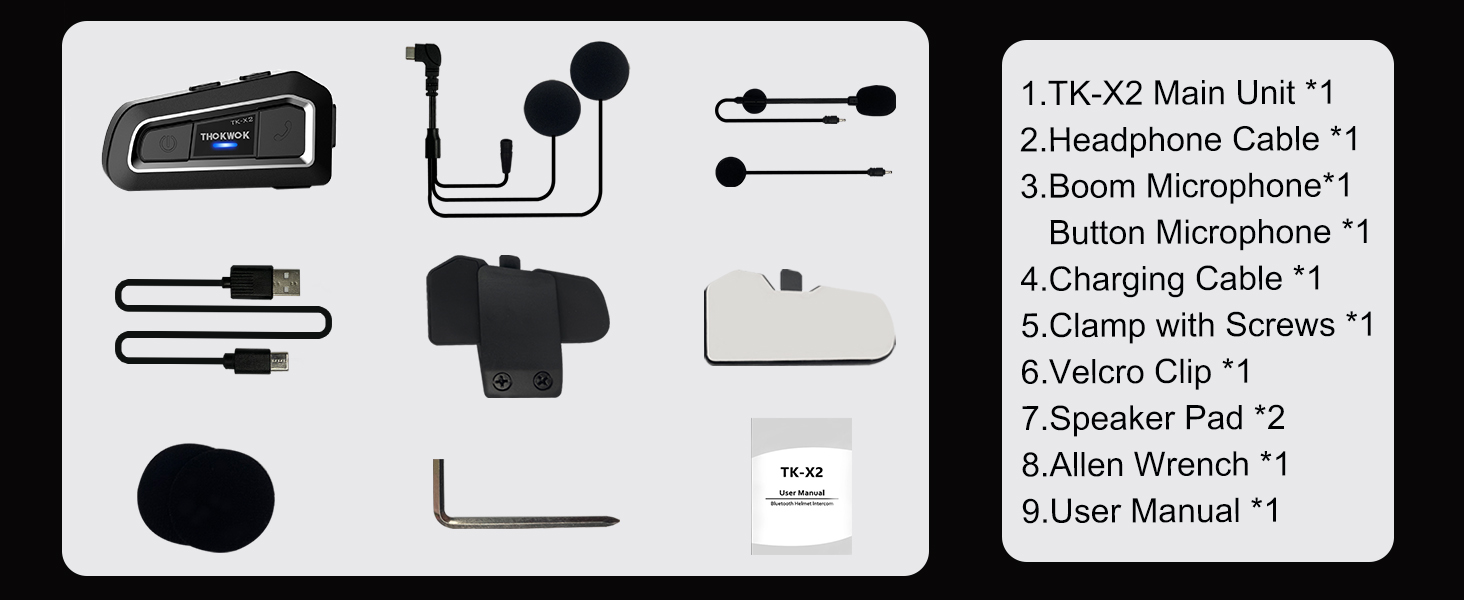
Cosa c'è nella scatola
The TK-X2 package includes the following components:
- TK-X2 Main Unit
- Cavo per cuffie
- Microfono boom
- Microfono a pulsante
- Cavo di ricarica
- Clamp con viti
- Clip in velcro
- Speaker Pad (2x)
- Chiave a brugola
- Manuale d'uso
Impostare
Caricamento del dispositivo
Before first use, fully charge the TK-X2 unit. Connect the provided charging cable to the unit and a USB power source. A full charge typically takes approximately 2.5 hours. The unit will indicate charging status.

Installazione
The TK-X2 helmet intercom offers two interchangeable microphones to suit different helmet types:
- Microfono a braccio: Ideal for open-face or flip-face (convertible) helmets.
- Microfono a pulsante: Suitable for full-face helmets.
Choose the appropriate microphone and install the main unit using either the clamp with screws or the velcro clip, ensuring secure attachment to your helmet. Position the speakers inside the helmet's ear pockets for optimal audio quality.

Operazione
Accensione/spegnimento
To power on the device, long press the power button until you hear an audible prompt. To power off, long press the power button again until the device shuts down.
Accoppiamento con il telefono
To pair your TK-X2 with a smartphone:
- Long press the power button for 4 seconds until the red and blue lights flash alternately, indicating pairing mode.
- On your phone, go to Bluetooth settings and turn on Bluetooth.
- Find "TK-X2" in the list of available devices and select it to connect.
- Once connected, the blue light will flash slowly, and you can play music and make calls.
Riproduzione musicale
- Riproduci/Pausa: Click the phone button.
- Prossima canzone: Click the forward button.
- Canzone precedente: Click the backward button.
- Aumenta volume: Hold the forward button.
- Volume basso: Hold the backward button.
Voice Assistant (Siri/S-Voice)
Long press the phone button for 2 seconds to activate your phone's voice assistant (Siri or S-Voice). You will hear "Voice Dial" as confirmation.
Radio FM
Double-click the phone button to start the FM radio. You will hear "Turn on radio". Double-click again to end FM radio.
Accoppiamento interfono (unità multiple)
The TK-X2 supports full-duplex intercom for up to 3 riders, with 2 riders able to communicate simultaneously. For optimal performance, clear previous Bluetooth pairing records before initiating new intercom connections.
- Clearing Pairing Records: Turn on all units. Long press the power button for 8 seconds until pink lights flash twice, indicating records are cleared.
- Abbinamento di due unità:
- Ensure both units are in pairing mode (red and blue lights flashing alternately).
- Click the power button on one unit to initiate pairing. Once successful, blue lights will flash slowly.
- Pairing Three Units:
- First, pair Unit A and Unit B as described above.
- Then, hang up the intercom on Unit B.
- Put Unit B and Unit C into pairing mode (red and blue lights flashing alternately).
- Click the power button on Unit B to initiate pairing with Unit C.
- Once B and C are paired, hang up the intercom on Unit C.
- Double-click the power button on Unit A to connect with Unit C.
Refer to Video 1 (starting from 1:55 mark) for a visual guide on pairing multiple TK-X2 units.
Intercom Usage
- Avvia Intercom: Fare clic sul pulsante di accensione.
- Hang Up Intercom: Click the power button again.
- When an intercom call is active, music playback will automatically pause. Ending the intercom call will resume music.
Caratteristiche principali

1000M Intercom Distance & Universal Pairing: The TK-X2 motorcycle Bluetooth headset enables full-duplex intercom communication up to 1000 meters (without obstacles) for 3 riders, with 2 riders able to converse simultaneously. It also features universal pairing, allowing connection with most Bluetooth intercoms on the market.

Noise Reduction & Upgraded Hi-Fi Stereo Speakers: Equipped with DSP and CVC advanced noise reduction technology and Bluetooth A2DP profile, the TK-X2 provides superior sound quality for both incoming and outgoing audio. Upgraded 40mm Hi-Fi stereo speakers deliver high-fidelity audio with deep bass, ensuring crystal-clear communications and music even at high speeds.

Bluetooth 5.0 & Long Standby Battery: Featuring Bluetooth 5.0 HFP profile, the TK-X2 allows access to Siri and S Voice commands for hands-free calls, music playback, FM radio, and GPS voice guidance. The built-in 650mAh battery offers low power consumption, providing up to 24 hours of music or intercom time and up to 280 hours of standby time.
Exchangeable Microphone & Great Helmet Compatibility: The TK-X2 helmet intercom includes two interchangeable microphones: a boom microphone for open-face or flip-face (convertible) helmets, and a button microphone for full-face helmets, ensuring broad compatibility.

Waterproof Design & Low Battery Alarm: The TK-X2's shell is constructed using an integral casting process, minimizing seams for excellent waterproof functionality, allowing use in any weather. The device broadcasts current battery status ("Battery full", "Battery medium", "Battery low") upon power-on.
Manutenzione
- Pulizia: Utilizzare un morbido, damp panno per pulire l'unità. Non utilizzare prodotti chimici aggressivi o detergenti abrasivi.
- Magazzinaggio: Conservare il dispositivo in un luogo fresco e asciutto quando non in uso. Evitare temperature estreme.
- Cura della batteria: Per prolungare la durata della batteria, evitare di scaricarla completamente frequentemente. Caricare il dispositivo regolarmente, anche se non in uso.
- Esposizione all'acqua: While waterproof, ensure the charging port cover is securely closed before exposure to water to prevent damage.
Risoluzione dei problemi
| Problema | Soluzione |
|---|---|
| Il dispositivo non si accende. | Assicurati che la batteria sia carica. Collegala a un caricabatterie e riprova. |
| Impossibile effettuare l'associazione con il telefono. | Ensure the TK-X2 is in pairing mode (red and blue lights flashing alternately). Turn off and on your phone's Bluetooth. Clear previous pairing records on the TK-X2 if necessary. |
| Nessun suono dagli altoparlanti. | Check speaker connections to the main unit. Ensure volume is not set to minimum on both the headset and your connected device. |
| Citofono non connesso. | Ensure all units have cleared previous pairing records. Follow the multi-unit pairing instructions carefully. Ensure units are within range. |
| Durata breve della batteria. | Assicurarsi che il dispositivo sia completamente carico prima dell'uso. Le temperature estreme possono influire sulle prestazioni della batteria. |
Specifiche
| Caratteristica | Dettaglio |
|---|---|
| Nome del modello | TK-X2 Single |
| Marca | THOKWOK |
| Tecnologia di connettività | Bluetooth |
| Versione Bluetooth | 5.1 |
| Controllo del rumore | Cancellazione attiva del rumore |
| Interfono Distanza | Up to 1000m (no obstacles) |
| Max Intercom Riders | 3 (2 talking simultaneously) |
| Battery Life (Music/Intercom) | Fino a 24 ore |
| Tempo di standby | Fino a 280 ore |
| Tempo di ricarica | 2.5 ore |
| Livello di resistenza all'acqua | Waterproof (IP67 equivalent) |
| Tipo di controllo | Controllo tramite pulsanti, controllo vocale |
| Presa per cuffie | Tipo C |
| Materiale | Acrilonitrile Butadiene Stirene (ABS) |
| Peso dell'articolo | 8.4 once |
| Dimensioni del prodotto | 3 x 1.6 x 0.83 pollici |
| Codice UPC | 797447004837 |
Garanzia e supporto
For warranty information, technical support, or any inquiries regarding your THOKWOK TK-X2 headset, please refer to the contact information provided on the product packaging or visit the official THOKWOK webluogo. Conserva la ricevuta di acquisto per eventuali richieste di garanzia.


