1. Prodotto finitoview
The Boneco X200 Thermo-Hygrometer is designed to accurately monitor the ambient temperature and relative humidity in your indoor environment. This compact and easy-to-use device helps you maintain an ideal indoor climate for comfort and health.
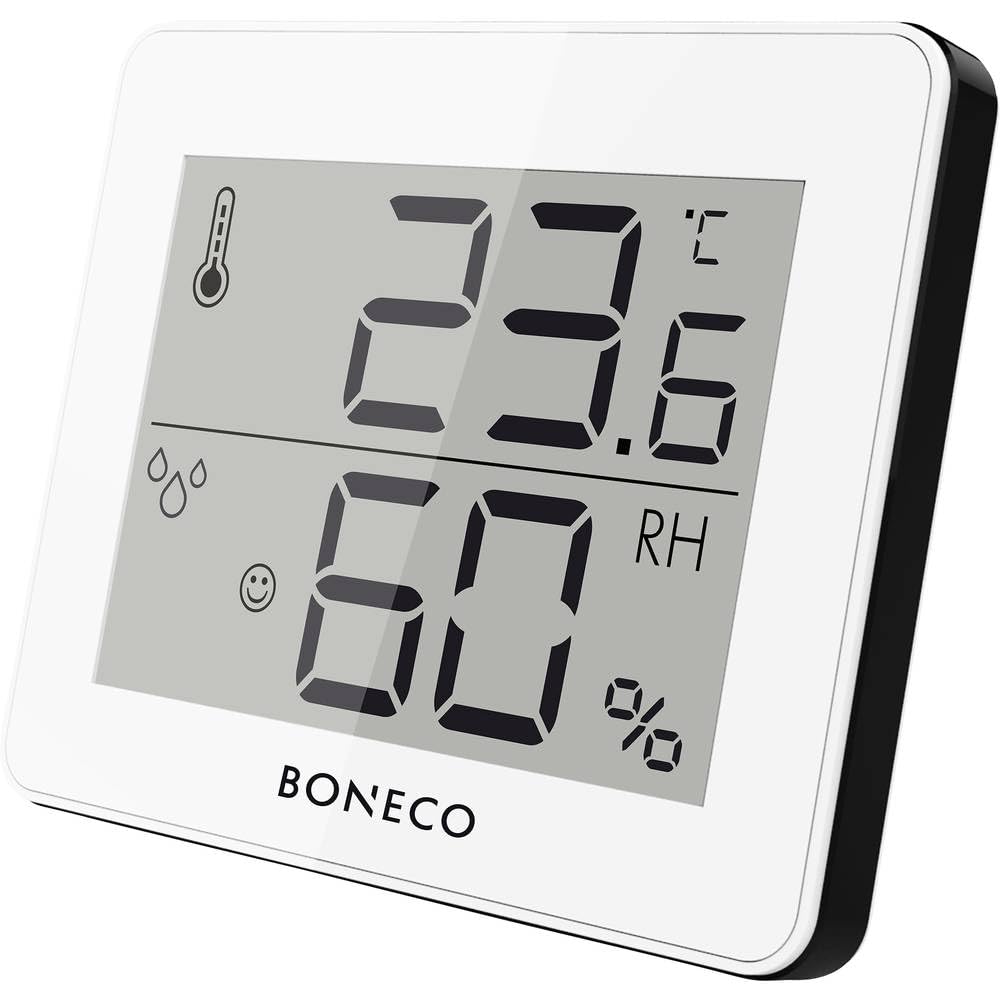
Immagine 1.1: anteriore view of the Boneco X200 Thermo-Hygrometer, showing its digital display with temperature and humidity readings.
Caratteristiche principali:
- Digital display of ambient temperature and relative air humidity.
- Measures temperature within a range of 0 – 50 °C (32 –122 °F).
- Compact design with an integrated support bracket for easy placement.
- Visualizzazione della temperatura commutabile tra Celsius (°C) e Fahrenheit (°F).
- MAX/MIN button to view maximum and minimum recorded temperature and humidity values.
2. Istruzioni di sicurezza
Please read these safety instructions carefully before using the Boneco X200 Thermo-Hygrometer to ensure safe and proper operation.
- Do not expose the device to extreme temperatures, direct sunlight, or high humidity beyond its operational limits.
- Evitare di far cadere il dispositivo o di sottoporlo a forti impatti.
- Non tentare di aprire o riparare il dispositivo da soli. Per qualsiasi intervento di assistenza, rivolgersi a personale qualificato.
- Tenere il dispositivo fuori dalla portata dei bambini.
- Pulire il dispositivo solo con un panno morbido e asciutto. Non utilizzare detergenti abrasivi o solventi.
- Questo dispositivo è destinato esclusivamente all'uso in ambienti interni.
3. Contenuto della confezione
Verificare che tutti gli articoli siano presenti nel pacco:
- Boneco X200 Thermo-Hygrometer unit
- Manuale di istruzioni (questo documento)
- Note: The device does not require user-replaceable batteries.
4. Impostazione
4.1 Posizionamento iniziale
The Boneco X200 is designed for easy placement on a flat surface using its integrated support bracket or for wall mounting.
- For tabletop use: Extend the support bracket located on the back of the device to stand it upright on a desk, shelf, or table.
- Per il montaggio a parete: Use a small screw (not included) to hang the device from the keyhole slot on its back. Ensure the screw is securely fastened to the wall.
Choose a location that provides an accurate representation of the room's temperature and humidity. Avoid placing the device near heat sources (e.g., radiators, direct sunlight), air vents, or in areas with high drafts, as these can affect readings.
Immagine 4.1: posteriore view of the Boneco X200, illustrating the integrated support bracket for freestanding use.
5. Istruzioni per l'uso
5.1 Accensione
The Boneco X200 is designed to be ready for use upon placement. It does not have an on/off switch. Once placed, it will begin displaying current temperature and humidity readings.
5.2 Displaying Temperature Units (°C / °F)
Per passare dalle unità di temperatura Celsius (°C) a Fahrenheit (°F):
- Individuare il ° C / ° F button, usually on the back or side of the device.
- Premere il tasto ° C / ° F button once to toggle between the two units. The display will update immediately.
5.3 Viewvalori MAX/MIN
The device records the maximum and minimum temperature and humidity values over a period. To view questi:
- Individuare il Massimo/minimo button, usually on the back or side of the device.
- Premere il tasto Massimo/minimo button once to display the maximum recorded temperature and humidity.
- Premere il tasto Massimo/minimo una seconda volta per visualizzare la temperatura e l'umidità minime registrate.
- Premere il tasto Massimo/minimo premere il pulsante una terza volta per tornare alle letture correnti.
To reset the MAX/MIN values, press and hold the Massimo/minimo button for approximately 3 seconds while the MAX or MIN values are displayed. The display will flash, indicating that the values have been reset.
6. Manutenzione
Proper maintenance ensures the longevity and accuracy of your Boneco X200 Thermo-Hygrometer.
6.1 Pulizia
- Wipe the device regularly with a soft, dry, lint-free cloth.
- Do not use liquid cleaners, sprays, or abrasive cleaning agents, as these can damage the display or internal components.
6.2 Conservazione
If storing the device for an extended period, keep it in a cool, dry place, away from direct sunlight and extreme temperatures.
7. Risoluzione Dei Problemi
If you encounter issues with your Boneco X200, please refer to the following common problems and solutions:
| Problema | Possibile causa | Soluzione |
|---|---|---|
| Nessun display o display debole | Low internal power / Device malfunction | Ensure the device is in a well-lit area if it uses solar power. If the issue persists, contact customer support. |
| Letture imprecise | Improper placement; Sensor obstruction; Environmental factors | Relocate the device away from direct heat/cold sources or drafts. Ensure sensors are clean and unobstructed. Allow time for readings to stabilize after relocation. |
| MAX/MIN values not resetting | Procedura di ripristino errata | Ensure you are pressing and holding the MAX/MIN button for approximately 3 seconds while MAX or MIN values are displayed. |
If the problem persists after trying these solutions, please contact Boneco customer support.
8. Specifiche
| Caratteristica | Dettaglio |
|---|---|
| Numero di modello | X200 |
| Marca | BONECO |
| Dimensioni (L x P x A) | Dimensioni: 7 x 10 x 10 cm |
| Peso | 92 grammi |
| Campo di misurazione della temperatura | 0 – 50 °C (32 – 122 °F) |
| Precisione della temperatura | ± 0.5 °C |
| Operational Humidity Range | 10 – 90% UR |
| Tipo di montaggio | Tabletop (with stand) / Wall mount |
| Fonte di alimentazione | Does not require user-replaceable batteries |
| Colore | Bianco |
| Paese di origine | Cina |
9. Garanzia e supporto
BONECO products are manufactured with high-quality materials and undergo strict quality control. For warranty information and customer support, please refer to the official BONECO websito o contattare il distributore locale.
Si prega di conservare la prova d'acquisto per eventuali reclami in garanzia.
Supporto online: www.boneco.com


