1. Introduzione
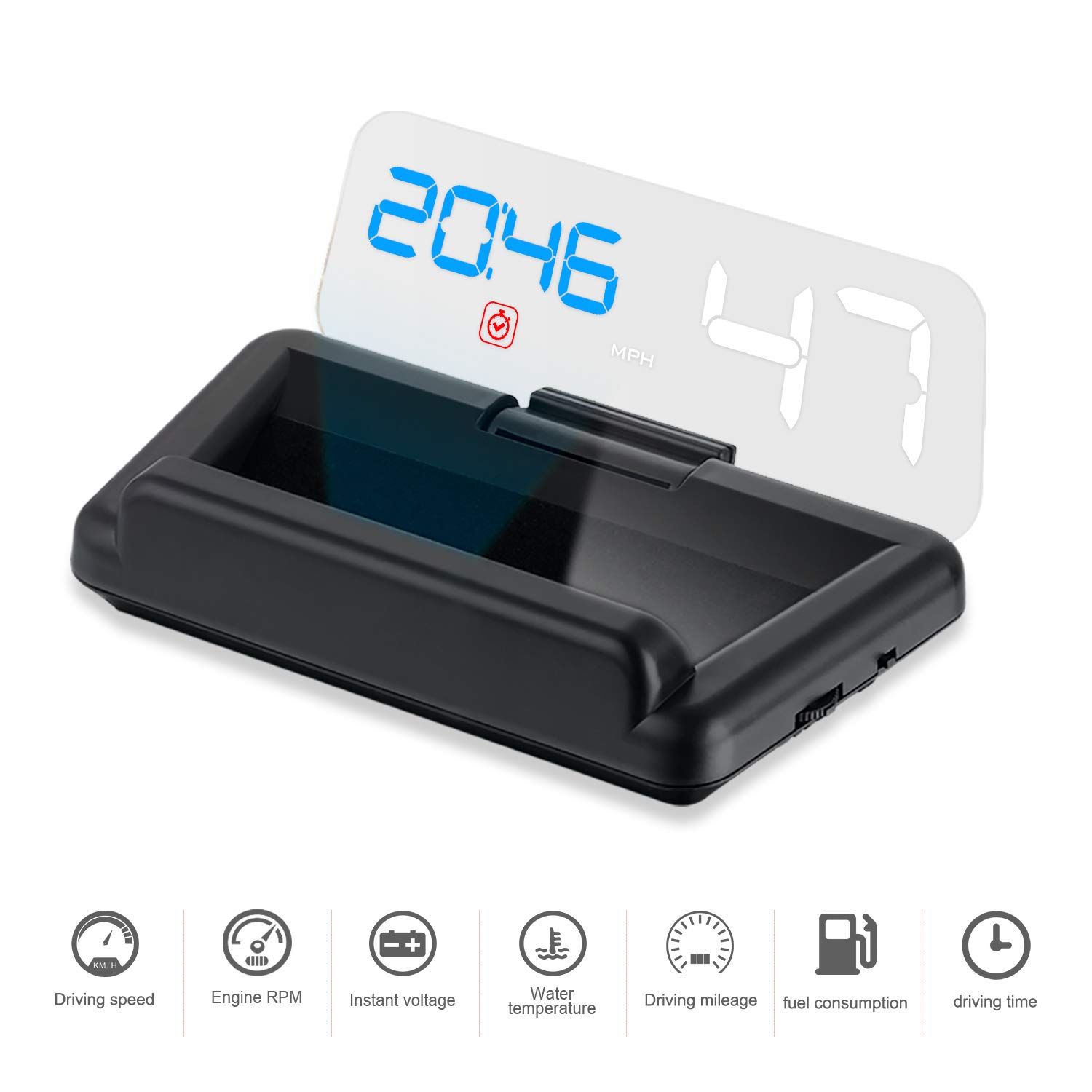
The iKiKin C500 Car Head-Up Display (HUD) is designed to enhance your driving experience by projecting essential vehicle information directly into your line of sight. This device utilizes an OBD2 interface to display data such as speed, RPM, voltage, water temperature, fuel consumption, driving distance, driving time, and clock, all without requiring a reflective film on your windshield.
Key features include a clear LED screen with a reflective glass for optimal visibility even in sunlight, automatic brightness adjustment based on ambient light, and multiple alarm functions to ensure safer driving.

2. Compatibilità
The iKiKin C500 HUD is compatible with vehicles equipped with an OBD2 interface. Please verify your car's compatibility before purchase.
2.1. OBD2 Model Application Range:
- American gasoline cars produced after 2004 that comply with the OBD2 protocol.
- Gasoline cars from other regions produced after 2008 that comply with the OBD2 protocol.
2.2. Incompatible Car Models:
- American Cars: Dodge, JEEP, SAIL, Chrysler, and models produced before or in 2004.
- All French and Italian car models.
- Japan Cars: Suzuki, Mazda6, Infiniti (QX50, Q50, Q501), Toyota Avanza 2013, Lexus (IS250, EX250, ES300h), Honda (Jazz, CRV), and cars produced before 2008.
- Some South Korean KIA and Hyundai models (e.g., Hyundai Sonata 2013, KIA Soul PS 2017).
- Oil-electric hybrid and diesel cars, pickup trucks, trucks, RVs, and cars with modified computer systems.

3. Componenti del prodotto
The iKiKin C500 package includes the following items:
- HUD Unit
- Manuale d'uso
- Cavo OBD
- Tappetino antiscivolo
- Panno pulito


4. Configurazione e installazione
The iKiKin C500 HUD is designed for simple plug-and-play installation. Follow these steps:
- Individuare la porta OBD2: Identify your vehicle's OBD2 diagnostic port. This is typically located under the dashboard on the driver's side, often near the steering column. Refer to your vehicle's owner's manual if you cannot locate it.
- Collegare il cavo OBD: Plug one end of the provided OBD cable into the HUD unit's power port and the other end into your vehicle's OBD2 port. Ensure a secure connection.
- Posizionare l'unità HUD: Place the HUD unit on your dashboard using the non-slip mat. Position it so that the projected display is clearly visible on the reflective glass without obstructing your view della strada.
- Avvia il tuo veicolo: Once connected and positioned, start your car. The HUD unit will automatically power on and begin displaying data.
No additional reflection film is required on your windshield as the unit uses its own reflective glass for projection.
5. Funzionamento
The iKiKin C500 HUD provides various display modes and alarm functions to keep you informed while driving.
5.1. Visualizza informazioni:
The HUD can display a range of driving information, including:
- Speed (MPH/KM/H)
- Giri motore
- Temperatura dell'acqua
- Voltage
- Consumo di carburante
- Distanza di guida
- Tempo di guida
- Orologio

5.2. Modalità di visualizzazione:
The unit offers 8 different display modes, allowing you to customize the information shown. You can switch between these modes to view various combinations of data, such as Speed only, Speed + RPM, Speed + Driving Distance, Speed + Fuel Consumption, Speed + Clock, Speed + Water Temperature, Speed + Voltage, and Speed + Driving Time.

5.3. Alarm and Reminder Functions:
The HUD includes multiple reminders and alarms to enhance driving safety:
- Cancella codice errore: Indicates engine fault codes.
- Allarme velocità eccessiva: Alerts you when exceeding a preset speed limit.
- Promemoria per la guida stancante: Suggests taking a break after extended driving periods.
- Allarme giri/min: Notifies you if engine RPM exceeds a set threshold.
- High Water Temperature Alarm: Warns of engine overheating.
- Basso volumetage Allarme: Alerts to low battery voltage.
- Shift Reminder: Suggests optimal gear shifts for fuel efficiency.
These reminders are designed to help prevent accidents and promote safer driving habits.
6. Risoluzione Dei Problemi
If you encounter issues with your iKiKin C500 HUD, refer to the following common troubleshooting steps:
- Nessun display/alimentazione:
- Assicurarsi che il cavo OBD sia collegato saldamente sia all'unità HUD sia alla porta OBD2 del veicolo.
- Verify that your vehicle is compatible with the OBD2 protocol (refer to Section 2).
- Check your vehicle's fuse box for any blown fuses related to the OBD2 port or accessory power.
- Lettura della velocità imprecisa:
- The HUD's speed reading can be calibrated. Refer to the detailed user manual (included in the package) for instructions on how to access and adjust the speed calibration settings.
- Alarms Not Functioning or Incorrectly Triggering:
- Some alarm thresholds (e.g., water temperature, voltage) may have fixed default values that are not user-adjustable. Consult the full user manual for specific details on alarm settings and adjustability.
- Ensure the HUD is receiving accurate data from the OBD2 port.
- Battery Drain Issue:
- The HUD is designed to shut off automatically after the car is turned off. If you experience battery drain, ensure the unit is indeed powering down. If not, check the OBD2 port for constant power supply or consider disconnecting the unit when the vehicle is not in use for extended periods.
- Display Too Bright at Night:
- The HUD has a built-in photosensitive component that automatically adjusts brightness. If it remains too bright, ensure the light sensor on the unit is not obstructed.
For more detailed troubleshooting steps and advanced settings, please refer to the comprehensive user manual provided with your product.
7. Specifiche
| Caratteristica | Dettaglio |
|---|---|
| Marca | iKiKin |
| Numero di modello | iKiKin-HUDC500 |
| Dimensioni dello schermo | 5.3 pollici |
| Materiale | Policarbonato (PC), acrilonitrile butadiene stirene (ABS) |
| Peso dell'articolo | 260 grammi (9.17 once) |
| Dimensioni del pacco | 6.69 x 4.88 x 1.65 pollici |
| ASIN | B07H7GGPCP |
| Codice UPC | 738920305959, 738920305973 |
| Data prima disponibilità | 10 settembre 2018 |
8. Manutenzione
To ensure the longevity and optimal performance of your iKiKin C500 HUD, follow these maintenance guidelines:
- Pulizia: Use the provided clean cloth or a soft, dry, lint-free cloth to gently wipe the display screen and the unit's exterior. Avoid using abrasive cleaners, solvents, or spray directly onto the unit.
- Posizionamento: Ensure the unit is placed on a stable surface using the non-slip mat to prevent movement during driving. Avoid placing it in direct sunlight for prolonged periods when the vehicle is parked, as extreme temperatures can affect electronics.
- Magazzinaggio: If storing the unit for an extended period, disconnect it from the OBD2 port and store it in a cool, dry place away from direct sunlight and extreme temperatures.
9. Garanzia e supporto
For warranty information, technical support, or any inquiries not covered in this manual, please contact iKiKin customer service. Refer to the contact information provided in your product packaging or on the official iKiKin websito.
Si consiglia di conservare la ricevuta d'acquisto ai fini della garanzia.